I’ve spent months testing multi-material feeders and dual-extrusion setups in my workshop, and finding a reliable system to 3d print multi color models completely changes what you can build at home. Between managing excessive filament purge waste and dealing with mechanical retraction jams, getting consistent results takes the right hardware. In this hands-on guide, I’ll walk you through ten proven machines that make colorful printing dependable, straightforward, and fun.
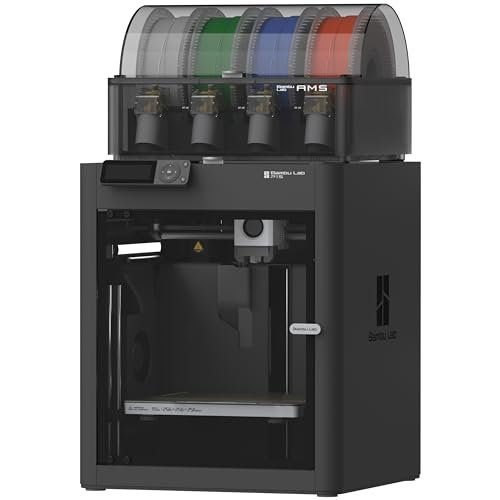
Bambu Lab P1S Combo

The Bambu Lab P1S Combo pairs an enclosed CoreXY printer with the automated material system (AMS), allowing you to produce prints with up to 16 colors seamlessly. With speeds reaching 500mm/s and acceleration at 20000 mm/s², it cuts project completion times down dramatically without losing structural integrity. Its fully enclosed body reliably handles tricky engineering filaments like ABS and ASA while maintaining stable chamber heat. Plus, the automated setup process gets you running in under fifteen minutes right out of the crate.
Key features that stand out:
– Up to 16 colors: Expandable multi-color printing by daisy-chaining multiple AMS units.
– Enclosed body: Preserves ambient chamber heat for warping-prone materials like ABS and ASA.
– High-speed motion: Reaches speeds up to 500mm/s with 20,000 mm/s² acceleration.
– Automatic bed leveling: Hands-off sensor probing ensures reliable first-layer bed adhesion.
Pros:
– Fast, clean multi-color transitions with minimal manual tinkering
– Enclosed chamber expands material choices to engineering polymers like ABS
– Quick initial setup takes roughly 15 minutes out of the box
Cons:
– Filament purge waste accumulates quickly during dense multi-color jobs.
Best for: Makers wanting enclosed reliability for functional, multi-color engineering parts.
Expert Opinion: The P1S Combo remains one of the most reliable workhorses in modern FDM printing because it balances high-speed performance with an enclosed chamber at an approachable price point.
Bambu Lab P2S Combo

The Bambu Lab P2S Combo elevates multi-tone printing by pairing a rigid CoreXY chassis with the AMS 2 Pro system, which includes active filament drying up to 65 °C. You get print speeds up to 600 mm/s alongside active flowrate compensation, giving crisp overhangs and uniform layer lines. The adaptive airflow system maintains a warm 50 °C chamber for tough polymers while filtering emissions through an activated carbon filter. It integrates smoothly with MakerWorld models and Bambu Studio for a headache-free slicing workflow.
Key features that stand out:
– AMS 2 Pro integration: Houses spools while actively drying moisture-sensitive filament up to 65 °C.
– Active flowrate compensation: Dynamically stabilizes extrusion volume for clean corners and edges.
– Smart airflow system: Balances chamber temperature and cooling with built-in carbon filtration.
– Rapid nozzle swapping: Tool-free quick-swap nozzles make hotend maintenance simple.
Pros:
– Built-in filament drying prevents moisture-related stringing between color changes
– High top speed of 600 mm/s cuts down print times on large models
– AI error detection catches print failures early to save filament
Cons:
– Higher price point compared to open-frame bed-slinger options.
Best for: Enthusiasts who demand engineering-grade materials and integrated filament drying.
Expert Opinion: The inclusion of active spool drying in the AMS 2 Pro solves one of the biggest headaches in multi-material printing: wet filament stringing across contrasting color boundaries.
FLASHFORGE AD5X Multi-Material 3D Printer
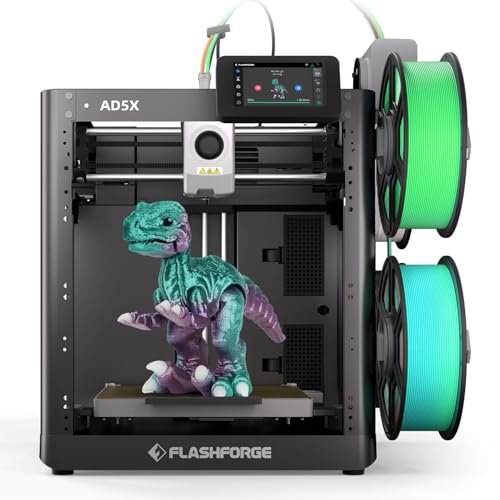
Designed with an Intelligent Filament System (IFS), the FLASHFORGE AD5X prints four colors or materials side-by-side in a compact footprint. Its rigid all-metal CoreXY frame reaches 600mm/s and 20000mm/s² acceleration, while dynamic vibration suppression prevents layer shift defects. The full auto leveling sensor checks multiple bed points to guarantee accurate first layers every single time. It handles a wide range of spools from standard PLA to abrasive carbon fiber blends like PLA-CF and PETG-CF.
Key features that stand out:
– Intelligent Filament System (IFS): Feeds 4 filaments side-by-side without occupying extra bench space.
– CoreXY vibration compensation: Minimizes ghosting and layer artifacts at 600mm/s travel speeds.
– Multi-material compatibility: Smoothly prints PLA, PETG, TPU, and carbon-fiber composites.
– Modular compact chassis: Keeps all 4 spools aligned closely to the machine frame.
Pros:
– Side-by-side spool arrangement saves precious workspace on your desk
– Capable composite support including carbon-fiber reinforced filaments
– Vibration suppression keeps details sharp even at top speeds
Cons:
– Open-frame design makes printing warping-prone materials like ABS difficult.
Best for: Makers short on bench space who want multi-color capability without bulky external boxes.
Expert Opinion: The AD5X’s IFS layout is ideal if you lack the desktop room for sprawling external multi-spool accessories, delivering solid 4-color switching in a tidy footprint.
Bambu Lab A1 Combo + LED Lamp Kit

The Bambu Lab A1 Combo brings multi-color printing to an accessible bed-slinger format paired with an included LED lamp hardware kit for instant decorative projects. Utilizing the AMS lite feeder, it manages four colors reliably while maintaining swift acceleration up to 10,000 mm/s². The machine features full-auto calibration and active motor noise canceling, keeping printing whisper-quiet in home offices or bedrooms. A one-clip quick swap nozzle allows you to change nozzle sizes in seconds without dealing with hotend wiring.
Key features that stand out:
– AMS lite system: Effortless 4-color management with simple top or side mounting options.
– Included LED lamp kit: Provides hardware components to build illuminated decorative prints right away.
– Active motor noise canceling: Operates at a whisper-quiet sound level ideal for living areas.
– 1-clip quick-swap nozzle: Tool-free hotend changes simplify routine maintenance and size swaps.
Pros:
– Extremely quiet operation makes it suitable for bedrooms and shared apartments
– Straightforward auto-calibration requires no manual bed leveling or paper shims
– Quick-swap nozzle design simplifies maintenance and unclogging
Cons:
– The moving bed format requires extra clearance front and back during operation.
Best for: Beginners and hobbyists looking for an easy, whisper-quiet multi-color printer for home crafts.
Expert Opinion: For anyone starting out, the A1 Combo offers the smoothest entry path into multi-color models, especially with its near-silent stepper drivers and automated offsets.
ELEGOO Centauri 2 Combo 3D Printer
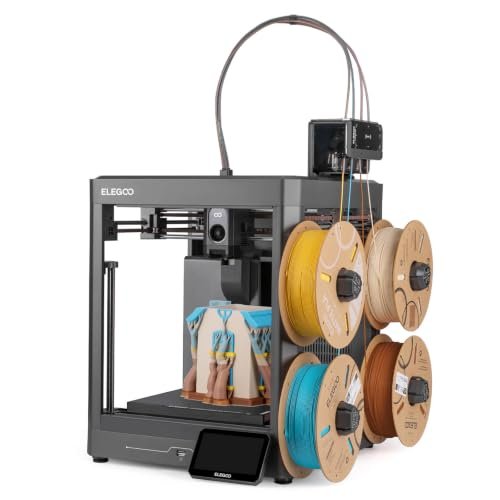
Built for speed and simplicity, the ELEGOO Centauri 2 Combo incorporates the CANVAS 4-color printing system featuring independent motors and RFID spool recognition. Powered by a rigid CoreXY platform running up to 500mm/s with 20,000mm/s² acceleration, it completes intricate colored models in a fraction of normal printing times. The machine is backed by 22 intelligent sensors that continuously monitor bed tilt, flow, and extrusion consistency to prevent print failures. Maintenance is kept straightforward thanks to a semi-automatic belt tensioner and a magnetic toolhead cover.
Key features that stand out:
– CANVAS 4-color unit: Employs independent feeder motors with RFID filament recognition.
– 22 integrated monitoring sensors: Continuously watches print integrity to prevent misprints.
– High-speed CoreXY motion: Delivers smooth finishes at speeds reaching 500mm/s.
– Magnetic toolhead cover: Allows rapid access for nozzle cleaning and maintenance.
Pros:
– RFID filament detection automatically matches material profiles inside the slicer
– Generous array of 22 sensors catches errors before they ruin a long print
– Semi-automatic belt tensioning makes regular maintenance straightforward
Cons:
– The software ecosystem is newer compared to long-established open-source slicers.
Best for: Hobbyists who want smart sensor diagnostics and hassle-free filament reloading.
Expert Opinion: Elegoo did a great job engineering the Centauri 2’s sensor cluster; having real-time feedback on color switches gives you peace of mind during multi-hour jobs.
FLASHFORGE AD5X Multi-Color 3D Printer (Built-In 4-Color)

This version of the FLASHFORGE AD5X emphasizes flexible production with its built-in 4-color switching system and rapid 12X printing capability. Driven by a stable CoreXY frame capable of 600mm/s speeds and 20,000mm/s² acceleration, it pairs speed with a 300°C direct-drive extruder. The toolhead features interchangeable nozzles ranging from 0.25mm to 0.8mm, letting you switch between detailed miniatures and rapid functional prints. Smart recovery tools like power-loss resume and the Flash Maker mobile app keep you in complete control remotely.
Key features that stand out:
– Multi-nozzle flexibility: Supports nozzles from 0.25mm for fine miniatures up to 0.8mm for rapid structural printing.
– 300°C direct-drive extruder: Comfortably prints technical filaments alongside colorful PLA.
– 1-click auto leveling: Probes the bed automatically to establish uniform first-layer squish.
– Flash Maker app monitoring: Enables remote print adjustments and status checks over Wi-Fi.
Pros:
– Wide nozzle compatibility opens up both fine-detail miniatures and rapid drafting
– 300°C hotend handles high-temperature filaments without jamming
– Automatic filament feeding and retraction eases color swaps during prints
Cons:
– Swapping to the optional nozzle sizes requires purchasing extra hotend assemblies.
Best for: Makers who alternate between tiny detailed multi-color figurines and large structural parts.
Expert Opinion: Having the option to easily swap down to a 0.25mm nozzle transforms this multi-color machine into an exceptional platform for tabletop minis and tiny colored badges.
Anycubic Kobra X Multicolor 3D Printer (One-Click, 19-Color Expandable)

The Anycubic Kobra X provides massive color potential, supporting four colors out of the box and expanding up to 19 colors using four ACE 2 Pro material stations. Its LeviQ 3.0 49-point auto bed leveling and vibration compensation ensure smooth first layers and clean finishes at speeds up to 600mm/s. An AI-powered 720P camera actively detects spaghetti failures and skips failed parts on multi-item print plates to preserve materials. The machine also features a generous 260x260x260mm build volume and a hardened steel nozzle rated up to 300°C.
Key features that stand out:
– Expandable up to 19 colors: Daisy-chain up to four ACE 2 Pro modules for giant palettes.
– LeviQ 3.0 49-point leveling: Delivers automatic bed calibration with precise z-height.
– AI 720P camera: Monitors for failures and skips individual bad models in batch prints.
– Sub-48 dB silent printing: Dynamic motor tuning dampens vibration noise during operation.
Pros:
– Massive 19-color ceiling offers unmatched palette breadth in this class
– Hardened steel nozzle allows composite and abrasive filaments right away
– Smart AI camera prevents filament waste by spotting print failures early
Cons:
– Expanding to all 19 colors requires significant extra bench space for four ACE units.
Best for: Digital artists and makers needing huge color palettes and smart failure prevention.
Expert Opinion: The Kobra X’s ability to expand to 19 colors is impressive for artistic projects; pair that with its AI camera and you can run complex, multi-day prints without hovering over the bed.
Anycubic Kobra X Multicolor 3D Printer (Native Setup & Travel Reduction)

This configuration of the Anycubic Kobra X focuses on efficiency, featuring an engineered filament pathway that reduces travel distance by 81.25% to slash color change purge times. Powered by high-speed CoreXY mechanics, it hits speeds up to 600mm/s, easily printing a standard speed benchy in just 14 minutes. The spacious 260 x 260 x 260 mm build envelope accommodates large functional prints or multi-part batches with ease. Stable dual-band Wi-Fi and LAN connectivity make sending slices and monitoring print progress seamless across devices.
Key features that stand out:
– 81.25% reduced travel path: Slashes purge waste and shortens color transition cycles.
– Sub-15 minute setup: Rapid out-of-the-box assembly with LeviQ 3.0 auto-leveling.
– Large 260mm³ build volume: Offers plenty of headroom for bigger multi-color models.
– Dual-band Wi-Fi and LAN: Ensures dependable network transfers via desktop or mobile app.
Pros:
– Optimized filament path significantly reduces wasted purge material
– Rapid print speeds produce test prints like a 3DBenchy in around 14 minutes
– Broad multi-material support handles both rigid filaments and TPU
Cons:
– Filament spools shown in product images must be purchased separately.
Best for: High-volume creators looking to reduce wasted purge filament and speed up print times.
Expert Opinion: Filament waste is the biggest drawback of single-nozzle multi-color printing, so Anycubic’s targeted travel-reduction design yields tangible savings on every spool.
Creality K2 Combo (A) 3D Printer

The Creality K2 Combo combines a rugged CoreXY machine with the Creality Filament System (CFS), allowing users to expand up to 16 colors using four connected CFS modules. It features three dynamic step-servo motors across the extruder and XY axes that adjust torque dynamically in under a millisecond for exceptional layer quality. The smart leveling system saves time by probing only the targeted print area rather than surveying the entire 260 x 260 x 260 mm bed. Integrated dynamic fans and step-servo dampening ensure the printer runs at quiet laptop-typing noise levels.
Key features that stand out:
– 16-color expandability: Links with up to four CFS units for complex multi-tone projects.
– Target-area auto leveling: Probes only the necessary section of the build plate to save setup time.
– Dynamic step-servo motors: Delivers microsecond torque adjustments for clean extrusion.
– Whisper-quiet silent mode: Dynamically balanced fans keep operational volume very low.
Pros:
– Targeted bed probing cuts down pre-print preparation time
– Closed-loop step-servo motors improve dimensional precision and eliminate missed steps
– AI camera provides continuous peace of mind against spaghetti failures
Cons:
– CFS units require dedicated shelf space when expanding beyond four colors.
Best for: Makers seeking an industrial-grade motion platform with quiet, smart multi-color expansion.
Expert Opinion: Creality’s move to step-servo motors pays immediate dividends on print surfaces, eliminating micro-vibrations and making color transitions exceptionally sharp.
FLASHFORGE Creator 5 3D Printer
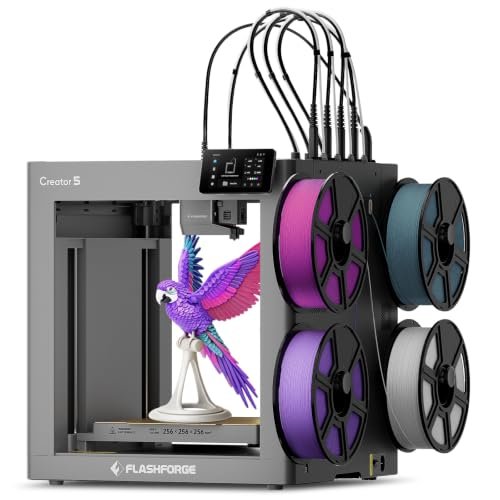
Breaking away from standard single-nozzle designs, the FLASHFORGE Creator 5 incorporates 4 independent toolheads to deliver genuine multi-color and multi-material output. By utilizing rapid 7-second FlashSwap tool changes with background preheating, it eliminates lengthy purge cycles and cuts filament waste by up to 80%. You can assign one dedicated toolhead to soluble support materials while running PLA, PETG, or TPU on the others for effortless support removal. All of this runs on an enclosed 600mm/s CoreXY chassis featuring active vibration compensation and automatic flow calibration.
Key features that stand out:
– 4 independent toolheads: Avoids single-nozzle cross-contamination and clogging issues.
– 7-second FlashSwap swaps: Preheats dormant nozzles in the background for instant tool changing.
– Up to 80% purge reduction: Bypasses the need for large purge towers or waste poops.
– Dedicated support material capability: Prints complex geometries with clean, hands-free support breakaway.
Pros:
– Drastically minimizes filament waste compared to single-nozzle filament feeders
– True multi-material compatibility lets you combine rigid polymers with TPU or PVA
– Enclosed CoreXY chassis provides thermal stability for engineering plastics
Cons:
– Significantly heavier and more mechanically complex than single-extruder printers.
Best for: Serious prototyping studios and makers who want multi-material printing with near-zero purge waste.
Expert Opinion: The 4-toolhead setup is a breath of fresh air; while single-nozzle feeders dump piles of wasted plastic during color changes, the Creator 5 simply swaps heads in seconds and keeps printing.
Comparison Insights for Multi-Color Printing
- Single-Nozzle Switching vs. Independent Toolheads: Machines like the Bambu P1S, A1, and Anycubic Kobra X rely on a single nozzle, which creates purge waste and longer print times during every filament retract-and-load cycle. In contrast, the Flashforge Creator 5 uses four independent toolheads to eliminate purge towers, cutting plastic waste by up to 80%.
- Chamber Enclosures and Filament Types: If you plan on printing multi-color parts in ABS, ASA, or polycarbonate, the enclosed chambers on the Bambu P1S, P2S, and Creator 5 prevent edge warping by maintaining warm internal temperatures. Open bedslingers like the Bambu A1 excel with PLA and PETG decorative items, but struggle with temperature-sensitive polymers.
- Palette Size and Expandability: If you need maximum shade variety for complex cosplay props or figurines, the Anycubic Kobra X scales up to 19 colors, while the Bambu P-Series and Creality K2 support up to 16 colors. For basic decorative accents, standard 4-color setups like the Elegoo Centauri 2 or Flashforge AD5X handle everyday prints with far less desktop clutter.
- Noise Levels in Shared Spaces: The Bambu Lab A1 and Creality K2 feature active motor noise canceling, keeping volume levels quiet enough for apartments and shared living spaces. Higher-speed CoreXY models with cooling blowers run louder, making them better suited for dedicated workshops.
Choosing the Right Setup
Instead of a one-size-fits-all recommendation, match your pick to how you plan to print:
- For Zero-Purge Multi-Material Engineering: The FLASHFORGE Creator 5 stands alone. Its independent 4-toolhead design allows you to mix rigid structural plastics with flexible TPU or soluble PVA support filaments without wasting huge amounts of plastic on purge blocks.
- For the Best Balance of Reliability and Value: The Bambu Lab P1S Combo remains the sweet spot. It provides an enclosed build chamber, proven 16-color expandability, and seamless slicing software that rarely requires manual troubleshooting.
- For Apartment and Desktop Printing on a Budget: The Bambu Lab A1 Combo is the easiest machine to live with day-to-day. It is remarkably quiet, auto-calibrates without fuss, and includes decorative project hardware right in the box.
- For Maximum Artistic Color Palette: The Anycubic Kobra X takes top honors for sheer versatility, allowing up to 19 colors with its modular ACE units, backed by an AI camera that keeps long print jobs safe from failure.
Frequently Asked Questions About 3D Print Multi Color Systems
How does a 3d print multi color system actually work?
Most desktop multi-color 3D printers use a single nozzle paired with an automated material switcher, such as Bambu Lab’s AMS or Creality’s CFS. When a color change occurs, the machine cuts the active filament, pulls it back into the feeder box, pushes the new color spool through the PTFE tube into the hotend, and purges the leftover melted plastic into a waste chute or purge block. Alternatively, multi-toolhead systems like the Flashforge Creator 5 physically swap hotends on the carriage, allowing instant color switching without purging filament.
How much filament waste does multi-color 3D printing create?
Filament waste varies drastically depending on the model’s geometry and color placement. When printing a model with frequent color changes across every layer on a single-nozzle printer, the purged filament can sometimes weigh as much as or more than the finished model itself. You can reduce this purge waste by flushing into the model’s infill, printing multiple copies of the same model at once, or using an independent toolhead printer.
Can I mix different materials like PLA and TPU in the same print?
Mixing materials is difficult on single-nozzle printers because different filaments require distinct nozzle temperatures, cooling rates, and extrusion pressures. Purging flexible TPU out of a nozzle to feed rigid PLA often causes clogs. However, independent multi-toolhead printers like the Flashforge Creator 5 handle mixed-material jobs effortlessly, making it simple to combine rigid bodies with soft rubberized grips or water-soluble PVA support structures.
Does 3D printing in multi-color slow down print times?
Yes, single-nozzle multi-color printing adds substantial time to each print job. Every color transition requires cooling, cutting, retracting, feeding, and purging, which typically takes between 30 and 90 seconds per swap. If a model features four colors on 500 layers, those swaps can add hours to the overall print duration. Toolhead-changing printers reduce this swap time down to roughly 7 to 10 seconds.
What is a purge tower and can I disable it in my slicing software?
A purge tower (or prime tower) is a sacrificial block printed alongside your main model. It stabilizes nozzle back-pressure and wipes away residual oozing after a filament change, ensuring clean layer lines and color transitions. While you can disable the prime tower in slicers like Bambu Studio or OrcaSlicer, doing so increases the risk of color bleeding, nozzle under-extrusion, and surface blemishes on your main model.
Can I dry my filament while printing multi-color models?
Yes, several newer material systems include integrated heating elements. For instance, the Bambu Lab AMS 2 Pro features an active heating chamber that reaches 65 °C to dry hygroscopic materials like PETG, Nylon, and PVA while printing. If your multi-color feeder lacks active heating, you should dry your spools in a standalone filament dryer before loading them, then use desiccant packs inside the feeder enclosure to keep them dry.
Affiliate Disclosure: As an Amazon Associate, I earn from qualifying purchases made through links on this site.