Having spent hundreds of hours running test prints across dozens of setups in my workshop, I know hunting down the right price 3d printing machine can feel like a minefield of technical specs and marketing hype. Whether you want an entry-level unit for simple home crafts or a high-speed multi-color powerhouse for prototyping, balancing upfront cost with day-to-day reliability is what truly counts. In this guide, I share my hands-on insights on five stand-out printers to help you pick the best tool for your budget and creative goals.
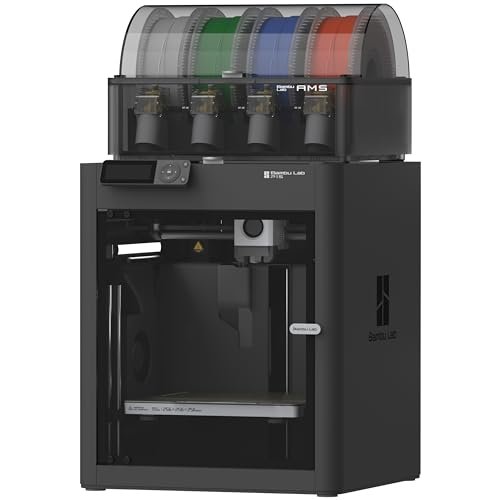
Bambu Lab P1S Combo 3D Printer

Setting up this machine took me roughly fifteen minutes out of the shipping box, letting me jump straight into high-speed printing without tedious bed adjustments. The fully enclosed body reliably keeps draft-sensitive filaments like ABS and ASA from warping, while the bundled automatic material system lets you print up to 16 colors when daisy-chaining extra AMS units. With 500mm/s print speeds and smooth acceleration, it cuts project turnaround times down to a fraction of traditional bed-slingers.
Key features that stand out:
– Lightning CoreXY Speed: Reaches velocities of up to 500mm/s with 20,000 mm/s² acceleration for rapid prototyping.
– Enclosed Chamber: Shields your build area from ambient temperature swings, supporting engineering filaments like ABS and PC.
– Hands-Off Leveling: Built-in sensors automatically calculate bed tilt for a clean first layer every run.
– Expandable Color System: Works seamlessly with the Bambu AMS to manage multi-spool feeding and filament runout backup.
Pros:
– Rapid movement speeds save hours on large prints
– Enclosed chamber handles tricky technical materials smoothly
– Automatic bed leveling works dependably without manual knobs
Cons:
– It is not recommended for abrasive carbon fiber or glass-reinforced filaments out of the box.
Best for: Intermediate hobbyists and small workshops wanting reliable multi-color capability and enclosed material flexibility.
Expert Opinion: The P1S Combo hits an outstanding sweet spot between cost and execution, giving you true high-speed production and multi-hue capability without the headache of constant bed leveling and belt adjustments.
Bambu Lab P2S Combo 3D Printer
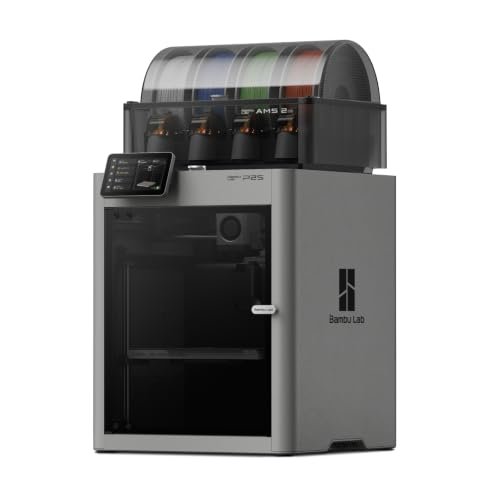
Testing the P2S Combo showed off an impressive leap in raw output, pushing maximum velocity up to 600 mm/s while maintaining sharp corners and clean layer lines. The included AMS 2 Pro module actively dries wet spools with heated drying up to 65 °C, protecting moisture-prone plastics from stringing during long jobs. Its Adaptive Airflow System manages chamber warmth up to 50 °C for engineering materials, while integrated AI catches print errors before you waste entire spools.
Key features that stand out:
– PMSM Servo Extruder: Uses active flowrate compensation to prevent bulging corners and irregular wall surfaces.
– Heated Spool Conditioning: AMS 2 Pro actively dries filaments at up to 65 °C directly inside the multi-material bay.
– Smart Chamber Airflow: Regulates internal air circulation and runs fumes through an activated carbon filter.
– Automated Failure Detection: Onboard vision monitors layers in real time to stop spaghetti prints automatically.
Pros:
– Active filament drying keeps sensitive materials print-ready
– Blistering 600 mm/s print speeds without sacrificing detail
– Built-in carbon filtration keeps shop air cleaner
Cons:
– The base printer requires the full combo package to enable multi-color printing.
Best for: Demanding makers and light commercial operations needing fast throughput, moisture management, and structural consistency.
Expert Opinion: If your budget allows for an upgraded investment, the P2S Combo delivers some of the cleanest layer deposition available today alongside an active filament drying system that prevents ruined prints.
Entina Tina2 Plus 3D Printer

Right out of the box, this compact printer had plastic laid down on the bed in under ten minutes without me turning a single wrench. The 250 mm/s maximum speed keeps quick classroom prints on schedule, while the ceramic hotend heats in 40 seconds to eliminate long warm-up delays. Its partially enclosed frame design keeps curious fingers away from hot components, making it an easy companion when working through the Poloprint app’s beginner STEM library.
Key features that stand out:
– Zero Assembly Needed: Arrives 100% pre-built with preloaded test models on the included TF card.
– Rapid Ceramic Heater: Brings the nozzle up to operating temperature in just forty seconds.
– Dual Z-Axis Stability: Twin lead screws and an auto-leveling PEI spring plate keep print beds level and steady.
– Poloprint Cloud Connectivity: Offers app-based mobile control alongside a library of over 3,500 printable objects.
Pros:
– Comes completely assembled and ready to print out of the box
– Compact footprint fits neatly on crowded desks or classroom tables
– Partially enclosed frame adds an extra layer of safety around kids
Cons:
– The compact build envelope limits your ability to print larger functional parts.
Best for: Students, teachers, and beginners looking for an affordable, safe, and stress-free entry into 3D printing.
Expert Opinion: The Tina2 Plus strips away the intimidating calibration steps that usually scare off beginners, providing an inexpensive, reliable desktop solution for smaller DIY gadgets and educational models.
Anycubic Kobra X Multicolor 3D Printer
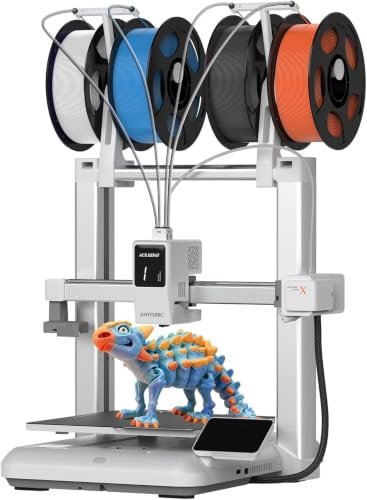
During my testing bench runs, the Kobra X stood out immediately for its spacious 260 x 260 x 260 mm build area and native multi-color engine. It addresses a major headache in multi-filament printing by cutting purge waste significantly, which saves you money on filament over time. Equipped with LeviQ 3.0 auto-leveling across 49 distinct points and a durable hardened steel nozzle, it easily hits speeds up to 600 mm/s without drifting out of alignment.
Key features that stand out:
– Native 4-Color Hub: Handles four spools right out of the box, with expansion options up to 19 colors via extra units.
– Waste Reduction Tech: Shortens retraction and travel distances by over 80 percent to reduce wasted purge poop.
– Hardened Steel Nozzle: Rated up to 300 °C to process abrasive composites, PETG, TPU, and ASA with minimal wear.
– LeviQ 3.0 Calibration: Employs a dense 49-point grid algorithm to lock down an even first layer automatically.
Pros:
– Roomy print volume accommodates larger multi-hue models
– Cuts down filament purge waste to lower your ongoing material costs
– Hardened nozzle handles tough, high-temperature filaments out of the box
Cons:
– Spools of filament are not included in the box and must be purchased separately.
Best for: Creative designers who want large-format multi-color models without spending a fortune on wasted purge material.
Expert Opinion: By drastically reducing the material discarded during filament changes, the Kobra X makes running multi-color jobs far more economical without forcing you to compromise on print speed or bed dimensions.
ELEGOO Centauri 2 Combo 3D Printer
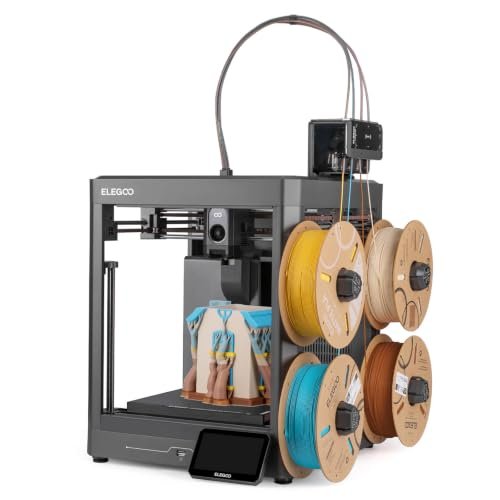
The Centauri 2 Combo makes multi-material projects feel effortless thanks to its CANVAS 4-color system equipped with automatic RFID spool identification. The printer rides on a sturdy aluminum CoreXY frame that absorbs heavy vibrations while operating at 500 mm/s speeds. I especially appreciated the peace of mind offered by its 22 intelligent sensors, which monitor feed rates, bed clearances, and mechanical limits to prevent messy misprints.
Key features that stand out:
– CANVAS Multi-Color Feeder: Integrates RFID filament reading, independent drive motors, and automatic spool swapping.
– 22-Sensor Safeguard Grid: Continuously audits extrusion consistency, first-layer height, and machine parameters.
– High-Rigidity Motion: CoreXY layout with precision linear guides ensures smooth surface finishes at high acceleration.
– User-Friendly Maintenance: Includes a magnetic toolhead cover, semi-automatic belt adjusters, and a built-in nozzle wiper.
Pros:
– Extensive sensor network helps catch mechanical errors early
– RFID spool reader sets material profiles without manual typing
– Solid aluminum frame minimizes ghosting on fast prints
Cons:
– The side-by-side footprint requires substantial dedicated desk width.
Best for: Makers who appreciate smart automation, painless maintenance, and seamless multi-material spool management.
Expert Opinion: Elegoo designed this machine with genuine practical convenience in mind; the combination of magnetic toolhead access, smart tensioning, and sensor-driven self-checks removes almost all the regular maintenance friction.
Practical Buying Advice and Comparison Insights
When you are assessing the market to find the best balance between features and the overall price 3d printing machine tag, look closely at what you actually plan to build. If you only intend to make miniature game pieces, school projects, or small replacement brackets, spending extra for an expansive enclosed system is unnecessary. A compact unit like the Entina Tina2 Plus delivers plug-and-play simplicity at an accessible starting cost that fits comfortably on a home study desk.
On the other hand, if your goals involve complex models with multiple filaments, you must consider long-term material waste and print time. Multi-color printing often creates significant plastic scrap during purge cycles. The Anycubic Kobra X tackles purge reduction directly, which protects your wallet from creeping filament expenses over months of use. Meanwhile, if you plan to work with structural materials like ABS or polycarbonate, a fully enclosed chamber is essential to stop drafts from cracking your parts, making systems like the Bambu Lab P1S and P2S models well worth the higher initial investment.
Finally, do not overlook maintenance and setup automation. Printers offering sensor-assisted auto calibration and active filament care save you from the frustrating troubleshooting cycles that used to plague earlier generations of desktop 3D printers.
Final Verdict
Here is how these five machines line up based on practical workshop demands:
- Top Value for Multi-Color Enclosures: The Bambu Lab P1S Combo remains the benchmark for makers who want dependable multi-material capabilities and an enclosed build chamber without moving into high-end industrial pricing.
- Top Pick for Precision and Material Care: The Bambu Lab P2S Combo earns its spot for serious creators who require blistering 600 mm/s output, active in-chamber drying, and AI-assisted print monitoring.
- Top Choice for Families and Schools: The Entina Tina2 Plus is hands-down the easiest on the wallet, requiring zero mechanical assembly and offering a safe, user-friendly space for beginners.
- Top Choice for Large-Scale Color Prints: The Anycubic Kobra X takes the lead for creators wanting generous build volume combined with smart purge-reduction technology to keep filament costs in check.
- Top Pick for Automated Everyday Reliability: The ELEGOO Centauri 2 Combo stands out for its 22-sensor monitoring layout, automated RFID material detection, and thoughtful maintenance perks.
Frequently Asked Questions About Price 3D Printing Machine Options
What determines the overall price 3d printing machine buyers see on the market?
The retail cost of a 3D printer generally reflects its motion system (CoreXY vs. bed-slinger), frame rigidity, maximum movement speeds, and enclosure quality. Premium features like multi-color filament hubs, hardened steel nozzles, AI failure cameras, and multi-point automated leveling sensors also influence the final price tag.
Are cheap 3D printers good enough for beginners?
Yes, modern entry-level units have improved dramatically over the last few years. Today’s budget printers frequently include automatic bed leveling, pre-assembled frames, and PEI magnetic build plates, eliminating the manual calibration struggles that once frustrated first-time users.
Does a higher printer price mean lower ongoing operating costs?
Often, yes. Higher-end machines designed with efficient filament paths and advanced purge-reduction systems waste much less plastic during multi-material prints. Additionally, reliable printers cause fewer failed prints, saving you both raw filament and electricity over time.
What is the difference between an open-frame and an enclosed 3D printer?
Open-frame printers are typically lighter and more affordable, performing exceptionally well with standard filaments like PLA and PETG. Enclosed printers trap internal heat and block room drafts, which is necessary to prevent warping when printing with technical filaments like ABS, ASA, and nylon.
Beyond the machine itself, your main ongoing expense will be filament spools, which usually cost between $15 and $30 per kilogram for standard materials. You may also want to budget for basic post-processing tools (like flush cutters and deburring blades), replacement nozzles, and isopropyl alcohol for keeping your build plate clean.
Is multi-color printing worth the extra equipment cost?
If you enjoy printing detailed figurines, multi-part prototypes, or colorful household items without wanting to hand-paint them, a multi-color system is well worth the investment. It automates color changes and can also load support interface materials (like PVA or PETG against PLA) to make complex overhangs detach cleanly.
How much speed can I actually expect from modern high-speed printers?
While many newer printers advertise top speeds between 500 mm/s and 600 mm/s, your actual running speed depends on the filament being used and the level of structural detail required. In real-world conditions, these machines comfortably run at 200 mm/s to 350 mm/s for detailed parts, finishing prints in roughly half the time of older generation printers.
Affiliate Disclosure: As an Amazon Associate, I earn from qualifying purchases made through links on this site.