I’ve spent years unboxing, tweaking, and running prints through dozens of machines, and navigating the current 3-d printer price landscape can be tricky. Today, a sensible 3-d printer price doesn’t force you to sacrifice speed, auto-leveling, or reliability like it used to. In this guide, I break down ten standout models across different budget tiers so you know exactly what kind of performance your hard-earned money buys.
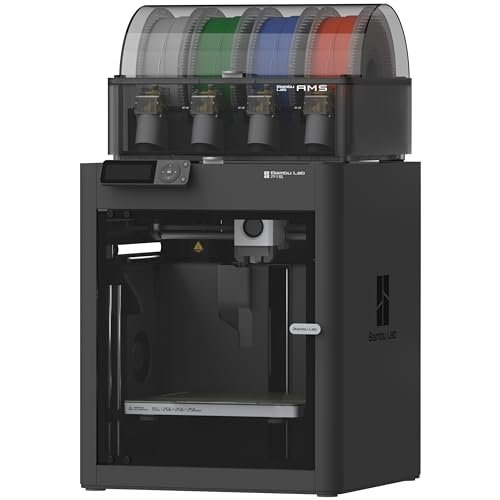
Bambu Lab P1S Combo
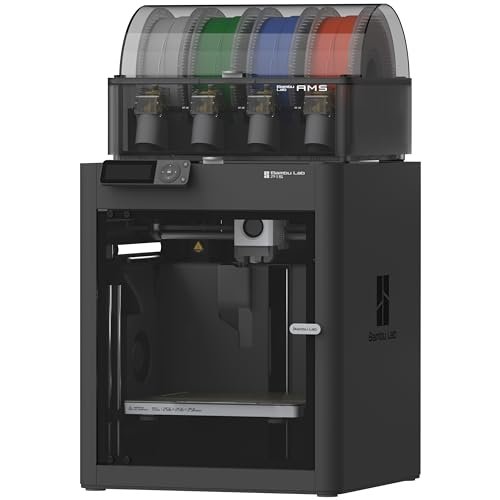
The Bambu Lab P1S Combo brings high-end production capability straight to your workbench without requiring endless manual tuning. Its fully enclosed chassis lets you tackle temperature-sensitive materials like ABS and ASA while keeping drafts away from your parts. Printing at up to 500mm/s with 20000 mm/s² acceleration, it completes intricate jobs in a fraction of standard print times. The included AMS system manages smooth multi-color workflows for up to four spools right out of the box, expandable up to 16 colors.
Key features that stand out:
– Enclosed body design for reliable ABS, ASA, and PETG printing
– Blazing fast print speeds up to 500mm/s with rapid acceleration
– Bundled AMS unit supporting automated multi-color and multi-material projects
– Automated bed leveling and vibration compensation
– Rapid out-of-the-box assembly taking roughly 15 minutes
Pros:
– Exceptional build speed without losing surface detail
– Fully enclosed chamber provides great temperature stability
– Reliable multi-color printing ecosystem
Cons:
– The proprietary parts mean you must buy specific replacements directly from Bambu Lab.
– The chamber cooling fan can get noticeably loud during long prints.
Best for: Intermediate to advanced makers wanting reliable multi-color prints and engineering materials.
Expert Opinion: The P1S Combo hits the sweet spot between consumer convenience and professional utility, making its price tag well worth every penny for serious hobbyists.
Creality Ender 3 V3 SE
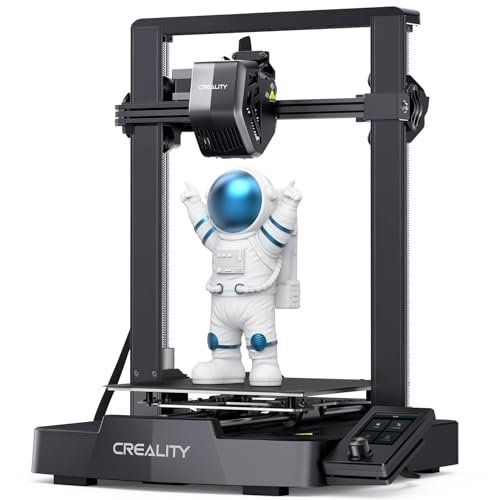
Creality updated its classic entry-level platform by packing the Ender 3 V3 SE with modern conveniences that eliminate past headaches. It features a Sprite direct drive extruder that feeds flexible TPU and standard PLA smoothly without slipping. You won’t have to fiddle with manual paper tests thanks to the CR Touch auto leveling and strain sensor that automates Z-offset calibration completely. It prints at a swift 250mm/s, cutting down wait times while keeping layer lines clean and uniform.
Key features that stand out:
– Maximum print speeds up to 250mm/s with 2500mm/s² acceleration
– Sprite dual-gear direct drive extruder compatible with flexible filaments
– Fully automated bed leveling paired with an automatic Z-offset sensor
– Rigid dual Z-axis lead screws and durable 8mm steel Y-axis linear shafts
– Simple 3-step assembly that takes roughly 20 minutes
Pros:
– Very accessible price point for true auto-leveling functionality
– Direct drive handles flexible TPU filament with ease
– Dual Z-axis eliminates bed gantry sagging
Cons:
– The open-frame design makes it unsuitable for high-temperature materials like ABS.
– The plastic screen interface feels a bit dated compared to full touchscreens.
Best for: Beginners looking for a reliable, low-cost workhorse for everyday PLA and PETG projects.
Expert Opinion: If you want a dependable starter machine that cuts out tedious bed leveling chores without driving up costs, this is one of the safest bets on the market.
Entina Tina2C
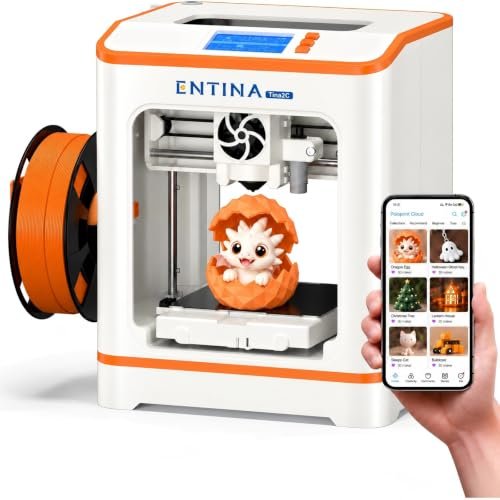
The Entina Tina2C is built specifically to remove every barrier to entry for complete beginners, classrooms, and younger creators. It arrives fully assembled with factory calibration, allowing you to run your first project within five minutes of opening the box. Its compact 3.9 x 3.9 x 3.9-inch build volume easily fits onto crowded desks or bookshelves. With the Poloprint Cloud app, you get access to thousands of ready-to-print models and AI design tools via standard 2.4GHz Wi-Fi.
Key features that stand out:
– Out-of-the-box ready with zero mechanical assembly required
– Wireless Wi-Fi printing and control through the Poloprint smartphone app
– Flexible magnetic build plate for effortless model removal
– Automated bed leveling and reliable power-loss recovery
– Quick-swap nozzle design that simplifies routine maintenance
Pros:
– Ultra-compact footprint fits virtually anywhere
– Friendly companion app makes printing easy for kids and beginners
– Flexible build plate prevents damaged prints during removal
Cons:
– The small build volume limits you to miniature items and small trinkets.
– It lacks a heated bed, so you are primarily limited to printing PLA.
Best for: Students, children, and beginners wanting a zero-fuss, compact introduction to 3D printing.
Expert Opinion: While it won’t produce large functional prototypes, its friendly mobile app and plug-and-play simplicity make it an exceptional educational tool for younger learners.
Creality Ender 3 V3 SE (Quiet Edition)
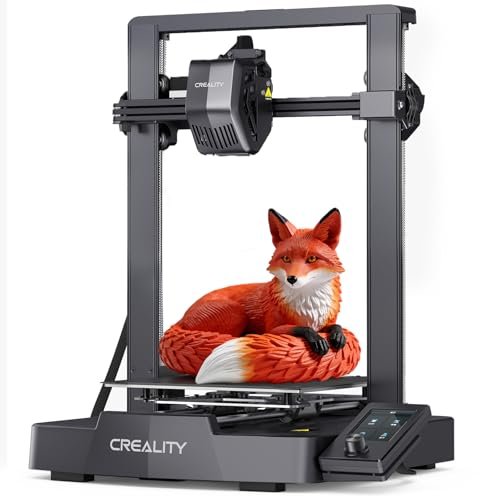
This iteration of the Ender 3 V3 SE focuses on delivering a smooth desktop experience by blending speed with reduced noise. Its 32-bit silent mainboard ensures whisper-quiet stepper motor movements while churning out parts at up to 250mm/s. The flexible PC spring steel build plate ensures that once your print finishes and cools, you can pop it off with a gentle bend. Dual synchronized Z-axis screws work alongside precision Y-axis steel shafts to keep layer alignment clean and free of banding.
Key features that stand out:
– 32-bit silent mainboard for quiet operation in home offices
– Flexible PC spring steel build surface for quick print removal
– Sprite direct extruder providing stable extrusion for PLA, PETG, and TPU
– CR Touch automated bed leveling system with automated Z-height offset
– High-speed movement up to 250mm/s backed by 2500mm/s² acceleration
Pros:
– Quiet operation makes it practical for bedrooms and shared study rooms
– Spring steel plate makes part removal fast and easy
– Strong layer consistency due to reinforced dual Z-axis rods
Cons:
– The stock cooling fans can still be heard even if the motors run quietly.
– The build volume remains standard, which may feel tight for larger helmets or single-piece props.
Best for: Budget-focused hobbyists who need a capable desktop printer that won’t disrupt their living space.
Expert Opinion: Creality nailed the balance between low cost and quality-of-life upgrades here; it’s a solid, practical choice that gives you great print consistency without irritating motor whine.
Bambu Lab P2S Combo
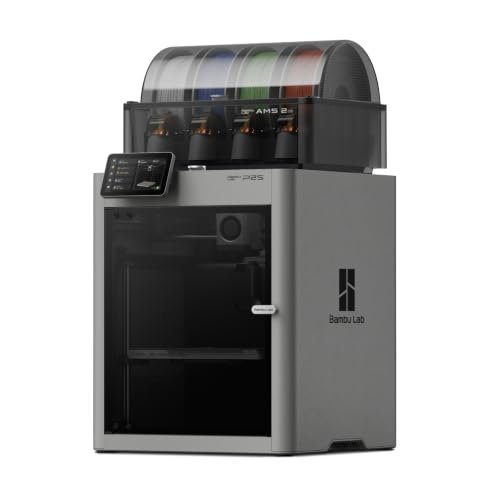
Designed for makers who demand speed without sacrificing surface precision, the Bambu Lab P2S Combo reaches speeds up to 600mm/s backed by a PMSM servo extruder. Its included AMS 2 Pro system features integrated active filament drying up to 65°C, ensuring moisture-sensitive materials stay print-ready. The Adaptive Airflow System intelligently manages chamber heat, maintaining a stable 50°C for engineering plastics or maximizing cooling for clean PLA overhangs. Built-in AI failure detection and automated calibration catch errors before filament goes to waste.
Key features that stand out:
– Blazing printing speeds up to 600mm/s with active flowrate compensation
– AMS 2 Pro system featuring built-in filament drying up to 65°C
– PMSM servo extruder paired with instant quick-swap nozzles
– Adaptive airflow chamber with activated carbon air filtration
– AI-driven failure detection and real-time print monitoring
Pros:
– Active spool drying inside the AMS preserves print quality
– Exceptionally high speeds with sharp, clean corners
– Advanced air filtration keeps indoor workshop air cleaner
Cons:
– The upfront investment is on the higher end of consumer machines.
– Replacement parts and upgrades remain largely restricted to first-party components.
Best for: Demanding makers, designers, and small businesses needing production-ready multi-material parts.
Expert Opinion: The combination of active drying inside the AMS and closed-loop servo control elevates this machine into a true desktop manufacturing station that justifies its premium price.
Entina Tina2 Plus
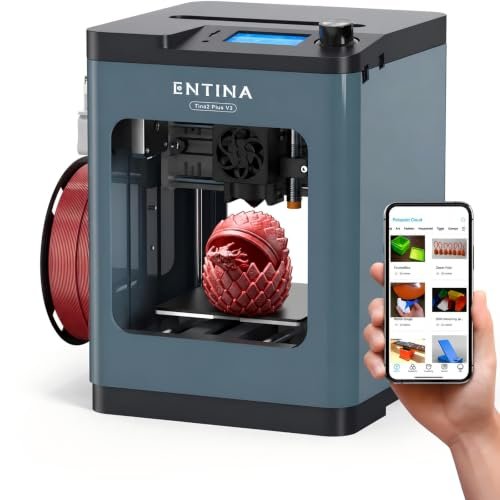
The Entina Tina2 Plus takes the simplicity of mini desktop printers and adds serious speed upgrades for home classrooms and hobby spaces. It features a ceramic hotend that heats up in just 40 seconds, slashing the preparation time before each project starts. Printing at speeds up to 250mm/s on a PEI spring steel plate, it produces clean models rapidly. A partially enclosed frame protects hands from moving axes, making it a safer companion around younger students.
Key features that stand out:
– Ceramic hotend reaching print temperature in 40 seconds
– Upgraded print speeds reaching up to 250mm/s
– Pre-assembled construction ready to print straight from the box
– Dual Z-axis mechanical structure for enhanced stability
– Poloprint cloud app integration with over 3,500 printable models
Pros:
– Ultra-quick preheat times get prints rolling immediately
– Textured PEI sheet provides reliable first-layer grip
– Safe physical layout suitable for supervised classroom use
Cons:
– The build platform remains on the smaller side for functional utility prints.
– Slicing custom models through third-party software requires manual profile adjustments.
Best for: Teachers, parents, and young makers wanting quick, dependable prints without mechanical setup.
Expert Opinion: The addition of a fast-heating ceramic hotend and a durable PEI plate turns this compact printer into a genuinely capable little machine for quick STEM exercises.
Portable 3D Printer (Compact FDM)
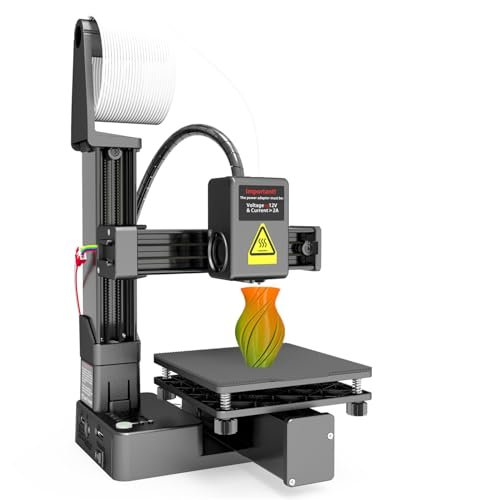
This ultra-portable FDM printer is tailored for creators who need an affordable, lightweight machine they can move from room to room. Powered by a 12V Type-C power connection, it can be set up in temporary workstations, maker spaces, or study areas with ease. It supports both standard PLA and flexible TPU through its 0.4mm brass nozzle, offering layer resolutions down to 0.05mm. The modular kit comes complete with tools, test filament, and step-by-step video setup guides.
Key features that stand out:
– Compact 100x100x100mm build volume suitable for small utility prints
– Modern 12V Type-C power adapter interface
– Wide layer thickness support ranging from 0.05mm to 0.3mm
– Removable print platform for quick object popping
– Complete starter bundle including 8GB TF card, tools, and sample PLA
Pros:
– Extremely lightweight and simple to transport anywhere
– Type-C power connectivity provides modern flexibility
– Low initial cost makes it accessible for tight budgets
Cons:
– It requires basic modular assembly guided by video instructions before first use.
– The bed is unheated, which limits filament selection strictly to basic PLA and TPU.
Best for: Hobbyists on a tight budget needing a portable secondary printer for mini figures and small parts.
Expert Opinion: While basic in its construction, this machine gives you functional FDM printing capabilities for the cost of a couple of filament spools, making it a fun travel or backup option.
AOSEED AI 3D Printer for Kids
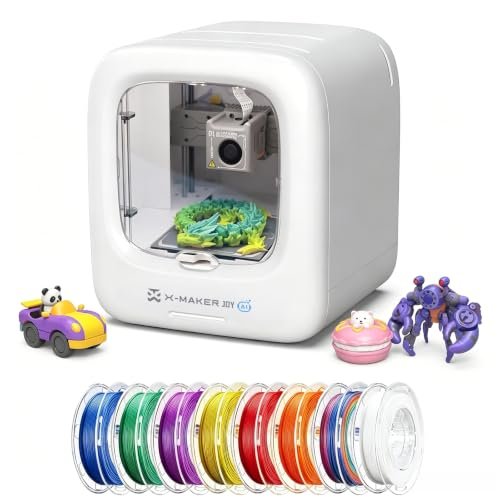
AOSEED took a software-first approach to make 3D printing genuinely engaging for children with its AI-integrated desktop printer. Through the dedicated app, kids can use AI Doodle and voice prompts to turn hand-drawn sketches or descriptions into printable 3D models. The machine features an enclosed, pinch-resistant frame with TÜV Rheinland ISO 16000-tested safety standards, ensuring safe operation at home. It prints at up to 400mm/s peak speeds and includes a built-in camera that records time-lapse clips of each build.
Key features that stand out:
– AI-assisted modeling tools (Doodle-to-3D, text-to-3D, photo-to-cartoon)
– Pinch-resistant fully enclosed safety design
– Integrated camera for live mobile monitoring and automated time-lapse creation
– Rapid printing reaching up to 400mm/s maximum speeds
– Generous starter kit containing 8 mini spools of child-safe PLA filament
Pros:
– Child-friendly app eliminates the steep learning curve of 3D modeling
– Enclosed chassis prevents accidental contact with hot surfaces
– Built-in camera provides fun time-lapses to share with friends
Cons:
– Only supports single-color printing per run despite multi-part model options.
– The build envelope is restricted to small toy sizes.
Best for: Families looking for an educational, safe creative hub that lets kids design toys using AI prompts.
Expert Opinion: The hardware is solid, but the AI modeling software is the real star here; it bridges the gap between imagination and a physical toy better than any standard printer app.
FLASHFORGE Adventurer 5M
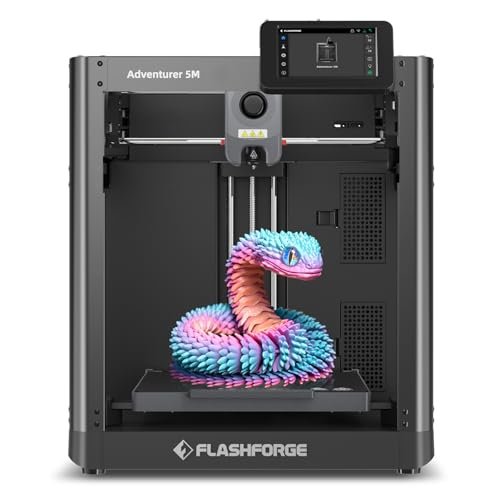
The FLASHFORGE Adventurer 5M brings industrial CoreXY speed down to an accessible consumer price bracket. Reaching speeds of up to 600mm/s with 20000mm/s² acceleration, it slashes standard print times dramatically while maintaining tight tolerances. Its quick-swap nozzle system swaps in just three seconds without requiring tools or wire disconnects. The 280°C direct drive extruder features dual-fan auxiliary cooling and built-in vibration compensation, ensuring steep overhangs and smooth exterior walls print cleanly.
Key features that stand out:
– Rigid all-metal CoreXY frame structure capable of 600mm/s travel speeds
– Tool-free, 3-second quick-change nozzle design
– High-flow 32mm³/s hotend heating to 200°C in just 35 seconds
– One-click fully automated bed leveling for seamless first layers
– Remote monitoring and slicing via the Flash Studio mobile application
Pros:
– CoreXY motion delivers blisteringly fast prints with minimal ghosting
– Lightning-fast nozzle changes make swapping sizes painless
– Full-auto bed leveling works reliably every single time
Cons:
– The open-frame standard model is susceptible to ambient room drafts when printing PETG.
– The cooling fans produce substantial noise during high-speed runs.
Best for: Makers needing rapid prototyping speeds and dependable CoreXY mechanics at a mid-tier price.
Expert Opinion: The Adventurer 5M offers some of the highest speed-per-dollar ratios available today; its rapid-change hotend is easily one of the best mechanical designs in this price class.
Bambu Lab A1
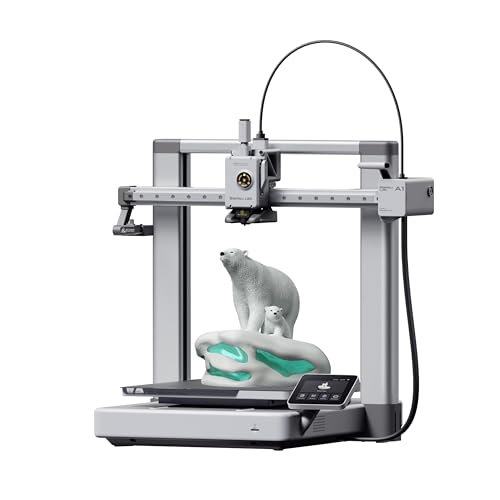
The Bambu Lab A1 brings the brand’s renowned print quality and ease of use to an open-bed design. It handles high-speed printing with 10,000 mm/s² acceleration while active motor noise canceling keeps operation exceptionally quiet. The active flow rate compensation measures extrusion pressure in real time, virtually eliminating under-extrusion gaps and corner bulging. When paired with the optional AMS lite, it provides seamless multi-color printing with automated spool switching and filament runout backup.
Key features that stand out:
– Active flow rate compensation algorithm for smooth extrusion consistency
– Full-auto calibration handling Z-offset, bed leveling, and vibration resonance
– Active motor noise cancellation for quiet desktop operation
– 1-Clip quick-swap nozzle mechanism for fast maintenance
– Native multi-color printing support through the optional AMS lite
Pros:
– Incredibly quiet operation compared to other high-speed printers
– Effortless first-layer consistency without manual adjustments
– Clean multi-color prints with the AMS lite accessory
Cons:
– The open bed design is not suitable for printing warping-prone plastics like ABS.
– It occupies more desktop depth due to the moving bed slinger configuration.
Best for: Hobbyists and tabletop gamers looking for quiet, reliable, high-detail multi-color printing.
Expert Opinion: If you don’t need to print high-temperature engineering plastics in an enclosed chamber, the A1 delivers the most polished, frustration-free printing experience you can buy in this price bracket.
Smart Buying Insights: Balancing Features and Cost
When evaluating 3-d printer price tags, your main goal should be avoiding features you don’t need while securing the ones that save time.
- Auto-Leveling is Non-Negotiable: Even budget printers now feature sensor-driven auto bed leveling. Never buy a modern printer that forces you to use paper sheets and thumbwheels unless your budget is strictly under a hundred dollars.
- Enclosed vs. Open Frame: Open-frame printers like the Creality Ender 3 V3 SE and Bambu Lab A1 offer fantastic value for PLA, PETG, and TPU. However, if you plan to print structural automotive parts or functional outdoor enclosures in ABS or ASA, prioritize an enclosed unit like the Bambu Lab P1S to prevent edge warping.
- Speed Saves Filaments and Headaches: Modern printers running at 250mm/s to 600mm/s do more than finish projects faster; their advanced input shaping and flow compensation also prevent heat creep and reduce print failures on tall models.
- Ecosystem and Multi-Color: Multi-material printing drives up the initial machine price, but units like the Bambu Lab P1S Combo or A1 drastically reduce post-processing time by printing supports in dissolvable materials or completing painted miniatures in one run.
Final Verdict
Here is how these tested machines match real-world requirements:
- Top Value Starter: The Creality Ender 3 V3 SE delivers solid direct-drive performance, auto-leveling, and 250mm/s speeds at a price point that is virtually impossible to beat for newcomers.
- Top Multi-Color Workhorse: The Bambu Lab P1S Combo remains the gold standard for hobbyists who want a sealed chamber, multi-color flexibility, and set-and-forget reliability straight out of the box.
- Top Speed for the Money: The FLASHFORGE Adventurer 5M brings legitimate 600mm/s CoreXY printing and quick-swap nozzles to a very accessible price point.
- Best for Classrooms & Kids: The AOSEED AI 3D Printer transforms 3D printing into an intuitive play-and-learn toy factory with AI-guided drawing tools and built-in pinch protection.
- Best Compact Space Saver: The Entina Tina2 Plus gives you rapid ceramic heating and PEI bed adhesion in a tiny footprint that sits comfortably on any small study desk.
Frequently Asked Questions About 3-D Printer Price
What is a reasonable 3-d printer price for a beginner?
For a reliable entry-level FDM printer, expect to pay between $180 and $300. In this range, you get modern essentials like automatic bed leveling, a heated bed, a direct drive extruder, and fast print speeds without needing aftermarket upgrades.
Why does a multi-color 3-d printer price run higher than single-color units?
Multi-color machines require motorized filament multiplexers (such as the Bambu AMS), extra sensors, cutting mechanisms, and sophisticated firmware to retract, purge, and switch spools automatically during printing. The added mechanical complexity accounts for the higher price tag.
Does a higher 3-d printer price mean lower ongoing maintenance costs?
Generally, yes. Higher-tier printers often use high-quality linear rails, hardened steel nozzles, closed-loop servo motors, and automated self-calibration routines. Cheaper models tend to use rubber V-slot wheels and brass nozzles that wear out faster and require manual tensioning.
Are cheap mini 3D printers worth buying?
Mini printers under $150 are worth it if you specifically need an educational tool for kids or only plan to print small items like gaming miniatures and keychains. However, their unheated beds and small build plates mean you will outgrow them quickly if you want to make functional household items.
Beyond the machine itself, budget for filament spools ($15 to $25 per kilogram), replacement nozzles ($5 to $20), textured PEI build sheets, rubbing alcohol for cleaning the bed, and basic digital calipers for measuring dimensions.
Is an enclosed 3D printer worth the extra money?
If you plan to print exclusively with PLA and PETG, an enclosure is unnecessary and can actually cause heat creep clogs if not vented. An enclosed printer is only worth the extra cost if you intend to print engineering materials like ABS, ASA, Nylon, or Polycarbonate, which require high ambient heat to avoid warping.
Affiliate Disclosure: As an Amazon Associate, I earn from qualifying purchases made through links on this site.