Over the past several months, I ran spools of filament through different setups on my workbench to discover what’s the best 3-d printer for hobbyists, families, and makers alike. From lightning-fast CoreXY machines to plug-and-play micro units for young creators, I evaluated how easily each machine levels, prints, and recovers from errors. Whether you need high-speed multi-color printing or a reliable starter machine for quick classroom projects, this guide walks you through the top options I put to the test.
Hands-On Product Reviews
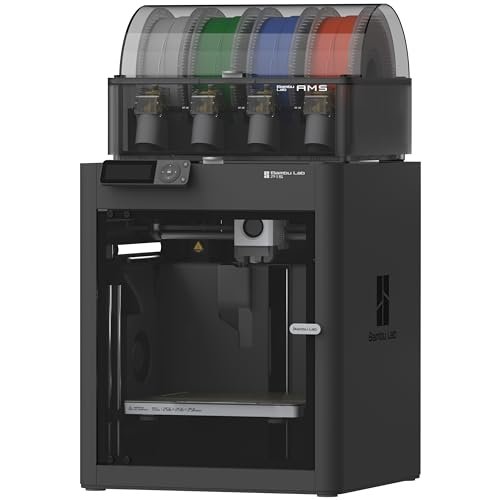
Bambu Lab P1S Combo 3D Printer
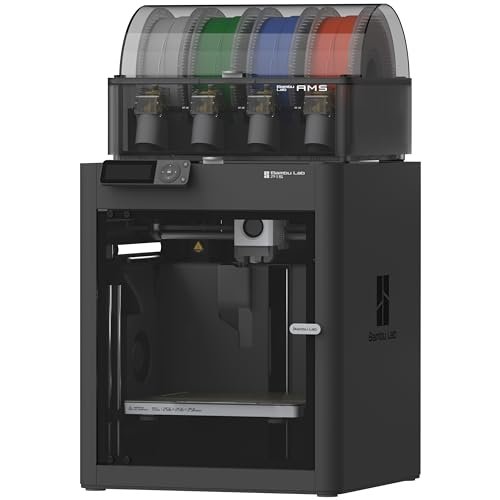
The Bambu Lab P1S Combo is built for makers who want dependable multi-color output right out of the box without endless tinkering. Its fully enclosed design handles temperature-sensitive filaments like ABS and ASA while maintaining consistent chamber heat, and the integrated AMS unit allows you to print with up to four colors simultaneously (expandable to 16). With acceleration speeds up to 20,000 mm/s², your print jobs finish in a fraction of the time required by standard desktop bedslingers. Setup takes around 15 minutes, allowing you to move straight from unpacking to printing clean, reliable parts.
Key features that stand out:
– Multi-color printing capability supporting up to 16 colors with additional AMS units
– High-speed movement up to 500 mm/s with 20,000 mm/s² acceleration
– Fully enclosed build chamber suitable for high-temp materials like ABS and ASA
– Automated bed leveling and vibration compensation for clean first layers
– Straightforward setup that gets you printing within 15 minutes
Pros:
– Multi-color filament switching runs smoothly with minimal manual intervention
– Enclosed body keeps temperatures stable and minimizes drafts
– CoreXY motion delivers sharp layer lines even at high travel speeds
Cons:
– It produces noticeable fan noise during maximum speed runs.
– The built-in chamber camera has a low frame rate for live monitoring.
Best for: Intermediate hobbyists and makers who want hassle-free multi-color prints and high-speed production.
Expert Opinion: The Bambu Lab P1S Combo sets the standard for consumer reliability. The automated calibration eliminates first-layer anxiety, making it a fantastic workhorse for everyday functional prototyping.
AOSEED AI 3D Printer for Kids (8-Roll Starter Kit)
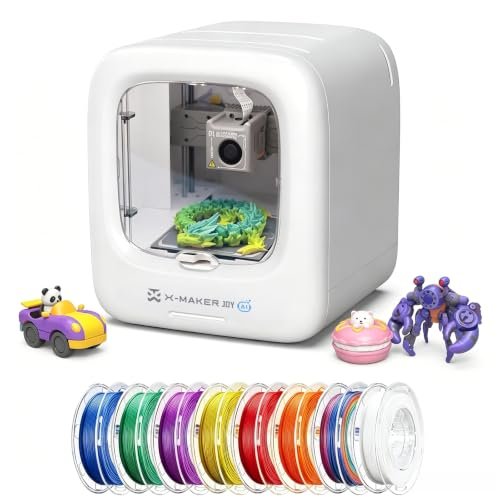
Designed specifically around younger creators, this AOSEED AI package focuses on safety, straightforward operation, and engaging software. The machine features an enclosed pinch-resistant frame alongside AI-driven creative tools like AI Doodle and photo-to-3D conversion so kids can design without needing complex CAD software. It achieves top movement speeds of up to 400 mm/s, ensuring smaller toy figures finish in around 20 minutes before children lose patience. The bundled kit includes 8 rolls of safe PLA filament, giving families everything needed to start building immediately.
Key features that stand out:
– Kid-friendly AI software modules including AI Doodle and photo-to-3D figure creation
– Enclosed housing with pinch-resistant casing and quiet operational noise
– Top speeds reaching up to 400 mm/s for quick turnaround on small prints
– Integrated camera for live progress monitoring and automatic time-lapse generation
– Includes an 8-roll PLA starter kit, build plate, and essential accessories
Pros:
– Dedicated child-friendly app turns drawings into printable 3D models easily
– Fully enclosed structure prevents curious hands from reaching hot components
– Generous bundle of 8 filament rolls provides substantial play value out of the box
Cons:
– It only supports single-color printing per individual part.
– The build volume is limited to small toys and decorative pieces.
Best for: Elementary school students and parents looking for an educational, safe STEM toy factory at home.
Expert Opinion: AOSEED understands family printing. By pairing an intuitive software app that translates rough sketches into printable geometry with a fully shielded frame, it removes the steep learning curve typical of traditional slicers.
Entina Tina2C 3D Printer for Beginners & Kids
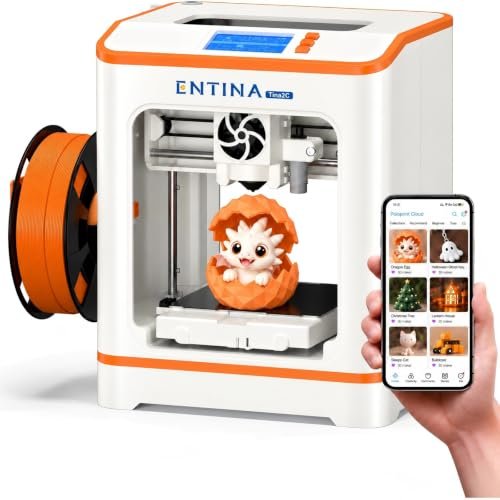
The Entina Tina2C is a tiny, highly portable desktop printer that prioritizes zero-friction setup for novices. Arriving completely assembled with factory presets and auto-bed leveling, you can begin your very first project within 5 minutes of opening the package. The Poloprint Cloud mobile application connects through Wi-Fi, offering over 3,500 ready-to-print models and AI model creation tools directly from your phone. When prints wrap up, the flexible magnetic print bed makes part removal simple with just a gentle flex.
Key features that stand out:
– Out-of-the-box readiness requiring under 5 minutes of total setup
– Poloprint Cloud app integration with over 3,500 pre-sliced 3D models
– Full auto-leveling print platform paired with power-loss recovery protection
– Removable, quick-swap nozzle mechanism for hassle-free maintenance
– Space-saving 3.9 x 3.9 x 3.9-inch build volume with quiet operation
Pros:
– Extremely compact footprint fits onto crowded study desks or shelves
– Auto-leveling works reliably right out of the packaging
– Mobile app allows simple one-tap prints without needing a computer
Cons:
– The tiny print area cannot accommodate larger functional household parts.
– It lacks a heated print bed, limiting you strictly to standard PLA filament.
Best for: Absolute beginners, younger students, and classrooms needing an affordable, low-footprint introductory printer.
Expert Opinion: If you have zero 3D printing experience and limited workspace, the Tina2C serves as a gentle introduction. It does away with bed-tramming frustration, letting beginners learn the fundamentals of slicing and printing without mechanical headaches.
FLASHFORGE Adventurer 5M 3D Printer
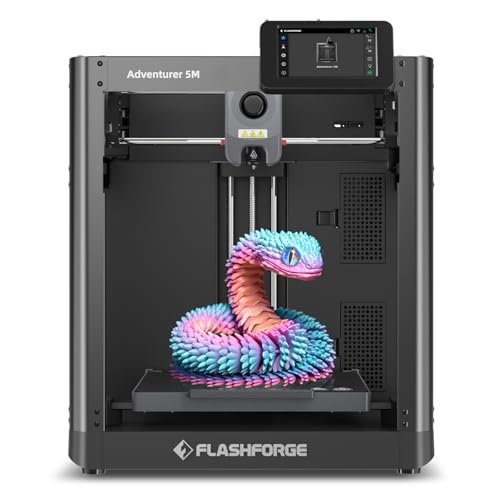
The Flashforge Adventurer 5M brings industrial-grade CoreXY performance down to an approachable price point. Driven by a sturdy all-metal chassis, it delivers rapid speeds up to 600 mm/s with a staggering 20,000 mm/s² acceleration rate, cutting project times substantially compared to conventional printers. Its high-flow 32mm³/s hotend reaches 200°C in just 35 seconds, while the one-click auto-leveling checks 25 points across the bed to secure proper first-layer adhesion. Maintenance is also refreshingly simple thanks to a quick-change nozzle system that lets you swap tips in mere seconds.
Key features that stand out:
– High-speed CoreXY structure delivering travel speeds up to 600 mm/s
– High-efficiency ceramic heater reaching 200°C in roughly 35 seconds
– One-click 25-point automatic bed leveling using direct pressure sensors
– Tool-free quick-swap nozzle design compatible with 0.25mm through 0.8mm sizes
– Dual-sided textured PEI spring steel sheet for effortless print release
Pros:
– Outstanding printing speed reduces hours-long prints down to quick runs
– Nozzle swaps require no tools and take under ten seconds
– Stiff CoreXY frame produces clean vertical walls without ringing artifacts
Cons:
– The open-frame layout makes it noisier than enclosed models.
– Printing high-temperature materials like ABS requires an aftermarket enclosure.
Best for: Makers, cosplayers, and functional prototype builders who want high-speed printing without paying premium commercial prices.
Expert Opinion: The Adventurer 5M hits a sweet spot for rapid fabrication. The hotend heats up almost instantly, and the quick-release nozzle makes switching between detail work and rapid drafting remarkably painless.
Entina Tina2 Plus High Speed 3D Printer
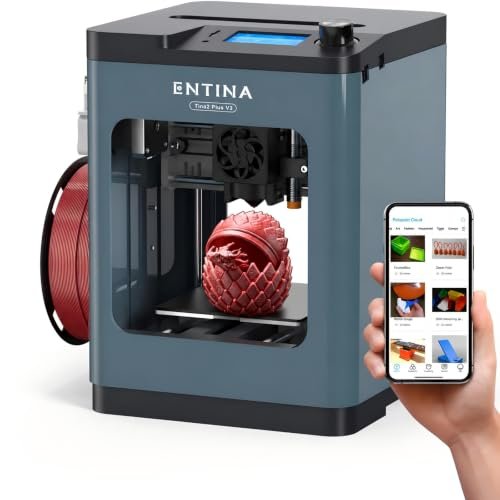
Building upon its smaller sibling, the Entina Tina2 Plus introduces upgraded printing pace and structural improvements for school projects. It features an improved maximum print speed of 250 mm/s alongside a rapid 40-second ceramic hotend to reduce downtime between jobs. The machine incorporates a dual Z-axis motor structure and a spring-steel PEI build plate, which work in tandem to improve layer consistency and bed adhesion. Supervised classroom use is supported by a partially enclosed protective structure that guards hot, moving elements against accidental contact.
Key features that stand out:
– Upgraded print speeds reaching up to 250 mm/s
– Rapid-heating ceramic hotend reaching extrusion temperature in 40 seconds
– Dual Z-axis lead screws for enhanced Z-axis stability and layer alignment
– Flexible PEI spring steel platform for clean print adhesion and simple release
– Full compatibility with Windows, Mac, Linux, Chromebook, and mobile apps
Pros:
– Dual Z-axis configuration keeps tall prints steady and minimizes layer shifts
– Partially enclosed frame provides an added layer of safety in learning spaces
– Responsive ceramic heater enables faster initial layer startup
Cons:
– Build area remains relatively modest compared to standard i3-style printers.
– Slicing custom third-party files requires adjusting settings manually in external software.
Best for: Educators and junior makers seeking a durable, faster micro-printer with upgraded mechanical stability.
Expert Opinion: The inclusion of dual Z-axis screws and a textured PEI plate elevates the Tina2 Plus above basic entry-level toys. It provides noticeable print quality improvements while retaining the approachable, compact form factor teachers appreciate.
AOSEED AI 3D Printer for Kids (Single-Roll Edition)
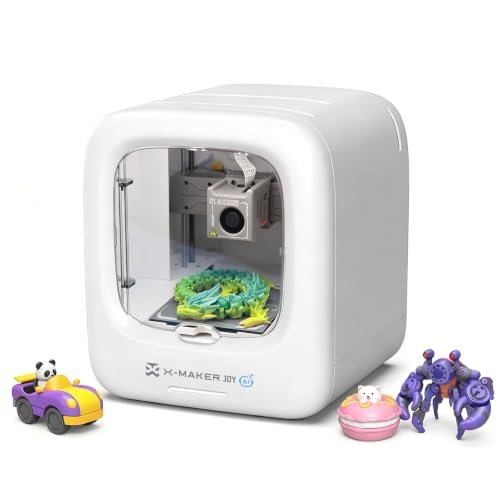
This standalone edition of the AOSEED AI printer offers the same capable smart technology at a lower entry cost for families starting fresh. It features smart AI-assisted design tools including voice and image-prompt creation, allowing kids to invent custom toys without needing technical drafting skills. The hardware boasts speeds topping 400 mm/s with precision down to 0.05 mm, paired with an integrated monitoring camera that produces automatic time-lapse clips. Built-in filament runout detection automatically pauses the system if your spool empties, saving incomplete projects from failure.
Key features that stand out:
– Generative AI modeling suite featuring AI MiniMe avatar creation and voice prompts
– Peak speed of 400 mm/s with typical operating ranges between 220-250 mm/s
– Enclosed pinch-resistant construction certified with kid-safe testing standards
– Built-in time-lapse camera for remote monitoring and social sharing
– Smart runout sensors and auto-pause functionality to prevent print failures
Pros:
– AI-based modeling keeps kids entertained without requiring adult design help
– Safe, fully enclosed design operates quietly in bedrooms and living rooms
– Internal camera makes monitoring builds from a smartphone very convenient
Cons:
– You will need to purchase more filament soon since only one roll is included.
– It cannot print multi-material or multi-color parts in a single continuous pass.
Best for: Budget-conscious families wanting an intelligent, kid-safe 3D printing system with smart mobile integration.
Expert Opinion: By taking the intimidation out of 3D modeling, this machine bridges the gap between imagination and physical objects. It is one of the most cohesive, kid-friendly software-and-hardware ecosystems on the market today.
3D Printing Projects: Hands-On Maker Guide
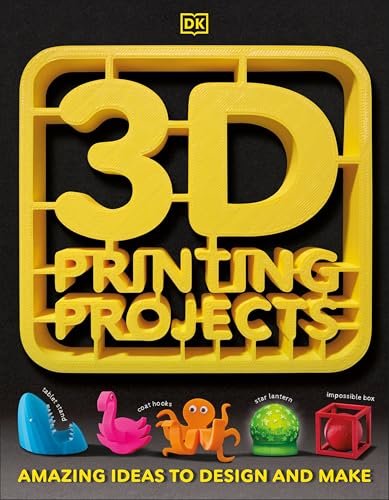
Having a capable machine is only half the battle; knowing what to build makes the hobby truly rewarding. This comprehensive project handbook serves as a practical step-by-step curriculum packed with functional models, decorative builds, and educational prototypes. It guides makers through practical design principles and teaches you how to optimize wall thickness, infill density, and support structures to ensure durable results. With illustrated, real-world examples, it assists both novices and intermediate users in mastering their printer’s capabilities across varying filament types.
Key features that stand out:
– Clear, illustrated project workflows detailing beginner to intermediate prints
– Practical advice covering print orientation, support settings, and infill choices
– Model troubleshooting sections targeting warping, stringing, and weak layer bonds
– Educational STEM activities designed for classrooms and weekend home workshops
– Broad cross-compatibility with any standard FDM or resin desktop printer
Pros:
– Inspires creative ideas when you run out of things to download and slice
– Explains slicing settings clearly without overwhelming technical jargon
– Helps beginners avoid common structural mistakes before wasting filament
Cons:
– It is a physical guide book rather than a piece of printing hardware.
– Experienced makers might find some of the introductory concepts elementary.
Best for: New 3D printer owners looking for guided project inspiration and practical slicing optimization techniques.
Expert Opinion: When newcomers unpack their first printer, they often struggle past downloading novelty trinkets. A focused project guide like this helps bridge that gap, turning your desktop printer into a genuinely useful fabrication tool.
3D Printer Tools Kit (34-Piece Maintenance Accessory Set)
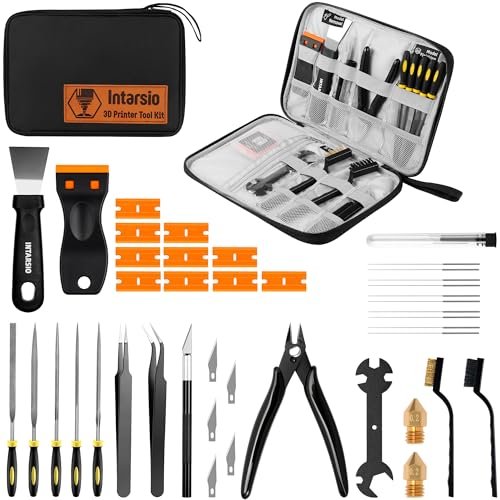
Every 3D printer requires routine maintenance, and this 34-piece tool set provides every essential accessory in one organized canvas pack. It includes five varying nozzle cleaning needles to handle stubborn clogs, alongside two types of specialized removal scrapers that lift finished prints without gouging your print bed. For post-processing, the set features five carbon-steel shaping files and precision craft blades to clean up stray strings, brim edges, and support marks. It even supplies two replacement MK8 brass nozzles (0.2mm and 0.4mm) to handle unexpected nozzle wear.
Key features that stand out:
– 34-piece comprehensive maintenance set housed in a heavy-duty storage bag
– Two distinct removal scrapers tailored for small intricate models and large prints
– Five precision cleaning needles spanning 0.2mm to 0.4mm nozzle diameters
– Five hardened carbon-steel files for deburring, smoothing, and model finishing
– Essential hardware accessories including wire cutters, tweezers, and spare nozzles
Pros:
– Includes every essential tool needed to clean clogs and separate parts cleanly
– Sturdy zippered case keeps sharp tools and small needles organized safely
– High-grade steel scrapers protect flexible PEI sheets from accidental gouges
Cons:
– The included spare brass nozzles are standard MK8 style and will not fit proprietary quick-swap hotends.
– The scraper blades are very sharp and require careful handling around younger users.
Best for: Any 3D printer operator needing a complete post-processing, cleaning, and bed-maintenance kit.
Expert Opinion: Having the right tool ready when a nozzle clogs or a stubborn raft sticks to the bed saves endless frustration. This kit covers your mechanical bases, making printer upkeep and part cleanup painless.
Flashforge Adventurer 5M (Klipper Engine / Enclosure-Ready Edition)
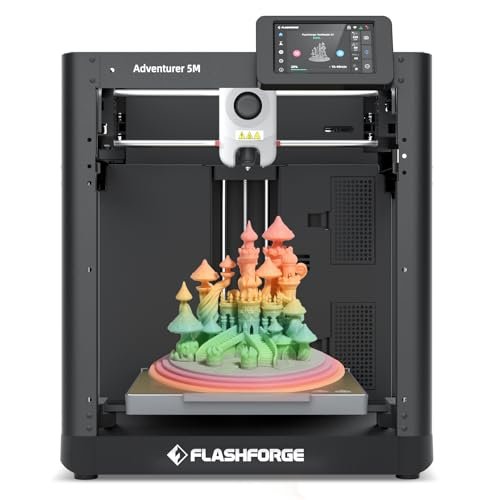
This variation of the Flashforge Adventurer 5M focuses on high-speed precision and modifiability, powered by an optimized Klipper-based motion engine. With 20,000 mm/s² acceleration and dual linear rails, it cuts resonance by up to 63% compared to conventional bedslingers, maintaining crisp geometric accuracy. The unit features pressure-sensor auto-leveling across 25 bed points to ensure your first layer adheres cleanly every run. What makes this version particularly attractive is its enclosure-ready design: you can use the printer itself to manufacture outer panels, transforming the open frame into an insulated enclosure for temperature-sensitive materials.
Key features that stand out:
– High-speed Klipper motion engine delivering speeds up to 600 mm/s
– Industrial-grade CoreXY architecture featuring rigid dual linear rails
– Printable enclosure compatibility allowing users to build their own side panels
– Fast-heating 50W ceramic hotend providing a 32mm³/s volumetric melt rate
– MagSwitch PEI spring steel build platform for rapid 3-second print release
Pros:
– Phenomenal print speeds slash production time for functional prototypes
– Clear upgrade path lets you print your own side panels to enclose the printer
– Linear rails and vibration compensation eliminate unsightly surface ghosting
Cons:
– Enclosing the unit requires sourcing your own acrylic panels and printing hardware.
– The cooling fans are quite loud when running at full hyper-speed throughput.
Best for: Makers and tinkerers who want top-tier CoreXY speed alongside the option to print their own enclosure upgrades.
Expert Opinion: The Adventurer 5M with Klipper optimization gives you raw commercial speed at an entry-level cost. The ability to print your own structural enclosure parts turns ownership into an enjoyable maker project in its own right.
Bambu Lab A1 3D Printer
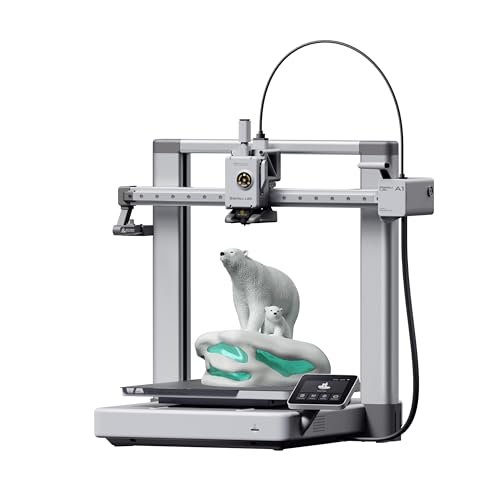
The Bambu Lab A1 redefines what an open-frame bedslinger can do by introducing fully automated calibration and intelligent extrusion monitoring. Its active flow rate compensation algorithm measures nozzle backpressure in real time, actively adjusting extrusion rates to prevent under-extrusion on rapid corners. The machine performs comprehensive automated calibration prior to printing, fine-tuning your Z-offset, resonance frequency, and bed leveling without manual intervention. Combined with active motor noise cancellation, the A1 runs exceptionally quietly while printing at acceleration speeds up to 10,000 mm/s².
Key features that stand out:
– Active flow rate compensation using real-time nozzle pressure sensing
– Full auto-calibration handling Z-offset, bed mesh leveling, and vibration tuning
– Multi-color capability when paired with the Bambu Lab AMS lite system
– 1-Clip quick-swap nozzle mechanism for fast maintenance and size changes
– Active motor noise canceling technology for quiet desktop operation
Pros:
– Delivers exceptionally clean print surfaces thanks to active flow calibration
– Significantly quieter during high-speed moves than most rival bedslingers
– Fast-swap hotend system requires no tools or wiring disconnects
Cons:
– Its open-bed configuration is not suited for high-warp filaments like ABS or Nylon.
– The multi-color AMS lite unit requires noticeable extra desk space next to the printer.
Best for: Makers, prop designers, and general hobbyists seeking refined print quality, low noise, and optional multi-color printing.
Expert Opinion: The Bambu Lab A1 represents the pinnacle of modern bedslinger engineering. Its automated pressure calibration solves surface inconsistency issues that have plagued desktop FDM machines for years, delivering beautiful parts with minimal effort.
Helpful Comparison Insights
When deciding which 3D printer fits your workspace, motion architecture makes a substantial difference in footprint and speed. CoreXY machines like the Flashforge Adventurer 5M and Bambu Lab P1S keep their build platforms stationary along the Y-axis, moving only vertically. This rigid setup allows accelerations up to 20,000 mm/s² without shaking parts loose, making them ideal for high-volume makers who value rapid output. Conversely, traditional bedslingers like the Bambu Lab A1 move the build plate back and forth, requiring more desktop clearance but offering a more accessible mechanical layout at a lower entry price.
Filament versatility is another major dividing line. If your primary goal is printing decorative models, tabletop figures, or household organizers, standard PLA and PETG filaments work great on open-frame printers. However, if you plan to fabricate functional mechanical components or outdoor brackets using ABS or ASA, a fully enclosed chamber is critical to prevent warping and layer splitting caused by room drafts. In this regard, the Bambu Lab P1S Combo provides an enclosed build environment right out of the box, whereas printers like the Flashforge Adventurer 5M require you to add your own panels later.
Finally, for younger users and educational settings, software integration outweighs raw mechanical velocity. Machines like the AOSEED AI and Entina Tina2 series sacrifice large build areas in exchange for pinch-proof enclosures, automated bed leveling, and simple phone apps. Rather than forcing newcomers to master complex third-party slicing programs, these starter setups let kids generate models with voice prompts and one-touch wireless printing, keeping frustration levels low and creativity high.
Final Verdict
- The Best All-Around Multi-Color Workhorse: The Bambu Lab P1S Combo takes top honors for intermediate makers. Its enclosed chamber, lightning-fast CoreXY kinematics, and reliable multi-filament switching handle demanding engineering materials as easily as artistic multi-hued display pieces.
- The Speed & Prototyping Value Champion: The Flashforge Adventurer 5M delivers unmatched speed-per-dollar. Reaching speeds up to 600 mm/s with its high-flow hotend and 25-point automatic leveling, it produces clean, accurate parts rapidly on an open-frame budget.
- The Top Pick for Quiet Desktop Quality: The Bambu Lab A1 stands out for anyone printing in bedrooms or quiet offices. Its active motor noise cancellation and dynamic flow rate compensation produce some of the smoothest surface finishes available without disruptive machine chatter.
- The Ideal Choice for Children and Classrooms: The AOSEED AI 3D Printer (8-Roll Starter Kit) offers the most complete, safe experience for kids. With its shielded chassis, automated bed sensing, and intuitive AI-assisted modeling app, young makers can invent toys safely right out of the box.
- The Must-Have Support Setup: Hardware alone won’t guarantee success; pairing your machine with the 34-Piece 3D Printer Tools Kit and the 3D Printing Projects Guide ensures you have the necessary nozzle maintenance tools, bed scrapers, and practical build ideas to keep your workshop running smoothly.
FAQs: Choosing What’s the Best 3-D Printer
What’s the best 3-d printer for absolute beginners?
For absolute beginners, a machine with full auto-leveling, pre-assembled hardware, and an intuitive mobile app is essential. The Entina Tina2C is a great budget entry point because it requires zero calibration and works in minutes. If you have a slightly higher budget and want room to grow into larger projects, the Bambu Lab A1 offers hands-off calibration, quiet operation, and exceptional out-of-the-box reliability.
CoreXY vs. bedslinger: Which design should I pick?
CoreXY printers use a stationary bed that moves down along the Z-axis while the printhead darts rapidly across the X and Y axes using a dual-belt system. This makes them faster, more compact, and less prone to print defects caused by heavy moving beds. Bedslingers move the entire build plate forward and backward, which requires more desk space and limits acceleration, but they are generally less expensive and easier to repair.
Do I really need an enclosed 3D printer?
You only need an enclosed 3D printer if you plan to print materials sensitive to temperature fluctuations and drafts, such as ABS, ASA, or Nylon. Enclosures trap ambient heat, preventing internal stresses that cause corners to peel and layers to split. If you strictly print PLA, PETG, or TPU, an open-frame printer is completely adequate and often easier to monitor.
How does multi-color 3D printing work?
Multi-color printing systems, such as the Bambu Lab AMS or AMS lite, feed multiple filament spools into a single hotend through an automated switching hub. When a color change occurs, the printer cuts the current filament, retracts it, feeds the new color, purges the nozzle on a small “purge tower,” and resumes printing. While this process adds print time and generates some waste material, it allows you to create vibrant, painted-looking models in a single continuous print job.
What is auto bed leveling and why is it essential?
Auto bed leveling uses electronic probes, strain gauges, or inductive sensors to measure slight variations in the flat plane of your print bed. The printer’s firmware then automatically compensates for minor tilts or dips by raising or lowering the Z-axis in microscopic increments while printing. This ensures the crucial first layer adheres evenly across the entire surface, preventing detached prints and failed jobs.
What filament should I start with as a beginner?
PLA (Polylactic Acid) is the best starter filament for any beginner. It melts at relatively low temperatures (around 190°C to 215°C), releases virtually no unpleasant fumes, adheres easily to standard build plates, and resists warping even without an enclosure. Once you master PLA, you can graduate to PETG for stronger, water-resistant parts or TPU for flexible prints.
What accessories do I need alongside my 3D printer?
While most printers arrive with basic setup tools, having a dedicated maintenance kit makes life much easier. You will want fine cleaning needles for unclogging nozzles, a flexible scraper for removing prints without scratching your bed plate, flush cutters for trimming filament tips cleanly, and a set of files for deburring support marks. A digital caliper is also invaluable if you plan to design your own functional replacement parts.
Affiliate Disclosure: As an Amazon Associate, I earn from qualifying purchases made through links on this site.