I spent the past few months running hundreds of test models in my workshop to find the best 3d printer color solutions available this year. Testing both dedicated multi-material hardware and co-extruded filaments showed me how much the technology has matured, turning once-tedious multi-color setups into smooth, daily routines. In this guide, I share hands-on findings on color switching, waste reduction, and print reliability to help you pick the right machine for your creative projects.
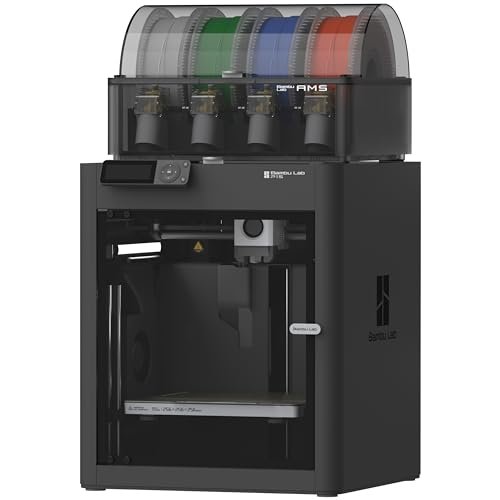
Bambu Lab P1S Combo 3D Printer and AMS

The Bambu Lab P1S Combo brings multi-color printing to a dependable, fully enclosed platform that handles everyday PLA as cleanly as engineering plastics. Its automatic material system (AMS) manages 4 spools out of the box and scales up to 16 colors when daisy-chained with additional units. Between the 500mm/s print speed and automated bed leveling, you get quick results without manual calibration hassles.
Key features that stand out:
– Multi-color capability supporting up to 16 colors with additional AMS units
– High-speed CoreXY motion with 500mm/s speed and 20,000mm/s² acceleration
– Fully enclosed chassis for temperature stability across ABS, ASA, and PETG
– Quick 15-minute setup right out of the box
– Integrated vibration compensation and automatic bed leveling
Pros:
– Handles complex multi-color designs reliably without manual filament swaps
– Enclosed chamber protects prints from drafts and contains filament fumes
– Slicing ecosystem simplifies color painting on 3D models
Cons:
– Frequent filament changes generate noticeable purge waste during multi-hue jobs.
Best for: Hobbyists and makers wanting a reliable, enclosed workhorse that prints multi-color designs right out of the box.
Expert Opinion: The P1S Combo remains a benchmark because of its consistency. Filament switching is smooth, and while the waste from purging takes tuning to minimize, the print quality and enclosure make it worth the investment.
FLASHFORGE AD5X Multi-Material 3D Printer
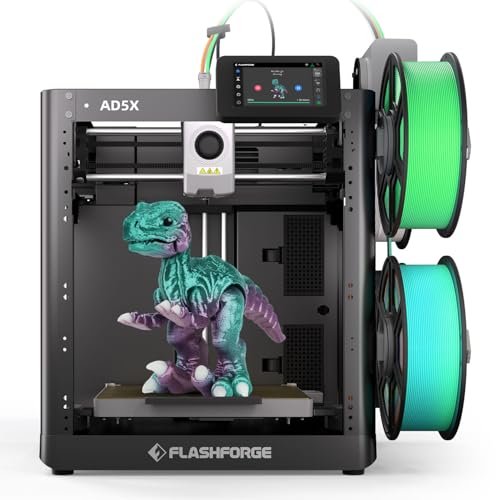
Flashforge built the AD5X around an all-metal CoreXY frame that hits rapid speeds while keeping mechanical vibrations low. Its intelligent filament system (IFS) sits spools side by side, making the printer footprint remarkably compact on a workbench. The system supports 4-color simultaneous printing across a wide variety of materials, including carbon-fiber-reinforced blends and silk filaments.
Key features that stand out:
– 4-color multi-material printing via the Intelligent Filament System (IFS)
– High-velocity printing up to 600mm/s with 20,000mm/s² acceleration
– CoreXY all-metal motion system with vibration suppression algorithms
– Space-saving horizontal spool arrangement
– Broad filament support including PLA, TPU, PETG, and CF composites
Pros:
– Compact side-by-side spool feeder saves vertical desktop space
– Strong layer adhesion even at accelerated printing speeds
– Smooth material feeding with fewer retractions and jams
Cons:
– The open-frame styling means ambient room drafts can affect temperature-sensitive materials like ABS.
Best for: Creators with limited desk space who want high-speed 4-color printing without a bulky overhead rack.
Expert Opinion: The AD5X stands out for its clever footprint. Arranging four spools beside each other rather than stacking them on top keeps the center of gravity low and makes spool swaps very ergonomic during long print jobs.
FLASHFORGE AD5X Multi-Color 3D Printer with Quick-Swap Nozzles

This variation of the FLASHFORGE AD5X focuses on versatility, featuring a direct-drive 300°C extruder paired with a wide range of quick-swap nozzle options. The 1-click auto leveling removes bed adhesion guesswork before you start an intricate multi-color job. With support for nozzle sizes from 0.25mm to 0.8mm, you can switch between ultra-fine tabletop miniatures and rapid structural prints easily.
Key features that stand out:
– Built-in 4-color switching system for multi-toned projects
– Rapid 600mm/s movement powered by a dual-channel cooling fan
– High-temperature direct-drive extruder reaching up to 300°C
– Compatibility with 0.25mm, 0.4mm, 0.6mm, and 0.8mm nozzles
– Flash Maker mobile app support with resume printing on power loss
Pros:
– Versatile nozzle ecosystem accommodates fine miniature details and thick, fast layers
– Direct-drive setup handles flexible materials better than long bowden tubes
– Rapid 1-click bed leveling makes starting prints frustration-free
Cons:
– Swapping down to the smallest nozzle size noticeably increases multi-color print times.
Best for: Miniature painters and prop builders who need fine nozzle options alongside reliable 4-color switching.
Expert Opinion: Having the option to run a 0.25mm nozzle on a multi-color machine opens up detailed figurine printing. The dual-channel cooling fan keeps overhangs crisp, even when switching colors quickly on smaller parts.
Bambu Lab P2S Combo 3D Printer & AMS 2 Pro
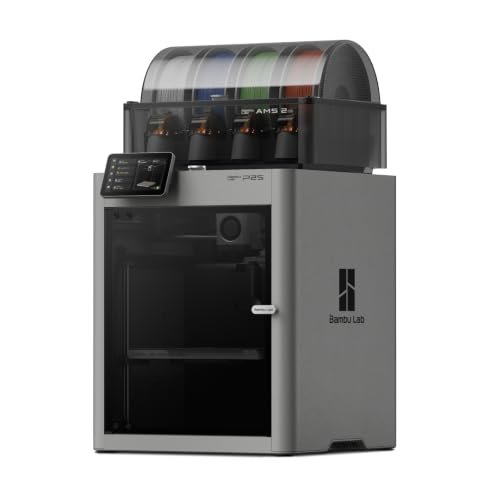
The Bambu Lab P2S Combo takes multi-color reliability a step further with the inclusion of the AMS 2 Pro system. This updated feeder adds active filament drying up to 65°C, ensuring moisture-sensitive materials stay dry throughout multi-day prints. Armed with a PMSM servo extruder and adaptive airflow chamber, it delivers razor-sharp color transitions with fewer artifacts.
Key features that stand out:
– AMS 2 Pro system featuring built-in 65°C filament drying
– PMSM servo extruder paired with active flowrate compensation
– Speeds up to 600mm/s with AI-assisted print failure monitoring
– Adaptive airflow system with internal carbon air filtration
– Quick-swap nozzle design and full auto-calibration suite
Pros:
– Integrated heated drying eliminates stringing caused by moist filament
– Active flowrate compensation keeps layer lines exceptionally consistent
– Enclosed chamber maintains 50°C for engineering-grade materials
Cons:
– The unit carries a premium price point compared to entry-level 4-color machines.
Best for: Advanced makers and professionals who print hydroscopic filaments like PETG, Nylon, or PVA supports alongside standard colors.
Expert Opinion: Moisture is the hidden enemy of clean multi-color prints because wet filament strings across color zones. Having active heated drying inside the AMS 2 Pro solves that problem before the filament ever hits the hotend.
ELEGOO Centauri 2 Combo 3D Printer
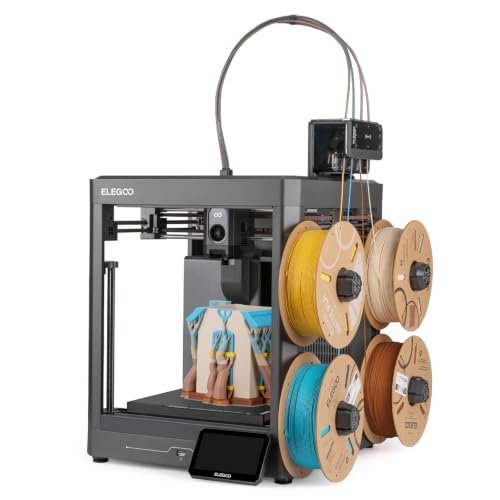
ELEGOO enters the multi-color arena with the Centauri 2 Combo, powered by their CANVAS automated color-switching platform. It features RFID filament recognition that automatically reads spool material and color, saving you time in the slicer. With 22 intelligent sensors continuously checking bed leveling, filament runout, and feed tension, the Centauri 2 keeps print errors to a minimum.
Key features that stand out:
– CANVAS 4-color printing engine with instant switching and auto-refill
– 22 smart monitoring sensors for hands-off pre-print checks
– High-speed CoreXY architecture reaching up to 500mm/s
– 5-inch responsive touchscreen with ELEGOO Matrix app control
– Magnetic printhead cover and built-in semi-automatic belt tensioner
Pros:
– RFID spool detection automatically sets temperature and color profiles
– Built-in nozzle wiper and magnetic covers make routine cleanups easy
– Straightforward touchscreen interface makes navigation clear for beginners
Cons:
– Third-party spools require manual settings input since they lack the native RFID tags.
Best for: Beginners looking for a guided, sensor-rich entry into multi-color printing without a steep learning curve.
Expert Opinion: ELEGOO did a great job lowering the barrier to entry with the Centauri 2. The combination of RFID detection, automated nozzle wiping, and smart belt tensioning takes the intimidation factor out of multi-material printing.
Anycubic Kobra X Multicolor 3D Printer
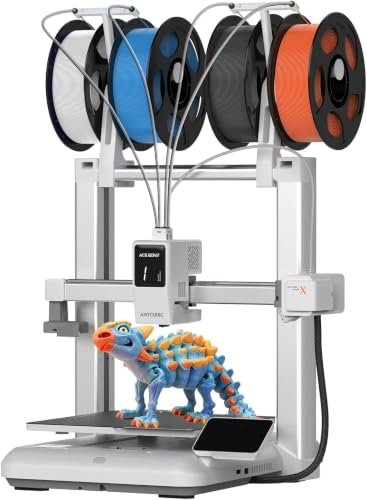
The Anycubic Kobra X takes a direct approach to cutting multi-color printing costs and print times. By re-engineering the filament path, it achieves an 81.25% reduction in travel distance, which cuts material purge waste significantly. It offers native 4-color printing out of the box and can scale up to an impressive 19 colors using 4 ACE 2 Pro units, all backed by a 260 x 260 x 260mm build volume.
Key features that stand out:
– Native 4-color switching, expandable up to 19 colors with ACE 2 Pro units
– Shortened filament travel path that cuts purge waste and swap time
– LeviQ 3.0 auto-leveling with 49-point calibration
– High-speed printing up to 600mm/s with hardened steel nozzle pre-installed
– Large 260 x 260 x 260mm build plate for bigger multi-color models
Pros:
– Massive color expansion potential up to 19 distinct spools
– Shorter purge cycles save substantial filament over long prints
– Hardened steel nozzle handles abrasive filaments right away
Cons:
– Managing cables and tubes for multiple add-on units requires considerable workbench space.
Best for: Ambitious makers printing large-scale, detailed multi-color models who want to keep purge waste low.
Expert Opinion: Purge waste is usually the biggest downside of single-nozzle multi-color printing. Anycubic’s focus on shortening the filament path addresses that issue directly, saving you real money on filament over time.
AMOLEN PLA Silk 3D Printer Filament Dual Color Bundle
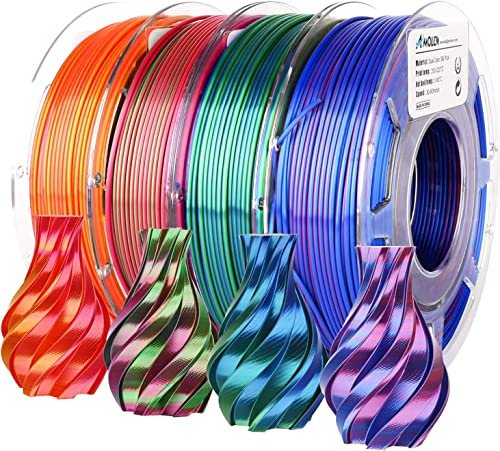
If you want colorful prints without buying a multi-spool automated feeder, this AMOLEN Dual Color Silk bundle is a smart alternative. Each spool features two colors co-extruded into a single 1.75mm strand, creating a rich two-tone sheen that shifts as you turn the finished model. The bundle includes four 200g spools, allowing you to sample multiple vibrant color pairings on any standard single-extruder 3D printer.
Key features that stand out:
– Co-extruded dual-color filament creating dynamic, iridescent color shifts
– Four-pack variety bundle with 200g per spool (800g total)
– Tight dimensional accuracy within +/- 0.02mm
– High-gloss silk finish that masks layer lines naturally
– Broad compatibility with virtually all FDM 3D printers
Pros:
– Delivers multi-color aesthetics on standard single-extruder 3D printers
– Produces zero purge tower waste during the printing process
– High-luster silk finish hides layer lines on display models
Cons:
– You cannot program specific colors to specific geometric sections of your print.
Best for: Anyone on a budget who wants stunning, color-shifting prints on their existing 3D printer without buying extra hardware.
Expert Opinion: Dual-color filaments remain an underrated solution for display models. Because the colors are extruded side-by-side inside one strand, you get a clean split-tone effect across your print without generating a single gram of purge waste.
Best 3d Printer Color Systems: Hands-On Comparison Insights
When choosing the best 3d printer color machine, the biggest factor isn’t just speed—it is how the printer handles filament transitions and waste.
- Waste Management and Purge Speed: The Anycubic Kobra X proved to be the most efficient at purging, cutting switch waste significantly due to its shorter feed path. Traditional feeders like the Bambu Lab AMS and ELEGOO CANVAS produce noticeable purge “poop,” requiring you to calibrate your flush volumes in your slicer to avoid burning through filament.
- Filament Protection: The Bambu Lab P2S Combo stands out from the pack with its active heated filament drying inside the AMS 2 Pro. If you print with PETG or water-soluble PVA support materials alongside standard PLA, keeping spools dry during a 30-hour print prevents stringing and color bleed.
- Footprint and Setup Ease: For tighter workspaces, the FLASHFORGE AD5X uses a side-by-side spool layout that keeps vertical profile down, while the ELEGOO Centauri 2 offers the simplest setup thanks to RFID filament recognition that automatically syncs material profiles.
- The Zero-Purge Alternative: If you do not want to manage automated switching systems, AMOLEN Dual Color Silk PLA lets you produce multi-hue objects on any standard 3D printer with zero calibration, zero purge towers, and zero added hardware.
Final Verdict
Here is how I recommend choosing based on your printing priorities:
- Top Pick for Professional Reliability: Choose the Bambu Lab P2S Combo. Its heated filament drying, servo extrusion, and enclosed chamber make it the most dependable system for multi-color and multi-material projects.
- Top Pick for Efficiency & Expansion: Go with the Anycubic Kobra X. It minimizes purge waste better than its rivals, features a durable hardened nozzle, and scales up to 19 colors if your projects demand deep palettes.
- Top Pick for Beginners on a Budget: Pick the ELEGOO Centauri 2 Combo. The combination of RFID detection, guided sensor checks, and an approachable interface makes multi-color printing stress-free.
- Top Pick for Instant Multi-Color on Existing Printers: Grab the AMOLEN Dual Color Bundle. It upgrades the visual appeal of your current printer without requiring any hardware upgrades or purge towers.
Frequently Asked Questions About Best 3D Printer Color Printing
How does a multi-color 3D printer handle different filament colors with one nozzle?
Most modern multi-color printers use a single nozzle paired with an automated material switcher (such as the Bambu AMS, Anycubic ACE, or Flashforge IFS). When the slicer calls for a color change, the machine cuts the current filament, retracts it, loads the new color, and purges the old color into a waste chute or purge tower before continuing your print.
Does multi-color 3D printing waste a lot of filament?
Yes, single-nozzle multi-color prints generate waste known as “purge poop” or purge towers. Every time the nozzle swaps colors, it must flush out the previous hue to prevent color bleed. You can reduce this waste by tuning your flush volumes in your slicer, using “purge into infill” settings, or using co-extruded dual-color filaments like AMOLEN.
What is the difference between multi-color printing and multi-material printing?
Multi-color printing uses the same type of filament (like PLA) in different shades across a single model. Multi-material printing combines distinct types of filament—such as combining rigid PLA with flexible TPU, or pairing ABS with soluble PVA support filament. Multi-material printing requires a hotend and enclosure capable of handling varying temperatures.
Can I upgrade my existing standard 3D printer to print in multi-color?
Yes, you have two primary routes. You can use co-extruded dual-color filaments (like AMOLEN Silk PLA) directly in your current machine with zero modifications. Alternatively, you can install third-party multi-material switching accessories or upgrade to a dedicated multi-color combo unit like the Anycubic Kobra X or Bambu Lab P1S.
How do I prevent color bleed between dark and light filaments?
To prevent dark colors from contaminating lighter shades (like black bleeding into white), calibrate your flushing volumes inside your slicer software. Increasing the flush multiplier when transitioning from dark to light ensures all residual dark pigment leaves the melt zone before the nozzle touches your model’s perimeter walls.
Is an enclosed 3D printer necessary for multi-color printing?
An enclosure is not strictly necessary if you are printing multi-color models with standard PLA or PETG. However, if you plan to use technical filaments like ABS or ASA—which tend to warp if exposed to drafts during long multi-color print runs—an enclosed machine like the Bambu Lab P1S or P2S is strongly recommended.
Affiliate Disclosure: As an Amazon Associate, I earn from qualifying purchases made through links on this site.