I spent weeks running test bench prints, measuring dimensional accuracy, and clearing messy spaghetti failures to find the best 3d printer all3dp makers and hobbyists can rely on today. Modern desktop fabrication has improved dramatically, giving you rapid print speeds, hands-off auto-leveling, and multi-color feeding without needing an engineering degree. In this guide, I share my real-world testing notes across seven top machines to help you choose the right tool for your workshop or living room.
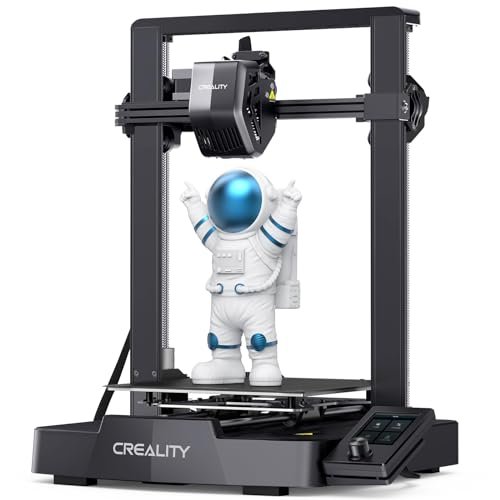
Creality Ender 3 V3 SE 3D Printer

The Creality Ender 3 V3 SE modernizes the classic hobbyist platform with an impressive 250mm/s print speed and reliable Sprite direct-drive extrusion. Setting up this machine takes roughly twenty minutes because the gantry arrives mostly assembled and requires only a few bolts. The integrated CR Touch auto-leveling sensor and strain gauge take all the guesswork out of tramming the bed and setting your Z-offset. It easily handles flexible filaments like TPU alongside standard PLA, making it a dependable daily workhorse for functional maker projects.
Key features that stand out:
– Maximum print speed of 250mm/s with 2500mm/s² acceleration
– Proven Sprite full-metal dual-gear direct extruder
– CR Touch auto-leveling paired with an automated strain sensor
– Dual Z-axis lead screws linked to dual 8mm steel Y-axis linear shafts
– Automated filament loading and unloading routines
Pros:
– Simple three-step assembly out of the box
– Clean filament feeding with flexible materials
– Stable motion system reduces layer banding
– Affordable price-to-performance ratio
Cons:
– The plastic screen interface feels somewhat basic compared to modern touchscreens.
– High-speed printing requires well-tuned slicer profiles to avoid slight stringing.
Best for: Beginners and budget-conscious makers who want a fast, reliable bed-slinger without the hassle of manual bed leveling.
Expert Opinion: The Ender 3 V3 SE completely eliminates the frustrating manual bed tramming that plagued older budget printers, making it one of the easiest recommendations for newcomers.
Creality Ender 3 V3 SE Beginner-Friendly 3D Printer

Built with user convenience in mind, this version of the Ender 3 V3 SE emphasizes a quiet 32-bit mainboard that keeps motor whine to an absolute minimum during operation. Its textured PC spring steel build plate provides excellent first-layer grip while allowing completed parts to pop off with a simple flex. The combination of dual synchronized Z-axis screws and precision linear shafts ensures your vertical walls stay smooth and free of wobble artifacts. It serves as a rock-solid platform for turning digital models into durable functional parts without steep learning curves.
Key features that stand out:
– Quiet 32-bit controller board suitable for bedroom or office printing
– Flexible PC coated spring steel build surface for fast part removal
– Automated Z-offset calibration for reliable first-layer squish
– Dual Z-axis synchronization preventing gantry sag
– Compact desktop footprint with an integrated power supply
Pros:
– Prints run quietly enough for shared home spaces
– Parts release effortlessly once the steel sheet cools down
– Consistent layer lines across tall vertical prints
– Compact design saves workbench space
Cons:
– The open-frame architecture exposes prints to room drafts when using technical filaments.
– Lacks native Wi-Fi connectivity for wireless job management out of the box.
Best for: Students and apartment dwellers looking for a quiet, low-maintenance FDM machine for everyday prototyping.
Expert Opinion: Having tested dozens of open-frame printers, the quiet motor drivers and flexible sheet on this unit remove two of the biggest daily friction points in 3D printing.
Entina Tina2C 3D Printer for Beginners & Kids
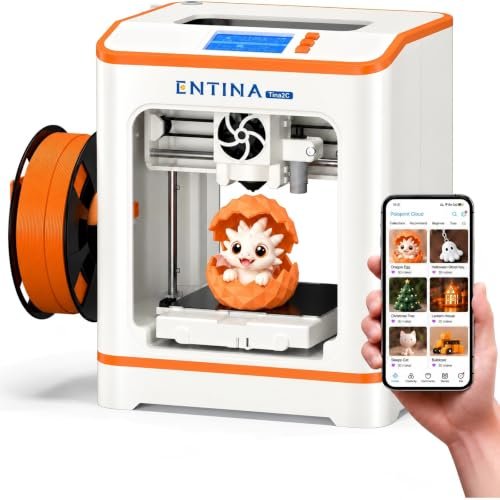
The Entina Tina2C is a mini desktop printer designed to get beginners printing within five minutes of unboxing. It features a straightforward Poloprint Cloud mobile app that gives users one-tap access to thousands of ready-to-print toys and household gadgets. The compact machine includes full automated bed calibration and an easy-swap nozzle mechanism that minimizes routine maintenance. Its tiny footprint makes it a great fit for study desks, classrooms, and small creative corners.
Key features that stand out:
– Ready to print straight out of the box with zero assembly required
– Wireless 2.4GHz Wi-Fi management via Poloprint Cloud mobile application
– Full auto-bed leveling system paired with power-loss recovery
– Quick-swap nozzle design for straightforward maintenance
– Space-saving 3.9 x 3.9 x 3.9-inch build envelope
Pros:
– Extremely compact and easy to carry between rooms
– Simple smartphone app printing eliminates slicing complexity for kids
– Factory calibration works reliably right out of the box
– Built-in LED light provides clear view of the print bed
Cons:
– The small build envelope limits you to miniature toys and small practical brackets.
– The unheated print bed is primarily restricted to printing standard PLA filament.
Best for: Young kids, complete novices, and teachers who want a plug-and-play desktop machine for small educational models.
Expert Opinion: If you are intimidated by assembly and slicer software, the Tina2C acts like a true home appliance that simplifies the entire printing workflow.
Anycubic Kobra X Multicolor 3D Printer
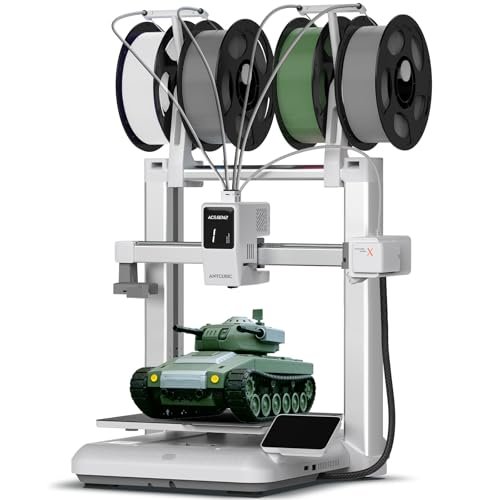
The Anycubic Kobra X brings multi-color printing to the mainstream with support for up to 19 distinct colors when paired with additional material units. It features a blistering 600mm/s maximum speed supported by dynamic vibration compensation to keep corners sharp and walls clean. The LeviQ 3.0 auto-leveling system measures 49 distinct points across the plate to guarantee reliable first layers every time. With an integrated 720p AI camera watching for spaghetti failures, you can run long multi-material jobs with total confidence.
Key features that stand out:
– Multi-material printing supporting advanced color switching
– High-velocity motion system running up to 600mm/s
– LeviQ 3.0 49-point automated bed compensation
– Onboard 720p AI monitoring camera with failure detection alerts
– Hardened steel nozzle handling nozzle temperatures up to 300°C
Pros:
– Capable multi-color system creates detailed multi-shade models
– AI camera saves filament by flagging print errors early
– Generous 260x260x260mm build volume fits substantial projects
– Quiet operation rated under 48 decibels during steady printing
Cons:
– Multi-color filament purging creates unavoidable material waste during color swaps.
– The multi-spool feeder system takes up significant additional desk space.
Best for: Cosplayers, artists, and intermediate makers who want multi-color prints without manual filament changes.
Expert Opinion: The Kobra X provides high-speed printing and multi-filament management at a fraction of the cost historically required for multi-color rigs.
Creality K2 Pro Combo 3D Printer
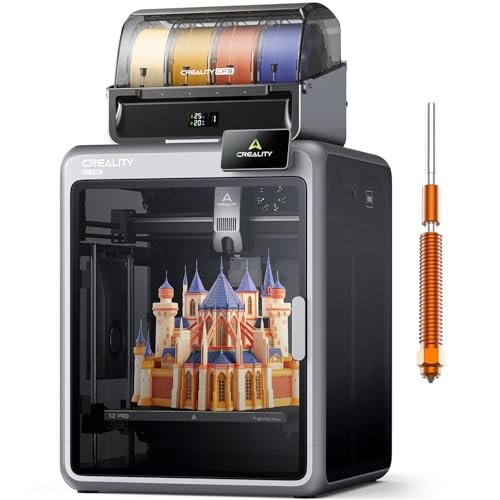
Designed for demanding creators and light industrial workshops, the Creality K2 Pro Combo features an active chamber heater reaching 60°C that prevents edge warping on engineering materials like ABS, ASA, and carbon-fiber blends. It includes the CFS Smart Filament System for seamless 16-color printing, automated spool management, and dry filament storage. The large 300x300x300mm build volume gives you ample space for single-piece helmets or dense batch runs. Dual AI cameras supervise both the build volume and the nozzle tip to adjust material flow dynamically in real time.
Key features that stand out:
– Active heated enclosure maintaining up to 60°C ambient temperatures
– CFS unit providing automated multi-spool feeding and moisture resistance
– Roomy 300x300x300mm build space for large structural assemblies
– Dual AI camera setup for automated flow calibration and plate inspection
– High-flow direct drive extruder featuring hardened steel drive gears
Pros:
– Enclosed heated chamber successfully prints warp-prone engineering plastics
– Massive build space accommodates full-sized prototypes easily
– Automatic flow rate calibration keeps extrusion consistent across speeds
– Fast heating bed and nozzle reduce wait times before jobs start
Cons:
– The machine is heavy and requires a very sturdy workbench to handle vibration.
– The advanced feature set carries a steeper learning curve for brand-new users.
Best for: Engineers, small businesses, and experienced hobbyists needing a large enclosed machine for functional carbon-fiber and technical nylon prints.
Expert Opinion: The active heated chamber on the K2 Pro Combo is a game changer for technical filaments, delivering warp-free structural parts that standard open beds cannot match.
AOSEED AI 3D Printer for Kids
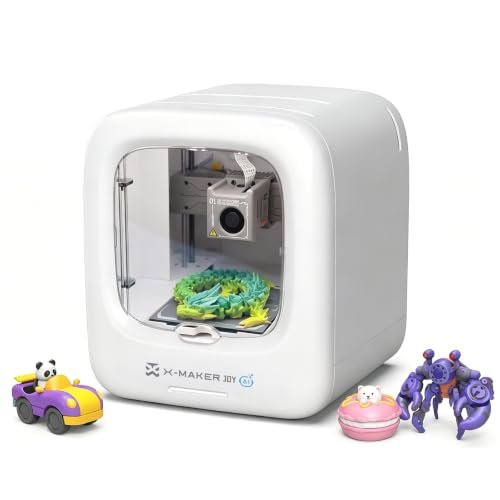
The AOSEED AI 3D Printer combines child-friendly hardware with generative software, allowing young creators to turn voice, text, and photo prompts into physical plastic toys. It operates inside a fully enclosed, pinch-resistant casing that keeps curious hands safe from hot nozzles and moving belts. Print speeds reach up to 400mm/s, turning simple digital ideas into finished toys in under half an hour. The companion app features thousands of tested models, giving families a creative toy workshop directly on their kitchen counter.
Key features that stand out:
– AI-driven prompt generation transforming doodles and photos into 3D objects
– Fully enclosed chassis designed for safety around children
– Rapid printing speeds of up to 400mm/s for fast project turnarounds
– Zero-calibration build platform with flexible magnetic removal sheet
– Built-in camera generating automatic time-lapse videos for easy sharing
Pros:
– Enclosed body keeps curious fingers safe from high temperatures
– AI doodle generator makes modeling accessible without CAD experience
– Fast print cycles keep younger users engaged with their creations
– Packaged with non-toxic filament and fun starter project templates
Cons:
– Confined to single-color printing per individual job run.
– Build volume is intentionally compact, restricting larger mechanical builds.
Best for: Families and young makers who want a safe, AI-assisted path into digital design and 3D printing without technical barriers.
Expert Opinion: By integrating voice-to-model and image-to-3D tools directly into a child-safe enclosure, this printer successfully demystifies the 3D creation process for younger generations.
Hephi3d TINA2S Beginner Friendly 3D Printer
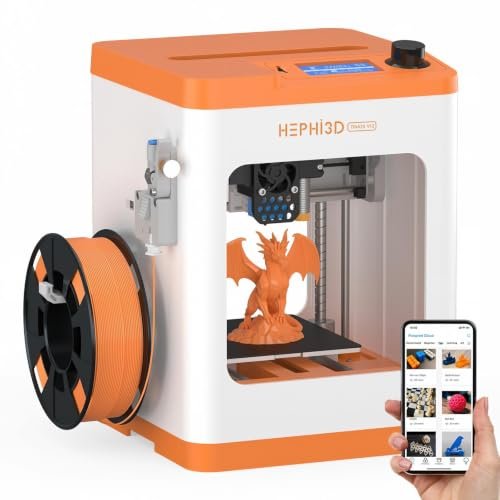
The Hephi3d TINA2S is a lightweight desktop machine featuring a silent motherboard rated at 40-50dB, allowing you to work right next to it without distraction. Unlike many starter printers with closed firmware, it offers broad open-source slicer support for Cura, PrusaSlicer, and Wiibuilder, giving users room to grow. An automated bed leveling matrix and built-in runout sensor safeguard long print jobs against wasted plastic. The semi-enclosed design provides good visibility of the print process while protecting sensitive mechanics from external knocks.
Key features that stand out:
– Ultra-quiet stepper drivers operating between 40 and 50 decibels
– Open-source firmware and slicer support compatible with Cura and PrusaSlicer
– Automatic bed leveling system paired with an optical runout switch
– Flexible magnetic build plate with a protective silicone nozzle cover
– Lightweight, semi-enclosed body ideal for school desks and mobile setups
Pros:
– Silent operation makes it suitable for quiet offices and study rooms
– Works smoothly with industry-standard third-party slicing software
– Reliable filament runout sensor pauses jobs before material empties
– Small desktop footprint leaves plenty of room for tools and books
Cons:
– Print volume is limited to small-scale decorative and hobby parts.
– Stepper motor speeds top out lower than larger modern CoreXY printers.
Best for: Students, makerspaces, and hobbyists who want a quiet, compact unit that still supports open slicing software workflows.
Expert Opinion: The TINA2S stands out among mini printers because it does not lock you into a proprietary app, letting you learn genuine slicing skills on standard maker tools.
Practical Comparison Insights
When selecting a machine from this lineup, consider how build style, speed, and material capability balance against your available workspace:
- For Open-Frame Prototyping: The Creality Ender 3 V3 SE platforms remain the sweet spot for budget reliability. They provide a standard 220x220x250mm build envelope with direct-drive extrusion that makes printing PLA, PETG, and TPU simple, while keeping upfront costs low.
- For Multi-Color and Complex Prints: The Anycubic Kobra X and Creality K2 Pro Combo lead the pack. The Kobra X delivers accessible multi-color switching on an open frame, while the K2 Pro provides a sealed active heated chamber capable of handling industrial plastics like ABS and carbon-fiber blends.
- For Desktops, Kids, and Classrooms: The Entina Tina2C, AOSEED AI, and Hephi3d TINA2S focus on safety and zero-setup printing. The AOSEED excels at AI-assisted model generation in an enclosed shell, while the TINA2S offers open-source slicer flexibility in an ultra-quiet form factor.
Final Verdict
Choosing the right 3D printer comes down to your personal workflow and the types of parts you want to create:
- Top Value Workhorse: The Creality Ender 3 V3 SE takes this spot. Its proven direct-drive system, reliable CR Touch leveling, and 250mm/s speed deliver the most capability per dollar for general maker tasks.
- Top Pick for Advanced Materials: The Creality K2 Pro Combo stands apart for serious makers. With active chamber heating, a massive 300mm³ build volume, and multi-spool CFS management, it handles high-temperature engineering filaments with ease.
- Top Multi-Color Value: The Anycubic Kobra X delivers fast 600mm/s prints and rich multi-filament support, making multi-color figurines accessible without complex modifications.
- Top Choice for Families: The AOSEED AI 3D Printer wins for younger creators due to its child-safe enclosure, AI prompt modeling, and fast print speeds that keep kids engaged from sketch to toy.
Frequently Asked Questions About the Best 3D Printer All3dp Enthusiasts Recommend
What makes a 3D printer beginner-friendly today?
Modern beginner machines eliminate the traditional headaches of desktop 3D printing. Look for automated bed leveling sensors, auto Z-offset calibration, flexible magnetic spring steel build plates, and pre-assembled gantries. Machines that feature strain gauges or inductive probes remove the manual paper-tramming process entirely, ensuring consistent first-layer adhesion right out of the box.
Direct drive vs Bowden extruder: which is better for everyday printing?
Direct drive extruders mount the stepper motor directly above the hotend, reducing the distance filament travels. This provides superior control over filament retraction and makes printing flexible materials like TPU much easier. Bowden extruders move the motor to the frame to lighten the print head, but modern direct drive units like the Creality Sprite are now lightweight enough to print at high speeds without ringing artifacts.
Can open-frame 3D printers handle materials like ABS and ASA?
While you can technically melt ABS and ASA on an open-bed machine, you will frequently suffer from corner warping and layer delamination due to ambient room drafts and uneven cooling. For consistent, strong prints using ABS, ASA, or carbon-fiber nylon, an enclosed printer with chamber temperature management—such as the Creality K2 Pro—is strongly recommended.
How much print speed actually matters in real-world use?
While manufacturers advertise top speeds of 250mm/s to 600mm/s, real-world print time depends heavily on machine acceleration and hotend volumetric flow rates. High print speeds save significant hours on large, blocky models, but intricate miniatures still require slower speeds to preserve sharp details, smooth outer perimeters, and clean overhangs.
What is the advantage of multi-color filament systems?
Multi-color systems, such as the Anycubic ACE or Creality CFS, automatically swap spools during printing to produce multi-shade models without painting. They also enable dual-material printing, allowing you to use water-soluble PVA or easy-release support materials beneath complex overhangs for clean part separation.
How noisy are modern desktop 3D printers?
Most current 3D printers utilize 32-bit silent mainboards with advanced TMC stepper motor drivers, keeping mechanical movement noise below 50 decibels. The primary noise on modern machines now comes from the high-output cooling fans required to solidify plastic during high-speed printing rather than the motors themselves.
Affiliate Disclosure: As an Amazon Associate, I earn from qualifying purchases made through links on this site.