I have spent hundreds of hours tuning stepper motors, leveling print beds, and testing different machines to find the best 3d printer aliexpress has to offer. When buying from overseas storefronts or marketplaces, balancing genuine component quality with affordable pricing can be tricky. In this guide, I share my hands-on testing notes and breakdowns to help you pick a reliable machine without wasting money on poorly built clones.
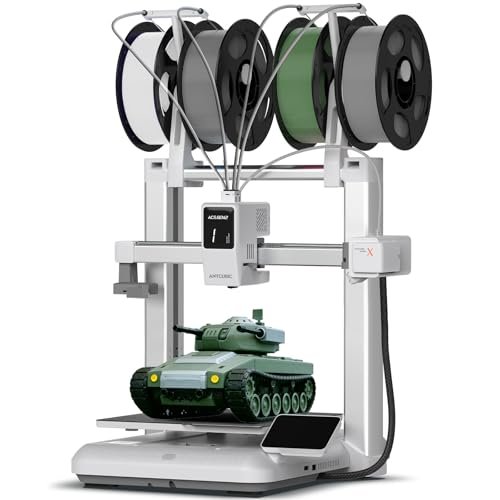
Anycubic Kobra X Multicolor 3D Printer

The Anycubic Kobra X provides an impressive multi-material platform that handles complex color workflows without typical setup headaches. Its high-speed performance up to 600mm/s cuts down print times drastically while active vibration compensation keeps fine structural details sharp. Thanks to the LeviQ 3.0 automatic bed leveling, getting a consistent first layer onto the generous 260x260x260mm build plate requires virtually zero manual calibration. It also runs quietly at under 48 dB, which makes it easy to keep running in a home office or living space.
Key features that stand out:
– Multi-color printing expanding up to 19 colors with support for materials ranging from PLA to 68D TPU.
– High-speed printing capability up to 600mm/s powered by Kobra OS and vibration compensation.
– LeviQ 3.0 49-point auto bed leveling system for reliable first-layer adhesion.
– Integrated AI monitoring with a 720P camera for real-time spaghetti detection and error alerts.
– Hardened steel nozzle handling temperatures up to 300°C for engineering-grade filaments.
Pros:
– Fast setup out of the box with quick 15-minute assembly.
– Broad multi-filament compatibility including flexible TPU and ASA.
– AI camera detects printing failures early to prevent wasted filament.
Cons:
– The multi-spool color units require a significant amount of additional desk space.
Best for: Hobbyists and makers wanting high-speed, multicolor printing with advanced material support.
Expert Opinion: The Kobra X shines brightest when you need multi-color parts without the steep learning curve of older open-source multi-material units. Its extruder handles flexible materials surprisingly well, though you should keep your print profiles tuned properly when switching across diverse material types.
Entina Tina2C 3D Printer for Beginners & Kids

If you need an ultra-compact setup that works straight out of the box, the Entina Tina2C is built specifically for hassle-free entry into 3D printing. The fully assembled desktop design lets you start your first project within five minutes using intuitive smartphone controls. Its flexible magnetic build plate ensures finished prints pop off with a light bend, avoiding scratched beds or damaged models. With a quiet footprint and an enclosed frame style, it fits comfortably into classrooms, kids’ bedrooms, or small desks.
Key features that stand out:
– Plug-and-play assembly with factory auto-leveling right out of the box.
– Poloprint Cloud app integration with 3500+ ready-to-print models and 2.4GHz WiFi support.
– Flexible magnetic build surface and quick-swap nozzle mechanism for easy maintenance.
– Power-loss recovery to resume builds smoothly after unexpected shutoffs.
– Compact 3.9 x 3.9 x 3.9-inch build volume with built-in LED lighting and quiet operation.
Pros:
– Very simple setup that takes under five minutes.
– Great companion app with thousands of pre-sliced models for kids and beginners.
– Lightweight and portable design that fits anywhere.
Cons:
– The small print volume prevents you from printing full-sized functional objects or larger figurines.
Best for: Young students, complete beginners, and educators looking for a safe, low-maintenance starter printer.
Expert Opinion: The Tina2C trades large build capacity for complete plug-and-play convenience. While seasoned makers will outgrow the 3.9-inch cube volume quickly, it is one of the least intimidating machines for children and educators to learn the fundamentals.
Creality Ender 3 V3 SE 3D Printer
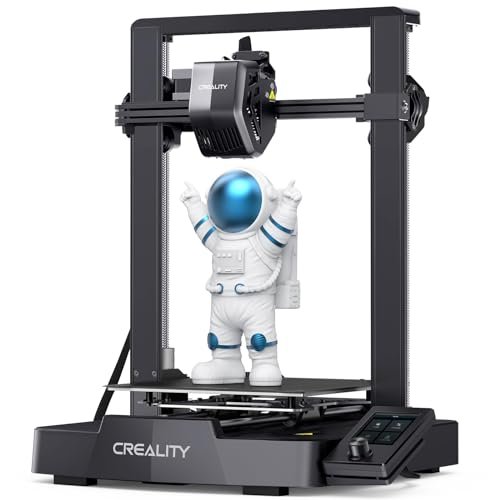
The Creality Ender 3 V3 SE revamps the classic budget platform by introducing modern automation and substantial speed increases. Featuring a Sprite direct-drive extruder, it feeds filament smoothly and handles flexible filaments like TPU far better than previous Bowden setups. The addition of CR Touch auto-leveling and strain sensors completely eliminates the tedious chore of manual sheet leveling. Running at up to 250mm/s with solid dual Z-axis screws, it produces clean, accurate prints without the wobble common in older entry-level frames.
Key features that stand out:
– Max print speeds up to 250mm/s with 2500mm/s² acceleration for fast turnarounds.
– Proven Sprite dual-gear direct extruder for consistent feeding across PLA, PETG, and TPU.
– Automated CR Touch sensor paired with strain gauge for automatic Z-offset calibration.
– Dual Z-axis lead screws and dual 8mm Y-axis steel shafts for structural rigidity.
– Quick 3-step assembly that takes roughly 20 minutes from unboxing to printing.
Pros:
– Highly affordable workhorse backed by massive community support and spare parts availability.
– Direct extruder feeds flexible filaments without jamming.
– Automated leveling and Z-offset work reliably out of the box.
Cons:
– The open-frame design can be noisy and struggles with high-temperature materials that require an enclosed chamber.
Best for: Budget-conscious makers, DIY tinkerers, and beginners wanting a dependable standard-size printer.
Expert Opinion: The Ender 3 V3 SE represents one of the most practical iterations of Creality’s budget line. It fixes the biggest complaints of earlier models—namely manual bed leveling and Bowden tube jams—making it a top benchmark for value.
ELEGOO Mars 5 Resin 3D Printer

For tabletop miniatures and fine-detail jewelry casting, the ELEGOO Mars 5 delivers remarkable precision via its high-resolution 4K mono LCD screen. It simplifies resin printing significantly through an effortless one-click automatic leveling system that removes standard paper-leveling frustrations. A built-in smart mechanical sensor checks for leftover debris and alerts you before the plate lowers, protecting the LCD glass from cracked screens. Its compact footprint and advanced thermal protection ensure safe, dependable performance during long curing sessions.
Key features that stand out:
– 4K mono LCD screen paired with a COB light source for ultra-fine surface details.
– True one-click automatic build plate leveling for quick calibration.
– Smart mechanical sensor that provides residue detection and resin shortage alarms.
– Automated one-click self-check diagnostics before every print job.
– Overheat protection that pauses printing if LED temperatures exceed 80°C.
Pros:
– Exceptional print fidelity that hides layer lines on miniatures and small art pieces.
– Smart sensors reduce LCD punctures caused by cured resin fragments.
– Fast cure times per layer thanks to the mono LCD.
Cons:
– Handling liquid photopolymer resin requires dedicated safety gear, ventilation, and alcohol washing baths.
Best for: Miniature painters, jewelry designers, and modelers prioritizing micro-detail over large build volume.
Expert Opinion: The Mars 5 bridges the gap between low-cost resin printing and reliable protection features. The mechanical residue detection alone saves you from costly screen replacements, making it a safe resin printer to recommend to newcomers.
68Pcs 3D Printer Tools Kit with Storage Case
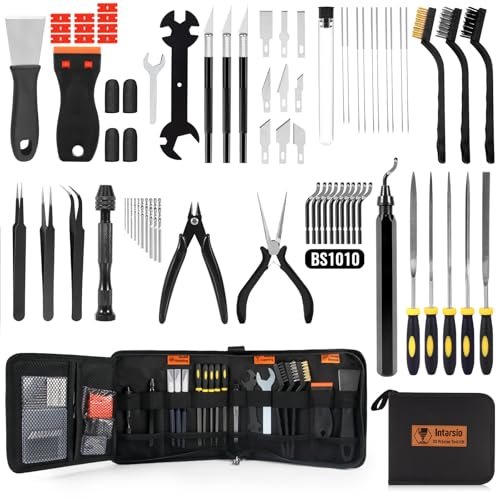
No 3D printing workflow is complete without post-processing gear, and this 68-piece toolkit gathers every vital maintenance implement in one place. The kit features a 360-degree swivel deburring tool alongside high-speed steel blades to clean up sharp brim lines and support remnants smoothly. You also receive specialized angled scrapers engineered to slide under delicate first layers without scratching magnetic or glass build plates. Packed inside a durable 900D Oxford fabric case, it keeps all your nozzle needles, files, and pliers organized in your workspace.
Key features that stand out:
– Comprehensive 68-in-1 toolkit designed specifically for FDM and resin post-processing.
– Heavy-duty deburring tool with 10 extra tempered high-speed steel (HSS) swivel blades.
– Two specialized print removal scrapers designed for varying print sizes and build plates.
– Five nozzle cleaning needle gauges (0.2mm to 0.4mm) with brass, steel, and nylon wire brushes.
– Includes hand pin vise drill with 10 drill bits, 5 metal files, pliers, and cut-resistant finger cots.
Pros:
– Contains practically every tool needed for daily printer maintenance and print cleaning.
– Heavy-duty storage case keeps small needles and sharp blades safely tucked away.
– Substantially cheaper than buying deburring tools, scrapers, and nozzle needles individually.
Cons:
– Some hand drill bits are very thin and can bend if used with excessive sideways pressure.
Best for: Any 3D printer owner who needs a dedicated set of tools for print removal, deburring, and nozzle unclogging.
Expert Opinion: While not a printer itself, this toolkit is an indispensable companion for any machine you purchase. Having the proper scrapers, deburring heads, and nozzle cleaning needles will spare your build surfaces from gouges and your hotends from permanent clogs.
Practical Insights: Comparing Your Options
Choosing between these options comes down to what you plan to produce and how much space you have.
- If maximum detail and smooth surfaces are your priority (such as tabletop miniatures), resin printing with the ELEGOO Mars 5 outperforms any FDM machine, though it demands safety precautions like gloves and ventilation.
- For general household utility and multicolor flexibility, the Anycubic Kobra X delivers high speed and expansive material support, but it requires a larger footprint on your workbench.
- When budget and reliability matter most, the Creality Ender 3 V3 SE remains the standard workhorse with straightforward mechanics and affordable replacement parts.
- For younger learners or small desks, the Entina Tina2C removes setup friction entirely at the expense of a restricted build envelope.
- Regardless of which machine you deploy, pairing it with a comprehensive toolset ensures clean support removal and quick nozzle clearing when clogs inevitably arise.
Final Verdict: Which Should You Pick?
- The Everyday Workhorse: Go with the Creality Ender 3 V3 SE. It hits the sweet spot of affordability, direct-drive extrusion, and automated leveling without breaking the bank.
- The High-Speed Creator: Choose the Anycubic Kobra X if you want multi-color capability, high speeds, and AI monitoring for larger, complex prints.
- The Miniature Specialist: Pick the ELEGOO Mars 5 when you need fine layer resolution for gaming figurines, jewelry, and detailed sculptures.
- The Classroom Starter: Select the Entina Tina2C if you want a child-friendly, plug-and-play experience that works within minutes.
- The Essential Companion: Grab the 68Pcs 3D Printer Tools Kit alongside your machine so you have scrapers, deburring blades, and cleaning needles ready from day one.
FAQs About the Best 3D Printer AliExpress Options
Is it safe to order a 3D printer from AliExpress?
Yes, ordering from AliExpress is generally safe if you buy from official brand storefronts (such as Creality, Anycubic, or Elegoo official stores). Look for high seller ratings, positive buyer feedback, and regional warehouse shipping options (such as EU or US warehouses) to avoid lengthy delivery times and import tariffs.
What should I look for when finding the best 3D printer on AliExpress?
Focus on automatic bed leveling, direct-drive extruders, a heated bed, and strong community support. A machine with automated Z-offset calibration will save you hours of troubleshooting compared to older manual designs.
What is the difference between FDM and resin 3D printers?
FDM (Fused Deposition Modeling) printers melt spools of plastic filament (like PLA and PETG) through a hot nozzle, making them ideal for functional parts, toys, and large models. Resin printers use UV light to cure liquid photopolymer resin layer by layer, producing ultra-fine detail for small figurines and jewelry, but requiring post-wash and UV curing steps.
What extra tools do I need when buying my first 3D printer?
At minimum, you will need flush wire cutters, a print removal scraper, nozzle unclogging needles, isopropyl alcohol (for cleaning beds or resin prints), and a deburring tool to smooth sharp edges. A pre-assembled toolkit keeps these accessories organized.
Can budget 3D printers handle flexible filaments like TPU?
Yes, provided the printer uses a direct-drive extruder rather than a Bowden tube setup. Both the Creality Ender 3 V3 SE and Anycubic Kobra X feature direct-drive systems that push flexible TPU filament smoothly without bunching up.
Do I have to pay import duties when buying printers on AliExpress?
It depends on your delivery location. If you select a printer that ships from a domestic or regional warehouse within your country or economic zone, taxes and duties are typically already settled. If shipped directly from overseas, your local customs office may charge import VAT or handling fees depending on your country’s thresholds.
How loud are budget 3D printers during operation?
Most modern printers use silent stepper motor drivers, keeping operating noise between 45 dB and 55 dB. Fans for cooling the hotend and power supply generate most of the audible sound, which is comparable to a quiet desk fan.
Affiliate Disclosure: As an Amazon Associate, I earn from qualifying purchases made through links on this site.