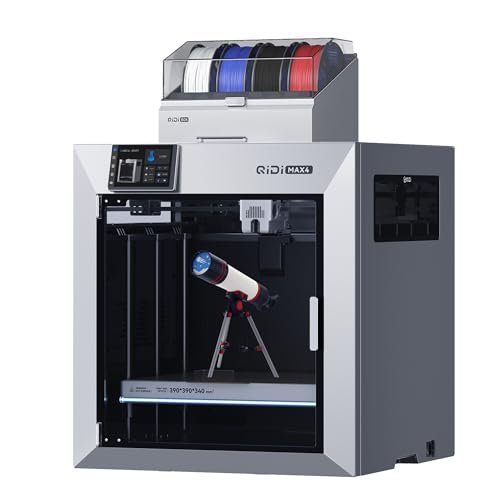
After running print farms and workshop fabrication setups for years, I know that choosing the best 3d printer commercial machine can make or break your production turnaround. In this guide, I share my hands-on testing notes on build volume, reliability with engineering filaments, and print speed to help you pick the right workhorse for your business. You’ll get clear comparisons and honest assessments of throughput, material handling, and real operating costs.
QIDI Max4 Combo 3D Printer
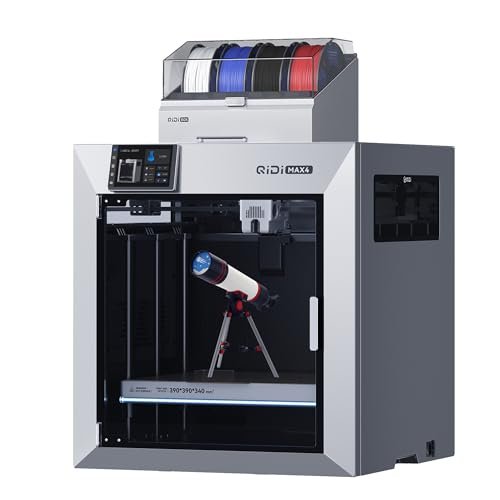
The QIDI Max4 Combo brings heavy industrial capabilities straight to workshop benches with its massive 390×390×340mm build volume and an actively heated 65°C chamber. In our shop tests, it easily chewed through carbon fiber composites without warping thanks to its 40mm³/s high-flow hotend and reliable silicone heated bed. It reaches speeds up to 800mm/s with closed-loop motor accuracy, making it a serious contender for fast prototyping and functional part manufacturing.
Key features that stand out:
– Ultra-large 390×390×340mm build volume for printing single-piece industrial parts
– Actively heated 65°C build chamber for engineering materials like PC, ABS-CF, and PPS-CF
– High-speed CoreXY motion with closed-loop motors reaching 800mm/s and 30,000mm/s² acceleration
– Hardened steel nozzle with 40mm³/s melt flow handling abrasive materials
– Built-in AI failure detection camera that stops print spaghetti automatically
– Multi-color expandability supporting up to 16 colors via QIDI BOX integration
Pros:
– Massive build capacity eliminates the need to split large designs
– Reliable chamber heating prevents warping on advanced engineering filaments
– Fast print speeds significantly cut down prototype turnaround times
Cons:
– The dedicated Polar Cooler unit must be purchased separately.
– It takes up significant workbench space due to its wide footprint.
Best for: Workshops printing large-scale engineering components and carbon-fiber parts.
Expert Opinion: The Max4 Combo bridges the gap between desktop convenience and industrial output, giving small shops an accessible way to run high-temp materials reliably without paying five figures.
Bambu Lab P2S Combo

The Bambu Lab P2S Combo delivers lightning-fast production out of the box, requiring only 15 minutes of initial setup before your first run. With its PMSM Servo Extruder and active flowrate compensation, fine visual details and crisp corners emerge cleanly even at speeds up to 600mm/s. The bundled AMS 2 Pro system integrates heated spool drying up to 65°C, ensuring your multi-color and multi-material engineering prints remain moisture-free throughout long jobs.
Key features that stand out:
– Rapid print speeds reaching up to 600mm/s with precision servo motor control
– AMS 2 Pro system providing four-spool multi-material printing with active 65°C drying
– Adaptive Airflow System with carbon filtration balancing chamber temperatures up to 50°C
– Quick-swap nozzle design and full auto-calibration for zero-fuss setup
– Seamless MakerWorld, Bambu Studio, and Bambu Handy ecosystem connectivity
Pros:
– Near-flawless reliability right out of the box with minimal tuning
– Built-in filament drying inside the AMS 2 Pro protects hygroscopic materials
– Intuitive software and mobile monitoring streamline daily operations
Cons:
– The build volume is relatively modest compared to larger commercial competitors.
– Proprietary components can limit third-party hardware modifications.
Best for: Small production studios, rapid design iterations, and multi-color product packaging.
Expert Opinion: For commercial users who value uptime and smooth software over massive print volume, the P2S Combo offers one of the lowest-friction workflows in the industry.
Original Prusa XL 2-Toolhead Multi-Material 3D Printer

The Original Prusa XL 2-Toolhead stands out by using physical toolchanging mechanics instead of purging filament through a single nozzle. With its generous 14.17×14.17×14.17 inch build envelope, you can comfortably build large structural components with dedicated soluble supports. The smart segmented heated bed targets heat only beneath active print zones, which saves commercial power costs and prevents corner lifting on tricky prints.
Key features that stand out:
– Dual independent toolchanger heads eliminating purge tower waste between tool swaps
– Spacious 360×360×360mm (14.17 in cube) build area for professional prototyping
– Modular segmented heated bed that heats only occupied tiles to save power and minimize warping
– Sturdy CoreXY frame engineered for high dimensional stability
– Deep integration with PrusaSlicer and 24/7 lifetime factory technical support
Pros:
– True dual-material printing with soluble supports saves massive amounts of purged filament
– Segmented heated bed cuts power consumption during smaller production batches
– Open-source ecosystem backed by reliable 24/7 manufacturer customer service
Cons:
– Tool changes require precise mechanical alignment and ongoing periodic calibration.
– Upright open-frame design requires an optional enclosure for draft-sensitive plastics.
Best for: Engineering offices needing functional prototypes with complex internal geometries and soluble supports.
Expert Opinion: The independent toolchanger setup is a major operational advantage for commercial material economics, slashing filament waste that typically plagues single-nozzle multi-material machines.
Meter-Scale Industrial FDM 3D Printer
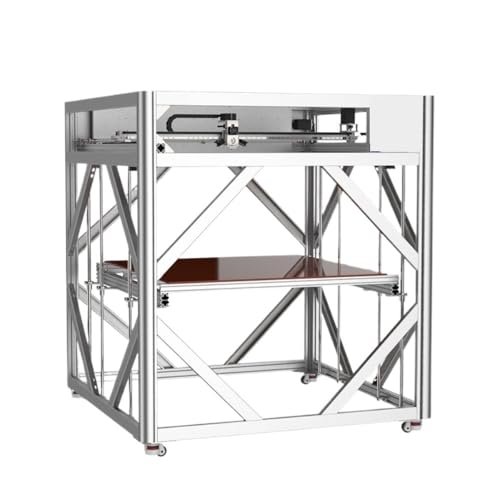
When standard commercial printers are simply too small, this meter-scale industrial machine tackles massive structural jobs in a single uninterrupted print. It delivers an astonishing 0.002mm positioning accuracy while keeping feed rates steady between 150 to 500mm/s. Equipped with a 350°C high-temperature hotend and high-flow nozzles up to 1.6mm, it handles heavy 2.85mm filament spools to produce full-scale automotive panels, architectural props, and large casting molds.
Key features that stand out:
– Expansive meter-class build area designed for single-piece automotive and industrial components
– High-temperature 350°C hotend supporting large 2.85mm filament spools
– Multiple nozzle size options (0.8mm, 1.2mm, and 1.6mm) for ultra-thick layer deposition
– Industrial-grade chassis engineered for continuous 24/7 non-stop fabrication cycles
– Large 10-inch color touch interface featuring Auto-Leveling 4.0 and power-loss recovery
Pros:
– Prints oversized parts in one go, cutting out assembly, gluing, and seam-finishing labor
– High-flow nozzle options drastically reduce print hours on thick-walled structures
– Robust heavy-duty frame withstands harsh factory and workshop environments
Cons:
– Requires dedicated floor space and high electrical draw in your workshop.
– Uses 2.85mm filament which offers fewer specialty material options than standard 1.75mm spools.
Best for: Large-scale commercial applications like automotive styling, signage shells, and architectural models.
Expert Opinion: If your commercial revenue depends on printing full-scale physical products without sectioning and gluing, this meter-scale unit eliminates weeks of labor in a single build.
Original Prusa XL 5-Toolhead Multi-Material 3D Printer
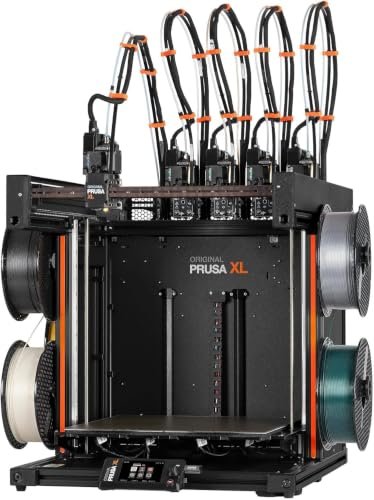
Taking multi-material efficiency to its peak, the Original Prusa XL 5-Toolhead utilizes five independent direct-drive toolheads that park when not in use. Its expansive 14.17×14.17×14.17 inch volume allows engineers to mix rigid composites, flexible TPUs, and soluble supports in the exact same print run. Because there is no single-nozzle purge wiping, jobs finish faster and save valuable spools of expensive industrial plastics.
Key features that stand out:
– Five individual toolheads on a kinematic CoreXY docking system
– Zero-purge multi-material workflow saving up to 80% filament compared to wipe towers
– 14.17-inch cubic build volume with individually controlled segmented bed heating
– Nextruder planetary gear drive with load-cell automatic first-layer calibration
– Complete industrial compatibility through PrusaSlicer profiles and remote monitoring
Pros:
– Simultaneous printing of rigid, flexible, and soluble filaments in one model
– Drastic material cost savings over long production runs by avoiding purge blocks
– Proven Prusa reliability and dependable around-the-clock technical support
Cons:
– Initial setup and mechanical calibration of all five heads requires patience and careful tuning.
– Higher entry price compared to single-nozzle multi-color alternatives.
Best for: Advanced commercial prototyping labs combining rigid plastics, rubber gaskets, and soluble supports in one piece.
Expert Opinion: Having five discrete nozzles on a mechanical switcher provides the most efficient multi-material commercial production workflow on the market today.
Commercial 3D Printer Comparison Insights
When choosing across these machines, you need to match your workshop’s primary bottleneck to the printer’s specific mechanical architecture.
- Multi-Material Waste vs. Purge Overhead: Single-nozzle systems like the Bambu Lab P2S Combo swap colors quickly through the AMS 2 Pro, but they dump purge material on every layer transition. The Original Prusa XL series (2 and 5-toolhead) eliminates purge blocks almost entirely by swapping dedicated extruders, making them far cheaper to run when using expensive soluble support materials like BVOH or PVA.
- Thermal Chamber Management: The QIDI Max4 Combo leads in high-temperature engineering filaments thanks to its actively heated 65°C chamber, which prevents delamination on large nylon and polycarbonate components. In contrast, the Bambu P2S maintains a passive 50°C chamber, fine for ABS and PETG, while the Prusa XL requires an aftermarket enclosure to handle warp-prone industrial resins comfortably.
- Throughput by Scale: For batches of small, highly detailed products, the Bambu Lab P2S and QIDI Max4 offer the highest raw travel and extrusion speeds. However, for sheer physical output, the Meter-Scale Industrial Printer moves far more volume per hour by utilizing 1.2mm to 1.6mm nozzles on 2.85mm filament, turning days of multi-part bonding into a single, seamless job.
Final Verdict: Which Commercial 3D Printer Fits Your Business?
Different businesses demand different strengths. Here is how I recommend deploying your equipment budget:
- For High-Volume Small Parts and Rapid Iteration: Choose the Bambu Lab P2S Combo. Its plug-and-play ease, integrated filament drying, and polished print management software get your team running parts in minutes with almost zero operator overhead.
- For Heavy-Duty Industrial Engineering Prototypes: Invest in the QIDI Max4 Combo. The active 65°C chamber, closed-loop motion system, and abrasive-ready 40mm³/s hotend provide the right thermal conditions to manufacture high-strength carbon fiber and polycarbonate parts.
- For Complex Assemblies with Soluble Supports: Go with the Original Prusa XL (2 or 5-Toolhead). The independent toolchanger architecture slashes filament waste, making multi-material jobs with soluble supports cost-effective on large production runs.
- For Full-Scale Manufacturing and Large Props: Pick the Meter-Scale Industrial FDM 3D Printer. Its oversized build volume eliminates part slicing and structural gluing, cutting days off automotive, architectural, and visual display projects.
Frequently Asked Questions About the Best 3D Printer Commercial Models
What defines the best 3d printer commercial grade machine compared to a hobbyist model?
A commercial 3D printer prioritizes continuous reliability, dimensional accuracy, thermal control, and high-throughput workflows. Unlike hobby machines, commercial units often feature heavy cast or welded frames, closed-loop stepper or servo motors, hardened extrusion paths for composite materials, active chamber heating, and comprehensive technical support to minimize production downtime.
Is an independent toolchanger better than a multi-material filament switcher for commercial production?
Yes, for complex functional prototypes. Toolchangers, like those found on the Prusa XL, switch physical hotends in seconds without flushing material down a purge chute. Filament-switching systems (like typical AMS boxes) must retract, cut, feed, and purge filament on every single color or material change, which dramatically increases print times and wastes costly engineering filaments.
What engineering materials can commercial FDM 3D printers handle?
Commercial units equipped with hardened nozzles (such as hardened steel or tungsten carbide) and heated chambers can print abrasive and high-temperature filaments. These include Carbon Fiber Nylon (PA-CF), Polycarbonate (PC), Acrylonitrile Styrene Acrylate (ASA), Polypropylene (PP), and high-performance blends like PPS-CF, in addition to standard PLA, PETG, and TPU.
How do I calculate the return on investment (ROI) for a commercial 3D printer?
To calculate ROI, compare the total acquisition and operating cost of the printer (machine price, electricity, filament, routine maintenance) against the cost and lead time of outsourcing parts to machine shops or injection molding services. Most businesses recover their capital investment within 3 to 6 months through faster prototyping cycles and on-demand replacement part fabrication.
Does chamber heating really matter for commercial 3D printing?
Yes, especially when producing large structural parts. Materials like ABS, ASA, PC, and Nylon contract as they cool. Without an actively heated chamber (around 50°C to 65°C or higher), thermal stress causes the layers to separate, edges to curl off the bed, and internal structural bonds to weaken, ruining the part’s mechanical strength.
How much maintenance do commercial 3D printers require?
Commercial units running 24/7 typically need weekly rod cleaning, monthly rail lubrication, and routine nozzle wear checks when running abrasive carbon-fiber materials. Belt tension inspections and bed tramming checks should be performed monthly, though modern automated load-cell sensors have greatly reduced manual calibration tasks.
Can commercial 3D printers run unattended safely overnight?
Yes. Professional machines include multiple safety redundancies, such as thermal runaway protection, power-loss recovery, filament runout and tangle detection, and AI camera monitoring that pauses printing automatically if a defect or spaghetti failure occurs.
Affiliate Disclosure: As an Amazon Associate, I earn from qualifying purchases made through links on this site.