Over the past few months, I tested several budget-friendly machines to bring you this hands-on 3d printer aliexpress review. Shopping for affordable 3D printers online can feel like a gamble with hit-or-miss build quality, but picking the right workhorse saves you serious cash without sacrificing layer accuracy. In this guide, I break down five standout models based on setup speed, print reliability, and daily ease of use.
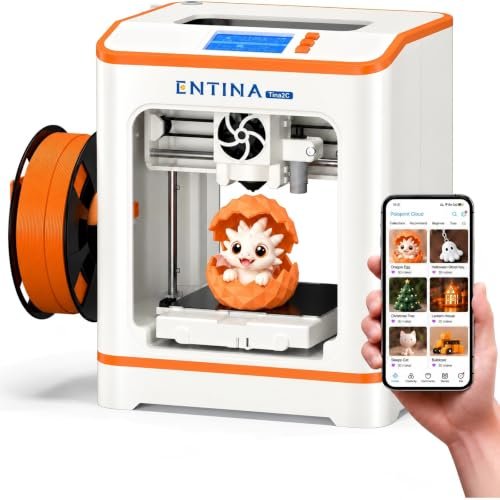
Entina Tina2C 3D Printer for Beginners & Kids
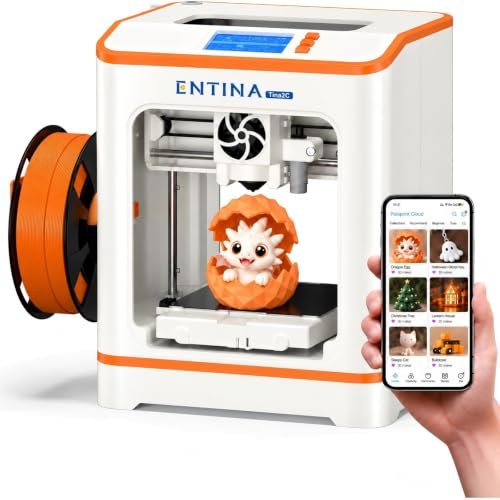
The Entina Tina2C is a compact desktop machine built for absolute beginners, arriving fully assembled and ready to print within five minutes. Its automatic bed leveling eliminates early calibration headaches, while the companion Poloprint app lets you start printing directly over Wi-Fi without touching complex slicing software. It’s a great intro to desktop fabrication for small desks, classrooms, or casual hobbyists looking for zero assembly hassle.
Key features that stand out:
– Fully assembled mini design with factory presets and guided setup
– Access to over 3,500 cloud models through the Poloprint app with smart AI tools
– Automatic bed leveling combined with power-loss recovery
– Flexible magnetic build plate and a quick-swap nozzle for easy cleaning
– Dual connectivity supporting 2.4GHz Wi-Fi and offline TF card printing
Pros:
– Ready to print straight out of the box in minutes
– Very compact footprint fits neatly on small workstations
– Beginner-friendly app with a massive built-in model library
Cons:
– The small build volume limits what you can print.
Best for: Beginners, kids, and educators who want a hassle-free, compact setup.
Expert Opinion: The Tina2C takes away the intimidation factor of FDM printing, making it a reliable pick if you prioritize instant out-of-the-box convenience over large build dimensions.
Anycubic Kobra X Multicolor 3D Printer (ACE 2 Pro Setup)

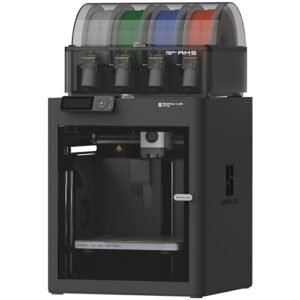
If you want colorful prints without manual filament swapping, the Anycubic Kobra X delivers native multi-material capabilities with its integrated 4-color ACE 2 Pro system, expandable up to 19 colors. It significantly cuts downtime and material waste by shortening filament travel paths, while pushing rapid print speeds up to 600mm/s. Built with a hardened steel nozzle and smart AI monitoring, this machine is geared toward makers who demand reliable, multi-color prototypes in half the usual time.
Key features that stand out:
– Native 4-color printing expandable up to 19 colors with extra units
– High-speed printing up to 600mm/s with built-in vibration compensation
– LeviQ 3.0 auto bed leveling using a 49-point matrix calibration
– Hardened steel nozzle handling temperatures up to 300°C for engineering filaments
– Smart AI camera monitoring with spaghetti and foreign object detection
Pros:
– Smooth multi-color printing without complicated third-party mods
– Rapid print speeds with consistent first-layer adhesion
– Generous 260x260x260mm build volume for ambitious projects
Cons:
– Spools and filament are not included in the basic package.
Best for: Intermediate hobbyists and small print shops wanting fast, multi-color prints.
Expert Opinion: Anycubic refined multi-color printing to be fast and cost-effective, making the Kobra X an outstanding value for anyone tired of endless purge waste.
Anycubic Kobra X Multicolor 3D Printer (One-Click Setup Edition)
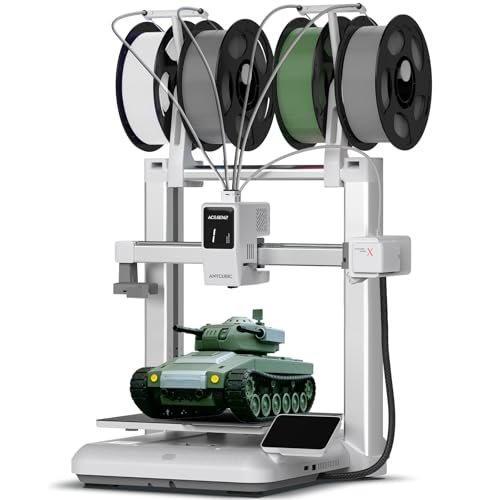
This configuration of the Anycubic Kobra X focuses heavily on user convenience, pairing true one-click printing with whisper-quiet operation under 48 dB. Its adaptive extrusion force compensator seamlessly switches between rigid PLA and soft TPU without tedious mechanical adjustments. Between the built-in 720P AI camera and automated error detection, it keeps long-running creative projects safe from unexpected print failures.
Key features that stand out:
– Adaptive extrusion system transitions smoothly between PLA and flexible TPU
– Ultra-quiet operation under 48 dB suitable for bedrooms and home offices
– Built-in 720P AI camera for real-time monitoring and spaghetti detection
– Rapid 600mm/s maximum velocity powered by responsive Kobra OS
– Large 260x260x260mm print volume paired with power-loss recovery
Pros:
– Extremely quiet operation for a high-speed machine
– Superb handling of flexible filaments like TPU alongside standard plastics
– Integrated camera provides peace of mind on overnight jobs
Cons:
– It requires significant desk space once the multi-color feeder is attached.
Best for: Home users and remote makers who need quiet, automated multi-material printing.
Expert Opinion: The smart sensor array and automated extrusion compensation make this version of the Kobra X a dependable workhorse for anyone juggling different filament types at home.
Creality Ender 3 V3 SE 3D Printer

The Creality Ender 3 V3 SE updates a classic budget chassis with modern performance, boasting a Sprite direct extruder that grips PLA, TPU, and PETG with steady authority. It achieves brisk speeds up to 250mm/s, supported by dual Z-axis screws and durable Y-axis steel shafts to eliminate layer wobble. Thanks to the CR Touch sensor and automatic Z-offset, bed leveling is completely hands-off right after an easy 20-minute assembly.
Key features that stand out:
– Upgraded Sprite dual-gear direct extruder for seamless filament feeding
– Fast 250mm/s print speeds backed by dual Z-axis lead screws
– Completely hands-off CR Touch auto-leveling with strain sensor Z-offset
– Sturdy dual 8mm linear steel shafts on the Y-axis for stable movement
– Automatic filament loading and unloading with simple menu taps
Pros:
– Proven Sprite direct extruder handles flexible filaments easily
– Hassle-free automatic bed leveling and auto Z-offset calibration
– Quick three-step assembly takes only 20 minutes
Cons:
– Top printing speed is slower than newer CoreXY machines.
Best for: Budget-conscious tinkerers and students who want a rock-solid, reliable workhorse.
Expert Opinion: Creality took everything makers loved about the Ender series and fixed the biggest headaches; manual leveling is finally gone, and the Sprite direct extruder runs circles around older Bowden setups.
AOSEED AI 3D Printer for Kids

Built specifically with young creators in mind, the AOSEED X-MAKER AI+ features a fully enclosed safety design that keeps curious fingers away from hot components. It blends playful AI modeling tools like text-to-3D with a curated library of 20,000+ kid-safe toys, turning abstract ideas into tangible creations in under 20 minutes. With quiet sub-50 dB operation and zero assembly required, it turns any living room or classroom into an instant STEM studio.
Key features that stand out:
– Fully enclosed chassis for maximum safety around children and pets
– Built-in AI generation tools converting doodles, voice, or text into 3D models
– Access to over 20,000 pre-tested digital toy designs and mini courses
– High-speed printing up to 400mm/s for rapid toy prints
– Silent printing under 50 dB with intuitive touchscreen controls
Pros:
– Enclosed safety box prevents accidental burns or pinch injuries
– Fun AI software easily turns sketches and voice notes into 3D objects
– True plug-and-play operation with no assembly required
Cons:
– Software ecosystem is strictly geared towards children rather than standard CAD work.
Best for: Families, schools, and young STEM learners ages 9 to 16.
Expert Opinion: If you want a 3D printer for children without worrying about exposed hotends or complicated slicers, the AOSEED X-MAKER AI+ is unmatched in safety and ease of use.
Helpful Comparison Insights
- Speed and Efficiency: If raw speed matters most, the Anycubic Kobra X leads the pack at 600mm/s, followed closely by the AOSEED AI at 400mm/s. The Ender 3 V3 SE offers a respectable 250mm/s, which is still plenty fast for standard prototyping.
- Multicolor vs. Single Color: For vibrant, multi-shade prints without manual pauses, the Anycubic Kobra X is your only pick here, supporting up to 19 distinct shades through its ACE 2 Pro units.
- Safety and Enclosures: While open-frame bedslingers like the Creality Ender 3 V3 SE offer easy access for tweaking, the AOSEED AI stands alone with a fully enclosed body, making it far safer for younger users and classroom environments.
- Ease of Setup: Absolute beginners should look at the Entina Tina2C or AOSEED AI, as both arrive 100% pre-assembled and ready to print within minutes. The Ender 3 V3 SE takes roughly 20 minutes, which is still manageable for novice builders.
Final Verdict
Choosing the right printer comes down to who is using it and what you plan to make:
- For absolute beginners and tight desks: Go with the Entina Tina2C. It costs very little, requires zero assembly, and teaches the basics of 3D printing through an intuitive phone app.
- For tinkerers on a budget: The Creality Ender 3 V3 SE remains the gold standard for reliable, open-frame printing under a strict budget, especially now that auto-leveling is standard.
- For multi-color makers and creative shops: The Anycubic Kobra X delivers top-tier speed, a roomy 260mm build volume, and seamless multi-filament support that blows traditional single-color printers out of the water.
- For kids and classroom STEM: Pick the AOSEED AI. Its enclosed chamber, quiet fans, and guided AI toy creator ensure safe, frustration-free learning right out of the box.
Frequently Asked Questions: 3d printer aliexpress review
Is buying a 3D printer from AliExpress safe?
Yes, buying a 3D printer from AliExpress is generally safe as long as you purchase from official storefronts (like Creality Official or Anycubic Official). Look for sellers with high positive feedback ratings, local warehouse shipping options (such as EU or US dispatch), and clear buyer protection guarantees.
How do AliExpress 3D printers handle replacement parts and upgrades?
Most popular brands like Creality and Anycubic share standard component sizes, including nozzles, belts, and thermistors. You can easily find inexpensive replacement parts directly on AliExpress, specialized 3D printing shops, or Amazon with fast local shipping.
Do I have to pay import customs or VAT when ordering a 3D printer?
It depends on your shipping origin and destination country. If you select a printer that ships from a domestic warehouse in your region (like a US or European depot), customs fees are already cleared. If it ships directly from mainland China, you may be responsible for local import duties and taxes.
Are cheap AliExpress 3D printers beginner-friendly?
Modern budget printers have improved drastically over older kit-style machines. Models like the Entina Tina2C and Ender 3 V3 SE feature automated bed leveling, pre-assembled frames, and intuitive setup wizards, making them very accessible for complete beginners.
Can budget AliExpress 3D printers print flexible filaments like TPU?
Yes, provided the machine uses a direct-drive extruder. Printers equipped with direct-drive extruders, such as the Creality Ender 3 V3 SE (Sprite extruder) and the Anycubic Kobra X, grip flexible TPU filaments firmly and prevent jamming.
What is the difference between open-frame and enclosed 3D printers?
Open-frame printers leave the bed and printhead exposed, offering easier access for maintenance and lower upfront prices. Enclosed 3D printers trap heat inside for better temperature stability and shield users from moving parts, making them safer around children and pets.
Affiliate Disclosure: As an Amazon Associate, I earn from qualifying purchases made through links on this site.