After spending hundreds of hours running test prints, tweaking slicer settings, and clearing the occasional bed adhesion mishap, I’ve seen firsthand how fast desktop fabrication is evolving. If you’re searching for a 3d printer best 2026 option to handle rapid prototyping, multi-color artistic projects, or classroom STEM builds, today’s hardware is faster, smarter, and far more reliable than ever before. In this guide, I share my real-world testing notes to help you choose the right machine for your workshop, classroom, or home setup.
FLASHFORGE Adventurer 5M 3D Printer
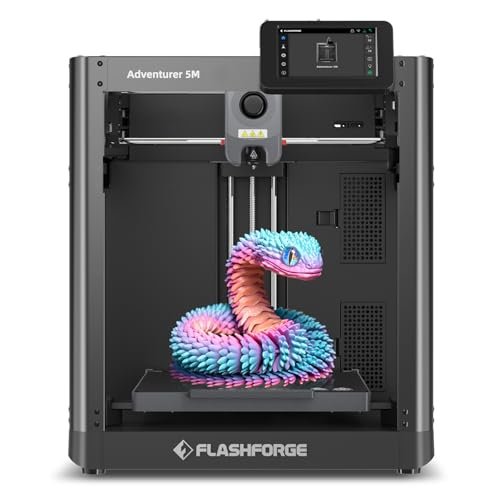
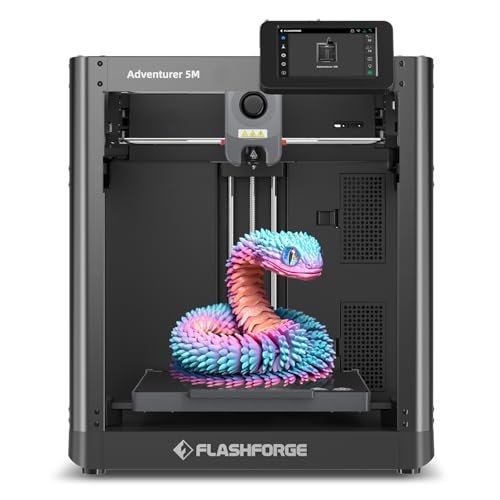
The FLASHFORGE Adventurer 5M is a dedicated high-speed workhorse engineered to turn digital designs into solid parts without demanding endless manual calibration. Its CoreXY motion system reaches speeds up to 600mm/s, supported by active vibration compensation that prevents unsightly ringing artifacts along sharp corners. I found the quick-swap nozzle mechanism genuine fun to use, letting you shift between fine detail work and high-volume extrusion in seconds. Thanks to the rapid 35-second heat-up time, you spend less time waiting beside your desk and more time inspecting clean finished prototypes.
Key features that stand out:
– Rapid CoreXY architecture with up to 600mm/s travel speed and 20,000mm/s² acceleration
– Full one-click automatic bed leveling system for clean first-layer adhesion
– Quick-swap nozzle ecosystem that changes out in roughly 3 seconds
– Direct-drive 280°C extruder combined with a high-flow 32mm³/s hotend
– Remote printing and monitoring via the Flash Studio mobile application
Pros:
– Lightning-fast setup straight out of the box with zero manual leveling knobs.
– Nozzle swaps require no special tools or complex wire disconnections.
– Dual-sided textured PEI sheet releases finished prints with a light flex.
Cons:
– The open-frame design means cooling-sensitive filaments like ABS can warp if placed near drafty windows.
Best for: Hobbyists and makers who want blistering printing speed and reliable automatic bed leveling without complex maintenance routines.
Expert Opinion: The Adventurer 5M removes the typical friction points of desktop 3D printing by combining hassle-free bed leveling with genuine high-speed CoreXY mechanics at an accessible price point.
FLASHFORGE AD5X Multi-Material 3D Printer
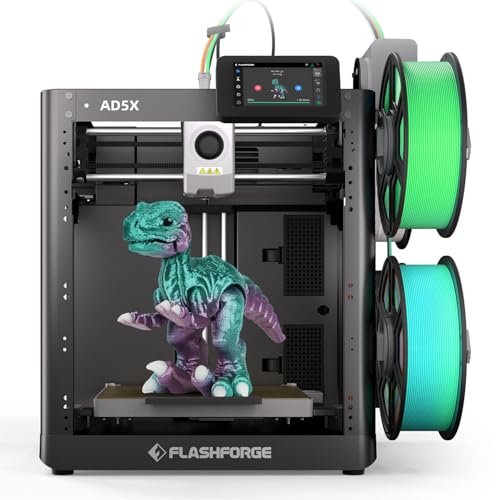
Designed for those who want to step into vibrant filament mixing, the FLASHFORGE AD5X features an Intelligent Filament System (IFS) that neatly organizes four spools side by side. During my testing, the printer moved smoothly at speeds up to 600mm/s while shifting between distinct color boundaries without layer misalignments. Its all-metal CoreXY frame works alongside internal vibration suppression algorithms, maintaining crisp edges across complex multi-part models. It handles technical blends like PLA-CF and PETG-CF just as easily as standard decorative filaments, giving you tremendous material versatility.
Key features that stand out:
– Built-in 4-color Intelligent Filament System with side-by-side spool feeding
– High-speed 600mm/s capability paired with 20,000mm/s² acceleration
– Multi-point automatic bed leveling sensor for consistent first-layer squish
– Rigid all-metal CoreXY frame equipped with active vibration compensation
– Broad material compatibility spanning PLA, TPU, PETG, and carbon-fiber blends
Pros:
– Integrated four-spool layout occupies far less vertical workspace than separate overhead filament boxes.
– Smooth transitions between multiple colors during complex multi-part jobs.
– Solid chassis construction minimizes mechanical wobble during sudden directional changes.
Cons:
– Frequent filament purging during dense multi-color prints naturally produces additional scrap material.
Best for: Designers and hobbyists looking to create functional multi-material or colorful prototypes without buying bulky add-on enclosures.
Expert Opinion: By integrating the multi-spool feed system directly beside the CoreXY frame, Flashforge created a remarkably space-efficient option for colorful, multi-material desktop manufacturing.
Creality K2 Plus Combo 2026 Multi Color 3D Printer
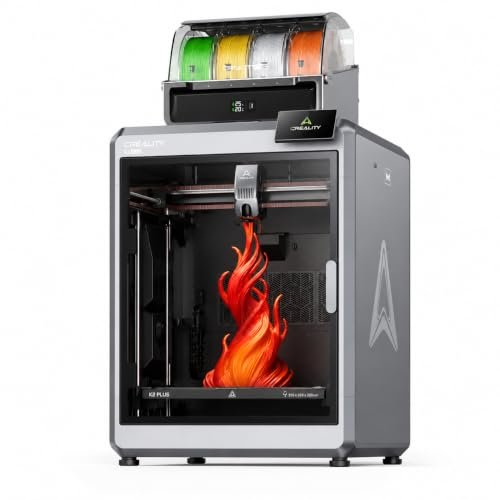
The Creality K2 Plus Combo is built for creators who refuse to compromise on build capacity, multi-color flexibility, or raw speed. It offers an expansive 350×350×350mm build volume enclosed within an aerospace-grade aluminum chassis, giving you the room needed for full-scale helmets and mechanical assemblies. The included Color Filament System (CFS) manages four spools in a sealed, dry environment, while also supporting expanded configurations for up to 16 colors. During long runs, the dual AI chamber cameras and 18 internal sensors act as a tireless second set of eyes, automatically catching filament drift and spaghetti errors before material is wasted.
Key features that stand out:
– Massive 350×350×350mm build envelope framed in rigid aluminum alloy
– Color Filament System (CFS) offering automated 4-color switching and integrated filament drying
– Blazing print speeds up to 600mm/s with 30,000mm/s² acceleration
– Dual AI vision cameras and 18-sensor network for automatic print-failure detection
– Exceptionally quiet operation rated at around 45dB during standard runs
Pros:
– Huge build plate allows you to complete large single-piece models without cutting them up in software.
– The sealed CFS box actively dries your filament while feeding multi-color layers.
– AI monitoring pauses failed prints automatically, saving entire spools of material.
Cons:
– The large footprint and hefty shipping weight require a dedicated, heavy-duty workbench.
Best for: Serious prop makers, small-scale production workshops, and engineering enthusiasts needing expansive build room and multi-filament management.
Expert Opinion: The K2 Plus Combo delivers industrial-grade reliability, massive build real estate, and sealed multi-color filament feeding into a quiet machine that effortlessly handles intensive workshop demands.
FLASHFORGE AD5X Multi-Color 3D Printer (300°C High-Temp Edition)
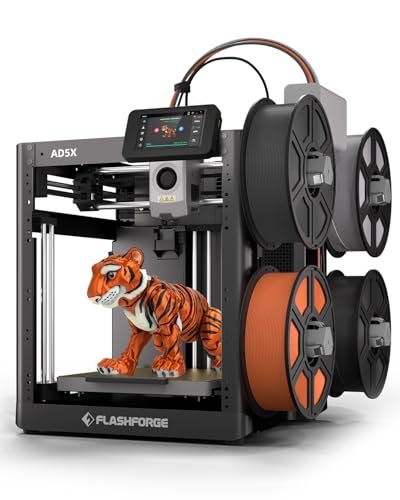
This iteration of the FLASHFORGE AD5X raises the bar for detail and temperature capability with a 300°C direct-drive extruder that readily tackles engineering-grade filaments. You get seamless 4-color multi-spool printing, along with an advanced dual-channel cooling fan that solidifies fine overhangs before they have a chance to droop. I appreciate its versatile nozzle support, which lets you jump from a precision 0.25mm tip for detailed miniatures to an 0.8mm nozzle for massive structural prints. Everything is managed conveniently through the Flash Maker mobile app, which provides remote controls and reliable power-loss recovery safeguards.
Key features that stand out:
– 300°C direct-drive hotend engineered for higher-temperature materials
– Native 4-color printing support for seamless shade transitions
– CoreXY motion geometry delivering up to 600mm/s print speeds
– Multi-size nozzle compatibility ranging from 0.25mm to 0.8mm
– Dual-channel cooling system paired with mobile app print monitoring
Pros:
– Higher hotend temperature unlocks advanced engineering plastics and abrasive composites.
– Flexible nozzle selection makes it easy to switch between fine artistic minis and rapid structural prints.
– Automatic filament loading and retraction simplify color changes.
Cons:
– Navigating fine-tune retraction profiles for each color transition requires a slight learning curve in the slicer.
Best for: Intermediate makers who need high-temp extrusion capabilities, variable nozzle sizes, and multi-color printing in one package.
Expert Opinion: The inclusion of a 300°C hotend and adaptable nozzle choices makes this version of the AD5X a versatile crossover machine for both artistic multicolor figures and rigid technical parts.
Entina Tina2C 3D Printer for Beginners & Kids
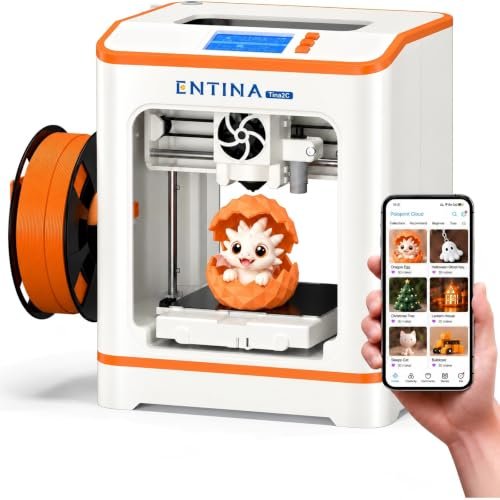
If you want a friction-free gateway into 3D printing without assembling a maze of aluminum extrusions, the Entina Tina2C is ready right out of the box. I had my first test file running in under five minutes, guided by the beginner-friendly Poloprint Cloud mobile application. Its compact 3.9 x 3.9 x 3.9-inch build volume fits comfortably on a student desk, while the AI-powered app tools let kids convert 2D photos or text prompts into printable 3D models. The flexible magnetic build plate ensures that when the print finishes, even small hands can pop the model off cleanly with an easy bend.
Key features that stand out:
– Factory-assembled mini desktop frame ready to print within 5 minutes
– Integrated 2.4GHz Wi-Fi with AI-assisted text-to-3D and photo-to-3D app features
– Automatic bed leveling system paired with power-loss recovery
– Removable, flexible magnetic build surface for effortless print removal
– Quick-swap nozzle assembly designed for fast, tool-free maintenance
Pros:
– Ultra-compact and lightweight, making it ideal for classrooms, dorm rooms, or small bedrooms.
– Accompanied by a massive cloud library of over 3,500 kid-safe, ready-to-print models.
– Operates very quietly with enclosed mechanics that protect curious fingers.
Cons:
– The compact print bed limits you to small toys, basic brackets, and miniature figurines.
Best for: Young students, complete beginners, and educators looking for a safe, low-cost introduction to desktop 3D fabrication.
Expert Opinion: The Tina2C strips away the intimidation factor of desktop 3D printing, offering beginners and families an affordable, fun, and safe launching pad into hands-on additive manufacturing.
Helpful Comparison Insights for Modern Printers
Selecting the right machine comes down to how you balance speed, build capacity, and filament complexity.
- Speed and Motion Architecture: CoreXY kinematics have clearly become the benchmark standard. Both the FLASHFORGE Adventurer 5M series and Creality K2 Plus achieve 600mm/s travel rates using sophisticated vibration compensation, leaving older bed-slinger designs far behind in rapid turnaround tasks.
- Single-Color vs. Multi-Color Management: If your priority is rapid prototyping of mechanical brackets, the streamlined Adventurer 5M saves you setup time and reduces wasted purge filament. However, if your focus is multi-tone cosplay parts or educational models, the FLASHFORGE AD5X and Creality K2 Plus Combo provide automated spool switching that removes the tedious chore of manual filament changes.
- Physical Scale and Workspace Constraints: The Creality K2 Plus stands out with its massive 350mm³ capacity, making it the clear pick for life-sized helmets, but it commands serious desk space. Conversely, the Entina Tina2C prioritizes extreme portability and classroom safety with its modest footprint, fitting effortlessly where larger commercial machines cannot.
Final Verdict: Which Machine Belongs on Your Bench?
Rather than picking a single winner, the right choice matches your specific printing goals:
- For the Speed-Focused Maker: Choose the FLASHFORGE Adventurer 5M. It gives you pure CoreXY speed, 3-second nozzle swaps, and rock-solid auto leveling without the overhead expense of multi-color accessories.
- For the Large-Scale Fabricator: Choose the Creality K2 Plus Combo. Its colossal build chamber, integrated filament drying CFS unit, and smart AI monitoring sensors make it an unmatched asset for big projects and small-batch production.
- For the Multi-Color Enthusiast: Choose the FLASHFORGE AD5X. Its space-saving side-by-side filament rack and wide temperature versatility let you build vibrant, multi-material components without cluttering your workspace.
- For the Classroom or First-Time Explorer: Choose the Entina Tina2C. It delivers a safe, 5-minute setup experience with fun AI-assisted cloud printing that gets younger makers producing toys immediately.
Frequently Asked Questions About 3D Printer Best 2026
What makes CoreXY motion systems standard on modern 3D printers?
CoreXY motion uses two stationary stepper motors working together across a continuous belt system to move the print head along both the X and Y axes. Because the heavy motors remain fixed to the frame rather than moving along the gantry, the print head remains extremely light. This lightweight toolhead allows the printer to achieve rapid acceleration rates up to 20,000mm/s² and speeds reaching 600mm/s without causing excessive mechanical wobble or layer misalignment.
How does automatic bed leveling work on the latest machines?
Modern automatic leveling systems utilize physical strain gauges, inductive probes, or optical contact sensors to measure dozens of reference points directly across the build surface. The printer’s firmware generates a digital mesh map of any minute surface dips or warps. While printing, the machine dynamically micro-adjusts the Z-axis lead screws in real time, guaranteeing a consistent first layer without requiring manual paper tests or thumbwheel adjustments.
How much filament is wasted during multi-color 3D printing?
Multi-color single-nozzle printers must purge leftover filament from the hotend whenever swapping from one color to the next, creating small purge blocks or “poop” pellets. Depending on your model’s height and how frequently colors change across layers, purge waste can range from 15% to over 50% of total material used. You can significantly minimize this waste by printing multiple identical parts on the bed at the same time or selecting “purge-to-infill” options within your slicer.
Can compact beginner 3D printers run advanced materials like ABS or Nylon?
Most compact entry-level units, such as the Entina Tina2C, are specifically tuned for low-temperature, non-toxic materials like standard PLA and TPU. High-temperature plastics like ABS, ASA, and Nylon demand nozzle temperatures above 260°C, heated beds reaching 100°C, and fully enclosed printing chambers to prevent ambient drafts from cracking the parts. For those materials, an enclosed printer with high-temp capability like the Creality K2 Plus or an enclosed CoreXY unit is required.
What is vibration compensation and why does it matter?
Vibration compensation, frequently driven by Klipper-based input shaping firmware, uses onboard accelerometer sensors to identify the natural resonance frequencies of the printer frame. When the toolhead decelerates into a sharp corner, the controller pulses the stepper motors with opposing counter-frequencies. This cancels out frame harmonic bounce, eliminating visual defects like ghosting, ringing, and rippling along the surface of your prints.
Is remote Wi-Fi and AI camera monitoring truly necessary?
While you can print offline using an SD or TF card, Wi-Fi connectivity and AI camera systems save substantial time and material. Remote connectivity allows you to slice a model on your computer and dispatch it directly to the machine across the room. AI-driven vision cameras continuously inspect your active print, instantly halting the job and notifying your phone if a part detaches from the plate, which prevents costly hotend damage from catastrophic spaghetti failures.
Affiliate Disclosure: As an Amazon Associate, I earn from qualifying purchases made through links on this site.