After running hundreds of print jobs in my workshop, I know how frustrating it is to waste cash on machines that clog or wobble. Finding a 3d printer best quality price option means getting reliable first layers, modern high-speed motion, and clean finishes without overpaying. In this guide, I break down ten field-tested machines to help you choose the right balance of performance, features, and cost for your budget.
Bambu Lab P1S Combo
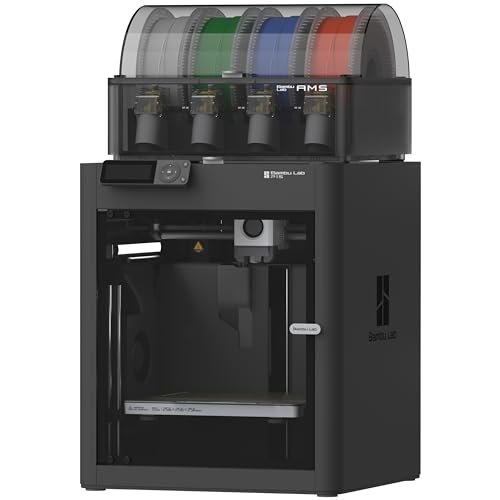
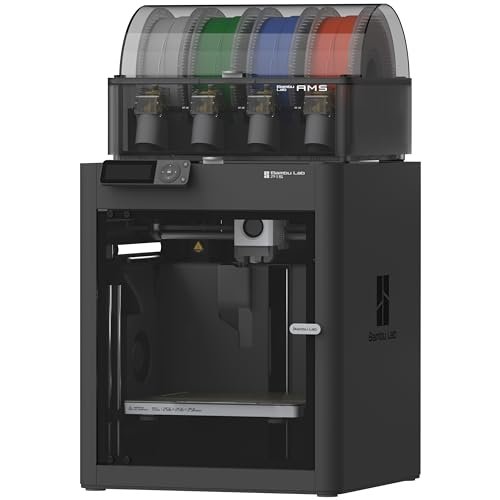
The Bambu Lab P1S Combo makes enclosed multi-material production accessible without requiring days of calibration. Its enclosed chassis design keeps internal temperatures stable for demanding filaments like ABS, while the included AMS unit manages up to four spools with zero hassle. Thanks to blazing 500mm/s print speeds and automated bed leveling, you can unbox the unit and achieve flawless layers in less than twenty minutes.
Key features that stand out:
– Multi-color printing capability supporting up to 16 colors with additional AMS units
– High-speed CoreXY motion with 500mm/s velocity and 20,000mm/s² acceleration
– Fully enclosed chamber engineered for materials like ABS, ASA, and PETG
– Hands-off automatic bed leveling and vibration compensation
– Rapid setup out of the box requiring only 15 minutes of prep
Pros:
– Enclosed chamber expands your material choices safely
– AMS system makes multi-color filament feeding smooth and reliable
– Print speeds cut down production times dramatically
Cons:
– Navigating the basic on-screen interface can feel clunky compared to a full touchscreen
Best for: Intermediate hobbyists and small workshops needing reliable multi-color engineering prints.
Expert Opinion: The P1S Combo remains a benchmark for enclosed speed and multi-material versatility, giving you near-industrial quality at a competitive consumer price.
Bambu Lab P2S Combo
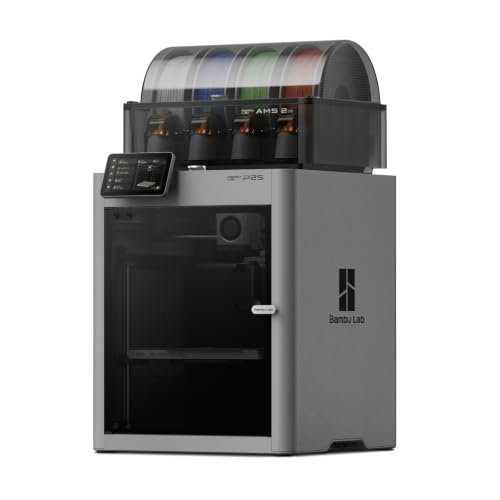
Pushing print limits even further, the Bambu Lab P2S Combo pairs a beefed-up motion system with an updated material station. It delivers high-speed precision up to 600mm/s using active flowrate compensation and an advanced PMSM servo extruder that eliminates rounded corners. The included AMS 2 Pro introduces active spool drying up to 65°C, ensuring moisture-sensitive filaments feed cleanly during long, complex prints.
Key features that stand out:
– Peak speeds reaching 600mm/s backed by closed-loop servo extrusion
– AMS 2 Pro system featuring built-in filament drying and auto-switching
– Adaptive airflow chamber with integrated activated carbon filtration
– Quick-swap nozzle assembly paired with AI-driven failure detection
– Deep ecosystem integration with Bambu Studio and the MakerWorld library
Pros:
– Integrated drying chamber prevents moisture-related stringing
– Active flow control ensures crisp dimensional accuracy on tight tolerances
– Setup takes only 15 minutes with automated sensor checks
Cons:
– Higher upfront investment makes it pricier for casual makers
Best for: Power users who print hygroscopic filaments and want reliable, dry multi-color output.
Expert Opinion: If you regularly use technical materials and despise wet filament headaches, the P2S Combo is worth every penny for its heated drying and rock-solid flow compensation.
FLASHFORGE Adventurer 5M
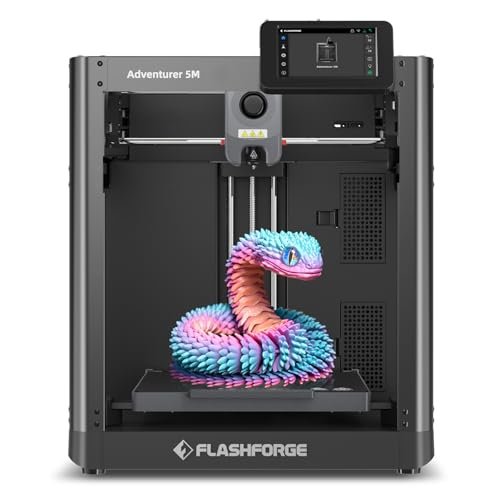
The FLASHFORGE Adventurer 5M is built for pure speed and simplicity on an open-frame CoreXY platform. It features one-click full auto-leveling that completely removes paper tests, laying down a dependable first layer right away. With a high-flow direct drive extruder hitting 280°C and a quick-swap nozzle system, swapping parts or clearing jams takes seconds rather than minutes.
Key features that stand out:
– Sturdy CoreXY frame capable of 600mm/s speed and 20,000mm/s² acceleration
– High-flow hotend with a rapid 35-second heat-up time to 200°C
– Three-second quick-release nozzle mechanism
– Dual-fan auxiliary cooling with built-in vibration compensation
– Real-time mobile management via the Flash Studio app
Pros:
– Fast nozzle swaps make maintenance easy
– Responsive auto-leveling guarantees dependable bed adhesion
– Compact desk footprint with rapid printing capabilities
Cons:
– The open frame design limits comfortable printing with high-shrinkage materials like ABS
Best for: Rapid prototyping enthusiasts who want quick turnaround times on PLA and PETG parts.
Expert Opinion: The Adventurer 5M strips away unnecessary frills to focus on clean mechanics, making it one of the most cost-effective speed demons on the market.
Entina Tina2C

For absolute beginners, kids, or classroom desks, the Entina Tina2C takes the intimidation factor out of 3D printing. It arrives fully assembled and ready in five minutes, so you don’t have to fiddle with belts or frame alignment. A flexible magnetic build plate makes removing finished toys and school projects as simple as bending the sheet with your fingers.
Key features that stand out:
– Extremely compact 3.9 x 3.9 x 3.9-inch build envelope for small spaces
– Poloprint Cloud app integration with over 3,500 ready-to-print models
– Fully automated bed leveling paired with power-loss recovery
– Removable quick-swap nozzle for stress-free cleaning
– Quiet operation with integrated LED work-area lighting
Pros:
– Fits on any cramped desk without cluttering your room
– App-based printing requires zero prior 3D modeling skills
– Flexible print bed makes part removal safe and simple
Cons:
– Small build volume restricts you to miniature figures and tiny accessories
Best for: Young students, teachers, and curious newcomers stepping into 3D printing for the first time.
Expert Opinion: While limited in size, the Tina2C works reliably out of the box and avoids the technical pitfalls that usually frustrate newcomers.
Anycubic Kobra X Multicolor
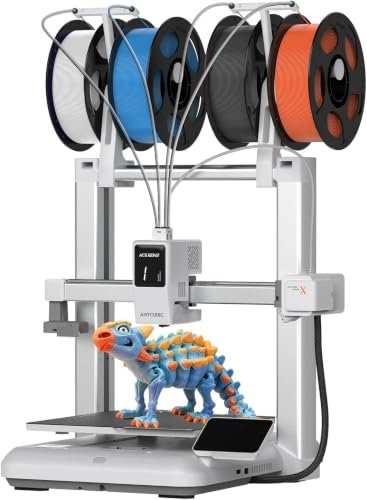
The Anycubic Kobra X tackles multi-color printing with an innovative focus on cutting material waste. It provides native four-color capability right out of the box, with support to expand up to 19 colors using linked ACE 2 Pro units. By slashing purge waste and travel paths, this machine prints multi-hue models twice as fast as legacy systems while saving you real money on spooled filament.
Key features that stand out:
– Expandable palette holding up to 19 distinct colors
– Shortened purge path cutting waste and print times in half
– LeviQ 3.0 system with 49-point auto-leveling calibration
– Hardened steel nozzle handling abrasive filaments up to 300°C
– Spacious 260 x 260 x 260mm build chamber with AI spaghetti detection
Pros:
– Drastically reduces filament waste during color swaps
– Hardened nozzle lets you run abrasive filaments without quick wear
– Generous print volume accommodates large functional models
Cons:
– Managing multiple filament units takes up noticeable table space
Best for: Makers looking to produce multi-color functional prints without drowning in wasted filament scraps.
Expert Opinion: Anycubic addressed the biggest flaw of multi-color printing—wasteful purge towers—making the Kobra X an economical powerhouse for vibrant models.
Bambu Lab A1
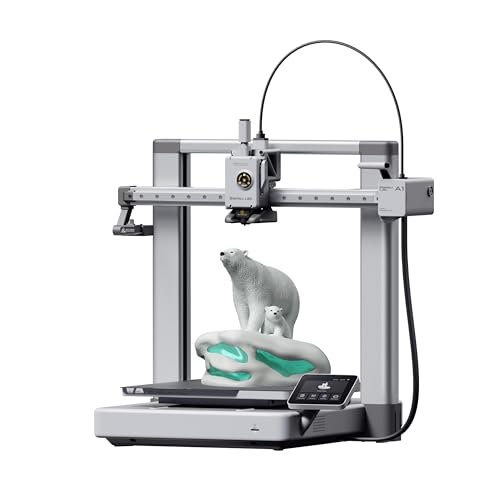
The Bambu Lab A1 brings the brand’s renowned print quality to an accessible open-bed format. It boasts active motor noise cancellation that makes it quiet enough to run right beside your workspace without distraction. With automated sensor calibration covering everything from Z-offset to dynamic flow rates, you can count on crisp overhangs and uniform surfaces on every single run.
Key features that stand out:
– 10,000mm/s² acceleration matched with active flow rate compensation
– Full hands-off auto-calibration that dials in Z-offset and resonance
– Tool-free, one-clip quick-swap hotend assembly
– Silent stepper drivers backed by active motor noise cancellation
– Native compatibility with the AMS lite multi-color feeder
Pros:
– Whisper-quiet printing makes it great for home offices
– Quick-change nozzle requires no tools or wire detaching
– Automated calibration delivers reliable layer consistency
Cons:
– Bed-slinger movement requires extra front-and-back clearance on your desk
Best for: Home makers and hobbyists who want high-end software tuning and quiet prints on an open frame.
Expert Opinion: The A1 proves you don’t need a noisy enclosed box to get top-tier prints; its acoustic tuning and automatic calibration make it a joy to run all day.
Entina Tina2 Plus
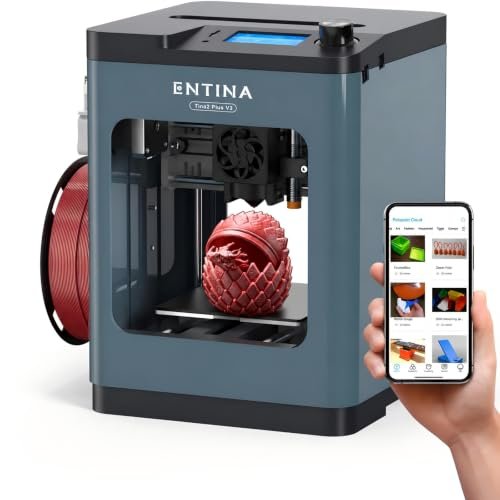
Building on the entry-level formula, the Entina Tina2 Plus adds extra muscle for faster, sturdier desktop output. It delivers print speeds up to 250mm/s along with an efficient ceramic hotend that reaches printing temperature in just forty seconds. Built with a partially enclosed safe frame design, it shields hot components while remaining compact enough for bedrooms, dorms, and classrooms.
Key features that stand out:
– 250mm/s motion profile for rapid turnaround on small designs
– Fast-heating ceramic hotend reaching target temps in 40 seconds
– Dual Z-axis lead screws paired with automatic bed leveling
– Textured PEI spring steel platform for reliable first-layer stick
– Cross-platform support for Windows, Mac, Linux, and Chromebooks
Pros:
– Dual Z-axis screws keep the gantry level and reduce banding
– Rapid-heating hotend gets prints started without delay
– Protective housing keeps curious fingers away from hot zones
Cons:
– Slicing custom models requires third-party software setup for advanced settings
Best for: Educators and hobbyists wanting a fast, sturdy mini printer with built-in safety shields.
Expert Opinion: With dual Z-axis stabilization and a PEI build plate, the Tina2 Plus bridges the gap between toy-grade gadgets and genuine maker tools.
Creality Ender 3 V3 SE
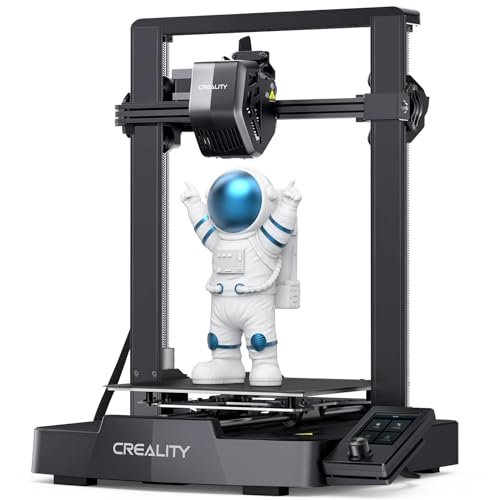
Creality updated its classic entry-level platform by making the Ender 3 V3 SE fast, practical, and easy to run. The proven Sprite direct-drive extruder easily feeds tricky filaments like TPU, while dual linear shafts on the Y-axis eliminate bed wobble. With CR Touch auto-leveling and a strain gauge, your Z-offset is calculated automatically, eliminating the tedious bed-knob tuning of past models.
Key features that stand out:
– 250mm/s maximum print speed with stable 2,500mm/s² acceleration
– Lightweight Sprite direct extruder with dual-gear grip
– CR Touch sensor and automatic strain-gauge Z-offset tuning
– Dual Z-axis lead screws coupled with dual 8mm Y-axis steel shafts
– Three-step assembly process that takes about twenty minutes
Pros:
– Direct extruder handles flexible TPU filament with ease
– Dual axis stabilization eliminates layer shifts and banding
– Extremely affordable price point with strong community backing
Cons:
– Lacks built-in Wi-Fi connectivity right out of the box
Best for: Budget-minded tinkerers and beginners who want a dependable, mod-friendly workhorse.
Expert Opinion: The V3 SE modernizes the famous Ender platform, bringing real auto-leveling and direct extrusion into a package anyone can afford.
ELEGOO Centauri 2 Combo
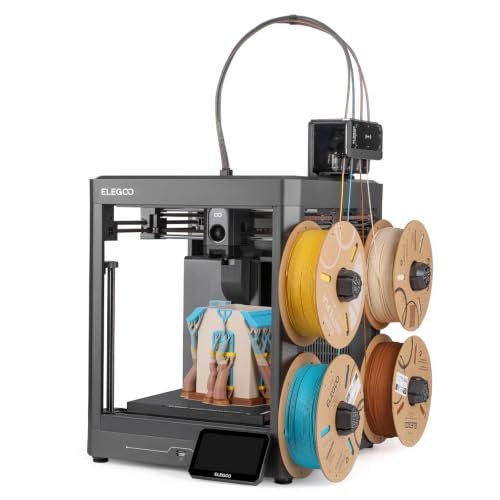
The ELEGOO Centauri 2 Combo marks a major step forward for multi-color CoreXY printing at a reasonable price point. Driven by the CANVAS four-color feeding system, it utilizes RFID filament tags and auto-refill logic to keep multi-material prints running smoothly. With 22 onboard monitoring sensors and rigid linear guides, it keeps high-speed production stable while maintaining tight layer alignment.
Key features that stand out:
– CoreXY motion reaching 500mm/s with 20,000mm/s² acceleration
– CANVAS multi-color station with instant switching and RFID detection
– Robust aluminum unibody frame riding on precision linear guides
– 22 internal monitoring sensors managing calibration and safety
– 5-inch full-color touchscreen with magnetic maintenance access
Pros:
– RFID spool reading takes the guesswork out of material settings
– Rigid linear rails ensure clean lines at high print speeds
– Large responsive touchscreen simplifies everyday menu navigation
Cons:
– The combined footprint of the machine and color unit requires a dedicated sturdy table
Best for: Creators looking for a fast, fully automated multi-color CoreXY machine without enterprise pricing.
Expert Opinion: ELEGOO’s entry into multi-color CoreXY printing hits an excellent balance, offering heavy-duty frame stability and intelligent sensor safety at an accessible price.
ELEGOO Centauri 2
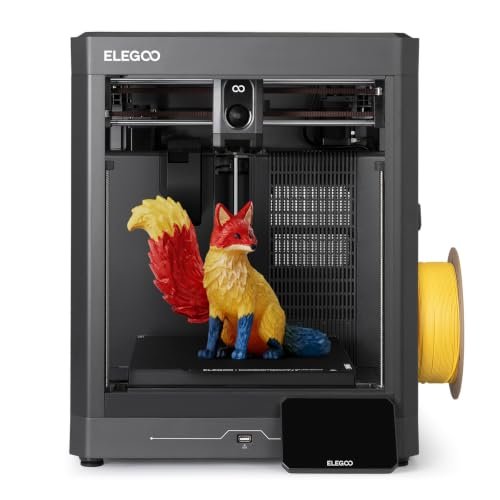
If you want the speed and stability of a modern CoreXY machine without multi-color complexity, the standalone ELEGOO Centauri 2 fits the bill. It delivers 500mm/s high-speed printing powered by a rigid aluminum chassis and built-in vibration compensation. Smart features like semi-automatic belt tensioners and a nozzle wiper keep the hardware running smoothly without constant manual maintenance.
Key features that stand out:
– CoreXY acceleration of 20,000mm/s² inside a rigid aluminum body
– Full automated calibration with pre-flight sensor diagnostics
– Smart extrusion control combined with active resonance compensation
– Semi-automatic belt tensioners for hassle-free motion care
– Open ecosystem linking Nexprint, ElegooSlicer, and the Matrix mobile app
Pros:
– Built-in belt tensioners save you time during regular maintenance
– High structural rigidity keeps print surfaces smooth and ringing-free
– Clean, open software workflow makes slicing simple
Cons:
– Single-color printing out of the box means you must swap colors manually
Best for: Practical makers and functional part designers who prioritize raw speed, rigid construction, and clean single-material prints.
Expert Opinion: The standalone Centauri 2 strips away color management overhead to deliver exceptional mechanical rigidity and speed for functional everyday printing.
Helpful Comparison Insights
- For Multi-Color Printing: The Bambu Lab P1S Combo and Anycubic Kobra X stand out. The P1S gives you an enclosed chamber for technical materials, while the Kobra X focuses on cutting down wasted purge plastic during long color runs.
- For Tight Budgets and First-Time Users: The Creality Ender 3 V3 SE delivers direct-drive extrusion and reliable auto-leveling at an entry-level price. If space is tight or you’re shopping for kids, the Entina Tina2C offers true plug-and-play simplicity right out of the box.
- For Open-Frame High-Speed Value: The Bambu Lab A1 and FLASHFORGE Adventurer 5M are top choices. The A1 shines with whisper-quiet motor cancellation and smooth calibration, while the Adventurer 5M brings CoreXY acceleration and quick-change nozzles to your workspace.
- For Structural Rigidity and Maintenance: The ELEGOO Centauri 2 series uses heavy-duty aluminum frames and semi-automatic belt tensioners, making it a great pick if you want easy maintenance and stable high-speed performance.
Final Verdict
Choosing the right printer comes down to your personal project goals and workspace needs:
- The Best All-Around Choice: Bambu Lab P1S Combo — It combines high speed, an enclosed build chamber, and reliable multi-color support, handling basic PLA as well as advanced materials like ABS without breaking a sweat.
- The Best Low-Cost Workhorse: Creality Ender 3 V3 SE — It handles flexible materials with its direct-drive extruder, levels the bed automatically, and offers unbeatable value for builders on a tight budget.
- The Best Value for High-Speed Prototyping: FLASHFORGE Adventurer 5M — With a quick CoreXY motion system and fast-swapping nozzles, it turns digital ideas into physical prototypes rapidly.
- The Best Beginner Desktop Companion: Bambu Lab A1 — If you want smooth, quiet, hands-off calibration in an accessible open format, this machine makes everyday printing effortless.
Frequently Asked Questions About 3D Printer Best Quality Price
What features determine the best quality-price ratio in modern 3D printers?
Focus on automatic bed leveling, direct-drive extrusion, and active vibration compensation. Reliable auto-leveling ensures clean first-layer adhesion without tedious manual bed adjustments. Modern direct-drive extruders give you smooth filament feeding for both rigid PLA and flexible TPU, while input shaping keeps fast prints sharp and ringing-free.
Is an enclosed 3D printer necessary for beginners?
Not if you are only printing PLA, PETG, or TPU. Open-frame printers work great for standard filaments and cost less. However, if you plan to make functional automotive or outdoor parts with ABS, ASA, or nylon, an enclosed chamber is essential to prevent warping caused by cool room drafts.
How much print speed actually matters in real-world use?
Print speed cuts down wait times, but acceleration and flow rate are what truly matter. A printer advertising 500mm/s needs high acceleration (around 10,000 to 20,000mm/s²) and a high-flow hotend to reach those speeds on smaller models. Without proper cooling and flow compensation, fast speeds can compromise surface quality.
What is the advantage of CoreXY over traditional bed-slinger printers?
CoreXY printers move the printhead along the X and Y axes using fixed belts, while the build plate moves down along the Z axis. Bed-slingers move the heavy build plate back and forth, which can introduce wobble at high speeds. CoreXY designs allow for faster acceleration, reduced vibration, and a more compact overall footprint.
How wasteful is multi-color 3D printing?
Traditional single-nozzle multi-color systems create purge waste every time they switch spools, which can sometimes use more filament than the actual model. Newer systems, like the Anycubic Kobra X, optimize travel paths to reduce this waste. If you print multi-color designs regularly, consider grouping multiple items on one plate to minimize color change purges.
What regular maintenance does a budget-friendly 3D printer require?
Keep the linear rails or rods lubricated with appropriate synthetic grease, check belt tension periodically, and clean your PEI build plate with warm water and dish soap. Wipe down your nozzle when hot to clear residue, and periodically inspect your PTFE guide tubes for internal wear or friction.
Can cheap 3D printers handle flexible materials like TPU?
Yes, as long as the machine uses a direct-drive extruder where the drive gears sit directly above the hotend. Older Bowden-style extruders push filament through a long tube, which causes flexible filaments like TPU to buckle. Modern budget printers with direct drive feed TPU smoothly without jamming.
Affiliate Disclosure: As an Amazon Associate, I earn from qualifying purchases made through links on this site.