I spent months running benchmarks, functional brackets, and multi-part prototypes to discover what truly defines the 2026 best 3d printers for creators today. High-speed printing and automated calibration are no longer optional extras; they have become the baseline standard for productive workshops. In this guide, I share my hands-on impressions across seven standout models to help you pick the right machine for your budget, workspace, and creative goals.
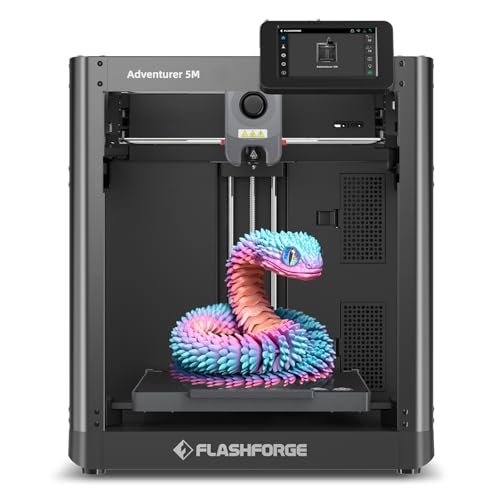
FLASHFORGE Adventurer 5M 3D Printer

The FLASHFORGE Adventurer 5M delivers lightning-fast output without demanding hours of calibration before your first run. Its CoreXY motion system paired with automatic one-click leveling reliably produces clean, smooth first layers straight out of the box. I found the quick-swap nozzle design remarkably practical, letting you swap from standard to wide-bore printing in seconds without tools. The open-frame build offers excellent visibility while maintaining tight dimensional accuracy across everyday functional prints.
Key features that stand out:
– CoreXY motion structure offering up to 600mm/s travel speeds and 20,000mm/s² acceleration
– Full-auto bed leveling that measures distances across the build surface without manual knobs
– Rapid 3-second quick-swap nozzle mechanism compatible with multiple aperture sizes
– Direct-drive extruder reaching 280°C alongside high-flow 32mm³/s melting capacity
– Dual-sided textured PEI spring steel plate for effortless part detachment
– Flash Studio mobile app for remote monitoring and simple print queuing
Pros:
– Sets up in under twenty minutes with zero manual leveling required
– Rapid heating hotend reaches target temperature in around 35 seconds
– Excellent structural rigidity reduces ringing artifacts on outer perimeters
Cons:
– The open frame makes it less suitable for warping-prone materials like standard ABS.
Best for: Beginners and makers seeking reliable, rapid PLA and PETG prototyping on a budget.
Expert Opinion: The Adventurer 5M strips away the technical friction that used to plague desktop printing. It prints fast, handles fine details gracefully, and gives you high-end CoreXY reliability without the premium price tag.
Creality K2 Combo (A) 3D Printer
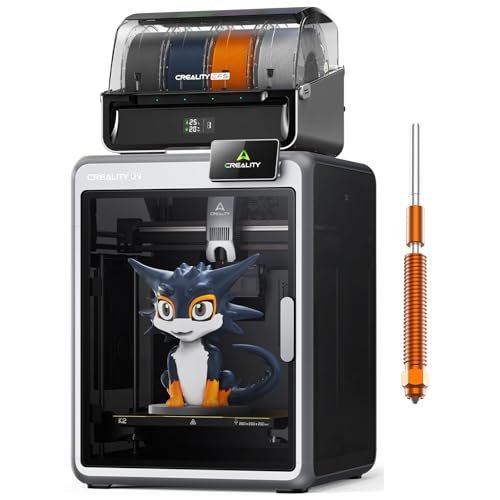
The Creality K2 Combo tackles multi-material production by combining a rigid chassis with Creality’s Color Filament System (CFS). You can print across four simultaneous colors out of the box or expand up to 16 colors by linking additional units, bypassing post-process painting completely. Creality integrated step-servo motors on the motion axes, which keep mechanical noise as low as quiet office keystrokes even at high acceleration. The targeted auto-leveling sensor probes strictly where your model sits, saving precious setup time on smaller jobs.
Key features that stand out:
– Multi-color filament management supporting 4 colors standard and up to 16 colors with linked CFS units
– Generous 260 × 260 × 260 mm build envelope suitable for functional household designs
– Step-servo motor system that dynamically adjusts torque within milliseconds for silent operation
– Targeted bed leveling system that calibrates only the specific area required for the model
– Integrated AI chamber camera that scans for spaghetti errors, part lifting, and nozzle clogs
– Wide filament compatibility including engineering blends like PLA-CF, PET, and ABS
Pros:
– The step-servo motors keep operation whisper-quiet during long print runs
– Multi-color switching runs reliably without jamming the feed paths
– Area-specific leveling saves several minutes before starting small prints
Cons:
– The combined footprint of the printer and filament system requires dedicated desk space.
Best for: Hobbyists and small shops wanting quiet multi-color printing without complex aftermarket mods.
Expert Opinion: Creality refined their motion architecture on the K2 Combo. The step-servo drives solve the whining motor noise of older models, and the smart filament system makes multi-color creation dependable.
FLASHFORGE AD5X Multi-Material 3D Printer
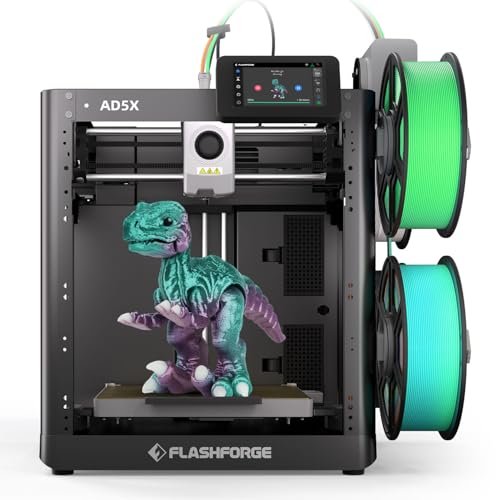
The FLASHFORGE AD5X brings multi-color printing into a compact workspace by using a neatly integrated Intelligent Filament System (IFS). Running at speeds up to 600mm/s, this CoreXY platform holds four spools side-by-side to minimize dead space on your workbench. Its active vibration suppression algorithms counteract high-acceleration resonance, keeping layer lines consistent even when jumping between color changes. I appreciated how easily it handles specialty filaments like Silk PLA and PETG-CF alongside standard materials.
Key features that stand out:
– Built-in Intelligent Filament System (IFS) for seamless four-color and multi-material printing
– CoreXY all-metal frame capable of 20,000mm/s² acceleration for reduced job runtimes
– Advanced vibration compensation to eliminate ghosting along steep corners
– Multi-point automatic leveling array to ensure uniform first-layer bed contact
– Space-efficient spool management designed for tighter desktop setups
– Broad material support spanning standard PLA, flexible TPU, and carbon-reinforced filaments
Pros:
– Compact side-by-side filament placement saves workbench depth
– Multi-material transitions handle flexible TPU and rigid PLA smoothly
– Vibration algorithms preserve crisp edges even at top print speeds
Cons:
– Purge waste during frequent color swaps can add up on dense multi-color models.
Best for: Designers and hobbyists wanting multi-material versatility without occupying an entire workbench.
Expert Opinion: The AD5X strikes a neat balance between footprint and capability. If you want multi-color prints without an external box towering over your machine, the built-in IFS layout is a smart choice.
AOSEED AI 3D Printer for Kids

The AOSEED AI 3D Printer is designed specifically to give younger creators an inviting, safe entry point into additive fabrication. It pairs an enclosed pinch-resistant frame with an intuitive mobile app featuring AI-assisted design tools like AI Doodle and photo-to-3D conversion. Operating at speeds up to 400mm/s, it finishes small toy designs in under half an hour, holding a child’s attention from concept to physical object. The kit includes non-toxic PLA and certified components, making it a plug-and-play STEM workstation right out of the box.
Key features that stand out:
– Child-safe fully enclosed cabinet with pinch-resistant doors and quiet fans
– AI Doodle software that translates voice, text, or sketches into printable 3D models
– Curated library of 20,000+ tested, family-friendly designs ready for one-tap printing
– Quick-release nozzle and leveling-free platform for maintenance-free operation
– Integrated monitoring camera that generates shareable time-lapse clips
– Comprehensive creative starter package containing eight rolls of kid-safe PLA filament
Pros:
– Safe, fully enclosed build chamber prevents accidental burns or finger pinches
– The AI software lets kids design unique toys without CAD experience
– Fast printing speeds keep younger family members engaged without long waits
Cons:
– It is limited strictly to single-color printing per job run.
Best for: Families, young makers, and elementary classrooms looking for a zero-frustration STEM tool.
Expert Opinion: AOSEED succeeded in removing the intimidating technical hurdles of 3D printing for children. The voice and doodle-based AI generation bridges the gap between imagination and physical play better than standard slicers.
FLASHFORGE AD5X Multi-Color 3D Printer (300°C Edition)
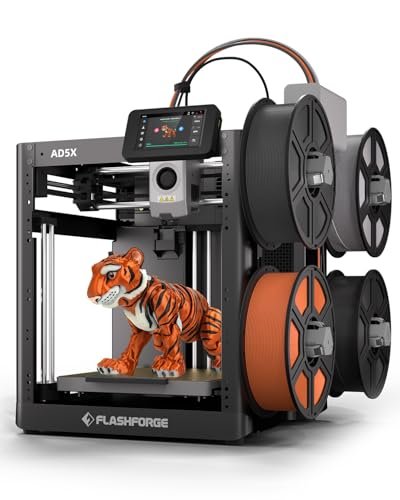
This variant of the FLASHFORGE AD5X expands high-temperature multi-color versatility with a 300°C direct-drive extruder and dual-channel part cooling. It accommodates four simultaneous filament spools while offering quick adaptations for varied nozzle diameters, ranging from 0.25mm for fine miniatures up to 0.8mm for structural shells. The one-click auto-leveling routine handles bed height calibration instantly, so you can spend your time building rather than troubleshooting z-offset. It also includes automatic filament feeding, retraction, and power-loss recovery to prevent lost print progress.
Key features that stand out:
– High-temp 300°C direct-drive toolhead built for abrasive and engineering grade filaments
– Four-color automated filament management system for multi-hue models
– High-velocity dual-channel cooling fans that secure sharp overhangs and bridge paths
– Support for swappable nozzle diameters from 0.25mm micro-detail up to 0.8mm high-volume
– One-click auto calibration paired with automated filament load and unload cycles
– Flash Maker mobile application for remote print control and monitoring
Pros:
– Higher hotend temperature unlocks more advanced engineering filaments
– Swapping between fine 0.25mm and wide 0.8mm nozzles takes very little effort
– Smooth automated filament loading prevents snagged lines inside the toolhead
Cons:
– Mastering slicer settings for complex multi-nozzle calibrations takes some practice.
Best for: Makers needing high-temperature extrusion alongside four-color automated printing.
Expert Opinion: The upgraded 300°C hotend on this AD5X opens the door to technical parts that need heat resistance and rigidity. Combined with multi-color automation, it is a versatile workhorse for practical shop projects.
Creality K2 Plus Combo Multi Color 3D Printer
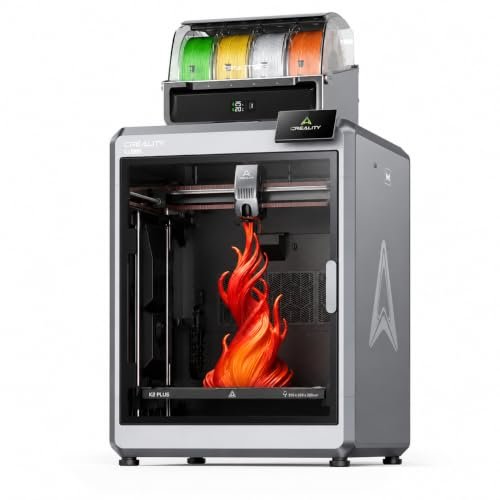
The Creality K2 Plus Combo stands as a heavy-duty production platform featuring a massive 350 × 350 × 350 mm build volume. Built with an aerospace-grade aluminum frame, it runs stably at speeds up to 600mm/s with an astonishing 30,000mm/s² acceleration. Creality equipped this machine with dual AI cameras and 18 internal sensors, actively catching layer shifts, spaghetti extrusions, and filament flow snags before they ruin a multi-day job. The included CFS filament module keeps materials sealed and dried, ensuring top performance across up to 16 color configurations.
Key features that stand out:
– Generous 350mm cubic build volume capable of printing full-scale helmets and multi-part batches
– Color Filament System with sealed desiccant storage to keep moisture-sensitive filaments dry
– Dual AI vision systems coupled with 18 internal sensors for automated fault detection
– Rigid aerospace-grade aluminum chassis engineered to absorb intense 30,000mm/s² accelerations
– Quiet 45dB printing profile enabled by precision step-servo motion controllers
– High-temperature closed-chamber configuration engineered for complex structural materials
Pros:
– Massive build volume allows full-sized functional prints in a single piece
– Built-in dry box functionality inside the CFS prevents moisture degradation
– Dual AI cameras catch print failures early to save valuable filament
Cons:
– The unit is very heavy and demands a dedicated, sturdy work table.
Best for: Cosplayers, engineers, and power users who need high-speed production on large-scale models.
Expert Opinion: If you have the bench space, the K2 Plus Combo is an absolute beast. The enclosed drying system inside the CFS, paired with the expansive build volume, eliminates the need to slice big props into tiny pieces.
FLASHFORGE Adventurer 5M Pro 3D Printer
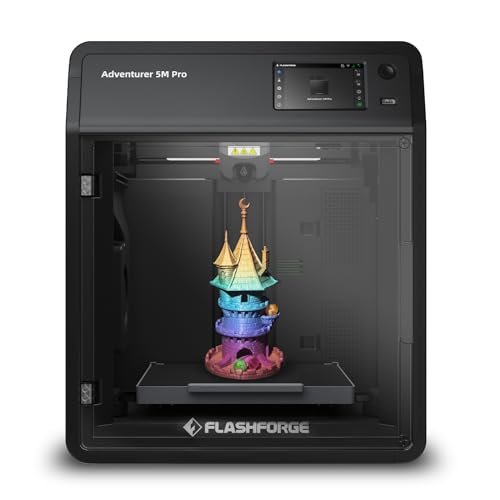
The Adventurer 5M Pro takes the rapid CoreXY foundation of the standard 5M and wraps it in a fully enclosed, dual-filtered chassis. Its internal HEPA and activated carbon filtration system neutralizes fumes and particulates, making it safe for bedrooms, home offices, and classrooms. The hotend reaches 280°C while the bed heats to 110°C, providing the thermal stability required for warp-sensitive materials like ABS and ASA. Combined with whisper-quiet operation under 50dB, it is one of the most polite desktop machines I have tested.
Key features that stand out:
– Fully enclosed print chamber with dual-stage HEPA and active carbon air filtration
– 600mm/s maximum travel speed driven by a stable CoreXY metal frame
– Tool-free 3-second quick-swap nozzle assembly compatible with sizes from 0.25mm to 0.8mm
– Enclosed thermal management supporting high-temp engineering plastics like ASA and PETG-CF
– Low-noise acoustic damping keeping operating volume below 50 decibels
– Internal monitoring camera with automatic time-lapse generation and remote access
Pros:
– Air filtration makes printing ABS and technical filaments practical indoors
– The fully enclosed body maintains steady ambient temperatures against room drafts
– Quick-swap nozzle design lets you change print resolutions without wrestling tools
Cons:
– Lacks a native multi-color filament switching system out of the box.
Best for: Students, hobbyists, and professionals printing technical filaments inside living or office quarters.
Expert Opinion: The Adventurer 5M Pro is the model I recommend most to people working in shared rooms or small apartments. The filtration system genuinely cuts down odors, and the enclosed chamber makes printing ASA as easy as standard PLA.
Practical Comparison Insights
Choosing between these printers comes down to three factors: build volume, filament handling, and room placement.
If your primary objective is multi-color or multi-material creation, both the Creality K2 Combo and the FLASHFORGE AD5X stand out as top contenders. The K2 offers an edge in multi-spool expansion (up to 16 colors) and active motor dampening, while the AD5X keeps spool management tightly integrated next to the chassis, ideal for narrow desks.
For makers who prioritize technical filaments and safety, the FLASHFORGE Adventurer 5M Pro is the top enclosed choice. Its integrated HEPA and carbon filtration allows you to run materials like ABS and ASA in home offices without breathing unpleasant fumes. If you only print standard PLA or PETG and want the most value for money, the open-frame Adventurer 5M offers identical CoreXY speed and nozzle modularity at a lower entry price.
When scale and volume take precedence, the Creality K2 Plus Combo has no real competition here. Its 350mm³ build plate easily accommodates large cosplay armor and full helmets, backed by dual AI cameras that keep long-duration jobs under constant surveillance. Finally, if you want a safe, beginner-friendly learning hub for children, the AOSEED AI 3D Printer stands alone with its voice-driven modeling app, non-pinch enclosed design, and rich starter pack.
Final Verdict
- Top Value Workhorse: FLASHFORGE Adventurer 5M — Delivers blistering CoreXY speeds, clean auto-calibration, and fast nozzle swaps at an accessible price.
- Top Multi-Color Choice: Creality K2 Combo (A) — Combines smooth color transitions, silent step-servo operation, and reliable print monitoring.
- Top Large-Format Powerhouse: Creality K2 Plus Combo — Massive 350mm build envelope backed by filament drying and dual AI monitoring cameras.
- Top Clean Workspace Pick: FLASHFORGE Adventurer 5M Pro — Fully enclosed with dual air filtration, quiet operation, and reliable ABS/ASA compatibility.
- Top STEM & Family Option: AOSEED AI 3D Printer — Safe, enclosed, and powered by simple AI prompt design tools that turn ideas into toys in minutes.
Frequently Asked Questions About the 2026 Best 3D Printers
What makes the 2026 best 3d printers so much faster than older models?
Modern 3D printers rely on rigid CoreXY motion frames, lightweight direct-drive toolheads, and advanced input shaping (vibration compensation) firmware. Instead of moving a heavy bed along the Y-axis like older bed-slingers, CoreXY machines move only the toolhead on lightweight gantry belts, allowing accelerations up to 20,000–30,000 mm/s² without sacrificing surface quality.
Do I still need to manually level the print bed on modern printers?
No. The leading printers in 2026 feature strain gauges, inductive sensors, or optical probes that map bed height automatically. They calculate offset compensations dynamically, ensuring clean first layers without the need to twist manual thumb screws or fiddle with feeler gauges.
Can an open-frame printer reliably print materials like ABS or ASA?
While an open printer like the standard Adventurer 5M can technically heat up enough to extrude ABS, the parts will likely warp or crack due to cool room drafts. For consistent prints with high-shrinkage plastics like ABS, ASA, and nylon, an enclosed chamber like that on the Adventurer 5M Pro or Creality K2 Plus is strongly recommended.
How much filament waste is produced during multi-color 3D printing?
Multi-color printing that relies on a single nozzle requires purging old color before pushing the new filament through. This produces purge blocks or “poop” pellets during each layer change. You can minimize this waste in modern slicers by purging into the infill of your model or printing multiple identical items at the same time.
What nozzle size should I choose for general 3D printing?
A 0.4mm nozzle remains the sweet spot for everyday balance between fine surface detail and reasonable print speed. However, quick-swap nozzles make it simple to switch to a 0.25mm nozzle for highly detailed tabletop miniatures or step up to a 0.6mm or 0.8mm nozzle for thick, rugged shop organizers printed in half the time.
Are enclosed 3D printers safe to keep in a bedroom or home office?
Enclosed printers that include integrated active carbon and HEPA filtration, such as the Adventurer 5M Pro, capture ultrafine particles (UFPs) and volatile organic compounds (VOCs). While this makes them far safer and quieter for living areas, maintaining good room ventilation is still a smart practice when running long jobs with technical filaments.
Affiliate Disclosure: As an Amazon Associate, I earn from qualifying purchases made through links on this site.