I’ve spent hundreds of hours unboxing, calibrating, and benchmarking modern machines to help you pinpoint the 3d printer best one for your workshop or living room. In this hands-on guide, I test real-world print speeds, check bed leveling accuracy, and evaluate material handling across leading hardware and reliable filaments. Whether you need rapid prototyping, multi-color artistic builds, or safe tinkering tools for kids, this rundown will save you both time and spool-wasting headaches.
Bambu Lab P1S Combo 3D Printer
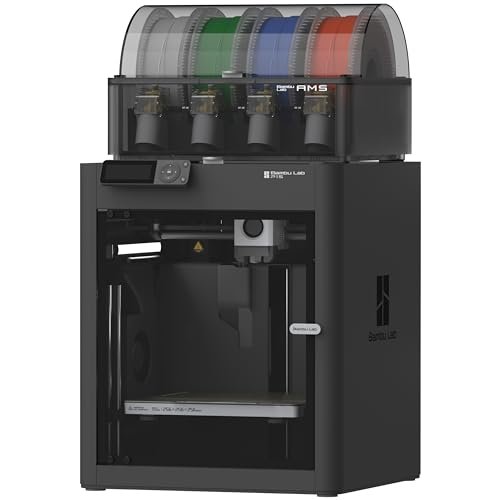
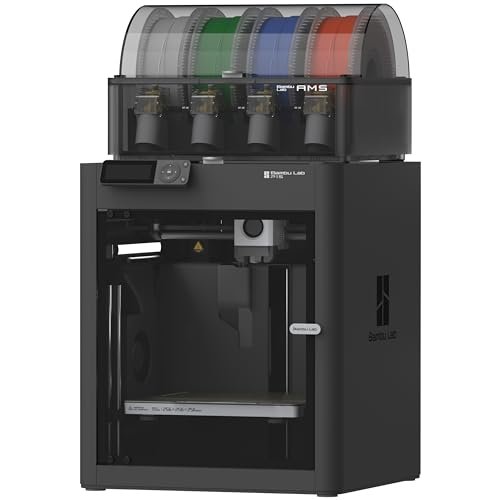
The Bambu Lab P1S Combo bridges the gap between affordable makerspace gear and commercial-grade workhorses. It features a fully enclosed body alongside an automatic bed leveling system that eliminates manual tuning from your daily workflow. With native support for the Automatic Material System (AMS), you can produce vibrant prints featuring up to 16 distinct colors without constant spool swapping. Speeds clocking up to 500mm/s with 20,000 mm/s² acceleration ensure you spend less time waiting around for completed models.
Key features that stand out:
– Up to 16-color printing capability via AMS integration
– Rapid 500mm/s print speed with 20000 mm/s² acceleration
– Fully enclosed chamber engineered for temperature-sensitive materials like ABS and ASA
– Automatic bed leveling and vibration compensation
– Rapid out-of-the-box setup taking roughly 15 minutes
Pros:
– Exceptional multi-color handling and automatic filament changeover
– High-speed movement without sacrificing fine visual detail
– Enclosed chamber keeps warping low on high-temperature filaments
Cons:
– High-flow engineering filaments with carbon or glass fibers are not recommended on the stock extruder.
Best for: Hobbyists and small businesses looking for fast, reliable multi-color prints without complex calibration.
Expert Opinion: The P1S Combo is a benchmark for plug-and-play performance, offering enclosed thermal stability at a price that embarrasses traditional open-frame bedslingers.
Bambu Lab P2S Combo 3D Printer
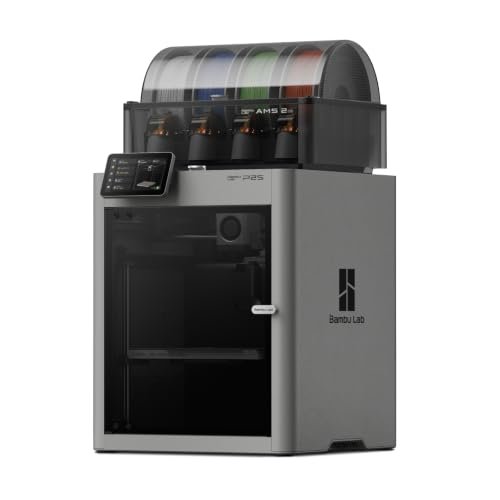
The Bambu Lab P2S Combo takes high-speed desktop fabrication up a notch with upgraded drive mechanics and thermal management. Its PMSM Servo Extruder and Active Flowrate Compensation work in tandem to keep sharp corners and overhangs remarkably consistent at speeds reaching 600 mm/s. The bundled AMS 2 Pro system even provides built-in filament drying up to 65 °C, protecting your hygroscopic materials right inside the spool holder. Plus, the smart adaptive airflow system automatically maintains stable internal heat or vents quickly for standard plastics.
Key features that stand out:
– Maximum speeds reaching 600 mm/s backed by active flow compensation
– AMS 2 Pro system featuring integrated active spool drying up to 65 °C
– Adaptive airflow chamber with integrated carbon filtration
– Quick-swap nozzle design and AI-assisted print failure detection
– Full ecosystem support with Bambu Studio, Bambu Handy, and MakerWorld
Pros:
– Integrated filament drying preserves moisture-sensitive spools during long runs
– Fast extrusion flow rate maintains precision across rapid direction changes
– Quick-swap nozzles reduce maintenance downtime significantly
Cons:
– The standalone base printer cannot print multi-color parts unless paired with the Combo setup.
Best for: Serious creators who want cutting-edge print acceleration paired with active filament conditioning.
Expert Opinion: The inclusion of active heating in the AMS 2 Pro addresses one of 3D printing’s biggest pain points—filament moisture—making this combo a powerhouse for high-demand makers.
Original Prusa CORE One+ DIY 3D Printer
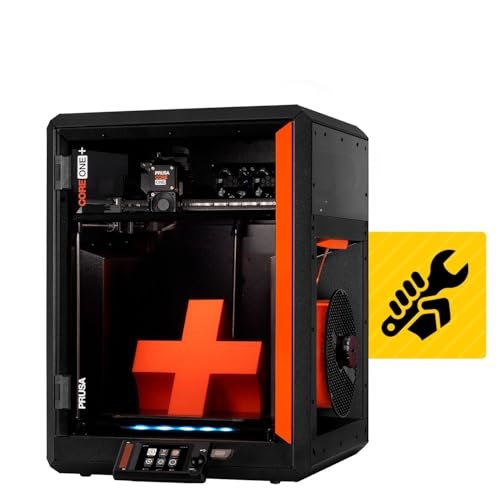
The Original Prusa CORE One+ kit provides an engaging hands-on build for makers who want to understand every nut, bolt, and sensor inside their machine. Its all-steel exoskeleton frame delivers exceptional CoreXY rigidity, allowing it to sustain pro-grade speeds while maintaining tight dimensional accuracy. The actively controlled chamber reaching 55 °C handles challenging technical filaments like PC-Blend, Nylon, and Carbon Fiber blends with minimal effort. In addition, it boasts a 100% offline-capable architecture, which makes it a standout choice for secure prototyping labs and classrooms.
Key features that stand out:
– Solder-free DIY build supported by detailed 1:1 scale photographic manuals
– Rigid all-steel exoskeleton housing a high-speed CoreXY motion system
– Actively managed 55 °C thermal chamber with automated top ventilation
– Redesigned easy-flex loading mechanism and bayonet spool carrier
– Complete offline capability featuring a removable Wi-Fi module for data security
Pros:
– Unmatched mechanical transparency and serviceability because you build it yourself
– Excellent thermal chamber management prevents warping on tricky materials
– Complete data privacy keeps proprietary model files off external servers
Cons:
– Assembling the kit from scratch requires a significant time investment of 15 to 20 hours.
Best for: Engineers, STEM educators, and dedicated tinkerers who prioritize privacy, repairability, and technical mastery.
Expert Opinion: If you prefer knowing your printer inside out while retaining top-tier print consistency and local data security, the CORE One+ is in a class of its own.
AOSEED AI 3D Printer for Kids

The AOSEED AI 3D printer turns creative ideation into an accessible, child-friendly reality right on the kitchen table. Equipped with AI-driven modeling features like AI Doodle and AI MiniMe, children can convert voice cues, basic sketches, or portraits into printable toys without needing prior CAD knowledge. It features a pinch-resistant enclosed housing combined with TÜV-tested PLA safety standards, making it secure for unsupervised room use. Operating up to 400 mm/s peak speed, it finishes small projects in 20 minutes to keep younger minds engaged.
Key features that stand out:
– AI-assisted creation suite that generates 3D files from voice, text, or photos
– Fully enclosed child-safe casing with quiet operation and pinch prevention
– Print speeds up to 400 mm/s with 0.05 mm mechanical precision
– Cloud repository featuring over 20,000 tested and kid-safe toys
– Integrated monitoring camera that generates automated time-lapse videos
Pros:
– Extremely safe physical design paired with non-toxic certified filament
– Generative AI software lowers the learning curve for young creators
– Complete kit arrives ready to print out of the box with 8 starter spools
Cons:
– Hardware only supports single-color output per job, requiring multi-part assembly for multi-color toys.
Best for: Young creators, classrooms, and parents seeking an educational, worry-free entry point into digital fabrication.
Expert Opinion: AOSEED bridges the gap between complex engineering software and pure childhood curiosity, turning 3D printing into an intuitive play-and-learn appliance.
FLASHFORGE Adventurer 5M 3D Printer
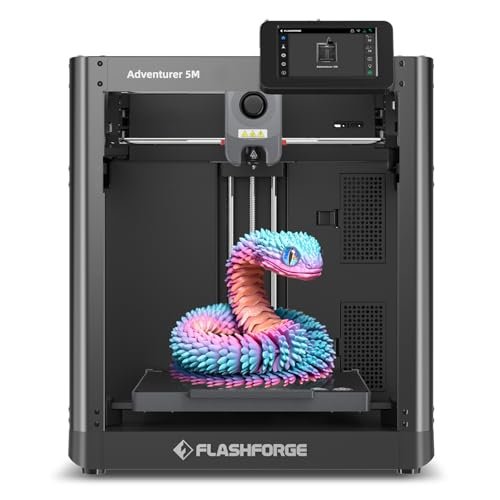
The FLASHFORGE Adventurer 5M offers an accessible gateway to industrial CoreXY speeds without breaking your gear budget. Running at travel speeds up to 600 mm/s with 20,000 mm/s² acceleration, it slashes standard print times down to small fractions. The tool-free 3-second nozzle swap mechanism makes swapping between fine detail work and fast draft passes remarkably easy. With one-click full auto-leveling and a high-flow 32mm³/s hotend that reaches 200 °C in 35 seconds, it takes the hassle out of everyday printing tasks.
Key features that stand out:
– High-efficiency CoreXY structure capable of 600 mm/s travel speeds
– Rapid 3-second quick-release nozzle system
– One-click automatic bed leveling across a flexible PEI spring sheet
– Direct-drive extruder reaching 280 °C with dual cooling fans
– Remote operation and print tracking via the Flash Studio application
Pros:
– Incredibly fast travel speeds and rapid warm-up times reduce turnaround
– Swapping nozzles requires zero tools and takes mere seconds
– Reliable out-of-the-box auto-leveling creates consistent first-layer squish
Cons:
– The open-frame design limits its ability to print warping-prone materials like ABS cleanly.
Best for: Budget-conscious hobbyists and rapid prototypers who want raw speed using standard PLA and PETG.
Expert Opinion: The Adventurer 5M strips away unnecessary frills to focus on what matters most to daily hobbyists: rapid travel, solid leveling, and effortless nozzle maintenance.
FLASHFORGE AD5X Multi-Color 3D Printer

The FLASHFORGE AD5X brings multi-material versatility directly into the high-velocity CoreXY space. Built to manage up to 4 colors simultaneously, it lets you produce complex, artistic models without stopping to manually splice or feed filament. The machine pairs a 300 °C direct-drive extruder with active vibration compensation, preserving sharp edges even at speeds up to 600 mm/s. With automated filament loading and a 1-click calibration routine, it simplifies multi-color workflows for both beginners and experienced tinkerers.
Key features that stand out:
– Native 4-color multi-material printing capabilities
– CoreXY motion platform pushing speeds up to 600 mm/s
– 300 °C high-temp direct drive extruder supporting a wide array of nozzles
– Integrated vibration compensation algorithms for smooth outer shells
– Automated filament retraction, feed assistance, and power-loss recovery
Pros:
– Integrated multi-color printing without the need for cumbersome external add-ons
– High nozzle temperature capacity accommodates high-performance filaments
– Vibration compensation prevents ringing and artifacts on high-speed runs
Cons:
– Multi-color purging can create noticeable filament waste if models are not carefully sliced.
Best for: Designers and hobbyists wanting seamless multi-color prints at top speeds straight from a single platform.
Expert Opinion: By combining an internal 4-color switching system with a 300 °C hotend, the AD5X makes colorful composite printing accessible to everyday desktop users.
Bambu Lab A1 3D Printer
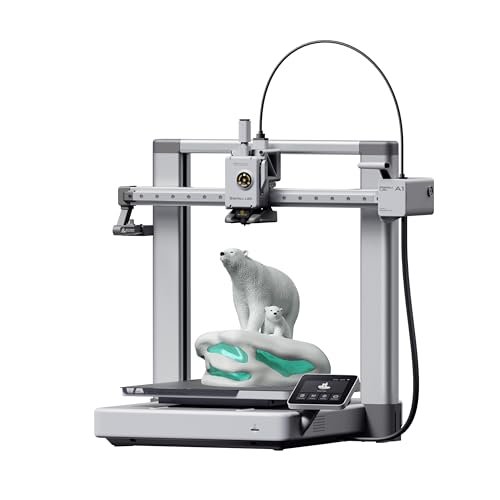
The Bambu Lab A1 proves that bedslinger 3D printers can still deliver elite quality while remaining whisper-quiet. Featuring full-auto calibration that automates everything from Z-offset to bed leveling and resonance testing, it eliminates setup guesswork completely. Its standout active motor noise canceling lowers background operating sounds dramatically, making it comfortable to run right beside your desk. When paired with the optional AMS lite, it produces clean multi-color prints with minimal mechanical friction, all backed by active flow rate compensation for clean layer seams.
Key features that stand out:
– Active motor noise cancellation for quiet desktop operation
– Comprehensive full-auto calibration covering leveling, vibration, and Z-offset
– Active flow rate compensation driven by real-time nozzle pressure sensors
– 1-clip quick-swap nozzle mechanism for fast maintenance
– Smooth multi-color printing support when connected to the AMS lite
Pros:
– Remarkably quiet during operation compared to typical high-speed bedslingers
– Consistent extrusion quality thanks to dynamic pressure monitoring
– Straightforward nozzle swaps require no wiring disassembly
Cons:
– The moving Y-axis bed demands more physical desktop depth than a CoreXY unit.
Best for: Students, apartment dwellers, and hobbyists who need a dependable, whisper-quiet printer for day-to-day projects.
Expert Opinion: The A1 is hands-down one of the most refined open-bed printers available, offering whisper-quiet stepper operation and precise extrusion control.
FLASHFORGE Adventurer 5M Pro 3D Printer
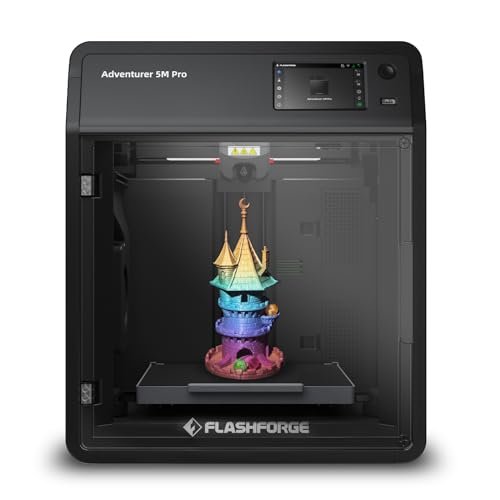
The FLASHFORGE Adventurer 5M Pro takes the rapid motion of the 5M and packs it inside a quiet, fully enclosed cabinet. It features a dual filtration system utilizing HEPA and activated carbon, making it safe for spaces with limited ventilation like classrooms and home offices. Operating at speeds up to 600 mm/s, it stays composed thanks to an internal vibration compensation algorithm that eliminates surface artifacts. The built-in monitoring camera keeps you connected to your jobs remotely while capturing time-lapse videos of your builds.
Key features that stand out:
– Fully enclosed chassis equipped with dual HEPA and carbon air filtration
– Ultra-quiet operation calibrated under 50 dB
– 280 °C hotend with a 110 °C heated bed for advanced materials
– Rapid 3-second tool-less nozzle exchange system
– Built-in live camera providing remote monitoring and automated time-lapses
Pros:
– Active air filtration makes it much safer to print inside living spaces
– Fully enclosed chamber reliably prints warping-prone materials like ASA
– Low noise profile won’t disrupt quiet study or work environments
Cons:
– Enclosure access can feel slightly cramped when working inside the rear of the chamber.
Best for: Classrooms, shared offices, and makers printing technical filaments indoors who value clean air and low noise.
Expert Opinion: The 5M Pro is a complete package that marries high-speed performance with indoor safety, offering air filtration and sound dampening that standard open printers simply can’t match.
SUNLU PLA 3D Printer Filament, Black, 1KG

Finding the 3d printer best one won’t matter much if you’re loading poor filament, which makes SUNLU’s Black PLA a key staple for your shop. This 1KG spool features 100% neat precision winding, drastically reducing knots and mechanical feed errors during unattended overnights. It holds a tight dimensional tolerance of +/- 0.02 mm, which prevents hotend jams and under-extrusion issues across high-speed setups. With low warping tendencies and solid layer bonding, it reliably produces clean mechanical brackets, decorative items, and everyday prototype parts.
Key features that stand out:
– Tangle-free precision winding device eliminates mid-print knots
– Tight diameter tolerance held strictly to +/- 0.02 mm
– Broad operational range accommodating 200–230 °C nozzle temperatures
– High layer adhesion with minimal shrinkage or thermal warping
– Universal spool sizing designed to fit standard external holders and feed systems
Pros:
– Highly consistent diameter prevents unexpected clogs at high extrusion rates
– Neat spooling minimizes the risk of filament getting caught on itself
– Deep, consistent black matte finish across different model batches
Cons:
– Standard PLA begins to soften under temperatures exceeding 55 °C, limiting outdoor utility.
Best for: Everyday prototyping, functional brackets, and long continuous prints requiring dependable feed reliability.
Expert Opinion: Reliable printing starts at the spool, and SUNLU’s meticulous winding and tight diameter tolerances make this black PLA an easy choice for hassle-free production runs.
SUNLU PLA 3D Printer Filament, White, 1KG

SUNLU White PLA delivers the same trusted consistency as its darker counterpart, serving as an ideal base material for painting or crisp visual models. The consistent 1.75 mm diameter ensures predictable flow rates across everything from slow detail passes to aggressive high-flow prints. Thanks to its bubble-free raw material formulation, you avoid unsightly surface pitting and voids on structural walls. It adheres firmly to heated beds between 50–65 °C, popping off effortlessly once your build surface drops back down to room temperature.
Key features that stand out:
– Uniform white pigmentation that holds paint primers and acrylics evenly
– 100% neat spool winding designed to prevent snag-induced print failures
– Diameter precision monitored to +/- 0.02 mm for steady flow dynamics
– Strong inter-layer fusion without brittle seam weaknesses
– Universal spool hub dimensions compatible with top multi-material systems
Pros:
– Clean, opaque white appearance hides layer lines well on curved geometries
– Excellent bed adhesion on standard textured and smooth PEI plates
– High purity prevents nozzle residue buildup during extended use
Cons:
– Can absorb moisture over weeks of humid exposure if left out of a sealed drybox.
Best for: Architectural scale mockups, detailed busts, lithophanes, and parts intended for post-process painting.
Expert Opinion: A clean white filament reveals every flaw in a machine’s calibration; SUNLU’s dimensional stability ensures that those flaws aren’t caused by the material itself.
Practical Comparison Insights
Choosing between these options comes down to how your project needs align with three practical factors: enclosure type, motion architecture, and material handling.
- CoreXY vs. Moving Beds: The CoreXY options—like the Bambu Lab P-series, Prusa CORE One+, and FLASHFORGE Adventurer series—keep the build platform stationary on the horizontal plane. This design allows for much faster directional acceleration without the risk of tall, slender prints wobbling off the build plate. On the other hand, a traditional bed-slinger like the Bambu Lab A1 uses a moving Y-axis, which takes up more table depth but offers a more economical entry price and whisper-quiet motor operation.
- Enclosed Chambers vs. Open Frames: If your work involves standard PLA and PETG, an open printer like the Adventurer 5M or Bambu A1 works great. However, if you plan to melt technical filaments like ABS, ASA, or Nylon, a fully enclosed system with active or passive thermal control (such as the Prusa CORE One+, P1S, or Adventurer 5M Pro) is necessary to keep drafts away and stop edges from curling.
- Multi-Color Capabilities: The Bambu P1S, P2S, and FLASHFORGE AD5X eliminate the chore of manually splicing colors or pausing mid-print. Keep in mind that multi-material setups generate a fair amount of purge tower waste, so factor that extra filament into your project costs.
- The Filament Foundation: A high-speed machine is only as good as the plastic passing through its nozzle. Using spools with strict +/- 0.02mm diameter tolerances and clean, machine-wound spools—like the SUNLU Black and White PLA—prevents sudden clogs and feed jams that ruin multi-hour prints.
Final Verdict
| Priority Category | Top Recommendation | Primary Advantage |
| :— | :— | :— |
| All-Around Workhorse | Bambu Lab P1S Combo | Enclosed multi-color reliability straight out of the box |
| High-Performance Prototyping | Bambu Lab P2S Combo | Active spool drying and automated flowrate compensation |
| Engineering & Data Privacy | Prusa CORE One+ DIY | Complete offline security with deep mechanical repairability |
| Best for Clean Indoor Spaces | FLASHFORGE Adventurer 5M Pro | Dual air filtration system running below 50 dB |
| Best Budget Speed Option | FLASHFORGE Adventurer 5M | Tool-free 3-second nozzle changes and raw 600 mm/s motion |
| Best Entry for Young Makers | AOSEED AI 3D Printer | Generative AI modeling in a safe, pinch-free shell |
| Best Value Desktop Daily | Bambu Lab A1 | Whisper-quiet motor performance with full auto-calibration |
If you want an appliance-like experience that handles complex multi-color builds with almost no manual tweaking, the Bambu Lab P1S Combo remains the standout pick. For workspaces where air quality and low noise are priorities, the FLASHFORGE Adventurer 5M Pro takes the lead thanks to its sealed, HEPA-filtered cabinet. Finally, if you value self-reliance, complete data privacy, and a deep understanding of your machine’s hardware, the Prusa CORE One+ is an investment that will serve your workshop for years to come.
Frequently Asked Questions About the 3d Printer Best One
Which 3d printer best one should a complete beginner choose?
For an absolute beginner, the Bambu Lab A1 or FLASHFORGE Adventurer 5M are among the easiest options to live with. Both eliminate tricky calibration by featuring one-click auto bed leveling, automatic Z-offset tuning, and simple touchscreen interfaces. You won’t have to fiddle with manual leveling knobs or use paper sheets to set your nozzle height before getting a clean first layer.
What makes CoreXY motion better than traditional bedslingers?
CoreXY printers move the lightweight toolhead along both the X and Y axes using a synchronized belt system, while the heavy print bed only moves incrementally downward along the Z-axis. This setup reduces moving mass, which virtually eliminates the “bed-flinging” motion that causes tall prints to wobble. As a result, CoreXY machines achieve significantly faster speeds and cleaner surface finishes without shaking your parts loose.
Do I really need an enclosed 3D printer?
You only need an enclosed 3D printer if you plan to print materials that are sensitive to drafts and ambient temperature drops, such as ABS, ASA, PC, or Nylon. These materials contract quickly as they cool, leading to cracked layer lines and lifting corners if exposed to ambient airflow. If you only plan to melt standard PLA, PETG, and TPU, an open-frame machine will handle your projects without issue.
Is multi-color 3D printing wasteful?
Multi-color printing on single-nozzle machines does generate wasted plastic because the printer must flush out the old color inside the hotend before feeding the new shade. This waste material is usually collected in a small purge pile or wipe tower next to your model. You can reduce this waste by printing multiple copies of the same multi-color item at once, or by using slicer settings that purge the leftover color directly into the infill of your part.
Why is filament quality important for high-speed printing?
Modern high-speed 3d printers pull filament through the extruder gears at a very fast pace. If your filament has uneven diameter swings, moisture pockets, or messy, tangled spooling, the extruder will either under-extrude or jam entirely. Using reliably wound filament like SUNLU PLA with a tight +/- 0.02 mm tolerance helps maintain steady nozzle pressure, which keeps your high-speed layers smooth and defect-free.
Can kids safely use modern 3D printers at home?
Yes, provided you choose a machine explicitly designed with child safety in mind, like the AOSEED AI printer. Safe options feature fully enclosed cabinets to block access to hot components, pinch-resistant doors, low operating noise, and non-toxic, safety-certified PLA materials. It is still best practice for an adult to oversee initial setup and make sure the machine runs in a well-ventilated room.
How often do I need to calibrate my print bed?
With older manual machines, users had to calibrate their print beds every few prints using hand wheels and feeler gauges. Modern machines equipped with strain gauges, inductive probes, or optical sensors automate this process entirely. Most users simply let the printer run a quick multi-point automated mesh leveling routine before starting an important print, ensuring reliable first-layer adhesion without any manual effort.
Affiliate Disclosure: As an Amazon Associate, I earn from qualifying purchases made through links on this site.