I’ve spent hundreds of hours leveling print beds, clearing stubborn nozzle jams, and testing rapid prototypes to track down the best 3d printer available for any skill level. In this guide, you’ll find reliable desktop workhorses, multi-color systems, and kid-friendly models that print cleanly right out of the box. Whether you need high-speed engineering prototypes or colorful hobby prints, these tested picks will save you time and filament.
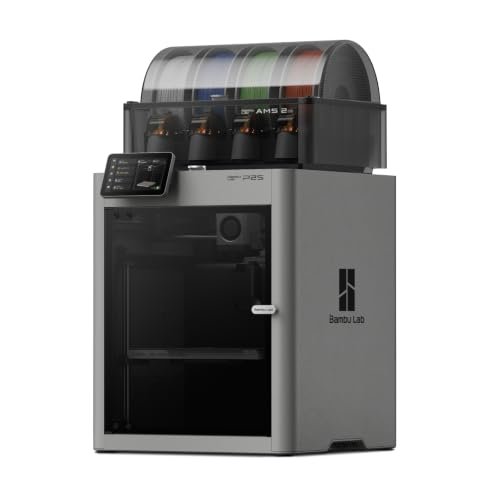
Bambu Lab P2S Combo 3D Printer & AMS 2

The Bambu Lab P2S Combo takes desktop manufacturing up a notch with its PMSM Servo Extruder and Active Flowrate Compensation, keeping layer lines virtually invisible even at blistering speeds. Its closed-loop thermal regulation uses an Adaptive Airflow System to maintain a warm 50°C chamber for warp-prone technical filaments or cool things down for crisp PLA overhangs. Combined with the AMS 2 Pro unit, this setup lets you handle multi-color prints while actively drying your spools up to 65°C.
Key features that stand out:
– Print speeds reaching up to 600 mm/s with active flowrate compensation
– AMS 2 Pro system with built-in filament drying up to 65°C
– Closed chamber with adaptive airflow and integrated carbon air filter
– AI failure detection and automated pre-flight bed calibration
– Quick-swap nozzle design for fast maintenance
Pros:
– Phenomenal print speed without losing sharp corner detail
– Built-in filament dryer in the AMS unit prevents moisture issues
– Setup takes less than 15 minutes from unboxing to first layer
– Cloud and local workflow via Bambu Studio is smooth and reliable
Cons:
– It carries a premium price tag compared to entry-level printers.
– The machine footprint is somewhat bulky when combined with the AMS 2 Pro.
Best for: Intermediate to advanced makers wanting reliable multi-material prints and engineering filament support.
Expert Opinion: The P2S Combo solves the biggest headache in multi-material printing by integrating active spool drying straight into the AMS unit. If you frequently print with moisture-sensitive materials like PETG or nylon blends, this setup delivers consistent, top-tier results with zero guesswork.
Bambu Lab P1S Combo 3D Printer with AMS
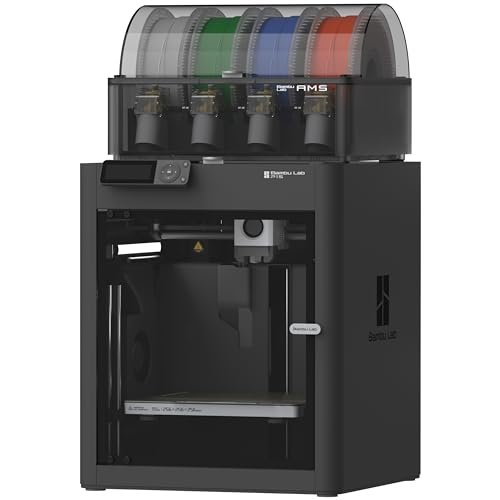
The Bambu Lab P1S Combo remains a gold standard for hobbyists who want up to 16-color printing capabilities without breaking into industrial price tiers. Thanks to its enclosed CoreXY chassis, the printer effortlessly prints ABS and ASA alongside everyday PLA and PETG. You get rapid 500 mm/s speeds and automatic bed leveling that takes all the manual calibration chores off your plate.
Key features that stand out:
– High-speed CoreXY motion system with 20,000 mm/s² acceleration
– Enclosed body design tailored for high-temperature filaments
– Automatic bed leveling and vibration resonance compensation
– Included AMS unit supporting up to four colors out of the box (expandable to 16)
– Factory assembled with a 15-minute quick-start setup
Pros:
– Enclosure keeps ambient temperatures stable for warp-free ABS prints
– Massive community support and pre-tuned material profiles in Bambu Studio
– Reliable multi-color feeding with minimal user intervention
Cons:
– The built-in monochrome control screen feels basic compared to touchscreens.
– The stock toolhead isn’t hardened for continuous carbon fiber printing.
Best for: Hobbyists and makers seeking dependable multi-color printing in a fully enclosed machine.
Expert Opinion: The P1S Combo hits the sweet spot between price and high-end performance. It cuts out the tedious troubleshooting associated with older bed-slingers, giving you clean, multi-color prototypes straight out of the box.
FLASHFORGE Adventurer 5M 3D Printer
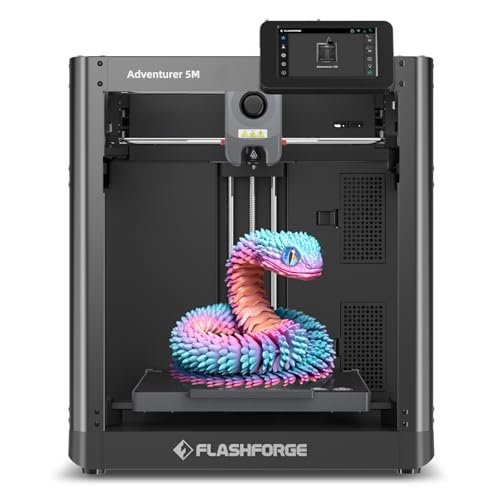
The FLASHFORGE Adventurer 5M delivers remarkable speed at an accessible price point, using an all-metal CoreXY structure capable of reaching 600 mm/s travel speeds. Its one-click automatic leveling system maps the bed thoroughly to ensure your first layers stick every single time. Maintenance is refreshingly easy thanks to a 3-second quick-swap nozzle mechanism that lets you change out worn or clogged tips without tools.
Key features that stand out:
– 600 mm/s maximum speed backed by 20,000 mm/s² acceleration
– Full-auto bed leveling eliminating manual paper-gap adjustments
– High-flow 32 mm³/s hotend heating up to 200°C in just 35 seconds
– Rapid toolless 3-second nozzle replacement system
– Flexible double-sided PEI spring steel build sheet
Pros:
– Superb print speed for a machine in this price range
– Swapping nozzles takes literal seconds without handling hot wires
– Clean first layers with reliable one-touch sensor leveling
Cons:
– The open-frame frame makes it louder and less suited for ABS filament.
– Flash Studio slicing software has a slight learning curve compared to standard Cura.
Best for: Budget-minded creators and small workshops needing fast, single-color PLA and PETG prototypes.
Expert Opinion: If you don’t need multi-color printing or an enclosure, the Adventurer 5M offers some of the best raw speed and mechanical reliability you can get for the money. The quick-change nozzle is genuinely one of the easiest to swap on the market.
AOSEED AI 3D Printer for Kids

The AOSEED AI 3D Printer turns model building into a playful experience for younger creators, featuring an enclosed pinch-resistant frame for safe home use. It features smart AI-powered creative tools like AI Doodle and AI MiniMe, letting children turn sketches or spoken prompts into physical plastic toys. With speeds reaching up to 400 mm/s and an auto-leveling build plate, young makers can watch their designs materialize in under half an hour.
Key features that stand out:
– Fully enclosed child-safe design with pinch-prevention housing
– AI Doodle and voice-prompt modeling tools built into the child-friendly app
– Fast 220–250 mm/s typical print speeds peaking at 400 mm/s
– Built-in camera for live print monitoring and automatic time-lapse creation
– Complete starter kit with 8 rolls of kid-safe PLA filament and DIY stickers
Pros:
– Extremely safe for bedroom or classroom environments
– The generative AI software makes 3D design intuitive for kids
– Comes packed with lots of filament rolls right in the box
Cons:
– It only supports single-color printing per print job.
– The build volume is small and strictly limited to standard PLA.
Best for: Elementary and middle school kids, parents, and educators introducing STEM design principles.
Expert Opinion: AOSEED built a printer that addresses real safety and engagement concerns. Instead of forcing kids to learn complicated CAD packages, the intuitive AI-assisted app keeps them excited and designing their own toys independently.
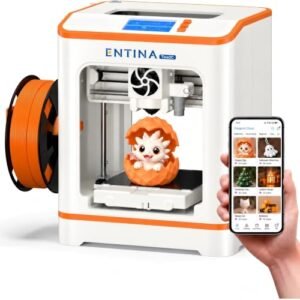
Entina Tina2C 3D Printer for Beginners & Kids
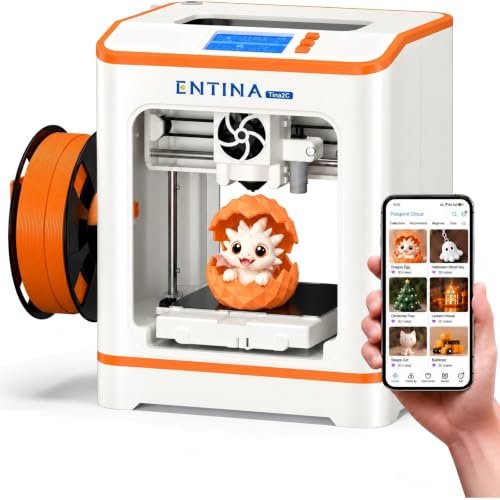
The Entina Tina2C is a compact desktop machine that removes the intimidation factor of 3D printing through plug-and-play factory calibration that gets you running in 5 minutes. Its lightweight build features a flexible magnetic build plate that lets you pop off finished prints with a light bend. Through the Poloprint Cloud app, you get access to thousands of one-tap 3D models, making it simple to start printing without touching complex slicer settings.
Key features that stand out:
– Factory-assembled mini footprint ready to print within 5 minutes
– Automated bed leveling with integrated power-loss print recovery
– Poloprint Cloud app with Wi-Fi control and AI text-to-3D generation
– Flexible magnetic build surface for effortless print removal
– Removable quick-swap nozzle for simple routine clearing
Pros:
– Fits neatly on crowded desks or small study tables
– Automatic leveling saves first-time users from bad first layers
– Very quiet stepper drivers won’t disrupt home or study spaces
Cons:
– The tiny 3.9-inch cubic build area restricts large projects.
– Lacks a heated bed, limiting materials primarily to PLA.
Best for: Complete beginners, students, and hobbyists with tight desk space wanting a low-cost entry point.
Expert Opinion: The Tina2C is essentially an appliance: you plug it in, pick a toy from the app, and it prints. While the build volume is limited, it is a very forgiving starter printer for young learners.
Bambu Lab A1 mini 3D Printer + LED Lamp Kit
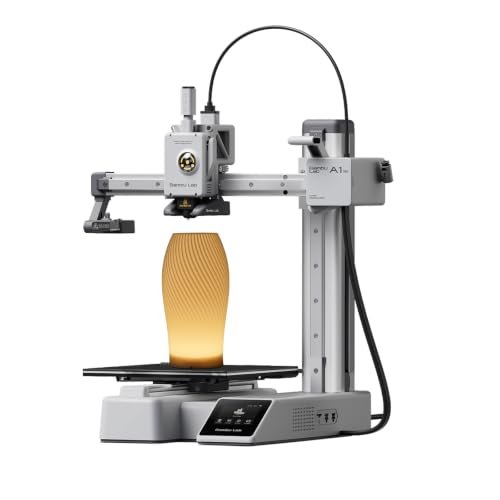
The Bambu Lab A1 mini delivers high-end automation in a space-saving “bed-slinger” format, complete with an LED Lamp Kit to turn your initial prints into functional home decor. It features fully automated calibration, handling nozzle offset, bed leveling, and active motor noise cancellation automatically. Driven by the Bambu Lab ecosystem, you can browse MakerWorld on your phone and send high-detail prints directly over Wi-Fi.
Key features that stand out:
– Active vibration compensation and high-speed motion up to 500 mm/s
– Full auto-calibration including Z-offset, bed tramming, and resonance tuning
– Active motor noise cancellation for whisper-quiet printing
– Includes hardware kit to build functional customized LED lamps
– Direct integration with MakerWorld and the Bambu Handy mobile app
Pros:
– Out-of-the-box print quality matches machines costing three times as much
– Incredibly quiet during operation, making it ideal for bedrooms
– Seamless app workflow allows true one-click printing from your phone
Cons:
– The 180 x 180 x 180 mm build volume limits larger functional parts.
– The cantilever arm design requires careful clearance on your desk.
Best for: Beginners and apartment dwellers looking for exceptional print quality and quiet operation on a budget.
Expert Opinion: Pound for pound, the A1 mini produces some of the cleanest layer lines on the market today. The automated calibration genuinely works, eliminating virtually all the manual setup typically required by open-frame printers.
Entina Tina2C Mini 3D Printer Starter Bundle
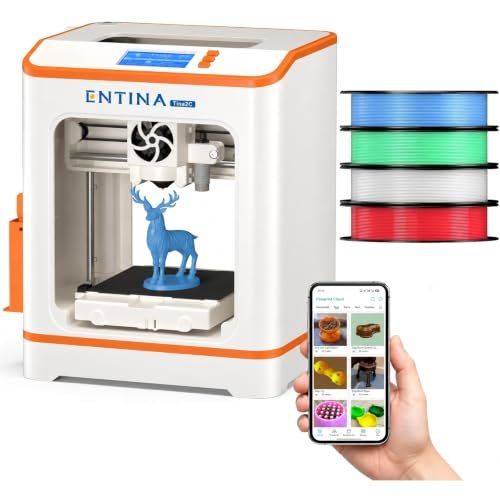
This extended bundle of the Entina Tina2C takes the convenient plug-and-play design and pairs it with a 1kg multi-color PLA filament pack so you can start diverse projects immediately. The printer features assisted auto-leveling and smart power-loss recovery, ensuring small power hiccups don’t ruin hours of progress. It also supports slicing in industry-standard software like Cura alongside its easy-to-use Poloprint mobile app.
Key features that stand out:
– Starter package includes 1kg of PLA split across four colorful mini spools
– Fully assembled setup taking roughly 5 minutes from box to print
– Poloprint Cloud library offering more than 3,500 ready-to-print designs
– Removable magnetic build plate and quick-swap extruder tip
– 2.4GHz Wi-Fi connectivity and TF card slot for offline printing
Pros:
– Complete package means no need to order separate filament spools
– Compact, lightweight frame is easy to store inside a cabinet
– Intuitive app interface lets younger family members pick models easily
Cons:
– The unheated print surface limits you strictly to PLA filaments.
– Not suited for printing large functional tools or wearable props.
Best for: Gift-givers and parents looking for an all-in-one starter kit that works immediately.
Expert Opinion: Bundling multiple filament colors with an ultra-compact, auto-leveling printer makes this an ideal birthday or holiday starter pack. You won’t have to spend your weekend troubleshooting bed level screws or downloading complex slicing profiles.
ELEGOO Centauri 2 Combo 3D Printer
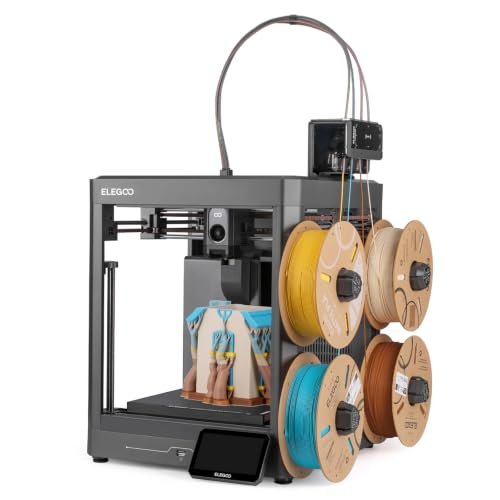
The ELEGOO Centauri 2 Combo steps into multi-color territory with its innovative CANVAS 4-color filament system, which uses independent feed motors and RFID recognition for smooth transitions. Built on a high-speed CoreXY aluminum frame, it achieves speeds up to 500 mm/s with stable linear guides keeping vibrations at bay. Its 22 intelligent sensor network monitors extrusion and temperatures continuously, catching errors before they turn into spaghetti prints.
Key features that stand out:
– CANVAS 4-color printing system with RFID filament auto-detection
– 500 mm/s maximum print speed with 20,000 mm/s² acceleration
– Heavy-duty aluminum frame fitted with precision linear motion rails
– Array of 22 smart sensors running pre-print diagnostics and flow monitoring
– Crisp 5-inch color touchscreen display with intuitive layout
Pros:
– Multi-color swapping is snappy and minimizes excessive filament purge waste
– Rigid metal construction minimizes ghosting and ringing at high speeds
– Large, responsive touchscreen makes on-device adjustments simple
Cons:
– The CANVAS feeder unit takes up noticeable additional desk space.
– Slicer support for custom multi-material painting requires learning the ELEGOO ecosystem.
Best for: Makers wanting a high-speed, multi-color CoreXY machine with a generous build volume and smart monitoring.
Expert Opinion: ELEGOO has put serious thought into the Centauri 2 Combo’s sensor array. By actively tracking extrusion consistency and auto-refilling empty spools, it delivers dependable multi-color prints without constant supervision.
FLASHFORGE AD5X Multi-Material 3D Printer
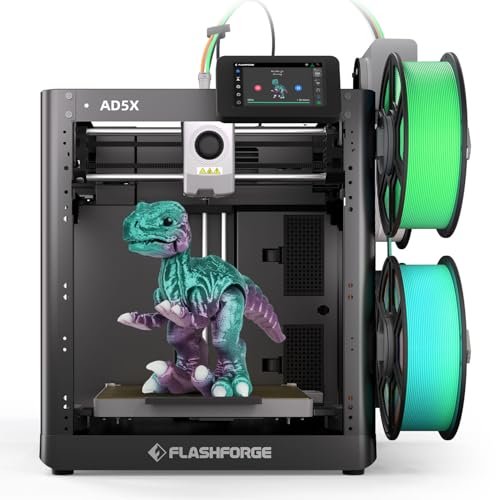
The FLASHFORGE AD5X brings multi-material versatility to the workshop via its Intelligent Filament System (IFS), allowing up to 4 colors or mixed material combinations on a single build. Utilizing an all-metal CoreXY motion layout with built-in vibration suppression algorithms, the AD5X holds layer alignment steady even at 600 mm/s. It supports a broad array of filaments—including tough PLA-CF and PETG-CF—making it as useful for rigid brackets as it is for decorative models.
Key features that stand out:
– 4-color capability powered by an integrated Intelligent Filament System (IFS)
– High speed printing up to 600 mm/s with active vibration suppression
– Broad material compatibility including PLA-CF, PETG-CF, TPU, and SILK
– Multi-point automatic bed leveling for balanced first-layer squish
– Compact modular profile with side-by-side filament mounting
Pros:
– Handles carbon fiber composite materials right out of the box
– Side-by-side spool layout keeps the overall vertical profile relatively low
– Extremely rigid chassis eliminates layer shifting during sudden directional changes
Cons:
– The spool switching mechanism can be noisy during frequent color changes.
– Slicing multi-material files in Flash Studio takes some time to master.
Best for: Functional prototyping, design studios, and makers wanting carbon-fiber composite printing with multi-color options.
Expert Opinion: If your printing needs swing between cosmetic multi-colored designs and durable carbon fiber parts, the AD5X is an exceptional option. The vibration compensation ensures clean surfaces even when running near its maximum speed limits.
Bambu Lab P1S 3D Printer (Standalone)

The standalone Bambu Lab P1S provides the rugged reliability of an enclosed high-temperature chamber at a lower cost for makers who don’t immediately need multi-color printing. It delivers the same blazing 500 mm/s speed and CoreXY acceleration found in its Combo sibling, ensuring high productivity right away. Because it maintains the same internal architecture, you can upgrade with an AMS later whenever you decide to explore multi-color designs.
Key features that stand out:
– Fully enclosed chassis designed for ABS, ASA, and PETG stability
– 500 mm/s print speeds backed by automated resonance compensation
– Hassle-free automatic bed leveling and dynamic flow calibration
– Upgradable to multi-color printing at any time via optional AMS units
– Reliable remote monitoring and control through Bambu Handy mobile app
Pros:
– Lower entry price while keeping the enclosed CoreXY frame
– Handles high-temp materials like ABS without edge warping
– Easy upgrade path to 16-color printing whenever your budget allows
Cons:
– Does not include multi-color hardware in this base configuration.
– The basic text-based screen is somewhat clunky to navigate manually.
Best for: Engineers, prop makers, and enthusiasts wanting enclosed high-performance printing without paying upfront for multi-color.
Expert Opinion: If you mainly print single-color mechanical parts in ABS, ASA, or PETG, the standalone P1S is arguably the most sensible buy. You get industrial-grade speeds and reliability today, with the freedom to plug in an AMS module down the road.
Practical Buying Advice: Finding Your Match
Picking the right machine comes down to how you plan to use it day-to-day. Here are a few practical insights to keep in mind:
- Motion Style Matters: CoreXY machines (like the Bambu Lab P-series, FLASHFORGE 5M/AD5X, and ELEGOO Centauri 2) move only the toolhead along the X/Y axes while the bed moves down slowly. This allows much higher speeds and cleaner vertical walls compared to traditional “bed-slingers” (like the A1 mini or Tina2C), which move the entire heavy build plate back and forth.
- Enclosures for Engineering Filaments: If you want to print functional brackets in ABS, ASA, or polycarbonate, an enclosed chamber is mandatory. Open-frame printers will cause these materials to warp and split along layer lines due to room drafts.
- Multi-Color Purge Management: Multi-color systems like the AMS, IFS, and CANVAS produce waste material (“poop”) during toolhead purging. Look for systems with well-tuned purge profiles and RFID spool recognition to minimize wasted plastic and shorten overall print times.
- Bed Leveling Automation: Never buy a modern 3D printer that requires manual thumb-screw bed leveling. Strain-gauge or sensor-driven automatic leveling saves hours of troubleshooting and guarantees proper adhesion on your first layer.
Final Verdict: Which Machine Should You Pick?
Rather than naming one single winner, the right choice depends entirely on your workshop goals:
- For the High-End Maker: The Bambu Lab P2S Combo is the top choice. Its heated AMS 2 Pro drying chamber and active airflow control solve the twin hurdles of filament moisture and chamber thermal stability.
- For the Value-Focused Multi-Color Enthusiast: The ELEGOO Centauri 2 Combo and Bambu Lab P1S Combo offer outstanding high-speed, multi-spool printing with reliable software ecosystems.
- For Speed on a Budget: The FLASHFORGE Adventurer 5M delivers 600 mm/s CoreXY speeds and a 3-second quick-swap nozzle at an entry-level price.
- For Apartments, Studios, and Beginners: The Bambu Lab A1 mini provides whisper-quiet operation, auto-calibration, and flawless PLA prints with zero mechanical tinkering.
- For Kids and Classrooms: The AOSEED AI 3D Printer stands out for its enclosed pinch-safe housing, child-friendly generative AI app, and comprehensive starter kit.
Frequently Asked Questions About the Best 3D Printer Available
What makes CoreXY 3D printers faster than traditional bed-slingers?
CoreXY printers use two stationary stepper motors working together via belts to move a lightweight toolhead along the X and Y axes. Because the heavy build plate only moves downward along the Z-axis, the machine experiences far less mechanical inertia. This design allows for acceleration rates above 20,000 mm/s² without causing print ringing, layer shifts, or ghosting artifacts.
Can I print ABS or nylon on an open-frame 3D printer?
While an open-frame printer can physically melt ABS or nylon if its hotend reaches the required temperature, the prints will almost certainly warp or delaminate. Materials like ABS, ASA, and nylon shrink rapidly when exposed to cool ambient air drafts. A fully enclosed printer maintains a warm, stable chamber temperature, preventing thermal shock and internal layer cracking.
How does multi-color 3D printing work with a single nozzle?
Modern multi-color systems, such as the Bambu Lab AMS or ELEGOO CANVAS, feed one filament at a time through a shared hotend. When a color change occurs, the printer cuts the current filament, retracts it back into the spool holder, feeds the new color forward, and purges the leftover melted plastic into a waste chute or purge block. Once the nozzle clears the old shade, it resumes printing your model.
Is automatic bed leveling really necessary for beginners?
Yes, automatic bed leveling is one of the most critical features on modern 3D printers. Setting the distance between the nozzle and the build surface manually using a sheet of paper is frustrating and error-prone. Modern auto-leveling uses electronic sensors or load cells to map bed unevenness and dynamically adjust the Z-axis during printing, guaranteeing clean first-layer adhesion every time.
How important is filament drying for print quality?
Filament drying is vital, especially for hygroscopic materials like PETG, TPU, nylon, and even standard PLA in humid climates. When moist filament passes through a 200°C+ hotend, the trapped water boils instantly into steam, causing popping noises, surface stringing, rough layer textures, and weak layer bonding. Printers or spool feeders with active heating, like the AMS 2 Pro, keep materials bone-dry for smooth, structurally sound prints.
What is the advantage of a quick-swap nozzle?
Traditional nozzle replacements require heating the hotend to over 250°C and using wrenches to torque the brass tip without snapping delicate heat-break tubes or burning your fingers. Quick-swap designs allow you to click or screw out the entire nozzle assembly cold in seconds. This makes it effortless to switch between a fine 0.2 mm nozzle for miniatures and a wide 0.6 mm or 0.8 mm nozzle for strong, fast functional parts.
Affiliate Disclosure: As an Amazon Associate, I earn from qualifying purchases made through links on this site.