When I first started testing 3D printers years ago, getting a clean first layer meant spending hours with a piece of paper, turning thumbwheels, and praying the bed stayed level. Today’s beginner-friendly machines have transformed that experience completely, offering plug-and-play setups and smart calibration right out of the box. In these beginner 3d printer reviews, I share hands-on testing notes on nine accessible machines to help you find the right fit for your budget, workspace, and creative goals.
Entina Tina2C 3D Printer for Beginners & Kids
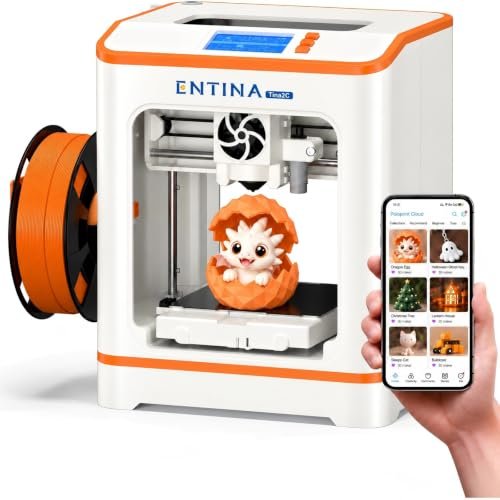
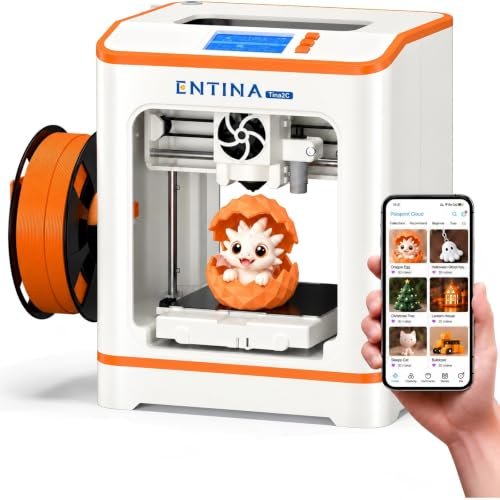
The Entina Tina2C is built specifically to take the intimidation out of desktop manufacturing. It arrives fully assembled, letting you plug it in and complete your first automated print in under five minutes. Its compact footprint fits effortlessly on a cluttered desk, while the Poloprint Cloud app gives kids and newcomers instant access to thousands of ready-to-print toys and STEM designs without needing CAD experience.
Key features that stand out:
– Factory-assembled build requiring zero mechanical assembly
– Hands-off automatic bed leveling system for clean first-layer adhesion
– Poloprint Cloud app with AI photo-to-3D generation and 3,500+ models
– Flexible magnetic build surface for effortless print removal
– Removable quick-swap nozzle for stress-free nozzle maintenance
– Integrated power-loss recovery to salvage interrupted jobs
Pros:
– Extremely compact and safe for bedroom or classroom desks
– Setup takes just a few minutes through the mobile app
– Flexible bed makes removing finished parts simple without scrapers
Cons:
– The 3.9-inch build volume restricts you to smaller trinkets and mini figures.
Best for: Young students, teachers, and total novices wanting an easy, low-risk entry into 3D printing.
Expert Opinion: The Tina2C is one of the friendliest starter printers on the market today. While its build volume is modest, the combination of reliable auto-leveling and a vast pre-sliced model library makes it an exceptionally smooth learning tool.
FLASHFORGE Adventurer 5M 3D Printer
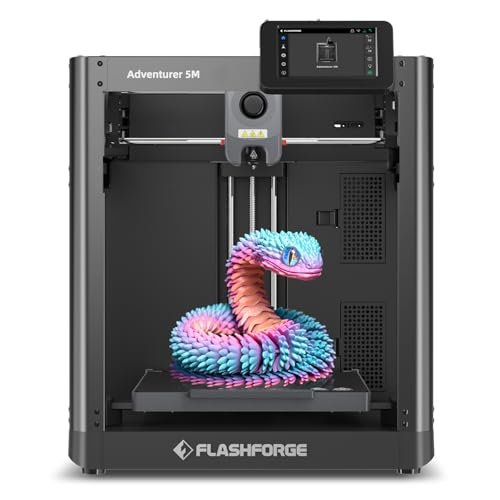
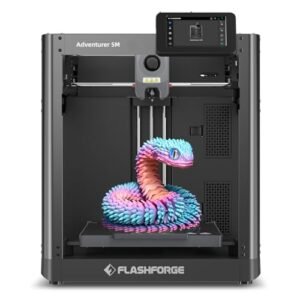
If you want industrial-grade speed without the complex setup, the FLASHFORGE Adventurer 5M delivers remarkable performance. With a CoreXY motion system reaching 600mm/s, this printer turns jobs that used to take all day into afternoon tasks. The one-click automatic leveling measures distance electronically, ensuring you get pristine adhesion without touching a single tool or calibration screw.
Key features that stand out:
– High-speed CoreXY motion with acceleration up to 20,000mm/s²
– Full auto-leveling routine requiring no manual offset adjustments
– Quick-release nozzle assembly that swaps in three seconds
– Dual-sided textured PEI spring steel build platform
– Direct-drive extruder reaching 280°C for broader filament compatibility
– Remote monitoring and project management via Flash Studio
Pros:
– Outstanding print speed that significantly shortens project turnaround
– Toolless nozzle swaps make size adjustments painless
– Robust metal frame delivers crisp details even at high velocities
Cons:
– High-speed printing generates noticeable fan noise in quiet rooms.
Best for: Hobbyists and makers who want high-speed prototyping and reliable engineering capabilities right out of the box.
Expert Opinion: The Adventurer 5M strikes a sweet spot between raw speed and beginner ease. You get the benefits of modern CoreXY kinematics without having to spend hours tuning slicer profiles or leveling beds.
Entina Tina2 Plus 3D Printer
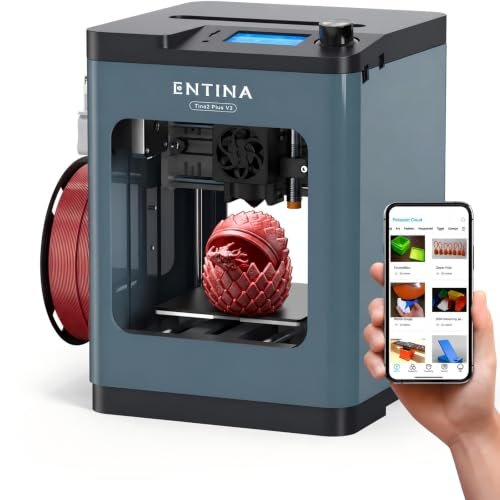
The Entina Tina2 Plus takes the approachable format of mini desktop printers and adds substantial performance upgrades. It features a rapid ceramic hotend that warms to operating temperature in just 40 seconds, alongside print speeds up to 250mm/s for rapid turnaround. The partially enclosed frame protects wandering fingers from moving parts, making it an excellent addition to busy family areas or maker spaces.
Key features that stand out:
– Enhanced 250mm/s printing speed powered by a dual Z-axis structure
– Rapid-heating 40-second ceramic hotend with quick-change nozzle design
– Textured PEI spring steel plate for clean release and durable adhesion
– Partially enclosed chassis design for improved safety during operation
– Poloprint Cloud integration offering thousands of free STEM projects
– Broad slicing compatibility with Cura, Simplify3D, and native mobile apps
Pros:
– Heats up quickly, minimizing the wait before prints begin
– Dual Z-axis provides noticeably better layer consistency
– Semi-enclosed frame adds safety when printing around curious kids
Cons:
– The build area remains on the smaller side for larger functional prints.
Best for: Classrooms, homeschool settings, and young makers ready for faster, higher-precision desktop printing.
Expert Opinion: The Tina2 Plus addresses the slower print speeds common among entry-level mini printers. The addition of a PEI spring steel sheet and a rigid dual Z-axis makes it a sturdy, dependable workhorse for daily learning projects.
Entina Tina2C Mini 3D Printer Starter Bundle
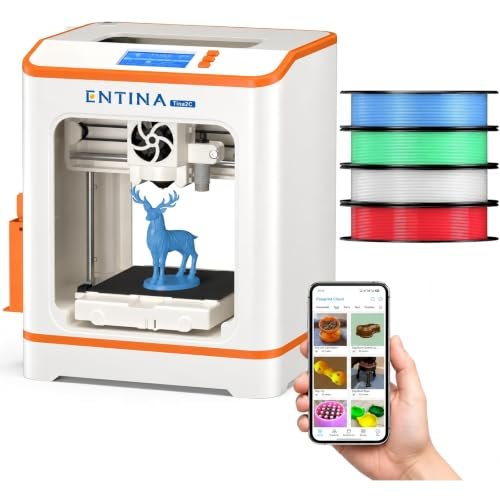
This all-in-one Tina2C Starter Bundle is designed to remove the guesswork of purchasing accessories separately. It comes packaged with four 250g spools of PLA filament in different colors, giving you everything needed to print multi-colored assemblies straight away. The pre-calibrated magnetic print bed ensures that children and parents can unbox the unit and begin printing simple household organizers or toys right on day one.
Key features that stand out:
– Comprehensive bundle including 1kg of multi-colored PLA filament
– Pre-assembled hardware ready to run within five minutes of opening the box
– Integrated 2.4GHz Wi-Fi module for cordless app-based printing
– Auto bed leveling with built-in power interruption recovery
– Bendable magnetic print bed surface for pop-off part removal
– Quiet internal stepper drivers suitable for home use
Pros:
– Included variety of filament colors lets you start printing without extra orders
– Straightforward mobile workflow requires no computer or technical slicing knowledge
– Small desktop footprint leaves plenty of room on standard desks
Cons:
– You will need to reload small spools more frequently during multi-part builds.
Best for: Gift-givers and parents seeking an all-in-one starter kit that works immediately out of the box.
Expert Opinion: Buying a first 3D printer can feel overwhelming when figuring out which filaments to match with it. This starter bundle eliminates that friction by bundling reliable filament with a machine that needs almost no manual tuning.
AOSEED AI 3D Printer for Kids
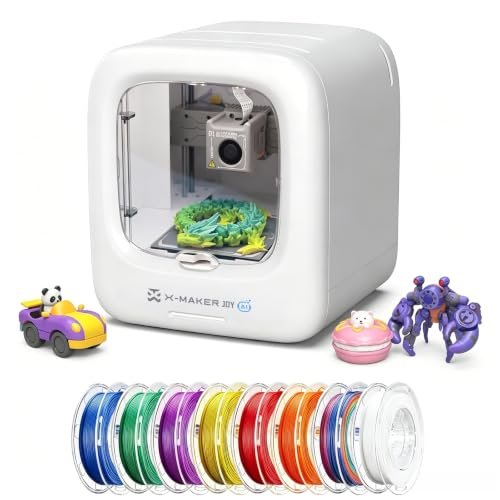
Designed from the ground up for younger inventors, the AOSEED AI printer functions like an at-home toy maker. Its companion software features AI-driven creative tools that turn simple text prompts, doodles, or personal photos into printable 3D models. The machine is fully enclosed with pinch-resistant safety panels, letting children explore digital fabrication with peace of mind for parents.
Key features that stand out:
– Child-friendly AI model generators including AI Doodle and AI MiniMe
– Fully enclosed, quiet body featuring pinch-resistant safety architecture
– Fast printing speeds reaching up to 400mm/s for rapid results
– Internal camera for live smartphone monitoring and time-lapse creation
– Auto-leveling platform that requires zero manual adjustments
– Starter pack with 8 mini rolls of non-toxic PLA and creative accessories
Pros:
– Enclosed chassis prevents curious fingers from touching hot components
– Built-in camera makes it fun to monitor progress from another room
– AI software tools let children create models without CAD training
Cons:
– Prints only one color per job, requiring multi-part assembly for multi-colored items.
Best for: Creative kids, schools, and families looking for an ultra-safe, software-guided introduction to digital design.
Expert Opinion: AOSEED understands that software is usually the biggest hurdle for young beginners. By combining generative AI sketching tools with a fully enclosed, safe enclosure, they have built an exceptionally engaging creative tool for children.
ELEGOO Centauri 2 Combo 3D Printer
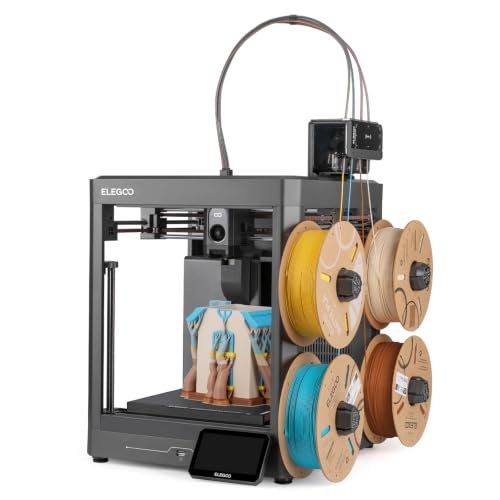
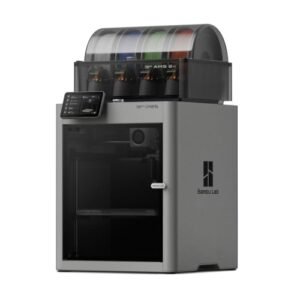
The ELEGOO Centauri 2 Combo brings sophisticated multi-color capability into an easy-to-use platform. Using its CANVAS 4-color automatic switching unit, the machine swaps filaments cleanly and handles RFID-tagged spools without tedious manual setup. Underneath, a high-speed CoreXY chassis guided by 22 onboard sensors monitors your print continuously to prevent common first-layer mishaps.
Key features that stand out:
– Automated 4-color printing system with RFID filament detection
– High-velocity 500mm/s CoreXY system with 20,000mm/s² acceleration
– Comprehensive array of 22 sensors providing automatic pre-flight checks
– Rigid die-cast aluminum frame with precision linear motion guides
– 5-inch responsive touchscreen running an intuitive guided interface
– Full ecosystem integration through ELEGOOSlicer and remote mobile apps
Pros:
– Clean multi-color prints without needing manual filament changes
– Rich sensor array stops prints before common errors ruin a whole job
– Rugged metal construction ensures sharp details during fast runs
Cons:
– Multi-color filament purging uses extra material and extends print times.
Best for: Beginners who want to skip the single-color barrier and jump straight into multi-color models and artistic decor.
Expert Opinion: Multi-color 3D printing used to be reserved for tinkerers willing to deal with endless jams. The Centauri 2 Combo streamlines the entire process with intelligent sensors and automated tensioning, making multi-material printing genuinely accessible.
MakeBuddy Smart5 AI 3D Printer for Beginners
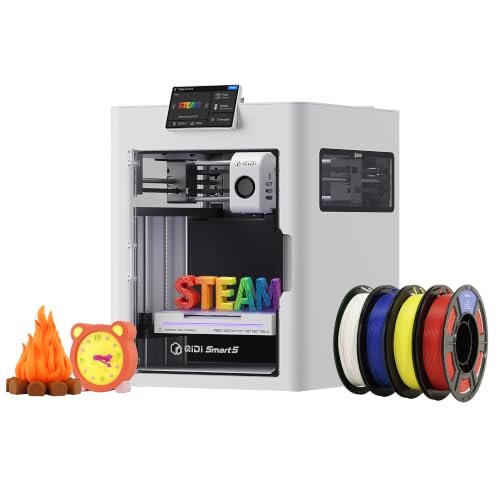
The MakeBuddy Smart5 incorporates advanced QIDI engineering into a beginner-friendly desktop machine. It features a completely enclosed workspace with dual-stage air filtration, pairing HEPA and activated carbon to trap ultrafine particles and cut down on odors. With one-tap AI photo generation, you can snap a real-world object on your tablet, convert it into a printable file, and print at 600mm/s without touching design software.
Key features that stand out:
– Fully enclosed enclosure with integrated HEPA and activated carbon filtration
– 600mm/s maximum travel speed on an ultra-stable CoreXY motion gantry
– QIDI-derived automatic leveling system for reliable first-layer adhesion
– Photo-to-3D AI model generation via the companion mobile app
– Capacious 180 x 180 x 180 mm build volume for functional household items
– Comprehensive starter kit including 4 PLA spools and STEAM course access
Pros:
– Built-in air filtration keeps bedroom or home office air smelling clean
– Enclosed CoreXY chassis provides fast, clean, and quiet operation
– Generous starter kit includes structured STEAM projects for beginners
Cons:
– The AI model generation requires cloud credits after using the initial five free passes.
Best for: Home offices, apartments, and hobbyists who want enclosed safety, fast speeds, and active odor filtration.
Expert Opinion: The Smart5 solves two common beginner complaints: printing odors and confusing slicing software. The filtration system keeps indoor environments fresh, while the automated leveling delivers consistent first layers without manual effort.
Tina2C Mini 3D Printer
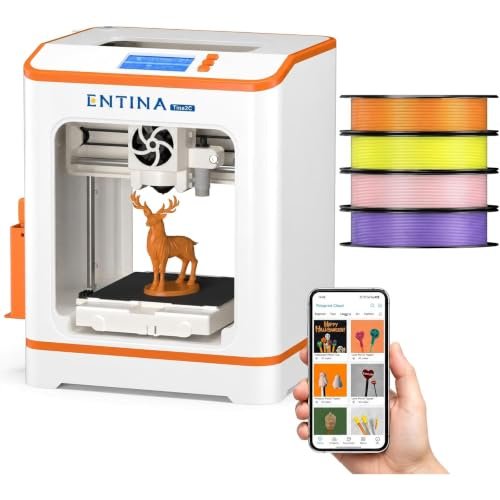
If you want a straightforward, no-nonsense tool to explore the hobby, this standalone Tina2C Mini keeps things simple and affordable. The machine comes 100% factory assembled, meaning you do not have to piece together aluminum extrusions or route motor wiring. Through its guided Poloprint interface, you can connect to Wi-Fi, select a model from the cloud, and begin printing small decorative models within minutes.
Key features that stand out:
– Out-of-the-box operation with a 5-minute initial setup cycle
– Factory-calibrated auto bed leveling eliminating mechanical knobs
– Cordless print management via smartphone through Poloprint Cloud
– Library of more than 3,500 tested models ready for one-tap printing
– Ultra-quiet stepper drivers engineered for noise-sensitive rooms
– Removable magnetic build plate for quick model detachment
Pros:
– Low cost makes it an easy entry point for curious newcomers
– Whispering operating volume won’t disrupt studying or remote work
– Zero mechanical assembly required before running your first test model
Cons:
– Does not include extra filament, so you must purchase a spool separately.
Best for: Budget-conscious beginners, college students, and casual hobbyists needing a small, quiet desk companion.
Expert Opinion: This standalone edition of the Tina2C remains one of the most reliable sub-$150 printers for learning the basics. It removes the mechanical frustrations of old-school DIY kits, allowing you to focus on the joy of printing.
Anycubic Kobra X Multicolor 3D Printer
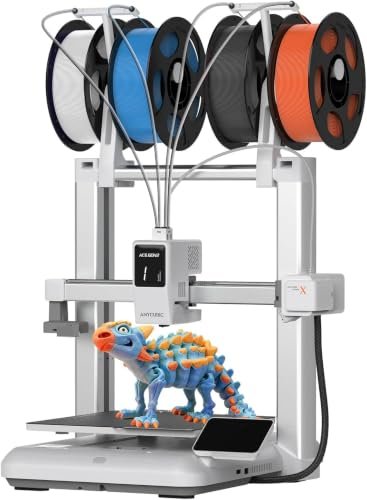
The Anycubic Kobra X brings serious workspace volume alongside expansive color capabilities. Built with native 4-color printing that expands up to 19 colors, it allows makers to tackle intricate, multi-hued figurines and signs. Its LeviQ 3.0 multi-point sensor calibration maps the bed with exceptional accuracy, while built-in AI spaghetti detection protects your machine against failed prints.
Key features that stand out:
– Native 4-color capacity expandable up to 19 distinct colors using ACE units
– Roomy 260 x 260 x 260 mm build envelope for larger functional prints
– LeviQ 3.0 automated 49-point matrix bed leveling
– Intelligent AI camera featuring spaghetti detection and foreign object alerts
– 300°C hardened steel nozzle ready for PLA, PETG, TPU, and ASA
– High-speed motion system reaching speeds up to 600mm/s
Pros:
– Generous build volume accommodates full-sized functional prints and helmets
– AI camera monitors prints and pauses the machine if errors occur
– Wide temperature range supports both common and engineering filaments
Cons:
– Filament is not included in the box and must be purchased separately.
Best for: Ambitious beginners and intermediate makers seeking large build volume, multi-color flexibility, and material versatility.
Expert Opinion: The Kobra X delivers an impressive feature set for its price tier. Combining high-speed multi-color printing, a large build area, and smart AI safety detection, it gives newcomers plenty of room to grow without needing an early upgrade.
Practical Buying Advice and Comparison Insights
Choosing among different beginner 3d printer reviews comes down to three main factors: available workspace, desired print speed, and whether you want multi-color capabilities.
If your goal is to let your children create miniature figures without dealing with complicated software, the Entina Tina2C series and AOSEED AI offer the quickest learning curve. Their compact beds and rich app catalogs make printing as simple as ordering an item on a phone.
For hobbyists wanting to design functional parts or household upgrades, print volume and speed matter much more. The FLASHFORGE Adventurer 5M and MakeBuddy Smart5 both run on rigid CoreXY frames reaching 600mm/s. The Smart5 stands out for living spaces thanks to its HEPA air filtration system, while the Adventurer 5M offers rapid toolless nozzle changes that simplify switching between fine detail and thicker layers.
Finally, if you want colorful models without painting, consider the ELEGOO Centauri 2 Combo and Anycubic Kobra X. Both feature multi-filament management systems, but the Kobra X offers a larger 260mm build plate and expansion up to 19 colors, whereas the Centauri 2 Combo emphasizes integrated sensor feedback to keep routine maintenance minimal.
Final Verdict
- Best Overall Value for Beginners: FLASHFORGE Adventurer 5M — It delivers unmatched speed, full auto-leveling, and rugged CoreXY reliability at an accessible price point.
- Best for Children and Classrooms: AOSEED AI 3D Printer — The fully enclosed safety shell, kid-friendly AI prompts, and built-in camera make it an engaging educational appliance.
- Best for Small Desks and Tight Budgets: Entina Tina2C Starter Bundle — Including 1kg of filament and needing zero assembly, it is the easiest way to start printing right out of the box.
- Best for Multi-Color Ambition: ELEGOO Centauri 2 Combo — With automated four-color switching and smart pre-print checks, it removes the headache from multi-color desktop fabrication.
Frequently Asked Questions About Beginner 3D Printer Reviews
What should I look for when reading beginner 3D printer reviews?
When evaluating beginner 3D printers, focus on three primary specifications: automatic bed leveling, assembly requirements, and software usability. Reliable auto-leveling removes the most common cause of early print failures. You should also look for a flexible build plate (like textured PEI) to make removing finished parts easy, as well as a user-friendly slicer or mobile app.
Is an enclosed 3D printer necessary for beginners?
An enclosed 3D printer is not strictly required if you only print with standard PLA or PETG filaments. However, an enclosure provides important safety benefits if you have young children or pets, shielding them from moving parts and hot nozzles. Enclosures also help contain operating noise and, when paired with HEPA or activated carbon filters, reduce airborne particles and plastic smells.
How much should a beginner spend on their first 3D printer?
Most newcomers will find capable beginner options between $120 and $450. Compact mini printers like the Entina Tina2C sit around the $120–$180 mark and are great for basic trinkets. If you want faster print speeds, larger build envelopes, or multi-color filament feeding, budget between $280 and $450 for machines like the FLASHFORGE Adventurer 5M or ELEGOO Centauri 2.
What is the easiest filament type for a beginner to use?
PLA (Polylactic Acid) is universally considered the best filament for beginners. It melts at relatively low temperatures (around 190°C–215°C), does not require an enclosure, produces very little odor, and resists warping on the build plate. Once you master PLA, you can easily transition to tougher materials like PETG or TPU.
What is the difference between CoreXY and standard bed-slinger printers?
Traditional “bed-slinger” printers move the print bed back and forth along the Y-axis while the printhead moves along the X and Z axes. CoreXY printers keep the bed moving only vertically (Z-axis) while two synchronized motors move the printhead rapidly in the X and Y directions. CoreXY machines generally deliver significantly higher print speeds and cleaner surface quality because the heavy print bed stays steady.
Do beginner 3D printers require 3D modeling skills?
No, you do not need 3D modeling or CAD skills to enjoy a 3D printer. Most modern machines connect directly to cloud libraries (such as Poloprint or Nexprint) with thousands of free, pre-tested models. You can also download millions of community designs from free websites like Printables and Thingiverse, slice them with a single click, and print immediately.
Why is automatic bed leveling so important on starter 3D printers?
Automatic bed leveling uses electronic or optical sensors to measure tiny variations across the build surface. The printer’s firmware then automatically adjusts the Z-height in real time during the first layer. This eliminates the tedious process of sliding paper under the nozzle to manually level the bed, which is where most newcomers encounter adhesion issues and failed prints.
Affiliate Disclosure: As an Amazon Associate, I earn from qualifying purchases made through links on this site.