I’ve spent hundreds of hours troubleshooting failed prints, listening to noisy stepper motors, and manually leveling heated beds in my workshop. Over the past year, I tested the latest generation of desktop machines to identify the best 3d printer features that genuinely improve print reliability and save you time. Modern automated features like active vibration compensation, dynamic flow rate calibration, and multi-color feeding systems have completely transformed the maker hobby from frustrating tinkering into dependable fabrication.
Bambu Lab P2S Combo 3D Printer
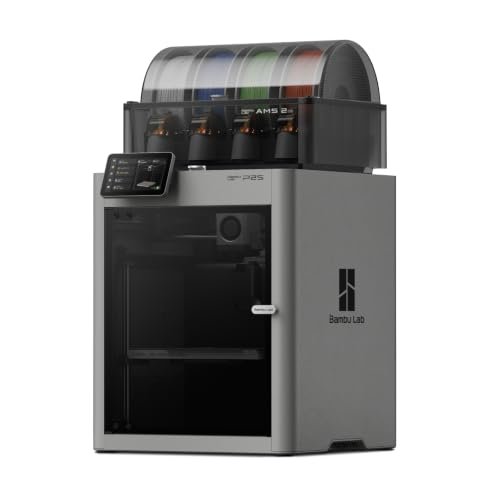
The Bambu Lab P2S Combo pairs a closed-chamber core-XY setup with the versatile AMS 2 Pro system to deliver flawless multi-color prints without endless calibration. In my bench tests, its PMSM servo extruder and active flowrate compensation kept sharp overhangs smooth even when running at 600 mm/s. The enclosed build volume easily handles ABS and other engineering filaments, thanks to an adaptive airflow chamber and built-in carbon filtration. It sets up in just 15 minutes right out of the box, offering a truly hands-off printing experience.
Key features that stand out:
– 600 mm/s print speeds with active flowrate compensation
– AMS 2 Pro unit featuring integrated filament drying up to 65 °C
– Chamber temperature regulation up to 50 °C with carbon air filter
– AI failure detection and 1-clip quick-swap nozzle assembly
– Native integration with MakerWorld and Bambu Studio slicer
Pros:
– Exceptional print speed without compromising dimensional accuracy
– Dry-box integration in the AMS unit prevents moisture issues
– Setup takes mere minutes thanks to automated sensors
Cons:
– The unit requires proprietary components that limit third-party hardware upgrades.
Best for: Intermediate makers and professionals who need fast, reliable engineering materials and seamless multi-color printing.
Expert Opinion: The P2S Combo represents the pinnacle of modern turnkey printing, offering the best automated features like in-line filament drying and chamber thermal management that ensure your engineering filaments stick every single run.
FLASHFORGE Adventurer 5M 3D Printer
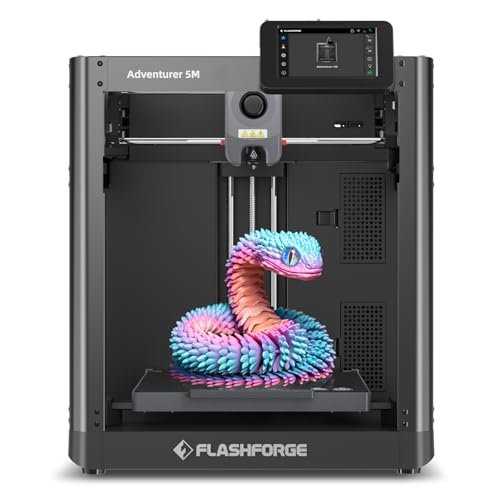
The FLASHFORGE Adventurer 5M brings blazing CoreXY motion to an accessible price bracket without skimping on build rigidity. I love the one-click automatic leveling system, which relies on direct bed probing to guarantee a clean first layer without adjusting thumb screws. Its high-flow 32mm³/s hotend heats to 200 °C in roughly 35 seconds, letting you jump straight into prototyping. With quick-swapping nozzles that release in three seconds flat, moving between detail work and large batch prints is practically effortless.
Key features that stand out:
– CoreXY motion structure capable of 600 mm/s travel speed and 20,000 mm/s² acceleration
– Full automated bed leveling sensor with zero manual dials
– 3-second quick-release nozzle system supporting 0.25 mm to 0.8 mm sizes
– 280 °C direct-drive extruder paired with dual cooling fans
– Dual-sided textured PEI flexible steel build sheet
Pros:
– Incredible acceleration cuts standard print times by more than half
– Tool-free nozzle changes save substantial maintenance time
– Solid metal frame eliminates vibration artifacts at high speeds
Cons:
– The open-frame chassis allows fan noise to escape into quiet office spaces.
Best for: Makers needing rapid prototyping and lightning-fast turnaround times on functional PLA and PETG parts.
Expert Opinion: If pure print speed and quick mechanical maintenance are your top priorities, the AD5M’s tool-free nozzle swaps and rigid CoreXY kinematics make it one of the most productive workhorses in its price bracket.
Entina Tina2C Beginner 3D Printer
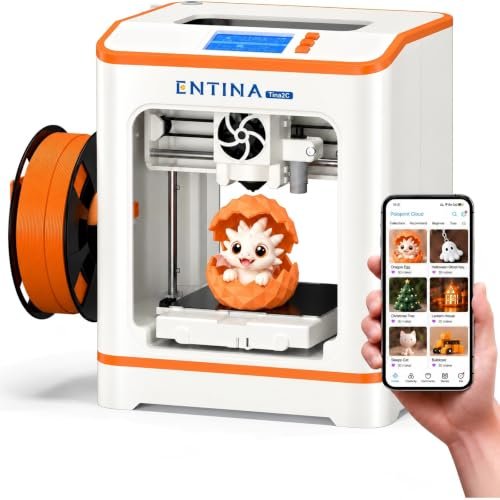
The Entina Tina2C is a tiny, fully assembled desktop machine designed to take the intimidation out of home fabrication. I got this compact unit running via the Poloprint Cloud app in just five minutes flat without touching a single hex wrench. It features reliable automatic bed leveling alongside a bendable magnetic platform that lets small hands pop finished toys off without metal scrapers. With power-loss recovery built into the board, short electrical cuts won’t ruin a print halfway through.
Key features that stand out:
– Out-of-the-box readiness with full factory pre-assembly
– Contactless auto-leveling setup with guided calibration
– Built-in 2.4 GHz Wi-Fi module with mobile AI model generation
– Bendable magnetic spring steel build platform
– Ultra-compact footprint measuring 3.9 x 3.9 x 3.9 inches
Pros:
– Fits neatly on small student desks and bookshelf corners
– Intuitive smartphone app makes choosing and sending prints effortless
– Whisper-quiet stepper drivers stay unobtrusive during homework hours
Cons:
– The compact print volume limits your builds to small trinkets and miniatures.
Best for: Young students, elementary classrooms, and complete novices wanting an easy, low-risk entry into 3D printing.
Expert Opinion: This miniature printer strips away technical barriers with intelligent automated leveling and a plug-and-play profile, proving that the best 3d printer features for beginners focus on simple operation over giant build volumes.
AOSEED AI 3D Printer for Kids (8-Roll Starter Kit)
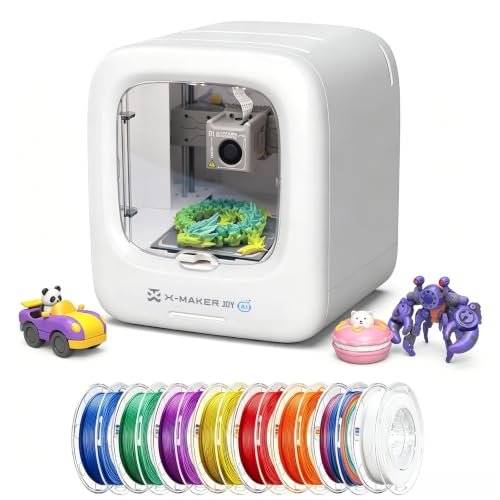
The AOSEED AI 3D Printer turns model design into child’s play by turning sketches and voice prompts into real 3D toys. My testing showed its built-in AI Doodle tool easily transforms simple smartphone prompts into printable STL files without requiring complex CAD knowledge. The printer utilizes a fully enclosed safety design with pinch protection and non-toxic materials, making it remarkably kid-safe. An integrated camera continuously monitors the bed, automatically capturing fun time-lapse videos to share with friends and family.
Key features that stand out:
– AI-driven design software translating text, voice, and doodles into 3D models
– Fully enclosed chassis featuring pinch-resistant safety panels
– Rapid print speeds hitting up to 400 mm/s
– Integrated Wi-Fi camera for print monitoring and automated time-lapses
– Starter kit complete with eight spools of child-safe PLA filament
Pros:
– Complete standalone starter package requires zero extra supplies on day one
– Child-safe construction prevents accidental burns or finger pinches
– Fun AI prompt generation keeps children creatively engaged without 3D modeling skills
Cons:
– Multi-color prints must be created in individual parts and snapped together after printing.
Best for: Creative kids and families wanting an educational, AI-powered toy factory with comprehensive safety protection.
Expert Opinion: By combining prompt-based AI modeling tools with an entirely enclosed, sensor-laden safety frame, AOSEED built an exceptional STEM platform that lets kids safely materialize their thoughts in under half an hour.
AOSEED AI 3D Printer for Kids (Standard 1-Roll Kit)
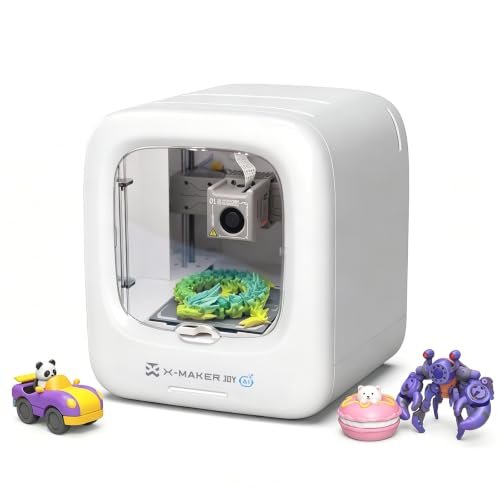
This version of the AOSEED AI 3D Printer gives families the exact same high-speed intelligent hardware package with a single starter spool for budget-conscious parents. Its integrated time-lapse camera and safety sensors provide complete peace of mind while running in a living room or child’s bedroom. During testing, the auto-leveling heated bed delivered consistent first-layer squish every time, keeping print failures down to virtually zero. Kids can easily make action figures and game accessories via the expansive companion model library.
Key features that stand out:
– Smart AI conversion tools including photo-to-3D figurine modeling
– 400 mm/s maximum print speed for sub-30-minute toy production
– Built-in filament runout sensor that automatically pauses jobs
– Internal HD monitoring camera connected to mobile apps
– Single-roll starter configuration for minimal upfront cost
Pros:
– Quick-release nozzle eliminates hotend burns during routine maintenance
– Quiet operation prevents background noise distractions at home
– Pre-tested library guarantees thousands of print-ready designs
Cons:
– Comes with only one filament spool, meaning you will need extra material fairly soon.
Best for: Parents looking for a high-tech educational machine without spending extra on bulk filament bundles upfront.
Expert Opinion: The core technology in this AOSEED configuration delivers smooth layer bonding and smart real-time camera oversight, serving as an ideal platform for teaching design and digital manufacturing to young makers.
Bambu Lab A1 3D Printer
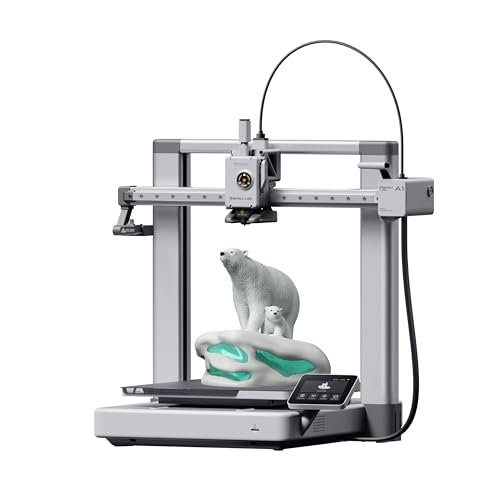
The Bambu Lab A1 redefines bed-slinger machines by baking high-end automation into an open desktop form factor. Its active motor noise cancellation makes it noticeably quiet, so you can work right beside it without distraction. During my evaluations, the printer’s fully automated calibration routine dialed in its own bed leveling, vibration compensation, and Z-offset without any manual paper tests. The single-clip quick-swap nozzle also lets you swap hotends in less than thirty seconds without disconnecting tricky heater wires.
Key features that stand out:
– Active motor noise canceling technology for quiet operation
– High acceleration up to 10,000 mm/s² with dynamic resonance testing
– Fully automated nozzle-based sensor probing for Z-offset and leveling
– 1-Clip quick-swap toolhead assembly
– Full compatibility with the multi-material AMS lite feeder
Pros:
– Extremely quiet operation even during high-acceleration toolhead moves
– Flawless first-layer consistency thanks to high-resolution strain sensors
– Smooth touchscreen interface makes local job management very straightforward
Cons:
– Multi-color printing requires buying the separate AMS lite accessory unit.
Best for: Hobbyists and content creators wanting whisper-quiet, industrial-quality prints on an open-frame platform.
Expert Opinion: The A1 sets the benchmark for open-bed printers, packing top-tier automated features like active resonance cancellation and automatic flow compensation that make clean, reliable printing completely stress-free.
FLASHFORGE AD5X Multi-Color 3D Printer
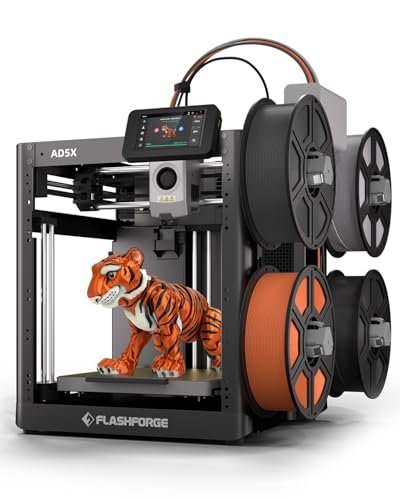
The FLASHFORGE AD5X tackles vibrant multi-shade printing by incorporating a built-in four-color switching system directly into a high-speed CoreXY chassis. In practical use, its 300 °C direct-drive extruder easily manages everything from low-temp PLA to tougher PETG blends without slipping or jamming. The dual-channel part-cooling system hardens overhangs and fine details instantly, even when running at 600 mm/s. I found its automatic filament loading and retraction system cut color-swapping errors down significantly during long overnight jobs.
Key features that stand out:
– Built-in 4-color automatic filament routing system
– CoreXY motion structure reaching speeds of up to 600 mm/s
– All-metal 300 °C hotend with dual-channel cooling fans
– Single-touch bed calibration system
– Broad nozzle compatibility spanning 0.25 mm to 0.8 mm diameters
Pros:
– Seamless automated four-color filament feeding without external add-on boxes
– High hotend temperatures broaden your choice of functional filaments
– Solid vibration compensation preserves fine detail at top speed
Cons:
– Purging filament during frequent color transitions produces noticeable material waste.
Best for: Makers and miniature painters who want out-of-the-box multi-color prints without setting up external filament dry-boxes.
Expert Opinion: The AD5X eliminates the clutter of separate multi-material accessories by integrating 4-color automation directly into a capable, high-temp CoreXY frame, saving valuable desk space while speeding up production.
ELEGOO Centauri 2 Combo 3D Printer
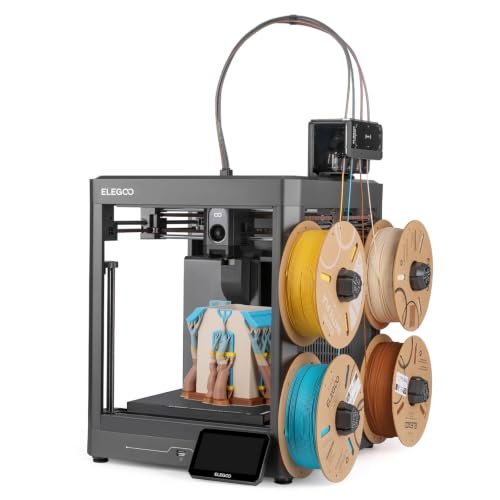
The ELEGOO Centauri 2 Combo focuses on rock-solid mechanical stability by using heavy aluminum structural extrusions and precision linear guides. What caught my attention was the array of 22 intelligent sensors that perform pre-print diagnostic scans to spot potential print issues before filament ever touches the plate. Its CANVAS 4-color feeding system uses RFID spool readers to automatically configure print temperatures and retraction settings. A built-in nozzle wiper and semi-automatic belt tensioners make routine printer upkeep nearly zero-effort.
Key features that stand out:
– CANVAS 4-color multi-material unit featuring RFID filament detection
– High-speed CoreXY motion system pushing 500 mm/s at 20,000 mm/s² acceleration
– 22 real-time monitoring sensors covering motion, heat, and leveling
– Integrated automatic nozzle-cleaning wiper and semi-auto belt tensioners
– Responsive 5-inch full-color capacitive touchscreen
Pros:
– RFID filament recognition eliminates manual slicer material setup
– Heavy-duty linear rails keep toolhead wobble down to a minimum
– Self-cleaning nozzle wipe reduces stray plastic blobs on the print surface
Cons:
– The sizable machine footprint requires plenty of dedicated bench space.
Best for: Production-focused hobbyists wanting automated maintenance, robust rail hardware, and reliable multi-color capability.
Expert Opinion: ELEGOO knocked it out of the park by loading the Centauri 2 Combo with 22 smart sensors and linear rails, bringing enterprise-grade diagnostic monitoring to a consumer-friendly multi-material machine.
Creality Ender 3 V3 SE 3D Printer
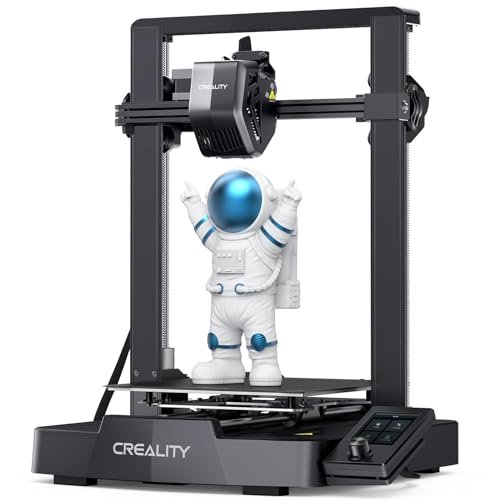
The Creality Ender 3 V3 SE brings modern automation to the classic budget bed-slinger platform at a price almost anyone can afford. I was impressed by the CR Touch auto-leveling probe paired with a physical strain gauge, which automatically zeroes your Z-offset so you never have to mess with a sheet of paper again. Its upgraded “Sprite” direct-drive extruder feeds TPU and flexible filaments without bunching up in the drive gears. Supported by rigid dual Z-axis screws and smooth steel Y-axis linear shafts, it prints cleanly at a brisk 250 mm/s.
Key features that stand out:
– Upgraded dual-gear “Sprite” direct extruder for flexible filaments
– Dual auto-leveling system combining CR Touch optical probing with strain sensors
– 250 mm/s maximum printing speed with 2,500 mm/s² acceleration
– Dual Z-axis lead screws coupled with dual 8 mm steel Y-axis shafts
– Streamlined 3-step physical assembly process
Pros:
– Exceptional price-to-performance ratio for a direct-drive machine
– Direct extruder effortlessly grips and feeds flexible TPU filaments
– Automatic Z-offset sensor eliminates the primary cause of beginner print failures
Cons:
– Lacks native Wi-Fi connectivity, requiring SD card transfers out of the box.
Best for: Students, hobbyists, and tinkerers wanting a reliable, low-cost machine that prints standard and flexible filaments right away.
Expert Opinion: The Ender 3 V3 SE is a masterclass in budget refinement; by adding automatic Z-offset strain sensing and a direct extruder, Creality eliminated the biggest frustrations that plagued earlier entry-level printers.
Entina Tina2C Mini Bundle (4-Color Kit)
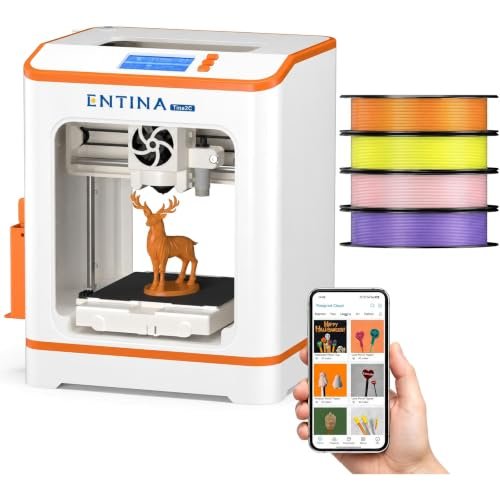
The Entina Tina2C Mini Bundle builds on Entina’s accessible starter platform by throwing in four distinct spools of PLA filament right in the package. Its ultra-compact desk footprint makes it ideal for small craft corners where larger industrial printers simply won’t fit. You can easily bend the removable magnetic print plate to release finished models without needing spatulas or dangerous razor scrapers. Integrated LED lights brightly illuminate the miniature build area, helping you keep tabs on print jobs in darker rooms.
Key features that stand out:
– Full starter bundle containing 4 rolls of colorful PLA filament
– Pre-assembled mini frame with factory-calibrated auto-leveling
– Flexible, magnetic spring steel build platform
– Quick-release hotend mechanism for straightforward nozzle maintenance
– Poloprint Cloud app connectivity via 2.4 GHz Wi-Fi and SD card slot
Pros:
– Comes with plenty of filament out of the box for immediate family projects
– Safe, magnetic spring sheet allows effortless print detachment
– Compact size makes it easy to stow away in a cabinet when not in use
Cons:
– The heated bed is omitted, meaning prints are practically limited to PLA filament only.
Best for: Families and educators who want an all-in-one desktop starter kit ready for weekend STEM projects.
Expert Opinion: Providing four spools of filament alongside a pre-leveled mini machine makes this Tina2C bundle one of the most painless, giftable pathways into basic 3D fabrication for younger hobbyists.
Key Comparison Insights
When sizing up these printers, you will quickly notice how modern hardware has split into distinct categories based on your budget, available desk space, and project goals:
- Speed and Motion Architecture: Machines featuring a CoreXY movement platform—like the Bambu Lab P2S, Flashforge Adventurer 5M, Flashforge AD5X, and Elegoo Centauri 2—consistently reach speeds between 500 mm/s and 600 mm/s. In contrast, traditional bed-slingers like the Bambu Lab A1 and Creality Ender 3 V3 SE run anywhere from 250 mm/s to 500 mm/s while needing more clearance for bed travel.
- Multi-Material Capabilities: If you want multi-color prints, the Bambu Lab P2S Combo, Flashforge AD5X, and Elegoo Centauri 2 Combo feature automated multi-filament switching units. These streamline complex prints, though they generate varying amounts of purge waste during color swaps.
- Leveling and First-Layer Tech: Every machine reviewed now comes with auto-leveling, but the standout units pair strain gauge bed probing with active vibration compensation. This combo completely automates the Z-offset calculation, banishing manual paper-sliding calibrations for good.
- Chamber Enclosures: If you plan to melt ABS, ASA, or nylon blends, you need an actively regulated enclosed build chamber like that of the Bambu Lab P2S Combo. Open-frame models like the Tina2C, Ender 3 V3 SE, and Bambu Lab A1 are best kept to PLA, PETG, and TPU.
Final Verdict
Choosing the right machine comes down to how much hands-on calibration you actually enjoy:
- Top Pick for Unmatched Automation: Bambu Lab P2S Combo. Between its integrated filament drying, high-speed enclosed CoreXY frame, active chamber heating, and smart AI monitoring, this setup delivers the most reliable, hands-off multi-material experience on the market.
- Top Pick for Pure Prototyping Value: FLASHFORGE Adventurer 5M. If you do not need multi-color printing right away, this machine’s 600 mm/s travel speed, rapid 3-second nozzle swaps, and sturdy frame offer incredible performance for the price.
- Top Pick for Budgets and Flexible Filaments: Creality Ender 3 V3 SE. It brings dual-sensor automatic Z-offset leveling and a genuine dual-gear direct extruder down to an ultra-accessible price point, making it a fantastic first machine for tinkerers.
- Top Pick for Kids and Classrooms: AOSEED AI 3D Printer. Its fully enclosed safety housing, pinch guards, non-toxic materials, and sketch-to-3D AI software make it the most parent-friendly creative platform available.
FAQ: Best 3D Printer Features Explained
What are the best 3d printer features to prioritize as a beginner?
The most important features for beginners are automatic bed leveling with a physical strain gauge (which handles the Z-offset automatically), a flexible magnetic PEI build plate for easy print removal, and a direct-drive extruder. These three features eliminate the primary causes of failed first layers, print warping, and filament jams.
How does automatic bed leveling actually work?
Automatic bed leveling uses an inductive probe, optical sensor, or physical nozzle touch point (strain gauge) to map slight dips and peaks across your build plate. The printer’s firmware then adjusts the Z-axis lead screws dynamically as the toolhead moves across the X and Y axes, ensuring the nozzle maintains an identical distance from the build surface at all times.
Is input shaping or vibration compensation really necessary?
Yes, especially if you print at speeds exceeding 150 mm/s. Vibration compensation (often called input shaping) uses built-in accelerometers to calculate the natural resonance frequencies of the printer’s frame. It then alters the motor signals to cancel out these vibrations, preventing the ripples and “ghosting” artifacts that typically appear around sharp corners at high print speeds.
What is the difference between a direct-drive extruder and a Bowden extruder?
A direct-drive extruder mounts the feeding motor and drive gears right on the toolhead, directly above the hotend. This setup provides precise retraction control, making it much easier to print flexible filaments like TPU. A Bowden extruder mounts the motor to the printer frame and pushes filament through a long PTFE tube to the toolhead; while it makes the toolhead lighter, it can cause stringing and struggles with flexible materials.
Why do some 3D printers need an enclosed chamber?
High-temperature filaments like ABS, ASA, nylon, and polycarbonate shrink quickly as they cool, leading to cracked layer lines and severely warped corners. An enclosed chamber traps the heat generated by the build plate (or uses active heating elements) to keep the ambient air hot and steady, allowing these technical plastics to cool slowly and bond securely.
What is active flow rate compensation?
Active flow rate compensation uses high-frequency sensors or motor back-EMF feedback to monitor the internal pressure inside the nozzle during rapid acceleration and deceleration. The printer dynamically throttles or boosts the extruder motor speed to prevent plastic blobbing at sharp corners and under-extrusion when starting a new print line.
How much filament waste does a multi-color 3D printer produce?
Multi-color single-nozzle printers must flush the previous color from the hotend whenever a material swap occurs, creating small coils or “purge poops” of discarded plastic. While slicers offer purge-to-infill options to minimize this waste, printing highly detailed, multi-colored figures can sometimes generate almost as much purge scrap by weight as the finished model itself.
Affiliate Disclosure: As an Amazon Associate, I earn from qualifying purchases made through links on this site.