When I first started tinkering with 3D printing years ago, figuring out the price of a good 3d printer felt like navigating a maze of hidden costs and confusing specs. After running spools of filament through everything from cheap mini rigs to high-speed enclosed setups, I’ve learned that price doesn’t always determine print quality. In this guide, I’ll walk you through seven reliable models across different budgets so you can find the right balance between cost, performance, and everyday convenience.
Bambu Lab P1S Combo
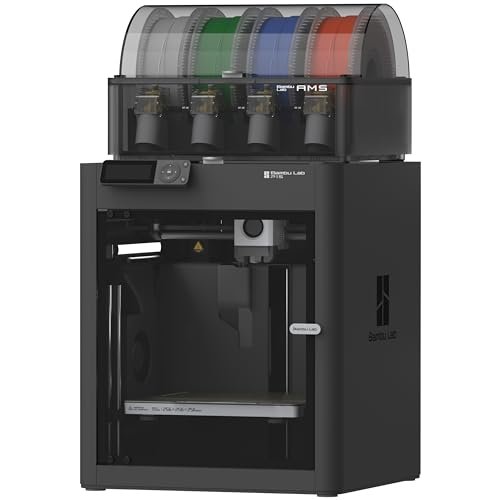
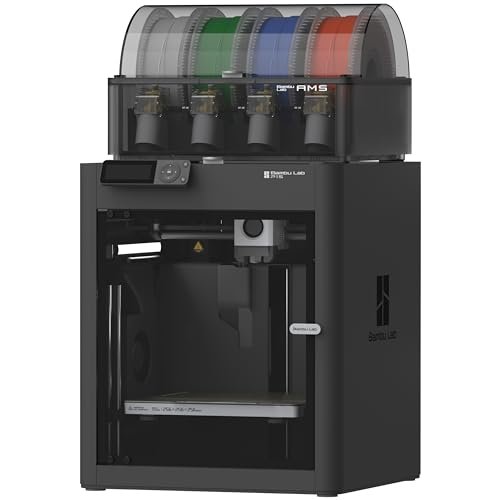
The Bambu Lab P1S Combo delivers industrial-grade reliability in an accessible package, featuring a fully enclosed chassis that effortlessly handles temperature-sensitive materials like ABS and ASA. Its integrated Automatic Material System (AMS) lets you explore up to 16 colors without messy manual filament swaps during complex prints. Thanks to its rigid CoreXY structure and lightning-fast 500mm/s speeds, this machine cuts down turnaround times dramatically without sacrificing fine surface detail. Setting it up takes roughly 15 minutes, making high-end multi-material fabrication straightforward right out of the box.
Key features that stand out:
– Up to 16-color printing capability via the included Bambu Lab AMS unit
– CoreXY motion system reaching print speeds up to 500mm/s and 20000 mm/s² acceleration
– Fully enclosed chamber engineered for high-temp filaments like ABS, ASA, and PETG
– Automated bed leveling and vibration compensation for dependable first layers
– Straightforward out-of-the-box setup taking roughly 15 minutes
Pros:
– Multi-color switching works smoothly with minimal user intervention
– High-speed printing drastically reduces standard print times
– Enclosed frame controls ambient temperatures and contains filament odors
Cons:
– It is not recommended for abrasive carbon-fiber filaments straight out of the box.
– The unit can be quite loud when running at maximum acceleration.
Best for: Intermediate hobbyists and small business owners who want reliable multi-color prints without constant manual tweaking.
Expert Opinion: The P1S Combo sets the standard for consumer-grade multi-color manufacturing, offering closed-chamber reliability that easily justifies its mid-tier price tag.
Bambu Lab P2S Combo
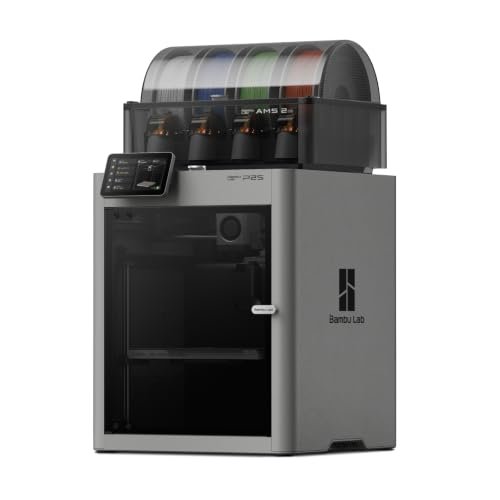
Stepping into next-generation desktop manufacturing, the Bambu Lab P2S Combo pairs a 600mm/s maximum print speed with a PMSM Servo Extruder for exceptional corner sharpness. It integrates the AMS 2 Pro system, which features active filament drying up to 65°C to keep hydroscopic filaments print-ready at all times. The built-in adaptive airflow management balances heat retention and cooling automatically, letting you jump between basic PLA and engineering plastics seamlessly. With integrated AI failure detection and automated sensor calibration, this package minimizes failed prints before they waste expensive material.
Key features that stand out:
– PMSM Servo Extruder delivering 600mm/s speed with Active Flowrate Compensation
– Included AMS 2 Pro with integrated heated filament drying up to 65°C
– Smart Adaptive Airflow System with a chamber temperature retention mode up to 50°C
– Integrated AI-driven print monitoring and quick-swap nozzle design
– Direct MakerWorld model integration through Bambu Studio and Bambu Handy
Pros:
– Built-in filament dryer keeps materials dry during multi-day jobs
– Active flowrate compensation produces clean layer seams and sharp corners
– AI error detection saves material by pausing failed prints early
Cons:
– The premium price tag might deter those looking for a casual hobby machine.
– Requires dedicated bench space due to the footprint of the enclosure and drying unit.
Best for: Serious makers, engineers, and power users looking for automated material conditioning and fast production speeds.
Expert Opinion: If your workflow relies on moisture-sensitive filaments like nylon or PETG, the P2S Combo’s integrated drying chamber and flow compensation justify every cent of its premium cost.
Entina Tina2C 3D Printer
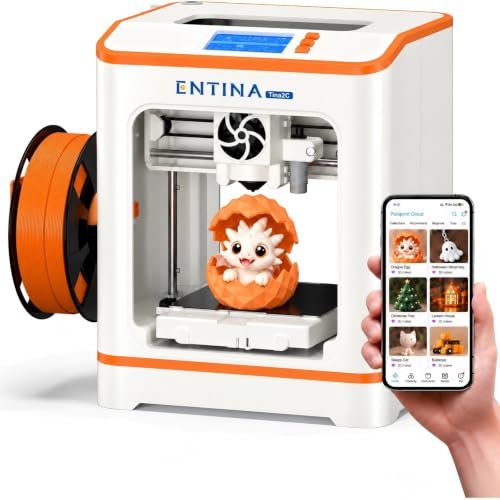
The Entina Tina2C is a mini, budget-conscious machine designed to remove the intimidating technical barriers for first-time builders and kids. It arrives fully assembled from the factory, allowing you to calibrate and produce your first test miniature in roughly five minutes. The companion Poloprint app introduces AI-powered photo-to-3D tools alongside access to over 3,500 ready-to-print creative designs over 2.4GHz Wi-Fi. A flexible magnetic build surface ensures that small toys and STEM models pop free without scrapers or damaged parts.
Key features that stand out:
– Factory-assembled setup requiring zero manual construction or calibration
– Wireless printing via 2.4GHz Wi-Fi and Poloprint Cloud app integration
– Automated bed leveling paired with power-loss resume functionality
– Removable magnetic build plate with a flexible spring-steel core
– Compact 3.9 x 3.9 x 3.9-inch build volume fitting neatly on small desks
Pros:
– Incredibly affordable entry price for young learners and classrooms
– Small footprint takes up no more room than a standard desktop lamp
– App-based model library lets beginners print without complex slicer knowledge
Cons:
– The tiny build volume limits you to small figurines and minor functional parts.
– Lacks a heated bed, which restricts filament choices mostly to standard PLA.
Best for: Young students, teachers, and curious beginners seeking an inexpensive entry point into 3D printing.
Expert Opinion: While limited in build volume, the Tina2C delivers an astonishingly frustration-free first-time experience at an entry-level price that anyone can afford.
Entina Tina2 Plus
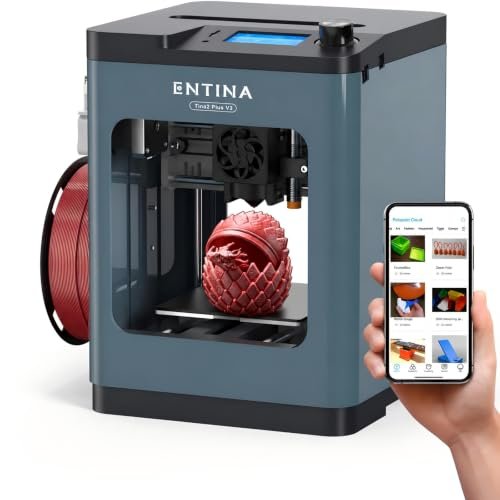
The Entina Tina2 Plus takes the simplicity of mini 3D printers and elevates it with a rapid 250mm/s print speed and an upgraded motion system. It uses an ultra-fast 40-second ceramic hotend paired with a quick-swap nozzle design, reducing warm-up delays so students can quickly see their designs come to life. The addition of a dual Z-axis structure provides extra rigidity, keeping layer alignment steady even during quick directional changes. With a semi-enclosed body and auto-leveling PEI build plate, it balances tabletop safety with reliable print adhesion.
Key features that stand out:
– Upgraded printing speeds reaching up to 250mm/s
– Fast-heating ceramic hotend reaching target temperatures in 40 seconds
– Dual Z-axis lead screws for improved mechanical stability and layer consistency
– Textured PEI spring-steel build platform for clean print release
– Partially enclosed safety frame designed to prevent accidental contact with hot parts
Pros:
– Much faster than traditional mini printers without losing print accuracy
– PEI build plate holds prints tight when hot and releases them easily when cool
– Safe frame styling makes it well-suited for supervised classroom environments
Cons:
– The build envelope remains relatively compact compared to standard desktop bedslingers.
– Cooling fans can be noticeably noisy when operating at maximum speed.
Best for: Classrooms, makerspaces, and parents who want a faster, safer, and more rigid compact printer.
Expert Opinion: The Tina2 Plus successfully solves the slow speed problem of entry-level educational printers, making it a capable learning tool that will not keep kids waiting around.
FLASHFORGE Adventurer 5M
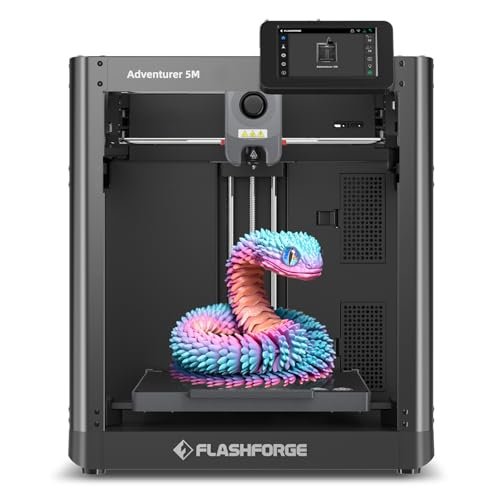
The FLASHFORGE Adventurer 5M brings commercial-grade CoreXY performance down to an accessible price point, pushing speeds up to 600mm/s with 20000mm/s² acceleration. Its full one-click automatic leveling system maps the bed using real-time sensors, entirely eliminating the need for manual paper tests or Z-offset adjustments. The smart hotend heats to 200°C in just 35 seconds and allows tool-free nozzle swaps in as little as three seconds. Paired with vibration compensation, this open-frame speedster finishes multi-hour print jobs in a fraction of the usual time.
Key features that stand out:
– High-efficiency CoreXY structure capable of 600mm/s travel speeds
– Fully automated click-and-print leveling system with zero manual adjustment
– Quick-release nozzle assembly that swaps out in roughly three seconds
– High-flow 32mm³/s hotend reaching 200°C in 35 seconds
– Dual-fan auxiliary cooling matched with built-in vibration compensation
Pros:
– Fast CoreXY kinematics at a very competitive mid-range price
– Effortless nozzle swaps simplify maintenance and nozzle size experiments
– Built-in vibration dampening keeps high-speed prints remarkably clean
Cons:
– The open-frame design makes printing draft-sensitive filaments like ABS challenging.
– Spool holder positioning on the rear requires extra clearance behind the machine.
Best for: Rapid prototyping, makers who value short print times, and hobbyists stepping up from budget bedslingers.
Expert Opinion: If pure speed and hands-off first layers are your priorities, the Adventurer 5M offers some of the best high-speed CoreXY value currently available.
Creality Ender 3 V3 SE (High-Speed Edition)
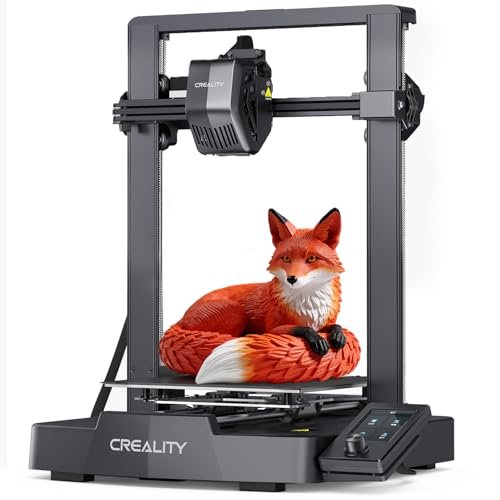
The Creality Ender 3 V3 SE modernizes the world’s most popular budget platform with up to 250mm/s print speeds and hassle-free CR Touch auto-leveling. It features the proven Sprite Direct Drive Extruder, which handles flexible filaments like TPU just as reliably as standard PLA and PETG. Dual synchronized Z-axis screws and rigid Y-axis linear shafts work together to eliminate bed wobble and maintain clean vertical walls. With its 32-bit silent mainboard, you can easily keep this printer running in a home office or bedroom without constant motor whining.
Key features that stand out:
– Upgraded printing speeds up to 250mm/s with 2500mm/s² acceleration
– CR Touch automated bed leveling combined with an automated strain sensor for Z-offset
– Reliable Sprite direct drive extruder compatible with PLA, PETG, and flexible TPU
– Dual synchronized Z-axis lead screws paired with sturdy 8mm linear shafts on the Y-axis
– Silent 32-bit stepper driver motherboard for quiet operation
Pros:
– Outstanding price-to-performance ratio for a standard-sized build bed
– Direct drive extruder feeds flexible TPU filament without jamming
– Automated Z-offset eliminates the biggest headache for beginner hobbyists
Cons:
– The standard PC build sheet can wear out faster than premium PEI plates.
– Bowden reverse guide tube can occasionally snag on wide spools if not angled properly.
Best for: Budget-focused makers wanting a dependable workhorse for household fixes, prototypes, and hobby prints.
Expert Opinion: Creality fixed the biggest pain points of classic budget printing here; the automated Z-offset and direct-drive feeding make this version a joy to use at an entry-level cost.
Creality Ender 3 V3 SE (Standard Edition)

Serving as the benchmark for budget-friendly printing, this edition of the Creality Ender 3 V3 SE focuses on hassle-free assembly, taking only 20 minutes from box to bench. It incorporates an automatic filament load and unload routine, feeding or retracting material with a simple screen tap. The CR Touch and strain gauge sensors perform hands-off calibration across the build area, taking the guesswork out of the all-important first layer. Driven by a lightweight dual-gear drive mechanism, it delivers dependable extrusion across long prints without slipping.
Key features that stand out:
– Straightforward 3-step assembly process that takes around 20 minutes
– Automated filament extrusion and retraction functions controlled via the screen
– CR Touch auto-leveling paired with integrated strain sensor technology
– Hardened dual steel linear shafts on the Y-axis for smooth bed travel
– Upgraded Sprite extruder mechanism with over 500,000 units tested worldwide
Pros:
– Extremely cost-effective platform with broad community support and spare parts
– Auto filament load/unload prevents clogged heat breaks during material changes
– Stable motion components deliver consistent layer stacking out of the box
Cons:
– Max hotend temperatures prevent running advanced engineering plastics like nylon.
– The user interface display looks basic compared to modern full-color touchscreens.
Best for: Beginners, DIY enthusiasts on a tight budget, and tinkerers wanting a reliable base machine to learn on.
Expert Opinion: You do not need to spend a fortune to get into modern 3D printing; this machine proves that entry-level costs can still get you automatic leveling and dependable direct-drive extrusion.
Price-to-Performance Insights
When assessing the price of a good 3d printer, matching your practical requirements with the right price tier prevents you from either overspending or ending up with a frustrating machine:
- Entry-Level and Compact Options (Under $200): Printers like the Entina Tina2C and Ender 3 V3 SE show that basic pricing no longer means poor quality. You get automated leveling sensors and direct extruders, making them great for learning without financial risk.
- Mid-Range Speed Machines ($250 – $400): Stepping up to models like the FLASHFORGE Adventurer 5M introduces rigid CoreXY kinematics and 600mm/s print rates, drastically reducing cycle times for prototyping.
- Enclosed Multi-Material Workhorses ($500+): Premium units like the Bambu Lab P1S and P2S Combo incorporate multi-material management and climate enclosures, saving countless hours of manual labor if you need functional, multi-colored parts.
Final Verdict
Choosing the right printer comes down to what you value most—budget, convenience, or raw capability:
- The Sensible Value Winner: The Creality Ender 3 V3 SE remains the undisputed king of affordable utility, bringing automatic calibration and flexible material printing to a sub-$200 price point.
- The Speed and Performance Pick: If you want fast turnaround times without breaking the bank, the FLASHFORGE Adventurer 5M outpaces traditional bedslingers at a fraction of the cost of commercial hardware.
- The Complete Creative Suite: For makers who want seamless multi-color printing, automated chamber regulation, and minimal hands-on troubleshooting, the Bambu Lab P1S Combo delivers the best overall experience for your money.
FAQ: Understanding the Price of a Good 3D Printer
What is the average price of a good 3d printer today?
A reliable entry-level 3D printer typically costs between $180 and $300. In this bracket, you can expect automated bed leveling, quiet mainboards, and direct-drive extruders. If you want high-speed CoreXY designs, enclosed chambers, or multi-filament capabilities, prices usually range from $400 to $900.
Does a higher 3d printer price guarantee better print quality?
Not necessarily. Most modern FDM 3D printers, regardless of price, use similar 0.4mm brass nozzles and can produce nearly identical surface finishes at moderate speeds. What higher price tags buy you is convenience: faster print speeds, automated calibration, enclosed chambers for technical filaments, and multi-color feeding systems.
Beyond the initial hardware cost, you should account for printing filament ($15 to $25 per 1kg spool of PLA/PETG), replacement nozzles ($5 to $15), spare build plates ($15 to $30), and occasionally slicing software plugins or maintenance tools. Electricity costs are generally minimal, rarely adding more than a few dollars to your monthly utility bill.
Is an enclosed 3D printer worth the extra money?
An enclosure is worth the extra investment if you plan to print materials beyond basic PLA and PETG. Filaments like ABS, ASA, and nylon require high, stable ambient temperatures to prevent warping and layer splitting. Enclosures also help contain ultrafine particles, VOCs, and cooling fan noise.
Can beginners start with a budget 3d printer under $200?
Yes. Modern entry-level machines, such as the Creality Ender 3 V3 SE or Entina Tina2C, come mostly pre-assembled with built-in auto-leveling sensors. Unlike early budget kits that required manual calibration and soldering, today’s affordable printers are ready to produce decent parts within minutes of unboxing.
How much should I spend if I want to print in multiple colors?
Reliable multi-color systems start around $550 to $800. While some tinkerers modify cheaper printers with dual extruders, integrated solutions like the Bambu Lab AMS ecosystem automate filament retraction, flushing, and spool management, saving significant time and reducing failed prints.
Affiliate Disclosure: As an Amazon Associate, I earn from qualifying purchases made through links on this site.