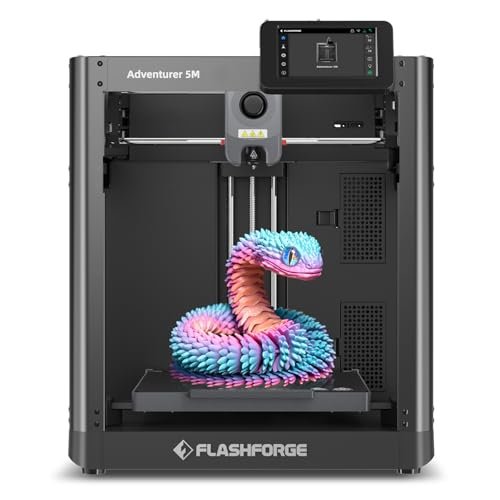
I spent the last several months running hundreds of test prints across top-tier machines to find the 2026 best 3d printer options for workshops, classrooms, and home desks. Between testing rapid CoreXY acceleration and troubleshooting multi-color filament systems, I evaluated how easily each machine delivers crisp, reliable parts right out of the box. Below, you will discover hands-on breakdowns of the top seven performers to help you pick the right machine for your creative projects and budget.
FLASHFORGE Adventurer 5M 3D Printer
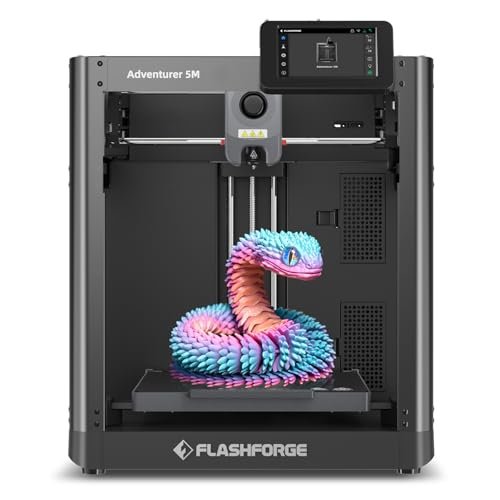
The FLASHFORGE Adventurer 5M brings dependable high-speed printing to an open-frame design without breaking the bank. During setup, the one-click automatic bed leveling took under ten minutes to dial in a clean first layer without any manual paper sliding. Its CoreXY motion system paired with a high-flow 32mm³/s hotend lets you print functional prototypes in a fraction of standard print times. Swapping print setups is remarkably simple thanks to the tool-free 3-second quick-swap nozzle, giving you rapid flexibility between fine detail and thick drafts.
Key features that stand out:
– All-metal CoreXY frame with up to 600mm/s speed and 20,000mm/s² acceleration
– Fully automated one-click bed leveling sensor
– Quick-swap nozzle design with 35-second heat-up time to 200°C
– Direct-drive extruder reaching 280°C with dual-fan auxiliary cooling
– Built-in vibration compensation algorithm for cleaner surface finishes
– Remote monitoring and slicing via the Flash Studio ecosystem
Pros:
– Fast print speeds significantly cut down prototyping time
– Effortless nozzle swaps require no tools or exposed wiring
– Reliable first-layer adhesion directly onto the textured PEI sheet
Cons:
– The open-frame structure lets out fan noise and struggles with temperature-sensitive materials like ABS.
Best for: Hobbyists and makers looking for high-speed PLA and PETG printing on a sensible budget.
Expert Opinion: The Adventurer 5M delivers raw speed and reliable calibration at an approachable price point, making it a great workhorse if you don’t require an enclosed chamber for engineering filaments.
FLASHFORGE AD5X Multi-Material 3D Printer
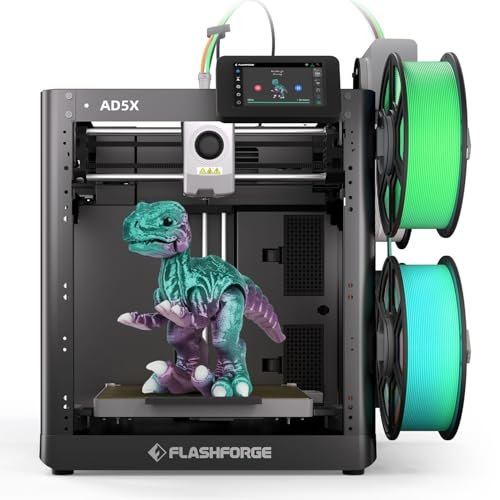
The FLASHFORGE AD5X tackles multicolor printing with a clever space-saving layout that keeps your workspace tidy. Its Intelligent Filament System (IFS) positions four spools side-by-side on the unit rather than stacking them high, making spool changes easy while saving overhead clearance. Running on a rigid all-metal CoreXY structure, the machine dampens vibration cleanly to keep multicolor transitions sharp and avoid layer shifts. It handles tough composites like PLA-CF and PETG-CF just as easily as standard PLA, providing great versatility for functional multicolor builds.
Key features that stand out:
– 4-color multi-material printing via integrated Intelligent Filament System (IFS)
– High-speed CoreXY motion capable of up to 600mm/s and 20,000mm/s² acceleration
– Full-grid automatic leveling measuring multiple reference points
– Wide filament compatibility including PLA, PETG, TPU, and carbon-fiber blends
– Space-efficient side-by-side 4-spool mounting layout
– Built-in resonance suppression to reduce ringing artifacts
Pros:
– Compact footprint compared to other external multi-material setups
– Smooth multi-color and multi-material transitions during long prints
– Excellent rigidity produces sharp corners even at elevated speeds
Cons:
– Multi-material purging adds noticeable print time and generates extra filament waste on complex models.
Best for: Designers and makers wanting clean multicolor functional prints without losing valuable desk space.
Expert Opinion: Flashforge has made multi-material printing far less intimidating with the AD5X, creating a practical balance between automated filament switching and a compact desktop footprint.
AOSEED AI 3D Printer for Kids
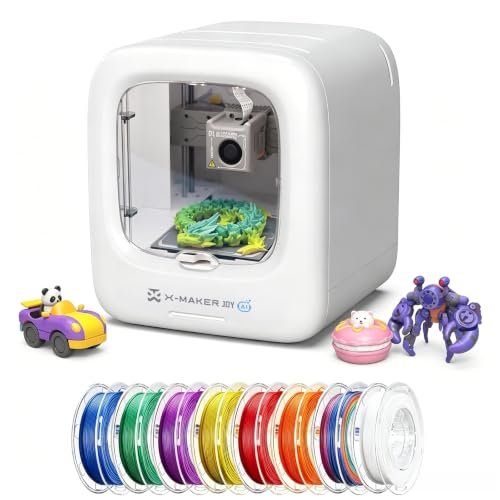
The AOSEED AI 3D printer turns creative toy-making into an accessible family activity through smart software integration. Its standout highlight is the AI-powered Doodle and MiniMe generation, allowing kids to transform voice prompts or sketches into printable 3D models without 3D modeling skills. The fully enclosed, pinch-resistant chassis gives parents peace of mind, while the machine runs quietly in bedrooms or living areas. With safety-certified TÜV Rheinland tested PLA and an extensive model catalog, kids can produce personalized toys in roughly twenty minutes.
Key features that stand out:
– AI-assisted design tools converting voice, text, and photos into 3D files
– Fully enclosed, safe design with pinch protection and quiet motors
– Speeds up to 400mm/s with 0.05mm layer precision
– Integrated camera for progress monitoring and automated time-lapse videos
– Curated library of 20,000+ kid-friendly, pre-tested models
– Complete starter kit including 8 rolls of filament and tools
Pros:
– Kid-safe design minimizes burn and pinch risks effectively
– Intuitive software lets younger children design toys independently
– Fast heat-up and print cycles keep children engaged without long waits
Cons:
– The print volume is quite compact, limiting you to small toys and trinkets.
Best for: Families, young creators, and elementary STEM classrooms wanting a guided, safe introduction to 3D printing.
Expert Opinion: AOSEED bridges the gap between complex CAD software and a child’s imagination by using thoughtful AI generation wrapped in a safety-first hardware package.
FLASHFORGE AD5X Multi-Color 3D Printer (300°C Edition)
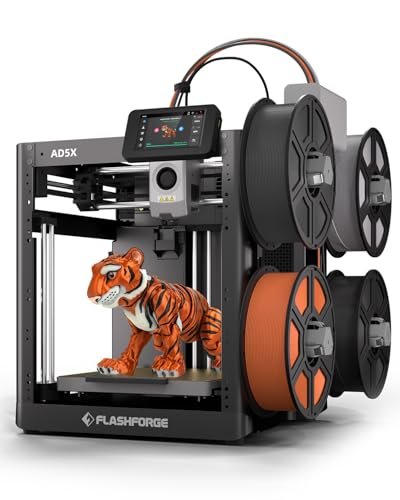
This high-temp configuration of the FLASHFORGE AD5X expands your printing potential with an upgraded 300°C direct-drive extruder. That extra thermal capability opens the door to demanding technical materials while retaining vibrant 4-color printing across complex multi-part designs. The advanced dual-channel cooling fan locks fine details in place rapidly, preventing color bleeds or drooping overhangs during high-speed runs. It also supports multiple swappable nozzle diameters from 0.25mm up to 0.8mm, so you can tailor the printer for miniature figurines or chunky mechanical parts.
Key features that stand out:
– Upgraded 300°C direct-drive extruder for expanded engineering filament support
– 4-color multi-spool automated filament management
– 1-click automatic bed calibration system
– Support for four nozzle sizes ranging from 0.25mm to 0.8mm
– Dual-channel cooling system preventing heat creep and bridging flaws
– Remote monitoring and operation through the Flash Maker mobile app
Pros:
– Higher hotend temperature supports a broader selection of technical filaments
– Clean layer consistency thanks to responsive vibration compensation
– Flexible nozzle choices allow you to balance print speed against fine detail
Cons:
– Calibrating custom high-temperature filaments requires some trial-and-error in the slicer settings.
Best for: Advanced hobbyists and prop makers who need both multi-color aesthetics and high-temperature material strength.
Expert Opinion: The upgraded 300°C extruder makes this AD5X variant a serious dual-threat, letting you tackle artistic multicolor display pieces and resilient mechanical components on the same bed.
FLASHFORGE Adventurer 5M Pro 3D Printer
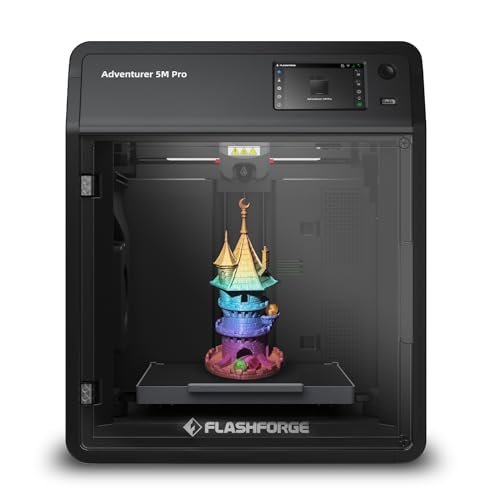
The FLASHFORGE Adventurer 5M Pro takes the core speed of the standard 5M and encloses it for serious indoor and workshop use. Its dual filtration system with HEPA and activated carbon catches ultrafine particles and odors, making it comfortable to run engineering filaments in a home office. Inside the fully enclosed, thermally stable chamber, printing tricky materials like ABS, ASA, and PETG-CF is reliable and resistant to corner warping. On top of that, the sub-50dB low-noise motion system ensures you can work alongside the machine without distracting mechanical whine.
Key features that stand out:
– Fully enclosed build chamber with dual HEPA and activated carbon air filtration
– Ultra-quiet operation rated under 50dB
– 280°C hotend paired with a 110°C heated print bed
– 3-second quick-swap nozzle mechanism for quick changes
– CoreXY motion reaching 600mm/s and 20,000mm/s² acceleration
– Built-in chamber camera for live feeds and automatic time-lapses
Pros:
– Enclosure keeps ambient temperatures stable to prevent warped prints
– Air filtration keeps plastic smells and micro-particles out of your living space
– Very quiet motion makes it pleasant for bedroom or office printing
Cons:
– The interior build volume is snug, which limits the size of one-piece functional prints.
Best for: Makers, educators, and apartment dwellers who want to print engineering filaments safely and quietly.
Expert Opinion: The 5M Pro is one of the most balanced turnkey enclosed printers around, successfully blending high-speed CoreXY mechanics with clean air filtration and whisper-quiet operation.
Creality K2 Plus Combo 2026 Multi Color 3D Printer
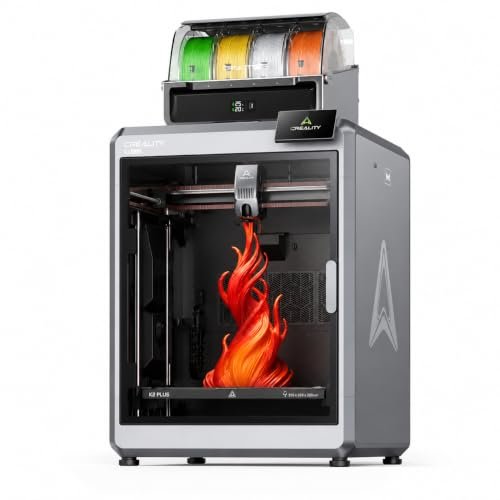
The Creality K2 Plus Combo 2026 is built for makers who refuse to compromise on size or color capabilities. Featuring a massive 350×350×350mm build volume, it lets you print full-scale cosplay helmets and large mechanical assemblies in a single go. The included Color Filament System (CFS) provides automated 4-color switching while maintaining sealed, heated filament drying to protect moisture-sensitive materials. Meanwhile, an array of dual AI cameras and 18 smart sensors monitors the print bed continuously, automatically catching spaghetti failures and extrusion anomalies before filament is wasted.
Key features that stand out:
– Huge 350×350×350mm build envelope housed in an aerospace-grade aluminum frame
– CFS unit offering 4-color automated feeding, sealed storage, and filament drying
– Up to 16-color capacity when linking multiple CFS modules
– CoreXY motion delivering 600mm/s speed with 30,000mm/s² acceleration
– Dual AI cameras and 18 onboard sensors for proactive failure detection
– Quiet operation rated at just 45dB despite its industrial frame size
Pros:
– Expansive build volume accommodates large one-piece models easily
– Integrated filament drying in the CFS protects nylon and PETG from moisture
– Proactive AI failure detection saves full spools of filament from accidental tangles
Cons:
– The machine has a massive physical footprint and is heavy to move or position on standard desks.
Best for: Serious makers, cosplay builders, and small-batch production shops needing massive scale, multi-color utility, and smart automation.
Expert Opinion: If you have the bench space, the K2 Plus Combo stands out as a true manufacturing powerhouse that solves both size constraints and filament moisture issues in one integrated package.
Entina Tina2C 3D Printer for Beginners & Kids
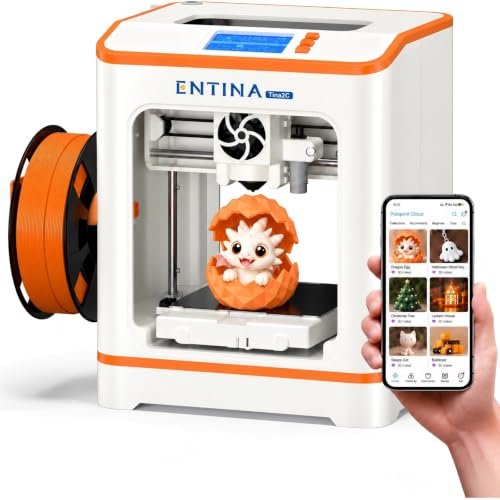
The Entina Tina2C focuses on eliminating the frustration often associated with entry-level 3D printing. It arrives fully assembled and ready to print within 5 minutes, making it an easy pick for kids, classrooms, and curious beginners. Operating the printer is straightforward using the Poloprint Cloud app, which hosts thousands of ready-to-print models alongside basic AI text-to-3D generation. The flexible magnetic build plate ensures that when prints finish, a gentle bend pops them off cleanly without needing scrapers or sharp tools.
Key features that stand out:
– True plug-and-play setup requiring no mechanical assembly
– Compact 3.9 x 3.9 x 3.9-inch build volume with built-in LED task lighting
– Factory-calibrated auto-leveling with reliable power-loss recovery
– Wireless 2.4GHz Wi-Fi control and SD card offline printing
– Mobile app integration featuring AI-assisted model generation and 3,500+ designs
– Flexible magnetic build surface and removable quick-swap nozzle
Pros:
– Highly affordable entry point into the world of 3D printing
– Small footprint fits neatly on any school desk or bedroom shelf
– Magnetic build surface makes part removal safe and simple for younger users
Cons:
– The 3.9-inch build area cannot accommodate larger models or functional tools.
Best for: Students, younger children, and total beginners who want an affordable, no-fuss introduction to 3D printing.
Expert Opinion: While it won’t replace a workshop machine, the Tina2C is a stress-free entry-level printer that lets curious learners explore additive manufacturing without spending hundreds of dollars.
Practical Buying Advice & Key Insights
Choosing between modern printers comes down to understanding your specific workflow instead of just chasing top-line speed numbers. Almost all modern CoreXY machines boast speeds around 600mm/s, but real-world reliability depends on build quality, calibration, and enclosure types.
- Open-Frame vs. Enclosed Machines: Open-frame printers like the FLASHFORGE Adventurer 5M offer exceptional value and easy access if you print standard PLA, PETG, or TPU. However, if you plan to print engineering materials like ABS or ASA, an enclosed chamber like that on the Adventurer 5M Pro is essential to prevent warping and control toxic fumes with HEPA and carbon filtration.
- Multi-Color Management: Automated systems like the Flashforge IFS and Creality CFS make multi-color printing approachable. Keep in mind that multi-color prints produce purge waste and take substantially longer. If you print primarily multi-color mechanical parts, look for systems that also offer sealed filament drying to keep hygroscopic filaments dry.
- Build Volume Needs: Standard 220mm cubic beds suit 80% of common prints. If you build functional armor, helmets, or large structural brackets, stepping up to a platform like the Creality K2 Plus (350mm³) prevents the hassle of cutting and gluing parts together later.
- Beginner and Kid Safety: For young learners, look for fully enclosed units with low-temperature safety features like the AOSEED AI or small-footprint plug-and-play units like the Entina Tina2C. Intuitive app controls and pre-tested model libraries prevent early software frustration.
Final Verdict
Here is how our top picks shake out based on different maker priorities:
- Top Value Workhorse: The FLASHFORGE Adventurer 5M provides the best balance of speed, auto-leveling ease, and price for general crafting and rapid prototyping.
- Top Enclosed Workshop Choice: The FLASHFORGE Adventurer 5M Pro takes the crown for indoor environments thanks to quiet motors and integrated air scrubbers.
- Top Heavy-Duty Production Pick: The Creality K2 Plus Combo 2026 dominates for large-scale, multi-color production where its massive 350mm volume and smart filament drying shine.
- Top Family & Beginner Starter: The AOSEED AI 3D Printer stands out for young creators with safe AI generation tools, while the Entina Tina2C serves as the most accessible budget entry point.
Frequently Asked Questions About the 2026 Best 3D Printer Options
What makes the 2026 best 3d printer models different from older generations?
Recent machines focus heavily on CoreXY motion architectures, automated resonance compensation (input shaping), and true hands-off bed leveling. While older printers required manual bed leveling knobs and printed at 50–60mm/s, newer options routinely print reliably at 300–600mm/s right out of the box with zero manual bed tuning.
Is multi-color 3D printing wasteful?
Multi-color printing that uses a single nozzle requires purging filament between each color switch. This creates a “purge tower” or small waste pellets. While it does generate scrap plastic, modern slicers feature flush-into-infill options that significantly reduce waste by hiding color purge lines inside the dense center of your print.
Do I need an enclosure for my 3D printer?
An enclosure is not necessary if you only print PLA, PETG, and TPU. However, if you plan to use engineering filaments such as ABS, ASA, Nylon, or polycarbonate, an enclosed 3D printer is vital. Enclosures trap ambient heat to prevent splitting and layer separation, while built-in air filters trap styrene fumes and fine particles.
How loud are modern high-speed 3D printers?
High-speed printing requires powerful cooling fans, which can generate noise between 55dB and 65dB on budget open-frame units. However, refined machines like the Adventurer 5M Pro and Creality K2 Plus utilize sound-dampened motion drivers and insulated chambers to keep operating noise down around 45dB to 50dB, which is quiet enough for normal room conversations.
Can beginners learn 3D printing without CAD or 3D modeling skills?
Yes. Modern ecosystems like Poloprint Cloud and Flash Studio give users access to tens of thousands of free, pre-tested models. Furthermore, newer kid-friendly printers now feature AI text-to-3D and image-to-3D tools, allowing beginners to generate custom models using simple voice prompts, drawings, or phone snapshots.
What is the advantage of quick-swap nozzles?
Traditional nozzle changes require heating the block to high temperatures, handling wrench sets, and being careful not to strip delicate wiring. Quick-swap nozzle mechanisms let you pop the cold or warm hotend assembly out in seconds using simple release clips. This makes switching between fine detail (0.25mm) and high-speed structural printing (0.6mm or 0.8mm) effortless.
Affiliate Disclosure: As an Amazon Associate, I earn from qualifying purchases made through links on this site.