I spent weeks running test prints right from my own workbench to discover which desktop machines truly hold up for family projects, school crafts, and rapid prototyping. Choosing the 3d printer best for home setups usually comes down to finding that sweet spot between dead-simple setup, quiet operation, and reliable print consistency. In this guide, I share my real-world testing notes across five standout desktop machines so you can bring home the right maker tool without the headache.
Entina Tina2 Plus 3D Printer
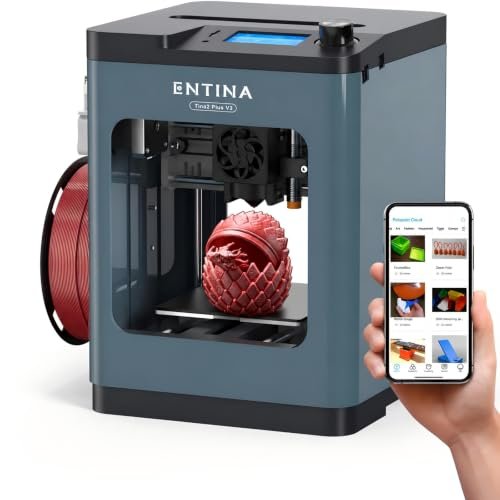
The Entina Tina2 Plus arrives fully assembled so you can skip tedious mechanical tuning and dive straight into your creative builds. It runs at a respectable print speed of up to 250mm/s, powered by a 40-second fast-heating ceramic hotend that cuts down preheating wait times significantly. Thanks to the dual Z-axis structure and auto-leveling PEI build plate, it keeps layer shifts at bay and consistently produces clean first layers right on your desk.
Key features that stand out:
– Fast ceramic hotend reaches operating temperature in roughly 40 seconds.
– Dual Z-axis hardware coupled with automated bed leveling for stable layering.
– Poloprint Cloud app providing WiFi remote controls and 3,500+ printable models.
– Partially enclosed design offering extra shielding around moving hot parts.
– Flexible PEI build sheet for popping prints off easily without scraper tools.
Pros:
– Fully assembled and ready to run straight out of the box.
– Reliable first-layer adhesion with zero manual bed leveling needed.
– Compact footprint fits easily on small student desks and home workspaces.
Cons:
– The compact build area restricts printing larger decorative items.
– High-speed cooling fans can get somewhat loud in quiet study rooms.
Best for: Students, hobbyists, and classroom STEM setups needing a compact, hassle-free plug-and-play machine.
Expert Opinion: If you dread assembling loose extruders or dialing in manual bed screws, the Tina2 Plus takes all the pain away with solid out-of-the-box consistency.
AOSEED AI 3D Printer for Kids
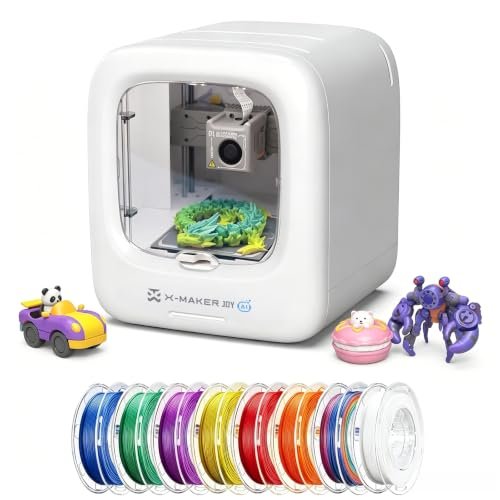
Designed specifically with young creators in mind, the AOSEED AI machine functions like an intuitive at-home toy workshop with a massive library of ready-to-print designs. It leverages AI-driven creative tools like AI Doodle and AI MiniMe, letting kids turn hand-drawn sketches or family snapshots into printable 3D figures in minutes. The machine pairs high-speed motion up to 400mm/s peak speeds with an enclosed pinch-resistant frame to keep curious little fingers safe during every run.
Key features that stand out:
– Smart AI design suite converts voice prompts, doodles, and photos into print models.
– Enclosed chassis and child-safe materials tested to TÜV Rheinland ISO 16000 standards.
– Built-in monitoring camera that tracks progress and records time-lapse clips.
– Fast-swap nozzle and smart filament runout sensor that automatically pauses jobs.
– Starter bundle including 8 PLA filament spools and creative craft tools.
Pros:
– Safe enclosed structure prevents curious fingers from touching hot nozzles.
– The guided AI modeling tools make 3D creation fun and accessible for children.
– Time-lapse video recording allows easy sharing of finished projects with friends.
Cons:
– It prints only one color at a time unless you pause or assemble parts manually.
– Advanced makers may find the simplified mobile app too restrictive for deep slicer tuning.
Best for: Families with young kids and elementary classrooms seeking a safe, creative, toy-making platform.
Expert Opinion: AOSEED nailed the software side here, turning complex CAD concepts into effortless AI prompts that keep children engaged rather than frustrated.
Entina Tina2C 3D Printer

The Entina Tina2C is a super-compact desktop unit built to get absolute beginners printing their very first model in around five minutes. It features automatic bed leveling paired with a flexible magnetic build plate that lets you bend and release finished models without scraping or cutting your fingers. The machine also incorporates power-loss recovery, ensuring that brief power hiccups do not ruin hours of continuous printing on your home desk.
Key features that stand out:
– Instant 5-minute setup backed by factory calibration and app walk-throughs.
– Smart auto-leveling system removing the need for tedious paper tests.
– Power-loss recovery to save ongoing prints after sudden power interruptions.
– Flexible magnetic bed enabling quick, tool-free model removals.
– Broad slicing support compatible with Cura, Simplify3D, and the Poloprint app.
Pros:
– Exceptionally budget-friendly entry point for anyone curious about 3D printing.
– Very quiet stepper motors and cooling make it unobtrusive in shared living spaces.
– Magnetic build sheet makes print removal simple and safe for young users.
Cons:
– The 3.9-inch cubic build volume restricts projects to mini trinkets and small parts.
– Lacks a heated bed, limiting reliable printing primarily to standard PLA.
Best for: Budget-conscious beginners, kids, and educators who want a straightforward, tiny tabletop printer.
Expert Opinion: For the price, the Tina2C is arguably the lowest barrier to entry for family crafting, though you will want to measure your project expectations against its modest 3.9-inch print zone.
FLASHFORGE Adventurer 5M 3D Printer
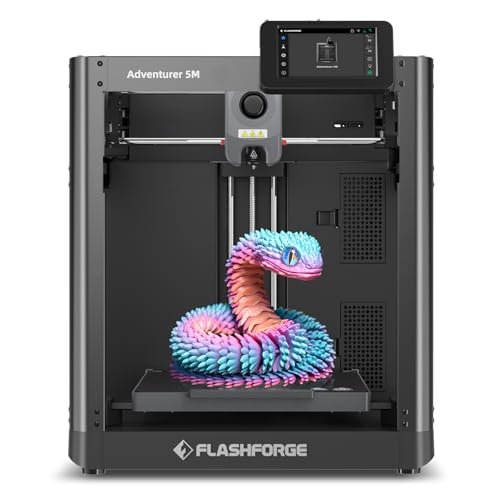
If you want serious printing speed without the hassle of building a kit from scratch, the FLASHFORGE Adventurer 5M is an outstanding performance powerhouse. Built around a rigid all-metal CoreXY structure, it pushes travel speeds up to 600mm/s with 20000mm/s² acceleration to cut typical print times down to a fraction of standard bedslingers. Its one-click full auto-leveling and quick-swap nozzle design ensure that you spend your valuable time printing high-grade functional parts rather than tweaking screws.
Key features that stand out:
– High-speed CoreXY motion system capable of reaching 600mm/s and rapid acceleration.
– Full auto-leveling sensor guaranteeing accurate first layers on every build.
– Quick-swap hotend assembly that releases in seconds without extra tools.
– 280°C direct drive extruder supporting versatile filament materials.
– Vibration compensation algorithms to prevent ringing and surface artifacts at top speeds.
Pros:
– Drastically cuts down print times while maintaining sharp, clean surface details.
– Direct-drive setup handles standard and semi-flexible materials like TPU with ease.
– Sturdy metal chassis minimizes mechanical wobble during sudden direction changes.
Cons:
– The open-frame design means cooling fan noise is noticeable at maximum print speeds.
– High acceleration demands a solid, heavy table to avoid transferring vibrations.
Best for: Prototypers, DIY makers, and hobbyists who prioritize lightning-fast print speeds and high dimensional accuracy.
Expert Opinion: The Adventurer 5M bridges the gap between budget hobbyist tools and high-speed professional fabrication, making it one of the most capable daily workhorses in its price class.
FLASHFORGE AD5X Multi-Material 3D Printer
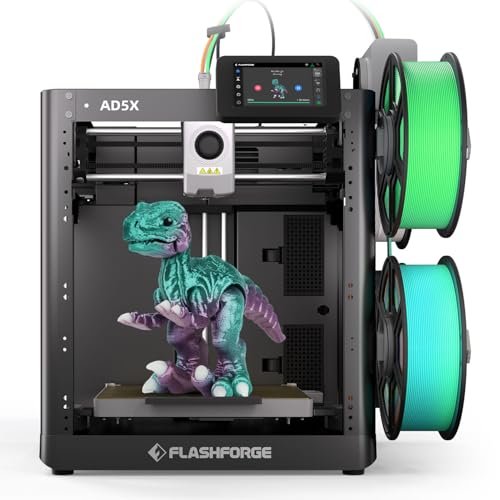
The FLASHFORGE AD5X expands your creative horizons by introducing 4-color multi-material printing without requiring cumbersome third-party accessories. It incorporates an Intelligent Filament System (IFS) alongside a blistering 600mm/s CoreXY platform, letting you weave multiple vibrant colors or soluble supports right into a single print run. With an all-metal frame and advanced vibration compensation, this printer keeps multi-colored models crisp, sturdy, and free from layer alignment flaws.
Key features that stand out:
– 4-color multi-material IFS enabling seamless multi-color blending and dissolvable supports.
– Blazing 600mm/s CoreXY system engineered for rapid high-detail output.
– Broad filament flexibility including PLA, PETG, TPU, and carbon-fiber infused variants.
– Comprehensive multi-point auto-leveling for flawless initial bed adhesion.
– Integrated space-saving spool layout holding four rolls side by side neatly.
Pros:
– Produces gorgeous multi-color prints without manual filament changes midway.
– Supports high-performance engineering filaments like PETG-CF and flexible TPU.
– Excellent vibration damping prevents ghosting on multi-colored surfaces.
Cons:
– Filament purging between color swaps naturally increases material waste.
– Higher price point makes it an investment compared to single-color alternatives.
Best for: Designers, cosplay crafters, and ambitious makers who want multi-color models and engineering-grade material flexibility.
Expert Opinion: Multi-color 3D printing used to require endless tinkering and wasted spools, but the AD5X makes multi-material printing feel smooth, fast, and remarkably accessible at home.
Practical Insights: Choosing the Right Home 3D Printer
- Build Volume vs. Footprint: If desktop space is tight, small units like the Entina Tina2 series take up very little room, whereas the Flashforge AD5M and AD5X provide significantly larger build envelopes for full-sized household prototypes.
- Single-Color Simplicity vs. Multi-Material Creativity: Beginners and young kids thrive on simpler single-spool machines like the AOSEED AI printer, while users looking to skip manual painting will benefit hugely from the FLASHFORGE AD5X and its 4-color Intelligent Filament System.
- Speed and Motion Architecture: While entry-level cartesian printers max out around 200–250 mm/s, CoreXY machines like the Adventurer 5M sprint up to 600 mm/s, saving hours on every complex print.
- Safety and Enclosure: Enclosed models protect curious young hands and pet paws from high-temperature nozzles reaching 200°C to 280°C, making enclosed models top picks for family living rooms.
Final Verdict: Which One Deserves a Spot in Your Home?
The Family Favorite: If you have school-aged children and want an engaging, worry-free toy factory, pick the AOSEED AI 3D Printer. Its child-safe enclosure and generative AI modeling apps eliminate the steep learning curve entirely.
The Space-Saving Starter: If you are working with a tight budget or limited counter space, go with the Entina Tina2 Plus or Tina2C. Both deliver reliable, ready-to-print performance right out of the box without complicated assembly.
The Speed Champion: For serious makers who want dependable functional prototypes in record time, the FLASHFORGE Adventurer 5M delivers unbeatable CoreXY speed and industrial build quality for its price.
The Multi-Color Artisan: If you want eye-catching, multi-colored prints and engineering filament capabilities, the FLASHFORGE AD5X stands alone as the top multi-material powerhouse.
Frequently Asked Questions About 3D Printer Best for Home Setups
What makes a 3D printer best for home use compared to industrial models?
A home-friendly 3D printer prioritizes quick setup, compact footprints, low operating noise, and safety features like enclosed nozzles. Industrial units are designed for massive continuous workloads and toxic high-temp materials that require dedicated ventilation, while home printers excel at user-friendly PLA printing right on an office desk.
Is PLA filament safe to use indoors around family and pets?
Yes, PLA (Polylactic Acid) is derived from renewable starches like corn and is generally considered safe for home environments. It releases a mild, sweet odor during heating and produces fewer volatile organic compounds (VOCs) than plastics like ABS. However, keeping your printer in a room with standard air circulation is always good practice.
Do I need to know 3D modeling software like CAD to use these machines?
Not at all. Most modern home printers connect to companion apps that include thousands of pre-sliced, ready-to-print 3D models. Newer child-friendly models, like the AOSEED AI, even let you generate custom print files simply by sketching a doodle or entering a text prompt.
How much maintenance does a home 3D printer actually require?
Routine upkeep is minimal on modern auto-leveling systems. You will occasionally need to wipe down the flexible PEI build plate with isopropyl alcohol to maintain bed adhesion, check belt tension every few months, and swap nozzles if you experience a filament clog.
What is the advantage of CoreXY over traditional cartesian bed-slinging printers?
CoreXY printers keep the print bed moving only along the vertical Z-axis, while lightweight belts drive the print head quickly along the X and Y axes. This reduces moving mass on the print bed, virtually eliminating wobble and allowing speeds up to 600mm/s without sacrificing print quality.
How much electricity does a desktop 3D printer consume per hour?
Most desktop printers draw between 50 and 150 watts on average while running—roughly equivalent to a bright incandescent bulb or a small desktop computer. Initial warm-up requires slightly more power, but continuous printing has a very low impact on your monthly utility bill.
Can I print flexible materials like TPU on these home printers?
Printers equipped with direct-drive extruders, such as the FLASHFORGE Adventurer 5M series, handle flexible TPU filament very well. Bowden-tube driven micro printers may struggle with softer filaments, so check your extruder type if flexible parts are on your wish list.
Affiliate Disclosure: As an Amazon Associate, I earn from qualifying purchases made through links on this site.