I’ve spent hundreds of hours unboxing, calibrating, and running continuous print jobs in my workshop to find the absolute best 3d printer 2026 has to offer. From multi-material tool changers to blazingly fast CoreXY desktop workhorses, today’s machines take the headache out of bed leveling, nozzle clogging, and filament switching. Whether you’re making rapid functional prototypes or intricate multi-color models, this guide breaks down the real-world performance of the top 10 options on the market.
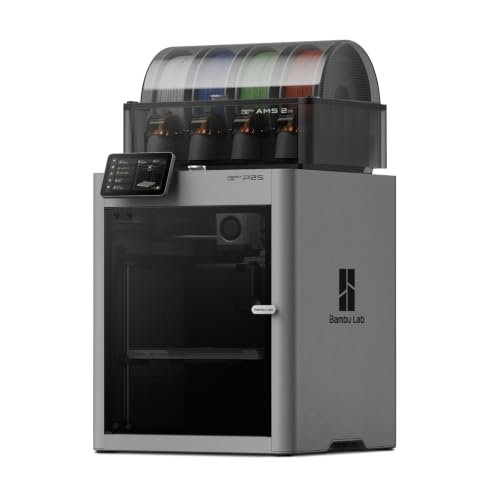
Bambu Lab P2S Combo 3D Printer with AMS 2 Pro
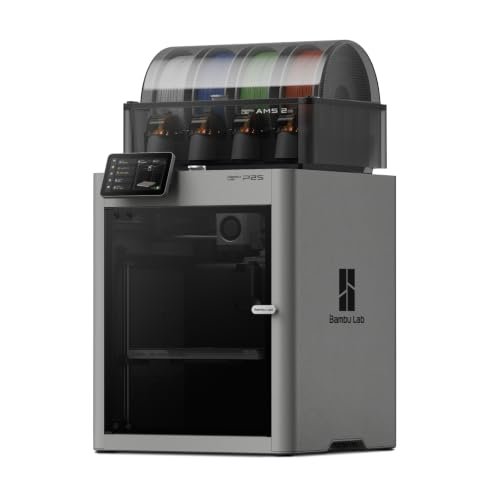
The Bambu Lab P2S Combo takes consumer desktop manufacturing to a whole new level with its PMSM Servo Extruder and active flowrate compensation. Printing at speeds up to 600 mm/s, it consistently produces crisp corners and smooth vertical surfaces without manual tuning. The included AMS 2 Pro handles multi-color prints seamlessly while offering active filament drying up to 65 °C, protecting hygroscopic filaments like PETG and Nylon during lengthy print runs. With full integration into the Bambu Handy app and an enclosed build chamber with an adaptive carbon filter, it’s a dependable setup for both hobbyists and small businesses.
Key features that stand out:
– PMSM Servo Extruder with Active Flowrate Compensation for consistent extrusion
– Speeds up to 600 mm/s with 15-minute quick setup out of the box
– AMS 2 Pro system providing multi-color switching and integrated 65 °C spool drying
– Adaptive Airflow System with a 50 °C heated chamber profile and activated carbon filter
– Seamless ecosystem linking MakerWorld, Bambu Studio, and remote monitoring
Pros:
– Active spool drying inside the AMS 2 Pro prevents moisture-related print defects
– Fast calibration and reliable AI failure detection minimize ruined prints
– Fully enclosed chassis easily handles ABS and other temperature-sensitive materials
Cons:
– The standalone P2S base unit lacks multi-color support unless you keep the AMS plugged in.
Best for: Makers who want hassle-free multi-color printing alongside enclosed chamber reliability for technical materials.
Expert Opinion: The P2S Combo sets the standard for user experience because it eliminates the tedious chore of pre-drying filament separately before a multi-color print job.
Snapmaker U1 4-Toolhead Multi-Color 3D Printer
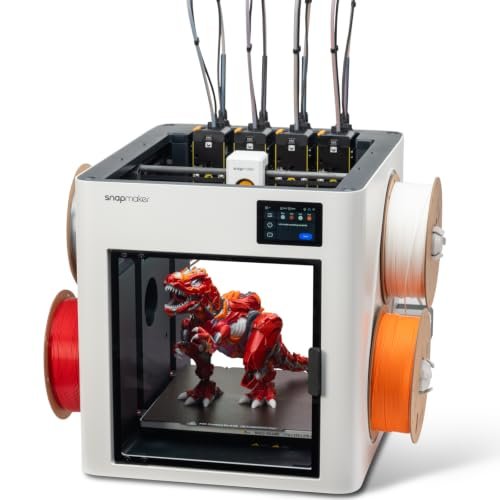
The Snapmaker U1 reinvents multi-material fabrication by deploying a 4-toolhead SnapSwap system that switches active nozzles in just 5 seconds. Because each toolhead maintains its own preheated nozzle, it completely bypasses the traditional purge tower, reducing material waste by up to five times. The rigid CoreXY motion system with carbon-fiber rails allows for speeds reaching 500 mm/s across a generous 270 x 270 x 270 mm build area. It effortlessly mixes hard and soft filaments in a single pass, letting you fuse rigid structural plastic with soft TPU accents or soluble PVA supports.
Key features that stand out:
– 4-toolhead automatic changer swapping loaded nozzles in roughly 5 seconds
– Independent preheated hotends that slash purge tower waste by up to 5X
– Carbon-fiber X-axis rails mounted on a rigid CoreXY frame reaching 500 mm/s
– Full support for multi-durometer printing, including PVA, TPU, PETG, and ABS
– Snapmaker Orca open-source slicer integration and AI camera print monitoring
Pros:
– Massive reduction in wasted filament and print time compared to single-nozzle switchers
– Flawless transitions between flexible TPU and rigid materials in one build
– Automatic offset calibration eliminates tedious manual nozzle alignment
Cons:
– The multi-toolhead gantry creates a slightly wider desktop footprint than standard enclosed printers.
Best for: Designers and small workshops producing complex multi-material models, soluble support structures, and functional mixed-hardness prototypes.
Expert Opinion: If you hate seeing half a spool of filament end up in the purge bucket during multi-color prints, the U1’s mechanical tool-changing design is a breath of fresh air.
FLASHFORGE Adventurer 5M CoreXY 3D Printer

For anyone seeking pure speed on an accessible budget, the FLASHFORGE Adventurer 5M packs a serious punch with 600 mm/s travel speed and 20,000 mm/s² acceleration. Its one-click full auto-leveling probes the flexible PEI sheet directly, giving you consistent first-layer squish without any paper tests or manual knob adjustments. The quick-swap hotend lets you jump between nozzle diameters in three seconds flat, running up to 280 °C with a high-flow 32 mm³/s melt zone. Real-time control via Flash Studio mobile software keeps you updated on print progress whether you’re across the room or away from the bench.
Key features that stand out:
– High-flow 32 mm³/s hotend reaching 200 °C in under 35 seconds
– 3-second tool-free quick-swap nozzle mechanism for flexible sizing
– One-click automatic bed leveling system mapping the entire build plate
– Dual-fan part cooling combined with internal vibration compensation
– High-rigidity CoreXY platform supporting up to 600 mm/s travel speed
Pros:
– Rapid heating times mean prints start working within a minute of hitting send
– Effortless nozzle swaps let you switch from detail work to coarse prototyping instantly
– Exceptional speed-to-price ratio for a sturdy CoreXY architecture
Cons:
– The open-frame construction makes it louder and less suited for warping-prone materials like ABS.
Best for: Students, beginners, and rapid prototypers who prioritize quick turnaround times on standard PLA and PETG projects.
Expert Opinion: The Adventurer 5M strips away unnecessary complexity, delivering direct-drive CoreXY acceleration at a price point that makes older bed-slingers feel obsolete.
Bambu Lab P1S Combo with AMS
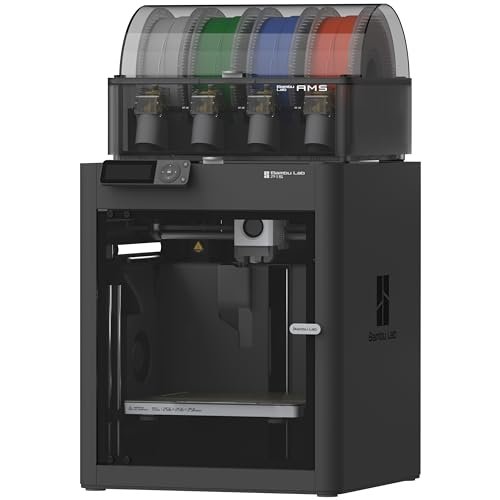
The Bambu Lab P1S Combo remains a true workhorse, offering a fully enclosed build chamber alongside the proven 4-spool AMS unit for multi-color printing. Capable of hitting 500 mm/s print speeds with 20,000 mm/s² acceleration, this machine powers through complex multi-colored files while maintaining impressive layer consistency. Its enclosed chassis keeps drafts away from sensitive polymers, making materials like ABS and ASA completely viable right out of the box. Setup takes under 15 minutes from unboxing to first layer, thanks to automated bed leveling and resonance testing routines.
Key features that stand out:
– Factory-enclosed body engineered for thermal stability on technical filaments
– AMS integration supporting up to 16 colors when daisy-chaining extra units
– High-speed direct-drive toolhead with automatic vibration compensation
– Automated bed leveling and active belt-tension monitoring
– Robust community support and native cloud printing via Bambu Handy
Pros:
– Reliable plug-and-play workflow that consistently outputs clean parts with minimal tweaking
– Enclosed chamber expands your filament palette into ABS, ASA, and polycarbonates
– Compact desktop profile relative to its 256 x 256 x 256 mm build volume
Cons:
– The simple monochrome screen interface feels basic compared to modern full-color touch displays.
Best for: Everyday creators wanting dependable, out-of-the-box multi-color printing and regular access to engineering materials.
Expert Opinion: While newer models boast minor spec bumps, the P1S Combo remains one of the safest investments for reliable day-in, day-out printing.
Anycubic Kobra X Multicolor 3D Printer
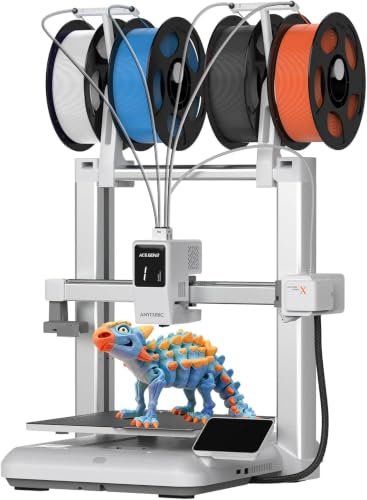
Anycubic pushes high-capacity printing forward with the Kobra X, a machine capable of scaling up to an astonishing 19-color palette using four ACE 2 Pro units. Its direct-feed architecture is built to cut down purge travel by over 81 percent, saving substantial print hours and raw filament on intricate multi-hued prints. The build surface covers a roomier 260 x 260 x 260 mm area, checked by LeviQ 3.0 49-point auto bed leveling for dependable first-layer adhesion. Paired with a hardened steel nozzle running at 300 °C and an integrated AI camera that watches for spaghetti errors, it easily handles engineering materials alongside PLA.
Key features that stand out:
– Modular multi-color capacity supporting up to 19 filaments across four units
– Shortened retraction and purge paths that double overall multi-color print efficiency
– LeviQ 3.0 sensor running 49-point matrix calibration for precise first layers
– Hardened steel nozzle handling abrasive blends up to 300 °C at 600 mm/s
– Smart AI detection suite flagging spaghetti strings and stray foreign objects
Pros:
– Reduced purge cycles noticeably cut down overall print times on multi-shade files
– Hardened nozzle comes standard, saving you from buying separate upgrades for glow-in-the-dark filaments
– Large model library integration right inside the Anycubic smartphone app
Cons:
– The filament spools shown in retail graphics must be purchased entirely separately.
Best for: Color-focused makers looking for expansive palette options without spending a fortune on wasted purge filament.
Expert Opinion: The Kobra X attacks the biggest drawback of multi-color 3D printing by dramatically shortening the purge cycle, making multi-shade models practical to print.
FLASHFORGE AD5X Multi-Color CoreXY 3D Printer
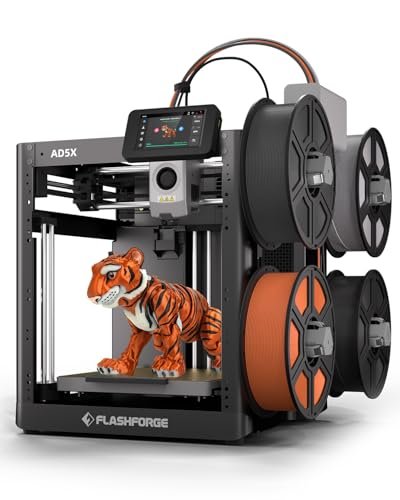
The FLASHFORGE AD5X brings built-in 4-color multi-material handling directly to a fast, reliable desktop frame. Driven by a stable CoreXY motion architecture, the toolhead pushes speeds up to 600 mm/s with 20,000 mm/s² acceleration, producing tight layer lines backed by dual-channel cooling fans. The hotend reaches 300 °C, enabling seamless compatibility with everything from standard PLA to high-temp nylon blends. Complete with one-click bed leveling, power-loss recovery, and automatic filament feeding, it keeps the barrier to multi-color entry refreshingly low.
Key features that stand out:
– Built-in multi-filament switching module handling 4 spools out of the box
– High-temp 300 °C direct-drive extruder with dual-channel airflow cooling
– Rapid CoreXY travel speeds reaching 600 mm/s for accelerated production runs
– Flexible nozzle compatibility spanning 0.25 mm detail tips up to 0.8 mm high-speed variants
– One-click automatic bed leveling and full mobile control through Flash Maker
Pros:
– Integrated 4-color module keeps the desktop workspace organized and tidy
– The 300 °C extruder provides plenty of headroom for specialized filaments
– Quick-change nozzle ecosystem makes swapping between detailed and bulky prints painless
Cons:
– Multi-color print changes will produce standard purge waste unless infill-flushing is carefully tuned.
Best for: Hobbyists and educators wanting an all-in-one multi-color printer that balances high printing speeds with simple maintenance.
Expert Opinion: FLASHFORGE managed to package high-speed CoreXY mechanics and multi-color feeding into an approachable machine that won’t overwhelm a newcomer.
Creality K2 Plus Combo 3D Printer
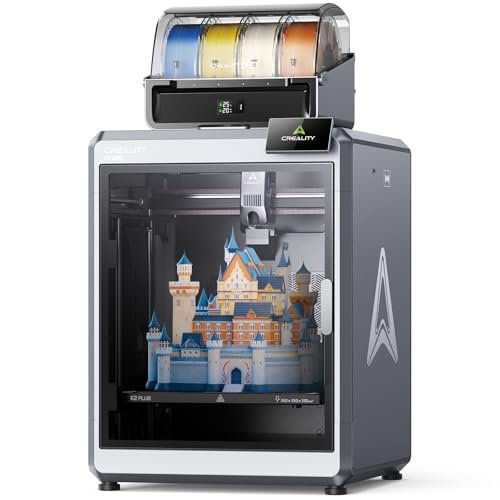
The Creality K2 Plus Combo is an industrial-leaning powerhouse featuring a massive 350 x 350 x 350 mm build volume to handle oversized models without splitting files. Driven by industry-grade FOC step-servo motors, the toolhead accelerates at a blistering 30,000 mm/s² while delivering up to 40 mm³/s flow rates. The all-new CFS unit supports intelligent RFID spool reading, automatic filament relay, and expansion up to 16 colors. Perhaps most impressive is the actively heated 60 °C chamber paired with a 350 °C hardened nozzle, allowing warp-free printing of high-strength engineering filaments like ASA, PPA, and carbon fiber blends.
Key features that stand out:
– Generous 350 mm cubic build volume for one-piece architectural and automotive prints
– Actively heated build chamber maintaining 60 °C alongside a 350 °C hotend
– Step-servo motor system on all axes achieving 30,000 mm/s² acceleration
– All-new CFS multi-filament system with RFID tracking and spool runout relay
– Dual AI cameras dedicated to toolhead flow rate optimization and live spaghetti detection
Pros:
– True active chamber heating makes printing tricky engineering filaments dependable
– Huge build volume allows for massive single-piece prototypes without splitting seams
– Step-servo motors run with impressive precision and noticeably reduced resonance
Cons:
– The overall unit is heavy and requires a very sturdy workbench to handle the moving mass.
Best for: Engineers, functional prototypers, and print-farm operators requiring large-scale structural parts in advanced engineering materials.
Expert Opinion: The active chamber heating on the K2 Plus Combo separates it from typical consumer machines, finally making high-temp plastics easy to print at home.
FLASHFORGE AD5X Multi-Material CoreXY 3D Printer
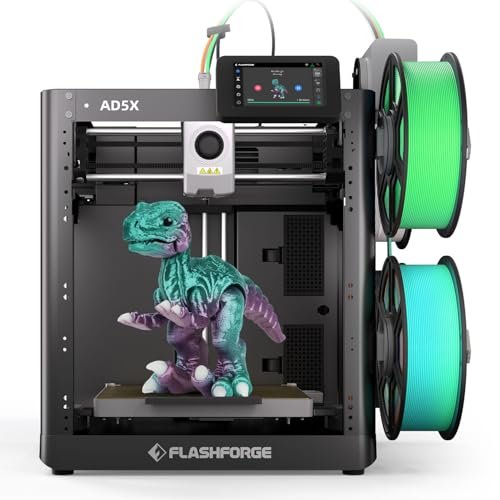
Focusing on functional mixed-material workflows, this version of the FLASHFORGE AD5X leverages an Intelligent Filament System (IFS) arranged in a space-saving side-by-side array. It supports simultaneous runs of rigid, flexible, and composite spools—including PLA-CF, PETG-CF, and TPU—without demanding constant manual intervention. The rigid all-metal CoreXY motion system incorporates advanced vibration suppression algorithms to cancel ghosting and ringing at 600 mm/s. The full auto-leveling sensor runs a multi-point check across the spring-steel build surface to guarantee strong, even adhesion across every quadrant.
Key features that stand out:
– Space-saving Intelligent Filament System (IFS) organizing 4 spools side by side
– Wide material tolerance encompassing carbon-fiber composites and flexible TPU
– All-metal CoreXY frame equipped with real-time vibration suppression algorithms
– Full multi-point auto-leveling sensor for uniform first-layer bonding
– Compact desktop form factor designed for easy integration in tight workspaces
Pros:
– Handles carbon-fiber filled filaments without skipping steps or chewing up drive gears
– Side-by-side spool layout keeps the overall height low enough to fit on standard shelving
– Fast travel speeds and snappy accelerations significantly cut down multi-material cycle times
Cons:
– The compact frame provides slightly less build volume than some larger competitors in its bracket.
Best for: Makers focused on functional mechanical components who regularly work with carbon-fiber reinforced filaments and flexible polymers.
Expert Opinion: The side-by-side spool arrangement on the IFS is a smart ergonomic touch, keeping filament changes within arm’s reach without adding awkward vertical height.
FLASHFORGE Creator 5 Pro 4-Toolhead 3D Printer
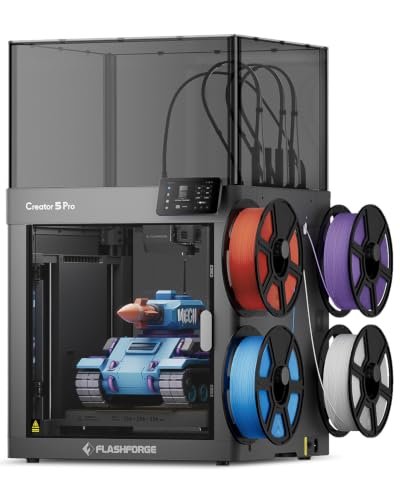
Built squarely for engineering applications, the FLASHFORGE Creator 5 Pro features 4 independent toolheads with a 7-second FlashSwap changer to eliminate filament flushing entirely. Its industrial-grade enclosure incorporates an actively heated chamber up to 65 °C, keeping advanced materials like ABS, PC, and Polyamide (Nylon) flat and dimensionally accurate. A robust CoreXY motion chassis riding on precision linear rails pushes speeds up to 600 mm/s with zero mechanical wobble. Workspace safety is managed by a dual HEPA 13 and activated carbon filtration system, trapping ultrafine particles and chemical odors before they escape into your room.
Key features that stand out:
– 4 independent toolheads swapping in 7 seconds without producing purge poop
– Actively heated build chamber reaching 65 °C for warp-free industrial engineering prints
– Dual HEPA 13 and activated carbon air cleaning system for safe indoor operation
– Precision linear rails with 1.5GT high-torque timing belts for accurate high-speed tracking
– Built-in HD monitoring camera with automatic time-lapse video generation
Pros:
– Zero filament purge waste dramatically cuts down the running cost of expensive engineering resins
– Active 65 °C chamber heat delivers industrial-grade layer bonding on polycarbonate and nylon
– Medical-grade HEPA 13 air filtration creates a safe environment in offices and classrooms
Cons:
– The advanced industrial features place this unit at a higher price tier than entry-level printers.
Best for: Professional engineering labs, design studios, and vocational classrooms where indoor air safety and high-strength technical parts are top priorities.
Expert Opinion: The combination of zero-waste toolhead switching and an active 65 °C heated chamber makes the Creator 5 Pro a genuine small-scale industrial manufacturing center.
Creality K2 Combo (A) Multicolor 3D Printer
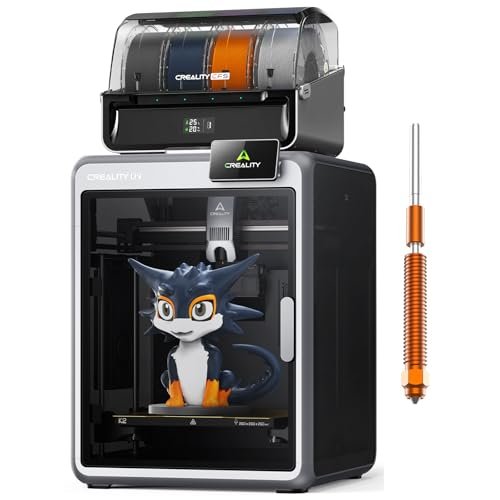
The Creality K2 Combo (A) brings flagship multi-filament capabilities into a balanced 260 x 260 x 260 mm format that fits comfortably on any desk. Driven by three step-servo motors that calculate dynamic torque adjustments in under a millisecond, it delivers whisper-quiet movements while printing at rapid speeds. The included CFS filament manager lets you print in four colors immediately, with support to chain up to four units for 16-color masterpieces. Smart targeted auto-leveling probes only the bed area needed for your current model, getting prints rolling faster while AI cameras watch out for common print failures.
Key features that stand out:
– Step-servo motor system with dynamic sub-millisecond torque adjustments
– Included CFS unit providing 4-color automation, expandable up to 16 colors
– Targeted auto-leveling that focuses calibration solely on the active print area
– Integrated AI vision system detecting spaghetti failures and mechanical stalls
– Whisper-quiet silent mode engineered with dynamically balanced cooling fans
Pros:
– Noticeably quieter than older high-speed printers, making it pleasant to keep near your desk
– Selective bed probing shaves minutes off the pre-print calibration routine
– Sturdy die-cast frame maintains sharp corners even during rapid direction changes
Cons:
– Expanding to the full 16 colors requires purchasing three additional CFS modules.
Best for: Home hobbyists and remote workers who want a fast, multi-color capable printer that won’t drown out phone calls or focus.
Expert Opinion: By pairing step-servo motors with targeted bed leveling, the K2 Combo (A) delivers a refined, low-noise printing experience that fits comfortably in a home office.
Helpful Comparison Insights
- Tool Changers vs. Single-Nozzle Switchers: The Snapmaker U1 and FLASHFORGE Creator 5 Pro use independent toolheads, which virtually eliminates purge waste and drastically cuts multi-material print times. Single-nozzle units like the Bambu Lab P2S and Creality K2 rely on filament flushing, making them slightly slower on multi-color jobs but more compact on your desk.
- Filament Management and Drying: If you print often with moisture-loving materials like PETG or Nylon, the Bambu Lab P2S Combo’s AMS 2 Pro has a major advantage with its integrated 65 °C active drying function, keeping filament crisp while you print.
- Build Volume Showdowns: When size matters, the Creality K2 Plus Combo dominates the field with its massive 350 x 350 x 350 mm build envelope, whereas the standard 260 mm cubes found on the Anycubic Kobra X and Creality K2 Combo (A) offer a tighter, more desktop-friendly footprint.
- Thermal Capabilities for Engineering Plastics: For printing ABS, PC, and Nylon without warping or delamination, choose a machine with active chamber heating like the FLASHFORGE Creator 5 Pro (65 °C) or the Creality K2 Plus (60 °C) over standard passively enclosed enclosures.
- Speed and Motion Systems: Every modern pick here employs a rigid CoreXY structure, meaning speeds above 500 mm/s are now the baseline. However, machines using step-servo motors (such as the Creality K2 series) run noticeably quieter and track steps more accurately than conventional stepper models.
Final Verdict
Rather than declaring a one-size-fits-all winner, your ideal choice depends entirely on how you balance materials, workspace, and budget:
- The Gold Standard for Everyday Multi-Color: Go with the Bambu Lab P2S Combo. The combination of reliable out-of-the-box tuning, active AMS filament drying, and clean slicing software makes it the easiest machine to live with every day.
- The Zero-Waste Multi-Material Champ: Choose the Snapmaker U1. If you plan to mix flexible TPU with rigid parts or use soluble supports, its 5-second toolhead changer saves you hundreds of dollars in wasted filament poop down the road.
- The Large-Format Engineering Workhorse: Pick the Creality K2 Plus Combo. Its enormous 350 mm build volume, step-servo precision, and active 60 °C heated chamber make it unmatched for heavy-duty structural components.
- The Budget Speedster: The FLASHFORGE Adventurer 5M offers the most performance per dollar if you only need single-material printing with blazing 600 mm/s CoreXY speeds.
Frequently Asked Questions About best 3d printer 2026
What makes a 3D printer the best choice in 2026?
The leading 3D printers in 2026 stand out by removing manual calibration entirely. Standard expectations now include direct-drive CoreXY motion systems hitting 500 to 600 mm/s, hands-free auto bed leveling via direct load-cell or inductive probing, vibration compensation, and built-in multi-color or tool-changing capabilities.
How does multi-toolhead printing differ from single-nozzle multi-color systems?
Single-nozzle systems (like the Bambu AMS or Creality CFS) retract the filament, cut it, load a new color, and purge material out the back of the machine on every color change. Multi-toolhead systems (like the Snapmaker U1 or Creator 5 Pro) switch entirely separate preheated extruders in a few seconds, which cuts print times significantly and eliminates almost all purge tower waste.
Is active chamber heating necessary for 3D printing?
For basic filaments like PLA and PETG, active chamber heating is not necessary and can even cause heat creep clogs. However, if you plan to print engineering materials such as ABS, ASA, Polycarbonate (PC), or Nylon (PA), an actively heated chamber (50 °C to 65 °C) prevents uneven cooling, which stops large prints from warping or splitting along layer lines.
What is the advantage of step-servo motors over standard stepper motors?
Step-servo motors use closed-loop feedback systems to continuously monitor the motor’s actual position. If a toolhead encounters resistance, the motor dynamically adjusts torque to prevent skipped steps and layer shifting. They also run significantly cooler, produce far less resonance noise, and handle rapid accelerations up to 30,000 mm/s² with pinpoint accuracy.
Can high-speed CoreXY 3D printers print flexible filaments like TPU?
Yes, modern direct-drive extruders handle flexible filaments exceptionally well. While you cannot run TPU at full 600 mm/s speeds due to its elasticity, direct-drive toolheads can reliably lay down TPU at 40 to 80 mm/s. Multi-toolhead machines like the Snapmaker U1 even allow you to combine rigid plastics and soft TPU into a single finished object.
Do I need to dry my filament before printing?
Yes, filament drying is critical for clean results. Even standard filaments like PLA and PETG absorb ambient humidity, causing stringing, popping noises at the nozzle, and brittle layers. Advanced units like the Bambu AMS 2 Pro feature built-in heating to dry your spools actively while they sit inside the multi-material feeder.
How loud are modern CoreXY 3D printers during operation?
While older high-speed machines sounded like small jet engines, printers equipped with dynamically balanced cooling fans and step-servo motors (such as the Creality K2 Combo) operate under 50 decibels in silent mode. That makes them quiet enough to run right beside your workstation without interrupting phone calls or daily tasks.
Affiliate Disclosure: As an Amazon Associate, I earn from qualifying purchases made through links on this site.