When I first set up a compact desktop printer on my workbench, I expected hours of frustrating bed leveling and calibration headaches, but modern consumer models have changed completely. After running dozens of real-world prints—ranging from household replacement brackets to detailed multi-color figurines—I found that today’s machines focus heavily on automated setup, quiet stepper motors, and intuitive mobile apps. Finding the best 3 d printer for home use comes down to balancing speed, safety, and ease of maintenance so you can spend your time making things instead of troubleshooting mechanical jams.
AOSEED AI 3D Printer for Kids (8-Roll Starter Kit)
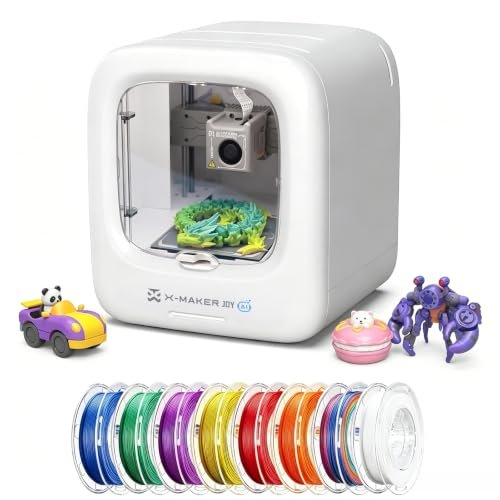
The AOSEED AI 3D Printer stands out as a dedicated family creation station that removes technical hurdles right out of the box. It features an enclosed pinch-resistant frame alongside AI-powered modeling tools like AI Doodle and photo-to-3D conversion, allowing children to create toys without prior CAD experience. With rapid speeds reaching up to 400mm/s and a safe, non-heated leveling-free bed, it keeps young creators engaged while maintaining peace of mind for parents. The bundled kit provides eight rolls of kid-safe PLA filament, so you can start creating directly after unboxing.
Key features that stand out:
– AI Doodle and MiniMe software transform voice prompts, sketches, and photos into printable 3D objects
– Fully enclosed build chamber with pinch-resistant doors and quiet motors for home safety
– Print speeds up to 400mm/s with 0.05mm layer precision
– Built-in camera for live remote monitoring and automatic creation of time-lapse clips
– Leveling-free print bed paired with a quick-release nozzle system
Pros:
– Complete all-in-one starter kit with eight spools of filament included
– Outstanding safety features tailored specifically for children and classroom environments
– Generous library of over 20,000 tested printable models
Cons:
– Build volume is restricted to smaller toys and decorative items.
– Only prints in a single color at a time, requiring multi-part assembly for colorful toys.
Best for: Families, elementary school students, and parents seeking a safe, hands-off introduction to 3D printing.
Expert Opinion: This machine excels at sparking childhood creativity because it bypasses complicated slicing software with intuitive AI tools, making it one of the most accessible family-focused gadgets available.
Bambu Lab A1 3D Printer
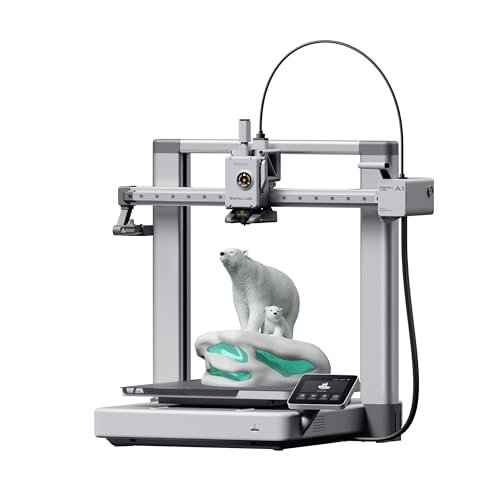
The Bambu Lab A1 brings high-end additive manufacturing performance into an accessible, open-bed bedslinger format. Equipped with active flow rate compensation and full-auto calibration, it measures bed tilt, nozzle height, and vibration resonance without requiring any manual tweaking. The lightning-fast 10,000 mm/s² acceleration dramatically cuts down production times while maintaining crisp surface finishes and tight dimensional tolerances. When paired with the optional AMS lite unit, it opens up seamless four-color filament switching for artistic and practical prints alike.
Key features that stand out:
– High-speed motion system reaching up to 500mm/s with 10,000 mm/s² acceleration
– Full automated calibration managing Z-offset, bed leveling, and resonance testing
– High-precision active flow rate extrusion utilizing high-frequency eddy current sensors
– Active motor noise canceling that keeps printing sound levels low
– One-clip quick-swap nozzle mechanism for fast maintenance
Pros:
– Industry-leading print quality right out of the box with zero manual tuning
– Expandable to multi-color printing using the AMS lite system
– Extremely quiet operation even when running at maximum speeds
Cons:
– Open-frame design exposes hot components and makes it less ideal for draft-sensitive materials.
– Footprint expands significantly if you decide to attach the multi-color feeder beside it.
Best for: Hobbyists, makers, and designers who demand reliable dimensional accuracy, speed, and multi-color flexibility.
Expert Opinion: The Bambu Lab A1 has raised the standard for desktop machines by automating the most frustrating setup steps, making high-speed, repeatable printing accessible to beginners and seasoned makers alike.
Entina Tina2C 3D Printer
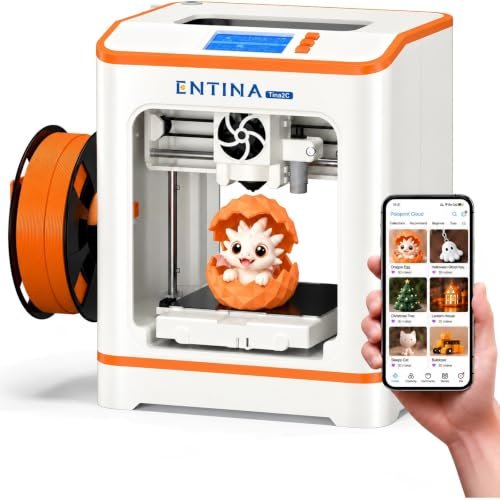
The Entina Tina2C is a compact desktop machine engineered for true plug-and-play simplicity in compact spaces. It arrives fully assembled from the factory with assisted automatic bed leveling, meaning you can unbox it, sync with the Poloprint Cloud app over 2.4GHz Wi-Fi, and complete your first build within minutes. Its flexible magnetic spring steel plate makes removing completed prints as simple as giving the surface a slight bend. Compact dimensions make it a natural fit for study desks, dorm rooms, or small home offices without cluttering your workspace.
Key features that stand out:
– Ready to print in roughly five minutes with factory-calibrated auto-leveling
– Poloprint Cloud mobile application featuring over 3,500 free printable models
– Flexible magnetic build platform for effortless print removal
– Quick-swap nozzle design that simplifies unclogging and routine cleaning
– Open software support compatible with Cura, Simplify3D, and Wiibuilder
Pros:
– Highly affordable entry point for complete novices
– Tiny footprint fits comfortably on any desk or bookshelf
– Power-loss recovery prevents lost progress during minor household power blinks
Cons:
– The 3.9-inch cubic build volume prevents you from making medium-to-large functional objects.
– Lacks a heated bed, which limits material options strictly to standard PLA.
Best for: Students, casual beginners, and budget-conscious buyers who want an easy, space-friendly desktop companion.
Expert Opinion: If you are nervous about complex mechanical assembly and simply want a machine to print miniature figurines and small desk toys reliably, the Tina2C delivers great value at entry-level pricing.
Entina Tina2 Plus 3D Printer
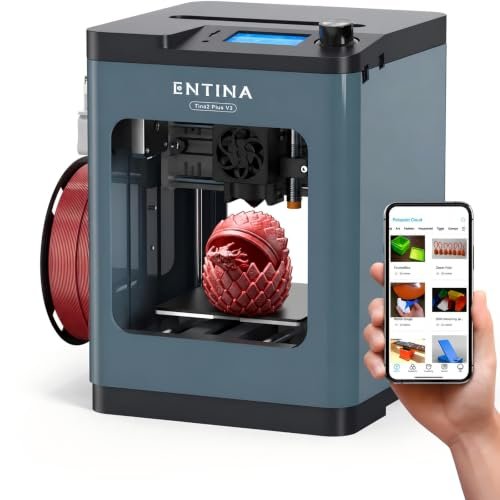
The Entina Tina2 Plus upgrades the beginner-friendly platform by introducing a rapid 250mm/s print speed and a 40-second fast-heating ceramic hotend. It features a sturdy dual Z-axis motion system alongside a textured PEI spring steel platform that significantly enhances first-layer adhesion compared to basic magnetic mats. The semi-enclosed frame adds an extra layer of protection, keeping hot components shielded from inquisitive pets or young children. Controlled easily via Wi-Fi, USB, or TF card, it delivers reliable small-format performance with substantially shorter wait times.
Key features that stand out:
– Upgraded print performance running smoothly up to 250mm/s
– 40-second rapid-heating ceramic hotend with quick-change nozzle hardware
– Dual Z-axis lead screws for stable layer stacking and minimal print banding
– Textured PEI spring steel build plate for reliable adhesion and easy release
– Integrated Wi-Fi connectivity and mobile slicing via the Poloprint app
Pros:
– Heats up fast and finishes small prints much quicker than standard beginner models
– Dual Z-axis provides noticeably better stability and layer consistency
– Semi-enclosed construction makes it safer for home study areas
Cons:
– Build dimensions remain limited to smaller-scale prototypes and crafts.
– Cooling fan produces a noticeable hum when running at top speed.
Best for: Classrooms, hobbyists, and STEM students seeking fast turnaround times on small functional parts.
Expert Opinion: The inclusion of a ceramic hotend and dual Z-axis mechanics turns this compact model into a speedy, surprisingly capable tool for fast prototyping of small components.
Flashforge AD5X Multi-Material 3D Printer
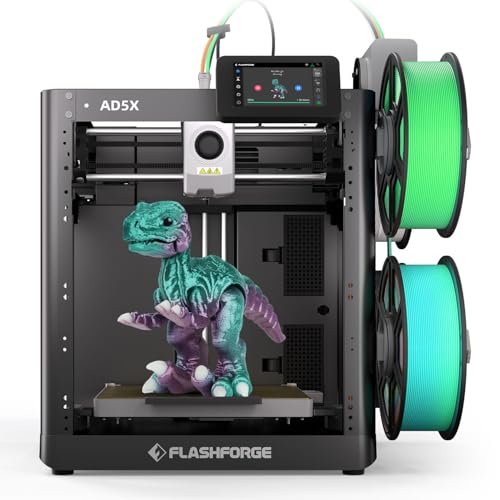
The Flashforge AD5X is an advanced desktop powerhouse designed around a rigid all-metal CoreXY structure that achieves blistering speeds up to 600mm/s. Its headline capability is the Intelligent Filament System (IFS), which manages four distinct spools side-by-side to deliver clean, multi-color and multi-material prints in one continuous operation. Vibration compensation algorithms keep high-speed inertia in check, eliminating ghosting artifacts on sharp corners. Thanks to wide filament compatibility extending from flexible TPU to rigid carbon-fiber blends, it handles both artistic pieces and demanding mechanical parts with ease.
Key features that stand out:
– Integrated Intelligent Filament System (IFS) for seamless 4-color multi-material prints
– Heavy-duty CoreXY all-metal frame supporting speeds up to 600mm/s and 20,000 mm/s² acceleration
– Full-auto multi-point bed leveling with active gap sensor calibration
– Advanced vibration suppression algorithms to eliminate high-speed ringing
– Broad material compatibility including PLA, PETG, TPU, and carbon-fiber composites
Pros:
– Flawless multi-color transitions without requiring third-party feeder accessories
– High rigidity ensures sharp detail even during aggressive high-speed moves
– Space-efficient side-by-side spool layout keeps the overall footprint compact
Cons:
– Slicing and purging multi-color transitions creates extra filament waste during prints.
– Learning curve is slightly steeper compared to basic single-material machines.
Best for: Creative makers and functional designers who want integrated multi-material versatility without paying enterprise-level prices.
Expert Opinion: The Flashforge AD5X combines high-speed CoreXY mechanics with reliable multi-filament feeding, making it a standout choice for producing multi-hue display pieces and composite prototypes.
Flashforge Adventurer 5M 3D Printer
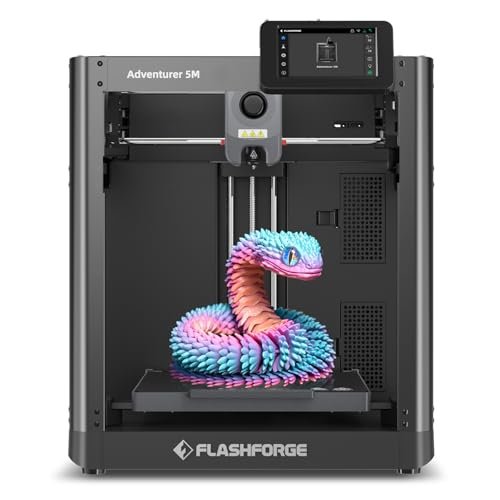
The Flashforge Adventurer 5M strips away setup frustrations by offering true one-click automatic bed leveling combined with an ultra-fast 600mm/s travel speed. Built with a rugged CoreXY chassis, it can reach an acceleration rate of 20,000 mm/s², reducing print jobs that once took ten hours down to just a couple. The high-flow direct-drive extruder heats up to 200°C in just 35 seconds, while the tool-free, 3-second quick-swap nozzle system lets you switch between fine 0.25mm detail nozzles and wide 0.8mm functional nozzles without touching a wrench.
Key features that stand out:
– High-efficiency CoreXY architecture providing 600mm/s speed and rapid acceleration
– Direct-drive extruder reaching 280°C with high-volume 32mm³/s flow capacity
– 3-second quick-swap nozzle design spanning 0.25mm to 0.8mm diameters
– Full automated leveling sensor for consistent first-layer squish
– Dual-sided flexible PEI build platform for reliable print release
Pros:
– Phenomenal print speed with clean layer stacking straight out of the box
– Effortless nozzle swaps save valuable time during maintenance
– Solid structural rigidity eliminates mechanical wobble during fast travel moves
Cons:
– Open-frame configuration makes printing high-temperature warp-prone filaments like ABS challenging.
– High-flow cooling fans generate moderate noise during maximum speed runs.
Best for: Makers, tinkerers, and rapid prototypers who value blistering production speed and zero-fuss nozzle maintenance.
Expert Opinion: The Adventurer 5M delivers raw speed and dependable first layers at an accessible price point, representing one of the best high-speed workhorses for standard home workshops.
AOSEED AI 3D Printer for Kids (Single-Roll Edition)
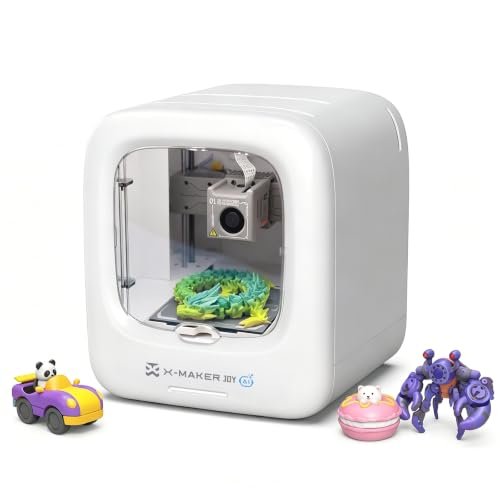
This edition of the AOSEED AI 3D Printer delivers the same kid-safe enclosed design and AI-driven creative toolset in a streamlined single-filament package. It bridges the gap between digital play and physical creation by letting kids speak prompts or upload sketches into the companion mobile app to produce tangible models in roughly 20 minutes. The system operates quietly, utilizes non-toxic ISO-tested PLA, and incorporates safety sensors that immediately pause operations if an issue occurs. With an integrated 720p camera, parents and children can easily check print progress from anywhere in the home.
Key features that stand out:
– Intuitive AI Doodle and photo-to-figure generation tools tailored for young minds
– Pinch-safe enclosed chassis with low-noise stepper motor dampening
– Integrated camera system generating automatic shareable time-lapse clips
– Fast printing speeds reaching up to 400mm/s with 0.05mm precision
– Filament runout detection and automated print pausing
Pros:
– Extremely safe physical construction with no exposed belts or pinch hazards
– Software removes the complexity of standard slicing programs
– Built-in camera provides handy remote monitoring from your phone
Cons:
– Ships with only one spool of filament, meaning you will need restocks sooner.
– Small build envelope restricts projects to small figures and trinkets.
Best for: Curious kids, classroom learning centers, and parents wanting a self-contained, safe creative station.
Expert Opinion: By focusing heavily on safety certifications and an AI-assisted user interface, this machine turns what used to be a complex hobby into an approachable educational appliance.
Hephi3d TINA2C 3D Printer
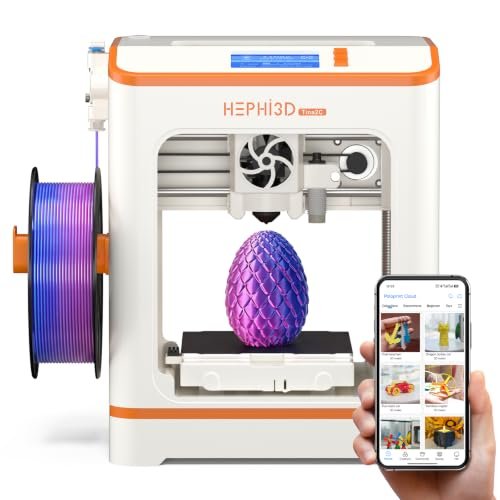
The Hephi3d Tina2C is a welcoming entry-level 3D printer focused on zero-assembly convenience and open-source software freedom. Coming pre-calibrated from the factory with fully automated bed detection, it allows users to jump into printing within five minutes of opening the shipping box. Unlike some beginner units that lock you into proprietary mobile ecosystems, the Hephi3d Tina2C supports both quick one-tap app printing and desktop slicers like Cura and Wiibuilder via USB-C or TF card. Its 3-second fast-release hotend simplifies upkeep, ensuring that minor clogs never halt your creative journey.
Key features that stand out:
– Out-of-the-box readiness with factory-configured auto bed leveling
– Open-source slicing compatibility supporting Cura, Wiibuilder, and USB-C inputs
– Access to an online library of 3,500+ printable designs and STEM project files
– Silent motor drive chips for distraction-free printing in living spaces
– Power outage resume function to safeguard multi-hour print jobs
Pros:
– Complete software flexibility without restrictive ecosystem lock-in
– Fast-release hotend makes maintenance and cleaning hassle-free
– Extremely budget-friendly purchase price for hobby starters
Cons:
– Tiny build plate limits practical household utility to smaller items.
– Non-heated bed means you are restricted to printing with standard PLA.
Best for: Tech-curious beginners and students who want an affordable, open platform to learn both mobile and desktop 3D slicing.
Expert Opinion: The Hephi3d Tina2C finds a great balance between beginner-friendly automation and open-source slicer compatibility, making it a versatile budget stepping-stone for future hobbyists.
Entina Tina2C Mini 3D Printer Starter Bundle
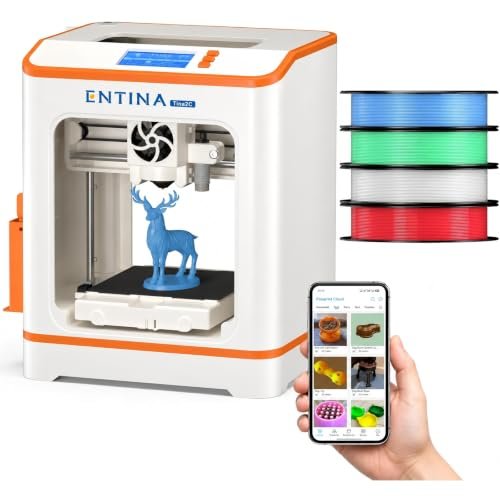
This Entina Tina2C Starter Bundle is curated to eliminate early printing roadblocks by pairing the plug-and-play desktop printer with a 1kg multi-color filament pack. Featuring four 250g spools of vibrant PLA, you have everything necessary to print multi-colored assemblies and decorative models right away. The machine retains all the beloved Tina2C benefits: guided setup via the Poloprint Cloud app, automated bed leveling, and a bendable magnetic build plate for zero-struggle model release. Low power draw and whisper-quiet motors ensure it fits seamlessly into shared family spaces.
Key features that stand out:
– Complete bundle includes four 250g rolls of colored PLA filament (1kg total)
– Guided 5-minute initial setup with fully automated bed sensor leveling
– Poloprint Cloud integration offering thousands of ready-to-print 3D designs
– Low-noise printing profile paired with built-in LED workspace lighting
– Flexible magnetic build platform for quick, tool-free print removal
Pros:
– Multi-color filament assortment lets you start making diverse prints immediately
– Factory-assembled chassis avoids mechanical setup errors
– Compact and energy-efficient design suited for small desks
Cons:
– The 3.9-inch build plate restricts you to compact prints.
– Lacks a heated print bed, keeping material choices limited to PLA.
Best for: Gift givers and first-time hobbyists who want a complete, ready-to-roll package without purchasing extra supplies separately.
Expert Opinion: Buying a printer only to wait for separate filament deliveries is frustrating; this bundle solves that problem completely, offering an all-in-one out-of-box experience for beginners.
Anycubic Kobra X Multicolor 3D Printer
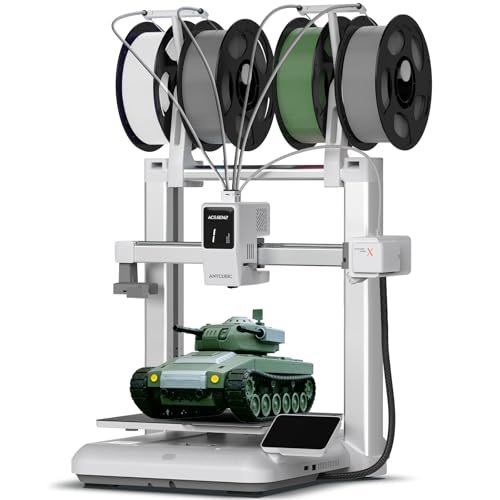
The Anycubic Kobra X represents a massive leap forward for ambitious home makers, delivering a generous 260x260x260mm build volume alongside multi-color capabilities expandable up to 19 colors. Driven by Kobra OS and high-speed motion planning, it hits print speeds up to 600mm/s while keeping operating noise down to a quiet ≤48 dB. The LeviQ 3.0 system handles 49-point auto bed leveling and dynamic vibration compensation for smooth bottom layers. Additionally, an integrated 720p AI camera actively monitors print progress, automatically pausing the machine if it detects spaghetti failures or debris on the build plate.
Key features that stand out:
– Expansive 260x260x260mm build plate supporting larger multi-part assemblies
– Multicolor printing starting at 4 colors and expandable up to 19 colors with ACE 2 Pro units
– LeviQ 3.0 smart 49-point auto-leveling with vibration suppression
– AI camera providing spaghetti detection, error alerts, and batch-print part skipping
– High-temperature 300°C hardened steel nozzle handling PLA, PETG, TPU, and ASA
Pros:
– Large build envelope handles big practical household projects effortlessly
– AI monitoring saves significant filament by catching failed prints early
– Extremely quiet operation despite its large frame and fast travel speeds
Cons:
– Takes up considerably more desk space than smaller desktop alternatives.
– Advanced features and multicolor settings require a short calibration learning curve.
Best for: Experienced hobbyists, makers, and power users wanting large-scale multi-color printing and smart failure prevention.
Expert Opinion: With its hardened nozzle, expansive build area, and smart AI monitoring, the Kobra X offers commercial-grade capabilities in a quiet, home-friendly package that easily justifies its footprint.
Helpful Comparison Insights for Home 3D Printers
When shopping for a home machine, choosing between different designs comes down to how much physical space you have, who will be using the printer, and what types of items you plan to build:
- Build Volume and Workspace Footprint: Compact mini printers like the Entina Tina2C series and AOSEED AI take up negligible space and fit easily on a child’s study desk, but their roughly 3.9-inch cubic print area means you cannot produce full-size functional brackets, helmets, or large household organizers. Conversely, full-size machines like the Anycubic Kobra X and Bambu Lab A1 require dedicated desk space but offer the volume necessary to print functional, full-scale household tools in a single job.
- Single vs. Multi-Color Capabilities: Single-extruder machines like the Flashforge Adventurer 5M or the standard Tina2C are faster to set up, simpler to maintain, and produce significantly less discarded plastic waste. However, if your main goal is creating painted-look figurines, art pieces, or dual-material mechanical components (like combining rigid PLA with flexible TPU seals), choosing an integrated multicolor solution like the Flashforge AD5X or the Anycubic Kobra X will save you countless hours of manual painting and gluing.
- Safety and User Demographics: For households with young children or active pets, fully enclosed frames with pinch protection (such as the AOSEED AI models) prevent accidental burns from exposed hotends running at 200°C+. For dedicated workshops or adult hobby spaces, an open-bed design provides easier access for cleaning, part removal, and nozzle upgrades.
Final Verdict: Which Home 3D Printer Should You Choose?
Selecting the right machine depends on your personal balance of budget, technical comfort, and project ambitions:
- Top Pick for Everyday Makers & Hobbyists: The Bambu Lab A1 offers the smoothest blend of speed, automated calibration, and print quality, making it an exceptional daily workhorse.
- Top Pick for High-Speed Multi-Color Printing: The Flashforge AD5X delivers an all-metal CoreXY build with a compact four-spool feeder, eliminating the fuss of third-party multi-material add-ons.
- Top Pick for Large-Scale Projects & Advanced Makers: The Anycubic Kobra X stands out thanks to its expansive 260mm³ build plate, high-temperature hardened steel nozzle, and AI spaghetti-detection camera.
- Top Pick for Kids & Family STEM Learning: The AOSEED AI 3D Printer (8-Roll Kit) provides an unmatched safe, enclosed environment backed by child-friendly AI doodle software that removes the intimidation of 3D modeling.
- Top Budget Pick for Beginners: The Entina Tina2C Starter Bundle offers unbeatable value, handing you a pre-assembled, auto-leveling machine and a kilogram of filament for the lowest upfront cost.
Frequently Asked Questions About the Best 3 D Printer for Home Use
What makes a 3D printer safe for home use around children and pets?
When selecting a printer for living spaces, safety centers on thermal and mechanical shielding. Look for machines with enclosed build chambers or partially shielded frames, thermal runaway protection, and certified non-toxic PLA filament testing. Machines like the AOSEED AI model also feature pinch-resistant doors and lower-temperature nozzles that make them safe for young family members.
Is an automatic bed leveling feature necessary for a beginner?
Automatic bed leveling is practically essential for newcomers today. Older manual leveling required sliding pieces of paper under nozzles at four different corners, which frequently caused first-layer adhesion failures. Modern systems use inductive sensors or strain gauges to map the bed topography digitally, saving you time and ensuring consistent print quality from day one.
How loud is a modern desktop 3D printer during operation?
Most modern printers utilize silent stepper motor drivers that keep operational sound levels between 45 dB and 55 dB, which is comparable to a quiet library or a gentle indoor fan. While the movement of the print head is virtually silent, you will still hear the high-speed cooling fans, particularly on fast CoreXY machines like the Flashforge Adventurer 5M running at 600mm/s.
What is the difference between CoreXY and standard bedslinger printers?
A bedslinger (like the Bambu Lab A1 or Anycubic Kobra) moves the build plate back and forth along the Y-axis while the print head travels along the X and Z axes. A CoreXY printer (like the Flashforge AD5X) moves only the toolhead along both X and Y axes using a synchronized belt system while the bed moves down gradually on the Z-axis. CoreXY frames tend to be sturdier and faster, though bedslingers are often simpler to maintain and more budget-friendly.
Can home 3D printers print functional, sturdy replacement parts?
Yes. By using resilient materials such as PETG, ABS, ASA, or carbon-fiber composites, you can produce sturdy mechanical brackets, replacement gears, plumbing fixtures, and outdoor hooks. Just verify that your chosen printer features a heated bed and a hotend capable of reaching at least 250°C to 300°C, like the Anycubic Kobra X.
How much maintenance does a desktop 3D printer require?
Routine upkeep is straightforward. Every few months, you should wipe down and lubricate the metal guide rails or lead screws, check belt tension, and ensure the build plate is clean of skin oils using warm water and dish soap. Quick-swap nozzle systems on modern printers make clearing an occasional filament clog a fast, five-minute task.
Do I need to know 3D modeling or CAD to enjoy a 3D printer at home?
Not at all. Vast online repositories like Printables, Thingiverse, and integrated cloud apps like Poloprint offer millions of free, pre-tested digital models that you can download and print immediately. If you want to design custom items, beginner-friendly tools like Tinkercad or automated AI-to-3D prompt generators make custom modeling simple to learn.
Affiliate Disclosure: As an Amazon Associate, I earn from qualifying purchases made through links on this site.