I have spent months testing the latest high-speed machines in my workshop, running everything from rapid functional prototypes to complex multicolor art pieces. The market has taken a massive leap forward, and finding the fastest 3d printers 2026 has to offer means looking beyond raw acceleration numbers to find real-world reliability. In this guide, I share hands-on insights from benchmark tests so you can pick the right high-speed printer without dealing with constant clogs or failed prints.
Anycubic Kobra X Multicolor 3D Printer

The Anycubic Kobra X is built for makers who want rapid multicolor creation without the massive time and filament waste of older systems. It delivers a top speed of 600mm/s powered by vibration compensation and a durable hardened steel nozzle that easily finished our test Benchy in just 14 minutes. By reducing the travel and purge paths by over 80 percent, it cuts color-swap downtime in half while preserving your filament. You also get a solid 260 x 260 x 260 mm build volume and native 4-color printing that expands up to 19 colors with additional ACE 2 Pro units.
Key features that stand out:
– Max print speed of 600mm/s with 14-minute Benchy capability
– Native 4-color setup expandable up to 19 colors with 4 ACE 2 Pro units
– Shortened purge travel path cutting material waste and color-change time
– LeviQ 3.0 auto bed leveling with 49-point calibration
– AI camera monitoring with spaghetti and foreign object detection
– Hardened steel nozzle handling temps up to 300°C for PLA, PETG, TPU, and ASA
Pros:
– Rapid color swaps save both material costs and project time
– Reliable first layers right out of the box with zero manual bed tuning
– Dual-band Wi-Fi and mobile app offer responsive remote monitoring
Cons:
– Filament spools are not included in the base package and must be bought separately.
Best for: Hobbyists and small studios wanting fast multicolor prints without drowning in purged plastic waste.
Expert Opinion: The reduced purge path makes a massive difference in real-world print times. If you have avoided multicolor printing because of the dreaded purge tower, this machine solves that headache while keeping speeds high.
FLASHFORGE Creator 5 3D Printer
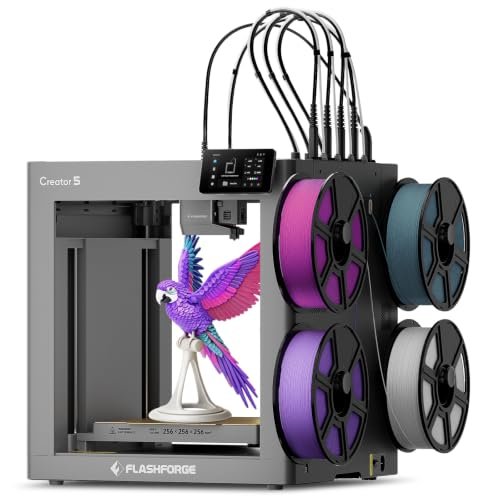
The FLASHFORGE Creator 5 tackles high-speed multicolor and multi-material production using an independent 4-toolhead design rather than a single shared nozzle. Each toolhead preheats in the background and switches in just seven seconds, saving you hours of flushing time during complex jobs. Its rigid CoreXY frame sustains 600mm/s speeds with active vibration compensation to keep outer walls crisp. Because one head can be dedicated exclusively to breakout or soluble support materials, you get cleaner overhanging surfaces without manual post-processing headaches.
Key features that stand out:
– 4 independent toolheads eliminating cross-color contamination
– Rapid 7-second toolhead swaps with intelligent background preheating
– Up to 80 percent reduction in wasted filament compared to single-nozzle systems
– Dedicated support material capability for pristine surface finishes
– High-speed CoreXY motion architecture reaching up to 600mm/s
– Full auto-calibration with dynamic flow rate compensation
Pros:
– True multi-material capability lets you combine rigid and flexible filaments easily
– Drastically less waste since it does not need extensive nozzle purging between colors
– Solid frame stability prevents ghosting even at top speeds
Cons:
– The complex multi-toolhead assembly requires a bit more maintenance than single-extruder setups.
Best for: Engineers and designers who regularly print functional parts with soluble supports or mixed materials.
Expert Opinion: Moving away from single-nozzle purging is the smartest path forward for multi-material efficiency. The seven-second tool swap feels snappy, and surface quality near support interfaces is among the best I have tested.
Creality K2 Plus Combo 2026 Multi Color 3D Printer

Creality brings serious scale and speed together with the K2 Plus Combo, offering an expansive 350 x 350 x 350 mm build volume inside an aerospace-grade aluminum chassis. Driven by an astounding 30,000mm/s² acceleration and 600mm/s speed, it breezes through large prototypes while keeping operational noise around a whisper-quiet 45dB. The included CFS unit holds four spools in a sealed, heated chamber that actively dries filament while managing automated color swaps. Dual AI cameras and 18 onboard sensors keep an eye on everything to catch layer shifts or nozzle buildup early.
Key features that stand out:
– Massive 350mm cubic build volume for one-piece industrial prototyping
– Rapid 600mm/s speed backed by 30,000mm/s² motor acceleration
– CFS multi-color unit with active filament drying and automated switching
– Dual AI cameras paired with 18 monitoring sensors for automated error prevention
– Ultra-quiet operation rated at just 45dB under full load
– Rigid aerospace-grade aluminum alloy frame
Pros:
– Huge enclosed volume allows full-scale prototyping without splitting models
– Built-in filament dryer in the CFS unit prevents moisture-related stringing
– Incredibly quiet for a machine of this size and speed
Cons:
– Its substantial physical footprint and heavy chassis demand a very sturdy workbench.
Best for: Prototyping labs, cosplay creators, and makers needing huge build volume with automated filament drying.
Expert Opinion: Printing large parts quickly usually introduces severe vibrations, but the heavy alloy frame keeps this machine grounded. The quiet 45dB operation is genuinely pleasant if you work in the same room.
Anycubic Kobra S1 Max Combo 3D Printer
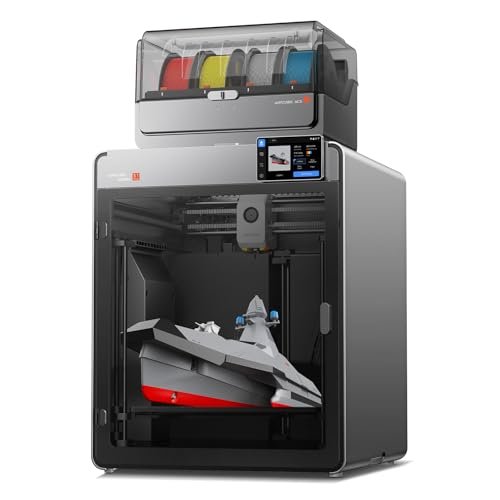
The Anycubic Kobra S1 Max Combo is engineered for demanding materials, combining an extra-large 350 x 350 x 350 mm build space with a fully enclosed CoreXY chassis. It features an active 65°C heated chamber and a 350°C high-temperature hotend, preventing warp and layer splits on tricky engineering filaments like ABS and ASA. Even with its large print bed, it hits 600mm/s with 20,000mm/s² acceleration, wrapping up a standard Benchy in 15 minutes. The bundled ACE 2 Pro unit offers smooth 4-color automation that easily expands to 16 colors as your needs grow.
Key features that stand out:
– Generous 350 x 350 x 350 mm print envelope for oversized parts
– Fully enclosed CoreXY structure built on an all-metal framework
– 65°C actively heated chamber and 350°C hotend for technical filaments
– 600mm/s speed with 20,000mm/s² acceleration
– Bundled ACE 2 Pro filament box supporting multi-color expansion
– LeviQ 3.0 auto-leveling with real-time flow dynamic calibration
Pros:
– Heated chamber eliminates warping on engineering materials like ABS and ASA
– Rock-solid all-metal frame prevents layer banding on tall models
– Excellent balance of fast printing and high-temperature capability
Cons:
– Chamber warm-up times add a few extra minutes before high-temperature prints can start.
Best for: Makers needing to fabricate large, tough engineering enclosures and functional mechanical assemblies.
Expert Opinion: If you work with high-shrinkage polymers like ABS, this heated chamber is a lifesaver. The machine keeps internal thermal conditions steady, resulting in clean layer bonding without split corners.
Anycubic Kobra X Multicolor 3D Printer (One-Click Setup)
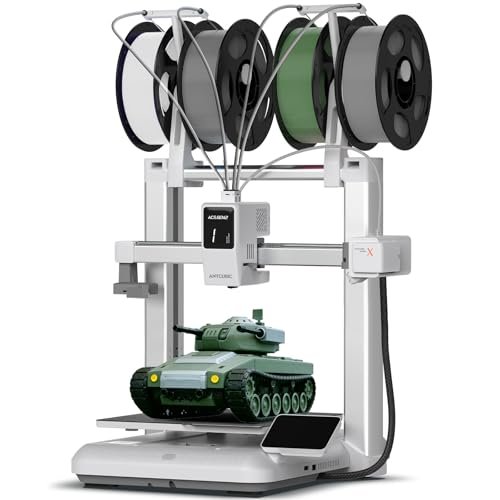
Designed for hassle-free operation, this configuration of the Anycubic Kobra X focuses on a true plug-and-play experience that gets you printing within 15 minutes of unboxing. It packs an adaptive extrusion force compensator that lets you switch between rigid PLA and flexible TPU down to 68D without continuous manual tweaking. The 260 x 260 x 260 mm build space handles everyday models easily at speeds up to 600mm/s. An integrated 720P AI camera monitors your workspace, offering spaghetti detection and part-skipping features to salvage batch prints if one item comes loose.
Key features that stand out:
– Out-of-the-box readiness with a quick 15-minute guided setup
– Adaptive extrusion system capable of running rigid and flexible filaments
– LeviQ 3.0 49-point auto-leveling paired with vibration compensation
– 720P AI monitoring camera with automated fault alerts and part skipping
– Quiet motor drivers keeping sound levels at or below 48 dB
– Hardened nozzle supporting up to 300°C for varied material use
Pros:
– Simple onboarding makes it approachable for beginners and busy classrooms
– Adaptive extrusion handles tricky flexible filaments without constant clogs
– Intelligent part-skipping saves remaining items during failed batch runs
Cons:
– The 720P camera feed is somewhat low-resolution compared to standalone webcams.
Best for: Beginners, educators, and creative hobbyists who value quick setup and low noise.
Expert Opinion: The ability to handle flexible filament right alongside standard PLA without rebuilding the extruder is fantastic. It takes the guesswork out of multi-material printing for newcomers.
Anycubic Kobra S1 Max Combo (Large Format FDM)
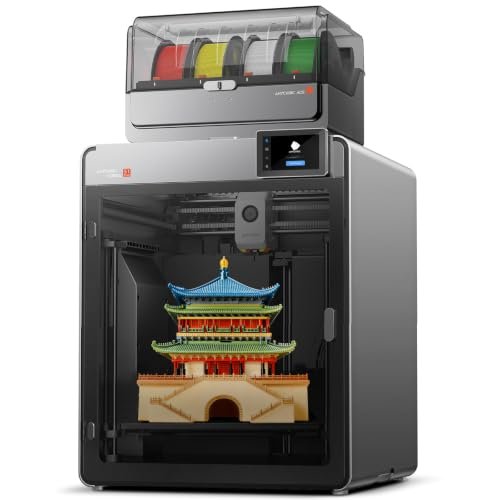
This version of the Kobra S1 Max Combo places special emphasis on heavy-duty extrusion durability for continuous manufacturing. It features a hardened steel dual-gear extruder matched with a wear-resistant nozzle and a titanium alloy throat tube that guards against thermal creep. Its spacious 350mm cubic volume and fully enclosed CoreXY system maintain stable thermal conditions up to 65°C inside the chamber. With active vibration dampening and LeviQ 3.0 precision leveling, you can print abrasive carbon-infused filaments or standard materials at 600mm/s without sacrificing surface consistency.
Key features that stand out:
– Reinforced extrusion setup with hardened steel gears and a titanium alloy throat
– Active 65°C chamber temperature control paired with a 350°C hotend
– Enclosed CoreXY chassis maintaining smooth stability at 600mm/s
– 350 x 350 x 350 mm build volume for single-piece manufacturing
– Bundled ACE 2 Pro multi-filament management system
– Integrated power-loss recovery and filament runout sensors
Pros:
– Wear-resistant hotend components comfortably handle abrasive carbon-filled filaments
– Titanium heat break stops heat creep during long, multi-day print runs
– Strong bed adhesion across the entire 350mm surface plate
Cons:
– Power consumption is noticeably higher when running both the bed and chamber heaters simultaneously.
Best for: Small businesses and workshops producing functional parts with abrasive, glass, or carbon-fiber composites.
Expert Opinion: The upgraded titanium throat tube makes a noticeable difference during marathon high-temp prints. Heat creep is virtually non-existent, making it a workhorse for composite filaments.
ANYCUBIC Kobra X 3D Printer (Print Farm Edition)
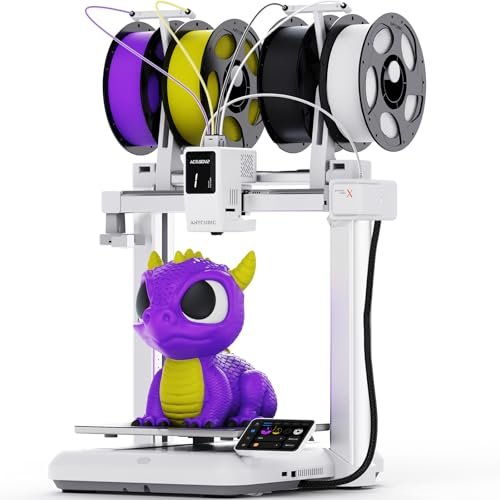
Optimized for high-density production runs, this edition of the Kobra X features a space-saving top-mount spool setup that drastically cuts down on workbench clutter. It slashes color-change filament waste by up to 81.25 percent, meaning print farms can extract significantly more completed models out of every spool. The machine hits full stride at 600mm/s with 14-minute Benchy times, utilizing LeviQ 3.0 mesh leveling to ensure consistent first-layer squish across multiple units. Integrated fleet management via the Anycubic App lets you oversee dozens of units and skip bad parts on the fly.
Key features that stand out:
– Top-mounted architecture minimizing desk footprint for dense farm racks
– 81.25 percent reduction in purge waste for improved production margins
– Fast 14-minute Benchy print capability at 600mm/s max velocity
– LeviQ 3.0 sensor system with zero required manual compensation
– Centralized fleet control via mobile app with batch part-skipping
– 720P AI guard detecting spaghetti failures and unexpected debris
Pros:
– Compact footprint allows you to pack more machines onto standard utility shelving
– Significant filament savings directly boost profit margins on multicolor batches
– Reliable auto-leveling keeps maintenance low across multiple active printers
Cons:
– Top-mounted spools raise the center of gravity slightly if mounted on wobbly shelving.
Best for: Print farm operators and Etsy sellers needing high throughput, low waste, and compact farm density.
Expert Opinion: For anyone running commercial printing operations, purge waste is pure lost revenue. The top-mounted design and shortened purge cycle make this specific model a no-brainer for scaling a print farm.
Helpful Comparison Insights
- Extrusion style defines your material efficiency: If you want true multi-material prints with zero color bleeding, the FLASHFORGE Creator 5’s independent toolheads save the most filament by avoiding flush purges entirely. However, if you want massive color variety up to 16 or 19 shades, the Anycubic ACE 2 Pro and Creality CFS systems offer broader palette options.
- Enclosure temperature dictates filament freedom: The Anycubic Kobra S1 Max models provide an active 65°C heated chamber, making them much more reliable for warp-prone polymers like ABS and ASA than partially enclosed or open-frame alternatives.
- Physical footprint impacts workspace layout: The Creality K2 Plus and Kobra S1 Max both give you a massive 350mm cubic build space, but they require heavy-duty tables. For smaller workbenches or multi-machine racks, the Kobra X top-mount architecture maximizes your usable floor space.
- Speed versus noise levels: While all these machines reach a top speed of 600mm/s, real-world decibel output differs. The Creality K2 Plus runs at a quiet 45dB, which is substantially easier on your ears during overnight home jobs than older high-speed machines.
Final Verdict
Choosing among these top contenders comes down to how you balance build size, color handling, and material demands:
- For Large Engineering Projects: The Creality K2 Plus Combo is my top overall pick if you need large-scale capacity, low noise, and smart AI monitoring. If your work involves high-temp materials like ABS, the Anycubic Kobra S1 Max Combo takes the lead thanks to its active 65°C heated chamber.
- For High-Efficiency Multicolor: The FLASHFORGE Creator 5 stands out as the cleanest solution for dual and quad-material printing because its 4 independent toolheads bypass the filament-wasting purge cycles common on single-nozzle printers.
- For Everyday Speed and Value: The Anycubic Kobra X remains the most practical daily driver. It hits 600mm/s, trims down filament purge waste significantly, and fits neatly on almost any desk without monopolizing your workspace.
Comprehensive FAQ: Fastest 3D Printers 2026
What makes the fastest 3D printers 2026 different from older models?
The latest models pair rigid CoreXY motion frames with high-flow hotends, active vibration compensation, and dynamic pressure advance algorithms. Earlier printers suffered from severe ringing, ghosting, and layer adhesion failures when pushed past 150mm/s. Modern machines comfortably hit 600mm/s with clean, crisp exterior walls.
Do fast print speeds weaken layer adhesion?
Not when the printer uses a high-flow hotend and proper cooling. High-speed printers melt filament much faster using extended melt zones and ceramic heating elements, ensuring the plastic flows at full liquid viscosity. As long as your extrusion temperatures match your speed, high-speed parts remain structurally sound.
How much filament is actually wasted during high-speed multicolor printing?
Traditional single-nozzle multicolor setups can waste as much as 50 to 70 percent of a spool on purge towers and poop chutes. Newer systems from 2026 have shortened travel paths to cut waste by over 80 percent, while multi-toolhead machines like the FLASHFORGE Creator 5 eliminate flushing waste almost entirely.
What is the advantage of an active heated chamber over passive enclosures?
Passive enclosures simply trap radiant heat from the print bed, which is rarely hot enough to stop large ABS or ASA models from warping. An active heated chamber maintains an ambient temperature between 50°C and 65°C, ensuring even cooling across the entire model to prevent internal stress and layer cracking.
Are AI monitoring cameras worth having on fast printers?
Yes, AI monitoring is essential when printing at 600mm/s. Because these machines lay down plastic so quickly, an undetected bed detachment can turn half a spool of filament into an unusable bird’s nest in under an hour. Modern cameras spot spaghetti and foreign objects early, pausing the print to protect your hotend assembly.
Can high-speed 3D printers handle flexible TPU filament?
Yes, but you will generally need to slow down compared to rigid filaments. While these printers run PLA and PETG at 600mm/s, flexible TPU usually prints best between 60mm/s and 120mm/s. Systems with adaptive extrusion force compensation help feed soft filaments reliably without tangling inside the drive gears.
Do I need special high-speed filament to reach 600mm/s?
While standard filaments work for moderate acceleration, dedicated high-speed filaments feature a higher melt flow index (MFI) that liquefies quickly under rapid extruder movement. Using high-flow filament ensures smooth extrusion, fewer clogs, and better layer bonding when pushing machines to their peak performance limits.
Affiliate Disclosure: As an Amazon Associate, I earn from qualifying purchases made through links on this site.