Having spent hundreds of hours clearing filament purges and dialing in complex dual extrusion prints, I know how frustrating single-nozzle color setups can get. Testing modern multi nozzle 3d printers showed me just how much time and material independent toolheads can save compared to standard purge-heavy systems. In this guide, I share hands-on insights on five reliable multi-material machines so you can find the right setup for clean multi-color prints and functional engineering parts.
FLASHFORGE Creator 5 3D Printer
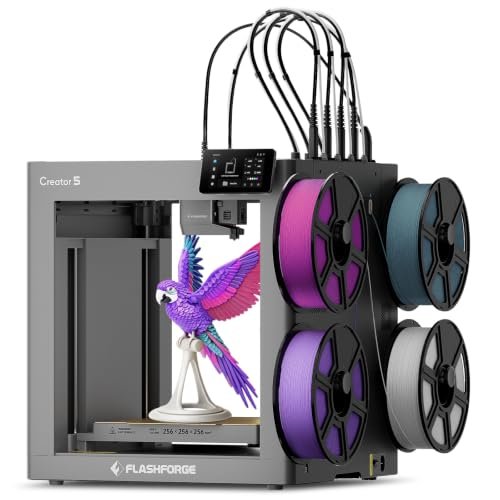
Running multi-material jobs on the FLASHFORGE Creator 5 is remarkably smooth thanks to its 4 independent toolheads that wipe out color bleeding. The machine utilizes intelligent background preheating to execute quick 7-second tool swaps without dumping piles of purged plastic. With its rigid CoreXY frame delivering speeds up to 600mm/s, you get crisp mechanical parts and soluble support prints without the typical multi-material slowdowns.
- Key features that stand out:
- 4 independent toolheads for true multi-color and multi-material printing without cross-contamination
- 7-second FlashSwap system with intelligent background nozzle preheating
- Up to 80% reduction in filament waste compared to single-nozzle color setups
- Dedicated support material printing for PLA, PETG, TPU, and soluble filaments
-
High-speed CoreXY motion system reaching up to 600mm/s with active vibration compensation
-
Pros:
- True independent toolheads eliminate messy filament purge waste
- Rapid 7-second tool changes keep print times fast
-
Seamlessly mixes flexible TPU with rigid engineering plastics
-
Cons:
- The machine requires a significant amount of desk space to accommodate its wide frame.
Best for: Makers and small studios needing fast, zero-waste multi-material prints.
Expert Opinion: The FlashSwap toolhead architecture solves the biggest headache in multi-filament printing by cutting purge towers down to almost nothing. It handles transitions between chemically incompatible materials like TPU and PLA far better than shared-nozzle switchers ever could.
Bambu Lab P2S Combo 3D Printer
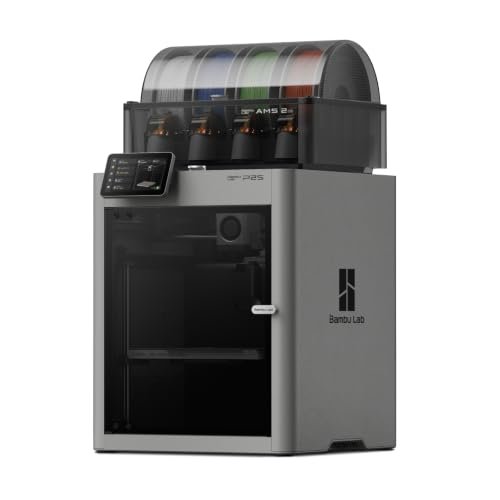
The Bambu Lab P2S Combo brings accessible multi-material handling to your workshop with its companion AMS 2 Pro filament manager and built-in spool drying. It prints reliably at speeds up to 600mm/s using an active flowrate-compensated PMSM servo extruder for clean corners and sharp details. The adaptive airflow system lets you toggle between cooling delicate PLA overhangs and holding chamber heat up to 50°C for technical filaments.
- Key features that stand out:
- High-speed printing up to 600mm/s backed by active flowrate compensation
- AMS 2 Pro system with built-in filament drying up to 65°C for pristine multi-spool feeding
- 15-minute quick setup featuring automated bed leveling and AI failure detection
- Adaptive airflow system that balances part cooling and 50°C chamber heat retention
-
Integrated MakerWorld and Bambu Studio workflow for smooth remote job control
-
Pros:
- Polished ecosystem that is ready to print within minutes out of the box
- Integrated dry box actively preserves hygroscopic filaments during long jobs
-
Excellent print quality with crisp corners at high print speeds
-
Cons:
- Frequent color switches create noticeable purge waste since it feeds into a single shared nozzle.
Best for: Hobbyists and designers wanting an effortless multi-color workflow with minimal initial calibration.
Expert Opinion: While it relies on an automated multi-spool feeder rather than discrete physical toolheads, the P2S Combo offers one of the smoothest multi-color workflows available today. Just keep in mind that material purges add up if you print dense, multi-color layer designs.
FLASHFORGE Creator 5 Pro 3D Printer
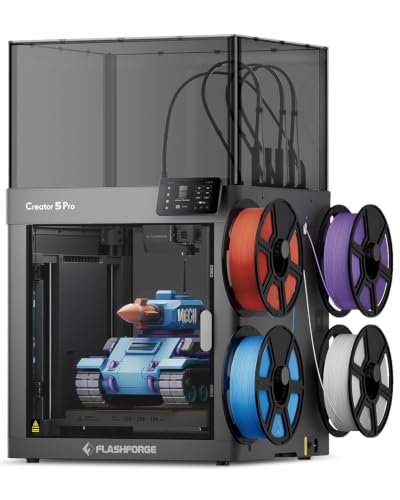
Built for demanding engineering jobs, the FLASHFORGE Creator 5 Pro packs an active 65°C heated chamber inside an ultra-rigid enclosed CoreXY structure. Its 4 independent toolheads switch in just 7 seconds, bypassing purge waste completely while handling high-temp filaments like ABS, PC, and nylon. Workspace safety is managed through an onboard dual HEPA 13 and carbon filtration system, so you can run technical filaments right next to your desk without worrying about fumes.
- Key features that stand out:
- 4 independent FlashSwap toolheads with 7-second nozzle changes and zero purge towers
- Active heated chamber reaching up to 65°C to eliminate warping in ABS, PC, and PA
- Heavy-duty CoreXY build with precision linear rails and 1.5GT high-torque belts
- Dual HEPA 13 and activated carbon air filtration system for odor and VOC control
-
Automated toolhead offset calibration with HD camera remote monitoring
-
Pros:
- Active chamber heating prevents warping on demanding industrial filaments
- Zero-purge independent toolhead mechanism drastically slashes operational material costs
-
Built-in dual filtration safely traps fumes and fine particles in indoor workspaces
-
Cons:
- The higher price point makes it an investment primarily suited for professional workshops.
Best for: Professional engineering labs and commercial prototyping environments.
Expert Opinion: If you are fabricating mechanical assemblies out of polycarbonate and nylon with dissolvable supports, this machine delivers true industrial capability. The active chamber heating paired with independent toolheads prevents layer separation without creating mounds of scrap filament.
Snapmaker U1 3D Printer
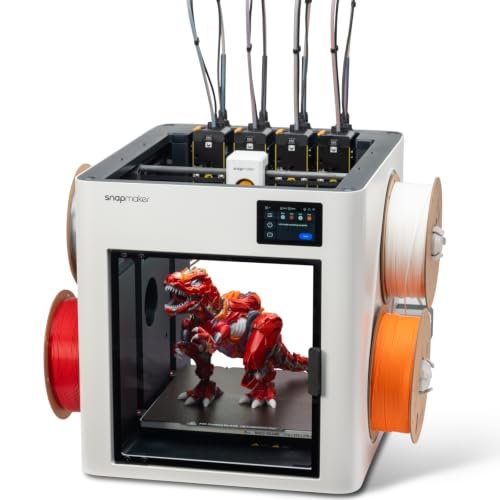
The Snapmaker U1 introduces an automated SnapSwap 4-toolhead changer that locks into new nozzles in a blistering 5 seconds. By eliminating nozzle flush routines, it delivers up to 5X faster multi-material cycles and saves heaps of material across big builds. With a generous 270 x 270 x 270 mm build volume and carbon fiber CoreXY motion rails, you can seamlessly blend rigid plastics, soluble supports, and soft TPUs in a single print.
- Key features that stand out:
- SnapSwap automated tool changer switching between 4 preheated heads in 5 seconds
- Drastic reduction in material waste and up to 5X faster multi-material job completion
- Compatible with broad material spectrum including TPU, PVA, PLA, ABS, and carbon fiber composites
- Lightweight carbon fiber X-axis rails with CoreXY motion running up to 500mm/s
-
Large 270 x 270 x 270 mm print volume with AI monitoring and smart auto-calibration
-
Pros:
- Lightning-fast 5-second tool changes save hours on complex multi-material models
- Capable of mixing flexible TPU with rigid filaments without retraction clogs
-
Sturdy carbon fiber rail assembly keeps motion light, smooth, and accurate
-
Cons:
- Slicing multi-toolhead profiles in custom software requires a slight learning curve for complete beginners.
Best for: Workshops and makers who want multi-material flexibility with flexible and rigid filaments.
Expert Opinion: The 5-second tool change on the U1 is a genuine time-saver on tall multi-material models. Having individual preheated nozzles completely sidesteps the cross-temperature clogging issues typical when combining PLA and TPU on shared hotends.
FLASHFORGE AD5X Multi-Material 3D Printer

The FLASHFORGE AD5X provides an accessible entry point into high-speed multi-material creation using its Intelligent Filament System (IFS). Reaching speeds up to 600mm/s with 20000mm/s² acceleration, it keeps project turnaround times remarkably brief without losing fine details. Its compact all-metal CoreXY frame integrates vibration suppression and full bed auto-leveling to keep your first layer reliable across 4-color jobs.
- Key features that stand out:
- Intelligent Filament System (IFS) supporting 4-color and multi-material spool feeding
- Fast 600mm/s print speed with 20000mm/s² acceleration for rapid turnarounds
- All-metal CoreXY structure featuring dynamic vibration suppression algorithms
- Multipoint auto-leveling sensor for precise first-layer bed adhesion
-
Compact, space-saving footprint with side-by-side four-spool feeder alignment
-
Pros:
- Compact footprint fits easily on smaller workbenches and desks
- Fast CoreXY acceleration significantly cuts total print time
-
Intuitive automated bed leveling works reliably right out of the box
-
Cons:
- Switching between contrasting colors requires purge cycles that produce waste material.
Best for: Hobbyists and makers looking for high-speed 4-color printing in a space-conscious footprint.
Expert Opinion: The AD5X strikes a neat balance between compact desk footprint and rapid CoreXY printing speeds. While IFS relies on sequential feeding rather than separate physical extruders, its snappy acceleration makes multi-color prototyping fast and painless.
Helpful Comparison Insights
When choosing between multi-material systems, understanding the mechanical differences will save you time and money.
- Independent Toolchangers vs. Shared Nozzle Feeders: Systems like the FLASHFORGE Creator 5 and Snapmaker U1 swap dedicated toolheads mechanically. This means zero filament purging, drastically reducing wasted plastic and eliminating color contamination. In contrast, multi-filament feeder boxes like the Bambu AMS or Flashforge IFS cycle spools through one nozzle, which requires purging material on every color change.
- Material Mixing Capabilities: If you plan on printing flexible TPU alongside rigid PLA, or running dedicated PVA water-soluble supports, true multi-nozzle toolchangers are significantly more reliable. Shared hotends struggle because switching between materials with drastically different melting temperatures often leads to heat-creep clogs.
- Speed and Cycle Times: While single-nozzle printers boast high linear speeds, every tool swap takes 40 to 90 seconds to retract, feed, and flush. Independent toolheads change in 5 to 7 seconds, resulting in substantially faster total job times on models with hundreds of layer swaps.
Final Verdict
Choosing the right printer comes down to what you produce and the materials you use daily:
- For Engineering Prototypes & Technical Plastics: The FLASHFORGE Creator 5 Pro stands above the rest. Its active 65°C heated chamber, dual filtration, and 4 dedicated toolheads make it the ideal workhorse for ABS, PC, and dissolvable supports.
- For Flexible, Multi-Material Maker Projects: The Snapmaker U1 offers the best balance of speed and versatility. The 5-second SnapSwap changer handles TPU, PETG, and rigid filaments seamlessly across a spacious build volume.
- For Fast Multi-Color Models on a Budget: The FLASHFORGE AD5X is an accessible, space-saving CoreXY option that gets you into multi-color printing without breaking the bank.
- For Plug-and-Play Everyday Printing: The Bambu Lab P2S Combo provides the smoothest software ecosystem and effortless spool management, provided you do not mind purge towers.
Frequently Asked Questions About Multi Nozzle 3D Printers
What is the main advantage of multi nozzle 3d printers over single nozzle multi-color systems?
The primary advantage is the elimination of filament purge waste. In single-nozzle multi-material setups, the printer must unload the current filament, load the new one, and purge excess material into a wipe tower or purge chute on every color change. Multi nozzle 3d printers switch dedicated toolheads, keeping each filament ready at its own temperature, which saves significant time and reduces plastic waste by up to 80%.
Can multi nozzle 3d printers print TPU and PLA together?
Yes, true multi-nozzle and toolchanger printers excel at combining flexible TPU with rigid PLA. Because each material stays loaded in its own independent extruder, you do not have to worry about retracting soft filament through long Bowden tubes or cross-contaminating nozzles with different melting points.
How does dual extrusion compare to a 4-toolhead system?
Dual extrusion traditionally uses two hotends mounted on a single carriage or an IDEX (Independent Dual Extruder) setup, limiting you to two materials or colors per print. A 4-toolhead system expands that capability significantly, allowing you to run four distinct colors or combine multiple rigid materials, flexible filaments, and dedicated soluble support filaments in a single automated print.
Do independent toolheads require manual nozzle alignment?
Modern multi-toolhead printers feature automated toolhead offset calibration. Sensors measure the physical X, Y, and Z offsets of each toolhead relative to the print bed and other nozzles, storing these values in firmware to ensure seamless layer transitions without manual dial indicators.
Are water-soluble supports practical on multi nozzle 3d printers?
Water-soluble supports like PVA or BVOH are exceptionally practical on multi nozzle machines. Because the support material has its own dedicated nozzle, it is never overheated or cooked during standard printing phases. This eliminates the clogging issues that frequently happen when purging soluble materials through a single shared nozzle.
Is an active heated chamber necessary for multi-material printing?
An active heated chamber is not necessary for basic materials like PLA, PETG, or TPU. However, if you plan to print engineering-grade filaments such as ABS, ASA, Polycarbonate (PC), or Nylon (PA) alongside support materials, an actively heated chamber (reaching 50°C to 65°C) is critical to prevent layer delamination and warping on larger parts.
Do multi nozzle 3d printers take longer to set up?
Initial calibration takes slightly longer than standard single-nozzle printers because the system needs to calibrate the physical position of each toolhead. However, modern automated routines have streamlined this process, allowing many systems to complete full calibrations within 15 to 20 minutes automatically.
Affiliate Disclosure: As an Amazon Associate, I earn from qualifying purchases made through links on this site.