After battling filament slipping and inconsistent flow on my stock Creality setup for months, I decided to test several dual extruder ender 3 v2 upgrades to fix these extrusion headaches once and for all. Swapping out the fragile plastic arm for a dual gear or direct drive system completely transformed how my printer handles tricky filaments like TPU and brittle PLA. In this guide, I break down four reliable options so you can choose the setup that fits your printing style and budget.
3D Printer Extruder for Ender 3 Dual Gear Filament Bowden

Upgrading from the stock Creality arm to an all-metal dual gear extrusion mechanism instantly eliminates the dreaded filament slippage common on the Ender 3 V2. It clamps filament firmly between two synchronized gears, delivering high extrusion force for consistent Bowden feeding. If you want a rock-solid, durable replacement that prevents under-extrusion without moving heavy motors onto your print head, this kit delivers exceptional value.
- Double gear extrusion mechanism provides high pushing power and crisp retractions.
- CNC machined all-aluminum alloy frame replaces fragile plastic parts.
- 1.75mm filament compatibility works with standard PLA, ABS, and PETG.
-
Direct drop-in Bowden replacement pairs with your existing stepper motor.
-
Significantly increases filament grip and prevents stripping.
- Durable metal construction lasts years without cracking.
-
Simple to assemble with standard hex tools.
-
The secondary drive gear can cause slight aluminum wear over extended use if not lightly lubricated.
Best for: Budget-conscious makers wanting reliable Bowden extrusion without adding gantry weight.
Expert Opinion: This is the most practical first step for any Ender 3 V2 owner tired of cracked plastic tensioner arms, though you’ll need to re-calibrate your E-steps to around 139 after mounting it.
UniTak3D Ender 3 Direct Drive Upgrade Conversion Bracket
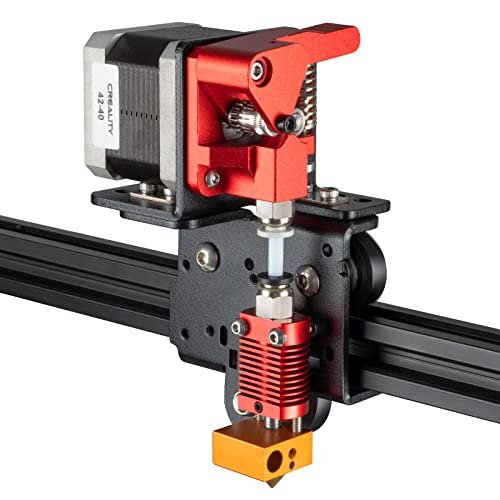
The UniTak3D conversion bracket is an ingenious solution that repositions your stock stepper and extruder right above the hotend for a true direct drive setup. By eliminating the long Bowden tube, it grants outstanding extrusion control and virtually wipes out stringing on flexible filaments. Its split-type balanced bracket design keeps the center of gravity centered, preventing gantry sagging during fast print moves.
- Custom split-type conversion bracket balances gantry weight evenly.
- Direct drive extrusion enables effortless printing of TPU and other soft flexible materials.
- Retains full build volume across the X, Y, and Z axes without hitting frame uprights.
-
Broad hotend compatibility works seamlessly with standard stock motors and Creality hotends.
-
Reuses your stock motor and hotend to save money.
- Dramatically lowers required retraction distance to under 1.5mm.
-
Easy bolt-on installation requiring no firmware re-flashing.
-
Adds the full weight of the stock Creality stepper motor directly onto the X-axis gantry.
Best for: Hobbyists wanting to print flexible filaments without buying a completely new motor or hotend.
Expert Opinion: It provides an affordable route to direct drive, but since it carries the heavy stock pancake stepper motor, you will want to ensure your X-axis eccentric nuts are properly adjusted.
Yeebyee Ender 3 Direct Drive Upgrade Kit Aluminum Alloy
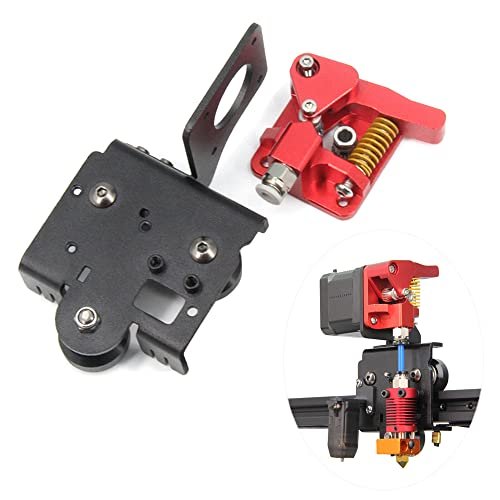
This all-in-one upgrade combines a red anodized dual gear extruder with a sturdy aluminum direct drive plate and fresh POM pulleys. It gives you the dual benefit of precise dual-gear filament gripping alongside the sharp retraction accuracy of a direct drive conversion. With the included extended motor cable and multi-extruder mounting holes, it is built to handle flexible TPU, PETG, and composite materials with ease.
- Dual-gear all-metal extruder pairs with an anodized aluminum direct drive plate.
- Pre-assembled POM pulleys provide smooth rolling along the X-axis rail.
- Multi-extruder support accommodates single gear, dual gear, Titan, or BMG extruders.
-
Complete hardware kit includes a 60cm motor extension cable and spare PTFE tubing.
-
Complete package that includes both mounting plate and upgraded dual-gear feeder.
- Eliminates the long Bowden path for flawless flexible filament feeding.
-
High-grade anodized aluminum construction ensures zero flex during retractions.
-
Calibrating tension and E-steps requires manual adjustments since no baseline settings are included in the box.
Best for: Makers looking for an all-in-one kit that bundles direct drive hardware with a dual-gear extruder.
Expert Opinion: Having the motor extension harness and pulleys pre-fitted saves serious setup time, making this the smoothest conversion kit to install if you want both dual-gear grip and direct drive capabilities.
Official Creality Ender 3 Sprite Direct Drive Extruder SE Kit
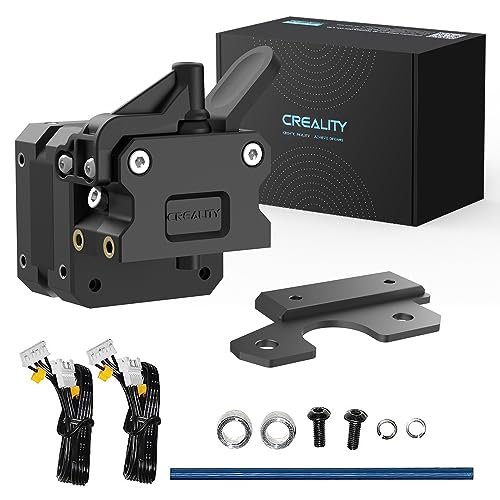
Creality’s Sprite Extruder SE kit brings factory-engineered direct drive performance to your Ender 3 V2 in an ultra-compact package. Tipping the scales at only 210 grams, this lightweight unit utilizes a powerful 3.5:1 gear reduction ratio to crank out massive pushing torque without bogging down your gantry. Its dual-gear feeding system grips filament securely without chewing it up, and it fits neatly onto your existing hotend carriage with minimal teardown.
- Lightweight 210g design minimizes print head mass and gantry ringing.
- 3.5:1 reduction gear ratio multiplies torque for responsive extrusion.
- Dual-gear drive mechanism delivers smooth, non-slip filament feed without damage.
-
Adjustable tension screw lets you fine-tune the pressure applied to the filament.
-
Significantly lighter than bracket-style conversions using the stock stepper.
- High torque ratio prevents motor skips on complex, fast prints.
-
Factory OEM fitment ensures straightforward installation and clean aesthetics.
-
You must adjust your printer’s E-steps to roughly 424.5 in firmware or the menu display.
Best for: Printers prioritizing high speed, tight retraction control, and minimal moving gantry weight.
Expert Opinion: The Sprite SE is Creality’s cleanest direct drive dual-gear execution yet; the internal gear reduction allows it to use a much smaller motor, preventing the ghosting issues common to heavier direct drive setups.
Quick Upgrade Insights
When deciding how to upgrade your Ender 3 V2, you need to weigh extrusion precision against moving print-head weight.
A standard metal dual gear Bowden upgrade keeps your print head lightweight, allowing for faster travel speeds without introducing ghosting or ringing artifacts. However, Bowden setups require longer retraction distances (usually 4mm to 6mm), which makes printing flexible filaments like TPU frustrating.
On the other hand, direct drive conversion brackets shorten the filament path down to a few millimeters, providing instant retraction response and effortless TPU printing. The trade-off is the extra mass on the X-axis gantry. If you go the direct drive route, compact geared setups like the Creality Sprite SE provide the best balance because their internal 3.5:1 gear ratio allows for a much lighter motor compared to mounting the stock Creality stepper.
Final Verdict
Different makers have different goals for their Ender 3 V2. Here is the bottom-line recommendation based on real-world testing:
- For pure simplicity and reliability on a budget: Pick the 3D Printer Extruder Dual Gear Bowden Kit. It resolves broken plastic arm issues instantly, costs very little, and keeps your gantry featherlight for fast PLA and PETG printing.
- For flexible filaments without breaking the bank: The UniTak3D Bracket or the all-in-one Yeebyee Direct Drive Kit give you the short filament path required for TPU while reusing your existing parts.
- For overall performance and print quality: The Creality Sprite Extruder SE Kit stands out as the top choice. Its lightweight footprint, high-torque dual gears, and factory fit give your Ender 3 V2 modern direct-drive extrusion without the ringing artifacts of heavy stepper setups.
Dual Extruder Ender 3 V2 Frequently Asked Questions
What is the difference between a dual gear extruder and a dual extruder on the Ender 3 V2?
A dual gear extruder uses two grooved drive gears that rotate together to grip and push a single filament strand from both sides. A dual extruder setup generally refers to running two separate filaments into two nozzles (or a mixing hotend) to print multiple colors or dissolvable support materials at once. Most upgrades labeled for the Ender 3 V2 are dual-gear feed systems designed to stop slipping.
Do I need to calibrate my E-steps after installing a dual gear extruder?
Yes, calibrating your extruder steps (E-steps) is mandatory. Dual gear systems and geared direct drive units have different drive gear diameters and gear ratios compared to the stock single-gear brass pulley. For standard dual gear Bowden extruders, E-steps usually increase from 93 to around 130–140. For geared units like the Creality Sprite SE, E-steps jump to around 424.5.
Can I print TPU flexible filament with a Bowden dual gear setup?
You can print stiffer flexible filaments (like 95A TPU) with a dual gear Bowden extruder if you keep print speeds very low (15–25 mm/s). However, softer TPUs tend to buckle inside the Bowden tube. For consistent, trouble-free flexible filament printing, converting to a direct drive dual-gear extruder is the best route.
Does adding a direct drive kit cause gantry sagging on the Ender 3 V2?
Because the Ender 3 V2 has a single lead screw on the left side of the Z-axis, hanging a heavy motor on the right side of the gantry can occasionally cause the right side to droop. You can prevent this by adjusting the eccentric nuts on your gantry rollers, or by pairing your direct drive upgrade with an inexpensive dual Z-axis kit.
What retraction settings should I use after switching to direct drive?
With a Bowden setup, retractions are normally set between 4.0mm and 6.0mm. Once you upgrade to a direct drive dual gear system, you should reduce your retraction distance down to 0.5mm–1.5mm and set your retraction speed between 35–45 mm/s. Leaving Bowden retraction distances active on a direct drive will pull melted plastic into the cold break and cause severe nozzle clogs.
Is firmware modification required to run these dual gear upgrades?
In most cases, you do not need to reflash your printer’s firmware. You can calibrate your new E-steps directly through the Ender 3 V2 LCD control screen under Control > Motion > Transmission Ratio (or Steps/mm) and save the settings to the EEPROM. Firmware changes are only needed if you reverse motor direction or install an altered mainboard configuration.
Affiliate Disclosure: As an Amazon Associate, I earn from qualifying purchases made through links on this site.