When I first set out to build multi-color models and complex overhangs with soluble supports, I realized that getting a reliable 2 nozzle 3d printer setup makes all the difference. Over the past few months, I tested dedicated multi-material printing rigs alongside specialized micro-aperture nozzle kits to see which hardware handles complex prints without constant clogging. Whether you want a complete multi-feed automated system or the precise nozzle kits needed to tune your hotends, this guide covers what worked best on my workbench.
Bambu Lab P2S Combo 3D Printer & AMS 2
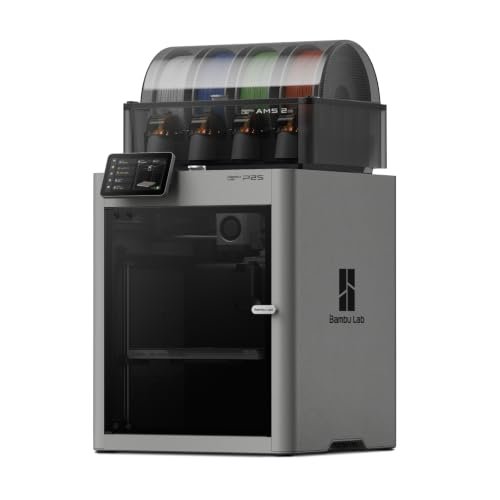
The Bambu Lab P2S Combo pairs a rigid CoreXY platform with the AMS 2 Pro unit, making it a standout choice for anyone wanting reliable multi-filament extrusion. I found the PMSM Servo Extruder and Active Flowrate Compensation keep corners crisp even when running at speeds up to 600 mm/s. The integrated AMS 2 Pro filament drying system heats spools up to 65 °C, which keeps moisture-sensitive support materials like PVA bone-dry while printing. Setting up took roughly 15 minutes right out of the box, letting you jump straight into complex multi-color projects without tedious bed-leveling routines.
Key features that stand out:
– High-speed CoreXY motion system reaching print speeds up to 600 mm/s
– AMS 2 Pro multi-material unit featuring active spool drying up to 65 °C
– Active Flowrate Compensation and PMSM Servo Extruder for clean layer stacking
– Fully automated bed leveling, vibration compensation, and AI failure monitoring
– Adaptive airflow chamber system with integrated carbon air filtration
Pros:
– Swapping between different materials and colors happens completely automatically
– Filament stays dry during long prints thanks to the heated AMS enclosure
– Quick-swap hotend assembly makes routine nozzle size changes straightforward
Cons:
– The automated filament purge cycle creates excess waste material without careful slicer tuning.
Best for: Makers who want hassle-free multi-material prints and high-speed production without manual hotend calibrating.
Expert Opinion: This setup solves the biggest headache of multi-material printing by integrating active filament drying directly into the feeder. It avoids the mechanical alignment issues common to traditional dual-gantry hotends while delivering clean, mixed-material parts reliably.
16Pcs 3D Printer Nozzles 0.2mm MK8 Set
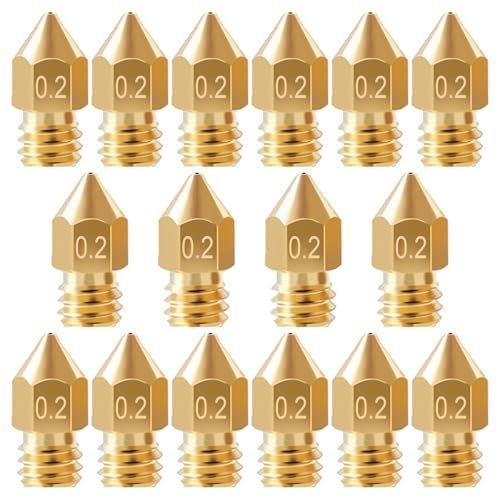
If you run a dual-block setup or need ultra-fine detail on miniature prints, this 16-piece 0.2mm brass nozzle pack delivers tight tolerances for standard MK8 heater blocks. With an internal diameter error under 0.02mm, these tips produce razor-thin layer lines that standard 0.4mm tips simply cannot match. The machined M6 threading provides a secure seal against the heat break, effectively preventing melted filament from oozing around the heater block during extended runs. Having 16 matched units on hand means you can dedicate matched pairs to a dual-extrusion hotend without worrying about height variances.
Key features that stand out:
– 16 identical 0.2mm micro-aperture brass nozzles with standard M6 thread
– Strict manufacturing tolerance with an internal bore variance under 0.02mm
– Smooth inner transition walls engineered to minimize backpressure and clogs
– Broad compatibility with Creality Ender, CR-10, and MK8 style hotends
– Suitable for standard 1.75mm PLA, PETG, and ABS filaments
Pros:
– Yields exceptional surface detail and barely visible layer lines on small figurines
– Large pack size allows you to swap in fresh nozzles frequently without extra cost
– Uniform machining makes Z-offset calibration easier across dual-block setups
Cons:
– The tiny 0.2mm opening significantly increases print times and is prone to clogs if using low-grade filament.
Best for: Hobbyists tuning their printer for high-detail miniatures, jewelry molds, and ultra-fine dual-color accents.
Expert Opinion: Running matched 0.2mm nozzles requires well-filtered filament, but the detail is unmatched. These brass tips offer consistent thermal conduction, making them a cost-effective choice when fine detail takes priority over raw printing speed.
Creality Official MK8 Ender 3 Nozzles (24-Piece Assortment)
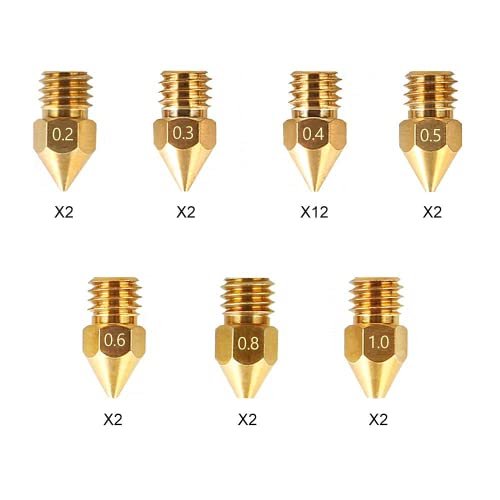
This official 24-piece kit from Creality gives you genuine factory replacements across seven practical bore sizes, ranging from 0.2mm up to 1.0mm. The precision rounded chamfer reduces friction at the entry point, which helps keep filament gliding smoothly into the melt zone. Each tip features clear engraved size markings, eliminating the guesswork when selecting components for an asymmetrical dual-extruder build. Because these are official Creality parts, the machining quality remains consistent across the whole batch, helping you avoid frustrating first-layer adhesion issues.
Key features that stand out:
– 24 genuine factory brass nozzles across 7 distinct opening sizes
– Size distribution: 2x 0.2mm, 2x 0.3mm, 12x 0.4mm, 2x 0.5mm, 2x 0.6mm, 2x 0.8mm, 2x 1.0mm
– Laser-engraved size indicators on each hexagonal flat for quick identification
– Rounded internal chamfers to prevent internal material catching and burning
– Direct drop-in fit for Creality CR-10 series, Ender series, and RepRap MK8 hotends
Pros:
– Includes 12 workhorse 0.4mm tips alongside specialty sizes for maximum versatility
– Clean thread tolerances prevent leaks when torqued properly at working temperatures
– Backed by Creality customer support and direct technical assistance
Cons:
– Standard brass construction wears down quickly if you attempt to push abrasive filaments like glow-in-the-dark or carbon fiber.
Best for: Creators who want genuine manufacturer parts to experiment with mixed-nozzle multi-material builds.
Expert Opinion: Using an official multi-pack lets you pair a large 0.8mm nozzle for rapid infill or support structures with a fine 0.4mm nozzle for detailed outer perimeters. The consistent shoulder height on these Creality nozzles simplifies mechanical leveling.
26Pcs Ender 3 MK8 Brass Nozzles Kit
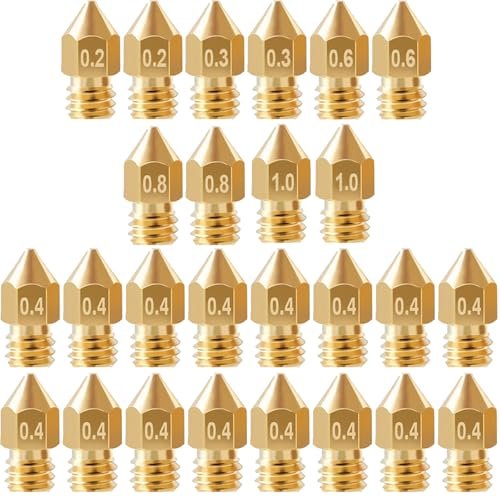
This extensive 26-piece nozzle pack gives you plenty of backup hardware to keep your print farm running without interruptions. Centered around sixteen 0.4mm workhorse nozzles, it also supplies paired sets of 0.2mm, 0.3mm, 0.6mm, 0.8mm, and 1.0mm tips for varied print tasks. The mirror-smooth internal bore prevents stagnant melted plastic from collecting inside the tip, reducing stringing when switching between filaments. With durable brass construction and standard M6 threading, these nozzles screw cleanly into standard heat blocks with minimal risk of cross-threading.
Key features that stand out:
– 26-piece brass nozzle set containing 6 distinct aperture sizes
– Heavy weighting toward daily printing needs with 16 included 0.4mm nozzles
– Tightly controlled output tolerances keeping bore variance below 0.02mm
– Premium brass composition offering dependable thermal conductivity up to 280 °C
– Universal M6 mounting thread compatible with standard 1.75mm MK8 extruders
Pros:
– Incredible value per nozzle for anyone managing multiple printers or dual hotends
– Paired alternative sizes make it easy to configure matched dual-nozzle toolheads
– Tight bore tolerances help maintain predictable flow rates across prints
Cons:
– The kit does not include an installation wrench or storage case to keep the loose nozzles separated.
Best for: Budget-conscious makers and workshop managers who burn through standard nozzles during high-volume production.
Expert Opinion: When running dual-nozzle printers, having matched pairs in alternative sizes is essential. This pack gives you paired 0.2mm tips for detail or paired 0.8mm tips for rapid structural prototypes at a fraction of the cost of branded singles.
ELEGOO Centauri 2 Combo 3D Printer
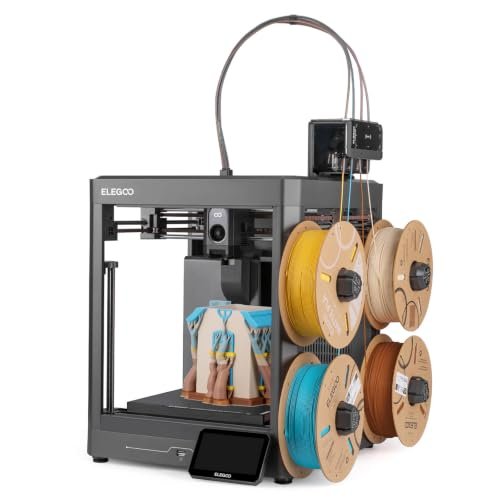
The ELEGOO Centauri 2 Combo tackles multi-material tasks with its CANVAS 4-color management system, providing smooth material handoffs through a rigid CoreXY platform. I was impressed by the 22 integrated monitoring sensors, which keep close tabs on filament tension, feed path issues, and print progress in real time. The motion system pairs an all-aluminum structural frame with hardened linear rails, supporting accelerations up to 20,000 mm/s² without missing a beat. Everyday maintenance is just as simple, thanks to the magnetic toolhead shroud, built-in silicone nozzle wiper, and semi-automatic belt tensioners.
Key features that stand out:
– CoreXY motion platform reaching 500 mm/s print speeds and 20,000 mm/s² acceleration
– CANVAS multi-material system supporting 4-color automatic filament switching
– 22 internal monitoring sensors tracking filament feeding and system metrics
– Full automatic bed leveling combined with active vibration resonance compensation
– Maintenance-friendly design featuring a magnetic toolhead faceplate and nozzle wiper
Pros:
– The automated nozzle wiping station reliably clears filament oozing before new layers start
– Rigid frame and linear guides keep prints smooth even at rapid acceleration speeds
– Responsive 5-inch touchscreen interface makes switching colors intuitive
Cons:
– Slicing software profiles for third-party filaments take some manual fine-tuning to get clean color boundaries.
Best for: Intermediate makers wanting a turnkey multi-color CoreXY machine with modern sensor safety checks.
Expert Opinion: The Centauri 2 Combo addresses the prime cause of failed multi-material prints: filament wiping. Its dedicated wiper assembly and automated purge sequencing do an admirable job of stopping color contamination between material swaps.
16PCS MK8 Brass Nozzle Kit with Tools & Storage Case
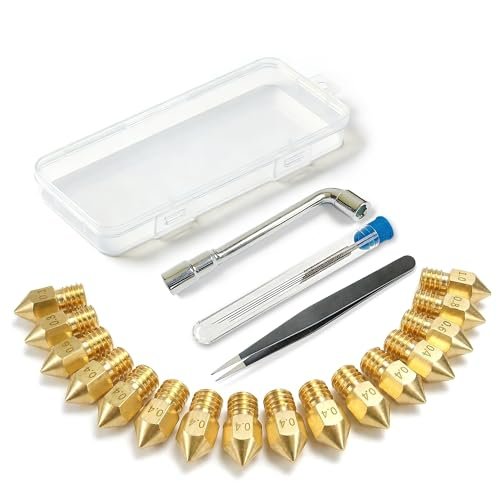
This organized 16-piece kit brings together practical nozzle sizes with the exact hand tools needed to install them properly. You get eight core 0.4mm brass nozzles alongside paired 0.2mm, 0.6mm, 0.8mm, and 1.0mm options, all protected in a sturdy compartmentalized carry box. The package includes an M6 socket wrench, angled fine-point tweezers, and six stainless steel cleaning needles, making hot swaps straightforward. The brass material provides steady heat distribution across 1.75mm filaments like PLA and PETG, while the included wrench prevents rounded hex flats during hot-tightening.
Key features that stand out:
– 16-piece brass nozzle assortment featuring 5 popular diameter options
– Complete tool package including an M6 hex wrench, fine tweezers, and 6 cleaning needles
– Labeled, compact storage case keeping each size cleanly separated and protected
– Machined brass construction providing consistent thermal transfer up to 260 °C
– Direct fit for standard MK8 setups across Ender-3 and CR-10 style machines
Pros:
– The included M6 wrench fits tightly around the nozzle hex to prevent stripped edges
– Storage case keeps tiny, unmarked nozzles organized so you grab the right size every time
– Cleaning needles help clear minor clogs quickly without disassembling the hotend
Cons:
– The kit is not compatible with proprietary hotends like the Ender-3 S1 Pro or CR-6 SE.
Best for: Beginners and multi-hotend users who need a self-contained maintenance kit with proper tools included.
Expert Opinion: Having the correct M6 wrench right beside your replacement nozzles saves time and prevents damaged heat blocks. It is a well-balanced kit for keeping dual-block print heads properly leveled, clean, and leak-free.
Sorcristy 44Pcs 3D Printer Nozzle Cleaning Kit
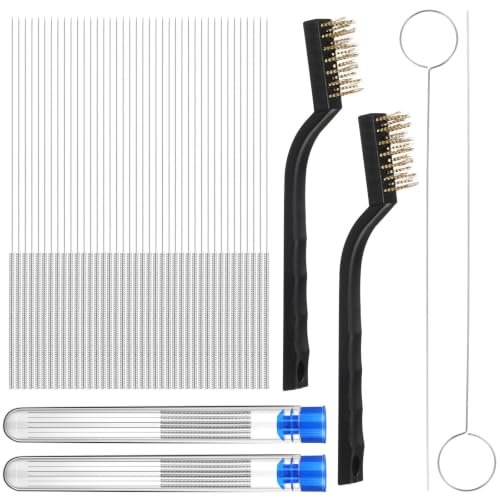
Keeping nozzles clean is essential when working with multi-filament setups, and this 44-piece maintenance kit covers all the bases. The star components are the two 1.5mm rigid clog pokers, which let you clear stuck filament plugs straight from the heat-break throat down through the nozzle. You also get 40 flexible 0.4mm stainless steel needles for clearing stubborn debris from the tip opening without scratching the brass interior. Two brass wire brushes round out the set, letting you scrub away baked-on plastic from your heater block, thermistor wires, and nozzle exterior while hot.
Key features that stand out:
– 44-piece dedicated hotend maintenance and unclogging toolset
– Includes 40 flexible 0.4mm stainless steel acupuncture-style clearing needles
– 2 heavy-duty 1.5mm cold-pull/throat clog pokers for clearing the melt zone
– 2 brass wire bristle brushes for clearing baked plastic off hotend exteriors
– Clear protective storage tubes preventing bent needles during storage
Pros:
– The 1.5mm pokers easily push out stuck filament plugs that standard thin needles cannot budge
– Wire brushes quickly remove accumulated residue from nozzle exteriors and silicone socks
– Stainless steel needles have enough flex to enter the nozzle tip without snapping
Cons:
– You must take care not to brush against exposed thermistor wires while cleaning hot blocks to avoid short circuits.
Best for: Any 3D printer operator troubleshooting stubborn material jams, burnt residues, or multi-filament feeder blocks.
Expert Opinion: Multi-filament setups double the chances of heat creep jams whenever materials switch back and forth. The 1.5mm clog pokers in this kit make short work of stubborn plugs, getting your extruder running again without a full hotend teardown.
Comparison Insights for Dual-Extrusion and Multi-Material Hardware
Choosing the right approach for multi-material prints comes down to deciding between automated filament-switching systems and traditional dual-nozzle toolheads. Automated single-nozzle systems, like those found on the Bambu Lab P2S Combo and the ELEGOO Centauri 2 Combo, eliminate mechanical alignment headaches between two physical hotends. By utilizing intelligent purge management and automated wiping, these machines allow you to print soluble supports or multi-color models without needing to manually align twin nozzle heights down to the hundredth of a millimeter.
If you are running a traditional dual-hotend printer—such as an IDEX (Independent Dual Extruder) or a dual-block carriage—nozzle manufacturing consistency is your top priority. Using matched brass nozzle pairs from packs like the Creality Official Assortment or the 16-piece 0.2mm set ensures both hotends share identical shoulder heights and bore geometries. When your nozzles are properly matched, calibrating your secondary Z-offset becomes significantly simpler, minimizing the risk of the idle nozzle scraping across your printed model.
Finally, keeping an active maintenance routine is critical regardless of your chosen hardware platform. Multi-material transitions frequently leave residual plastic in the melt zone, which leads to degraded layers or sudden clogs. Having a dedicated kit like the Sorcristy 44-piece cleaning set or the MK8 16-piece toolkit ensures you can quickly clear debris, swap worn brass tips, and keep your extrusion rates smooth and predictable.
Final Verdict
Here is how I recommend approaching your multi-material and dual-nozzle printing setup based on your practical workspace needs:
- Top Turnkey Multi-Material Machine: Go with the Bambu Lab P2S Combo. Its active AMS 2 filament drying, enclosed build chamber, and reliable flow calibration make multi-material printing remarkably smooth, especially when using moisture-sensitive support materials like PVA.
- Top CoreXY Value Pick: The ELEGOO Centauri 2 Combo is an outstanding alternative. Its robust 22-sensor monitoring system, high acceleration rates, and automatic nozzle wiper deliver clean multi-color transitions at an approachable price point.
- Top Nozzle Pack for Fine Detail: The 16Pcs 0.2mm MK8 Nozzle Set is the clear winner for ultra-detailed work. It gives you plenty of matched micro-aperture tips to run dual-head miniature prints with exceptionally clean surface finishes.
- Top All-in-One Maintenance Kit: The 16PCS MK8 Brass Nozzle Kit with Tools offers the best balance of replacement parts and hardware. The included M6 hex wrench and storage case save real time when performing hot nozzle swaps.
Frequently Asked Questions About 2 Nozzle 3D Printers
What is the difference between an IDEX printer and a dual-inlet single-nozzle system?
An IDEX (Independent Dual Extruder) printer uses two separate print heads moving on the same X-axis gantry. Each toolhead holds its own dedicated nozzle, allowing you to print two distinct materials—such as rigid PLA and flexible TPU—without cross-contamination. In contrast, dual-inlet single-nozzle printers (or automated AMS/CANVAS filament changers) route multiple spools into a single hotend. The printer cuts and retracts the filament between color swaps, purging the melt zone inside a waste chute or purge tower before continuing.
How do I prevent the second nozzle from scraping my print on a dual-hotend machine?
Physical nozzle alignment is critical on fixed dual-block setups. To prevent the idle nozzle from knocking into your print, heat both hotends to operating temperature, loosen the heat-break mounting grub screws, and set both tips flat against a feeler gauge on your print bed. Tighten everything down while hot to lock in identical Z-heights. Slicers also offer an “ooze shield” or a small Z-hop setting during tool changes, which lifts the printhead slightly while traversing printed sections.
Can I run two different nozzle sizes at the same time on a dual-extrusion printer?
Yes, running asymmetrical nozzle sizes is one of the biggest benefits of a dual-extruder or IDEX machine. A common setup is pairing a fine 0.2mm or 0.4mm nozzle on Extruder 1 for crisp exterior perimeters with a wide 0.8mm nozzle on Extruder 2 for structural infill or dense support material. This configuration gives you sharp cosmetic details while significantly cutting down overall print time.
Why do multi-material printers generate so much waste material?
Whenever multiple filaments share a single nozzle, the hotend must completely flush out the previous material before laying down the new one. If it fails to clear the melt zone thoroughly, darker pigments or support materials will bleed into the next layer. Slicers build a purge tower or dump waste filament into a purge bucket to ensure clean color transitions. You can reduce this waste by enabling “purge to infill” or using dual independent hotends that keep materials separated.
How often should I replace brass nozzles when printing multi-material parts?
Standard brass nozzles typically last through several hundred hours of clean printing with standard PLA or PETG. However, using composite filaments—such as glow-in-the-dark, wood-filled, or carbon fiber blends—can widen a standard 0.4mm brass aperture to 0.5mm or larger in just a few prints. If you notice inconsistent line widths, sudden stringing, or unexplained under-extrusion, it is time to install a fresh brass tip or upgrade to hardened steel.
What is the best way to clear a clog when switching between two different filament types?
When switching from a high-temperature filament like ABS or PETG to a low-temperature filament like PLA, the leftover material can easily form a solid plug inside the nozzle. To clear it, heat your hotend to the higher material’s printing temperature (around 240 °C to 250 °C) and manually push a short length of cleaning filament or nylon through the throat. If the blockage persists, use a 1.5mm clog poker from a dedicated maintenance kit to press the obstruction straight out through the heat block.
Affiliate Disclosure: As an Amazon Associate, I earn from qualifying purchases made through links on this site.