Over the past few weeks, I set up, calibrated, and ran real-world prints on four distinct desktop machines to see what kind of value you actually get for your hard-earned money. Navigating the true cost of three d printer hardware can be tricky once you factor in slicing software, replacement nozzles, and filament consumption. In this guide, I share my hands-on takeaways across budget-friendly mini units and high-speed multi-color powerhouses so you can pick the right setup without overspending.
Entina Tina2C 3D Printer
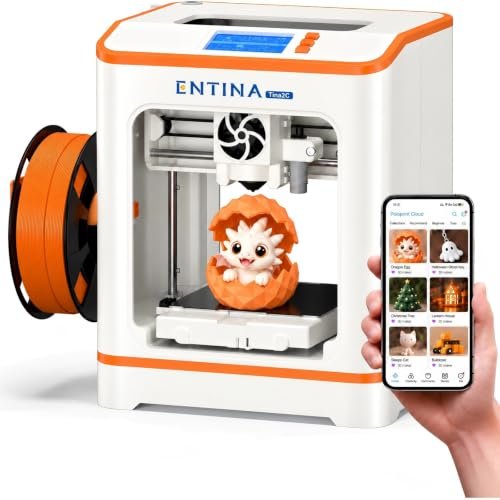
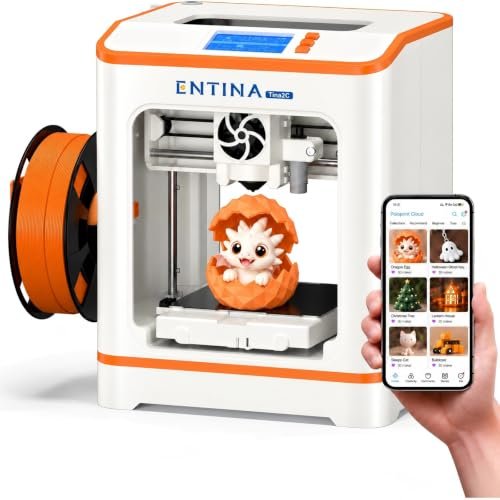
The Entina Tina2C makes entering the hobby refreshingly simple thanks to its plug-and-play assembly that took me under five minutes to unbox and get running. I found the Poloprint Cloud app practical for quick jobs, offering access to thousands of ready-to-print designs directly over 2.4GHz Wi-Fi without needing prior 3D modeling experience. For desks and compact workstations, its automatic bed leveling and bendable magnetic plate deliver consistent first layers and easy model removal every single time.
Key features that stand out:
– Fully pre-assembled design ready to run in roughly five minutes
– Integrated Poloprint app with 3,500+ cloud models and AI generation tools
– Automatic bed leveling and power-loss recovery to safeguard prints
– Flexible magnetic build plate and quick-swap nozzle for easy upkeep
– Compact 3.9 x 3.9 x 3.9-inch build volume with quiet desktop operation
- Seamless setup right out of the box with zero manual leveling required
- Companion mobile app makes it easy for kids and beginners to find models
-
Flexible build plate lets finished prints pop off with a gentle bend
-
The 3.9-inch build cube is too small for larger functional parts or multi-piece builds.
Best for: Beginners, kids, and educators who want a hassle-free, compact desktop machine at an entry-level price point.
Expert Opinion: The Tina2C offers serious convenience for the money, serving as one of the most accessible machines I have tested for small toys, calibration tests, and classroom projects.
FLASHFORGE AD5X Multi-Color 3D Printer
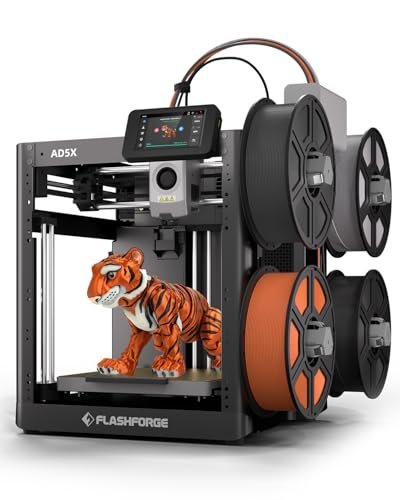
If you want to step beyond monochrome prints, the FLASHFORGE AD5X handles multi-material builds effortlessly thanks to its built-in 4-color printing feeding system. The rigid CoreXY frame achieves blistering print speeds up to 600mm/s, working alongside internal vibration compensation to keep surface artifacts to an absolute minimum. Between the 300°C direct-drive extruder and 1-click automatic bed leveling, this unit bridges the gap between everyday hobby printing and rapid prototyping.
Key features that stand out:
– Built-in multi-color printing supporting up to four colors simultaneously
– CoreXY motion structure delivering speeds up to 600mm/s and 20,000mm/s² acceleration
– One-click auto leveling paired with a high-temperature 300°C direct-drive extruder
– Dual-channel cooling fans and active vibration compensation for clean walls
– Remote print monitoring and controls via the Flash Maker mobile app
- Automated multi-color feeding eliminates the hassle of manual filament swapping
- Rapid printing speeds significantly cut down project turnaround times
-
Direct-drive hotend handles abrasive and high-temperature materials smoothly
-
The initial investment is noticeably higher than standard single-color entry models.
Best for: Experienced hobbyists, designers, and small workshops needing multi-color production and rapid turnaround times.
Expert Opinion: Flashforge built a versatile production machine here; having automated four-color filament handling built straight into a high-speed CoreXY platform saves countless hours of manual labor.
Portable Compact FDM 3D Printer
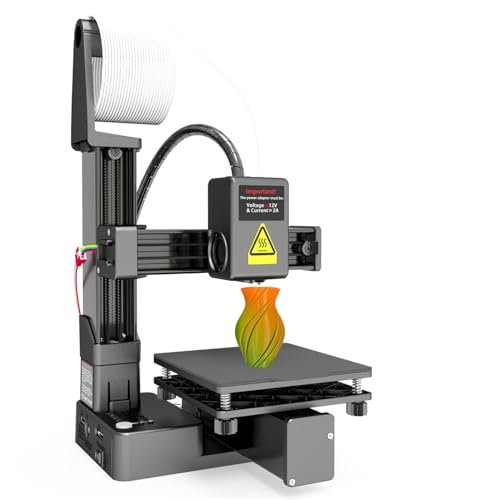
This ultra-portable mini machine is built for makers who need a lightweight desktop footprint that can run efficiently from a simple 12V Type-C power adapter. It features a straightforward modular assembly process supported by clear video guides, ensuring you will not feel lost during initial calibration. I was also impressed by its versatile filament compatibility, cleanly extruding both standard rigid PLA and flexible TPU through its 0.4mm nozzle.
Key features that stand out:
– Modular assembly supported by clear step-by-step video tutorials
– Type-C 12V power supply support for versatile, portable desktop operation
– Compatible with both 1.75mm PLA and flexible TPU filaments
– Removable build plate over a practical 100 x 100 x 100mm build volume
– Complete starter kit including test PLA filament, tools, and an 8GB TF card
- Type-C power design provides true portability between classrooms and home desks
- Extrudes flexible TPU filament reliably, which many entry-level printers struggle to do
-
Ships with all necessary tools, memory cards, and test materials in the box
-
It requires hands-on modular assembly and manual bed adjustments before printing.
Best for: Students, STEM classrooms, and budget-focused tinkerers who prioritize portability and flexible material support.
Expert Opinion: While it requires a bit of assembly, the inclusion of Type-C power and TPU compatibility makes this a uniquely practical portable option in the budget category.
Entina Tina2 Plus 3D Printer
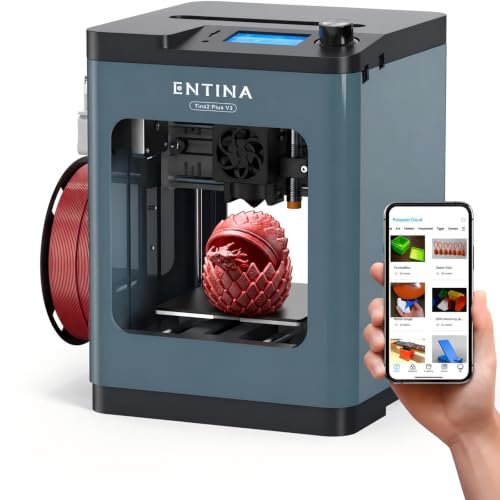
The Entina Tina2 Plus takes the simplicity of entry-level printing and adds higher throughput, boasting print speeds up to 250mm/s for faster results. It features a 40-second fast-heating ceramic hotend paired with a textured PEI spring steel build plate that guarantees solid first-layer adhesion. I particularly appreciated the dual Z-axis structure, which keeps the gantry level and steady even when pushing the printer through rapid directional changes.
Key features that stand out:
– Fast 250mm/s maximum print speed with stable motion control
– Ceramic hotend reaching print temperatures in approximately 40 seconds
– Dual Z-axis lead screws and textured PEI spring steel sheet for stability
– Partially enclosed safety frame designed to shield high-temperature parts
– Wide software compatibility across Windows, macOS, Linux, and Chromebooks
- Rapid hotend warm-up lets you initiate prints in under a minute
- Dual Z-axis design noticeably improves layer consistency on taller models
-
Semi-enclosed frame adds an extra layer of safety around children and students
-
The compact build area limits your ability to print large functional parts in a single pass.
Best for: Families, educators, and hobbyists looking for a safe, quick-heating, and reliable desktop printer.
Expert Opinion: With its dual Z-axis, PEI spring plate, and rapid ceramic heater, the Tina2 Plus feels like a refined machine that consistently delivers clean prints with minimal fuss.
Practical Insights: Evaluating the Cost of Three D Printer Options
When you examine the marketplace, the initial purchase price is only one part of the equation. Finding the right balance requires weighing features against your actual printing routine:
- Upfront Hardware vs. Long-Term Value: Entry-level units under $150, like the portable FDM kit or the Tina2C, keep your initial risk low. However, if you plan to print detailed prototypes or commercial items, spending more upfront on a machine like the FLASHFORGE AD5X pays for itself by reducing failed prints and eliminating manual color painting.
- Print Speed Saves Real Money: A printer capable of 250mm/s to 600mm/s print speeds drastically reduces electrical runtime and frees up the build plate for your next design. Faster turnaround is crucial if you intend to run small-batch production.
- Component Durability and Maintenance: Machines equipped with PEI spring steel plates and ceramic hotends require fewer replacement parts over time. Budget beds with adhesive tape or basic stickers wear out quickly, adding recurring maintenance costs.
- Material Versatility: If your printer only runs standard PLA, you are limited. Choosing a unit that natively handles flexible TPU or high-temp filaments expands what you can create without needing to purchase an entirely new machine later.
Final Verdict
Choosing the right option comes down to matching your project goals with your budget:
- The Value-First Beginner Choice: Go with the Entina Tina2C if you want zero setup headaches, cloud printing via Wi-Fi, and a safe, kid-friendly experience right out of the box.
- The Performance & Multi-Color Champion: Pick the FLASHFORGE AD5X if you want fast speeds, multi-color capabilities, and a heavy-duty direct-drive toolhead that handles advanced filaments.
- The Compact Classroom Pick: Choose the Entina Tina2 Plus for its quick-heating ceramic hotend, dual Z-axis stability, and semi-enclosed frame that keeps curious fingers safe.
- The Portable Tinkerer: Opt for the Portable Compact FDM Printer if you want an affordable, Type-C-powered mini setup that handles both standard PLA and flexible TPU on the move.
Frequently Asked Questions About the Cost of Three D Printer Options
What is the average cost of three d printer setups for beginners?
Entry-level FDM 3D printers typically range between $100 and $300. In this price tier, you can expect compact build volumes, automatic bed leveling, and simple out-of-the-box operation suitable for learning basic slicing and printing.
Yes, beyond the machine itself, you need to budget for filament spools (usually $15 to $25 per kilogram), replacement nozzles, spare build surfaces, and electricity. Slicing software like Cura and PrusaSlicer is free, but premium modeling software or cloud libraries may have optional subscriptions.
Does a faster print speed increase the overall cost of three d printer ownership?
While high-speed machines like CoreXY models cost more upfront, they often reduce ongoing expenses. They complete jobs in a fraction of the time, lowering overall electricity consumption per part and freeing up the printer for higher productivity.
How much does filament typically cost over time?
A standard 1kg spool of PLA or PETG filament costs around $18 to $22 and can print dozens of small toys or several large mechanical prototypes. Specialized materials like flexible TPU, carbon fiber composites, or nylon range from $30 to $50 per spool.
Is multi-color 3D printing worth the extra investment?
If you frequently paint your models or design items with contrasting text and visual accents, a multi-color machine like the FLASHFORGE AD5X is well worth the added price. It automates filament swaps during the print process, saving hours of manual assembly and painting.
How much electricity does an average desktop 3D printer consume?
Most compact desktop 3D printers draw between 50 and 150 watts during operation, while larger heated-bed machines draw 200 to 350 watts during initial warm-up. In most areas, running a print for 10 hours adds only a few cents to your utility bill.
Is it cheaper to buy a 3D printer or use an online 3D printing service?
If you plan to print more than five to ten custom items a year, owning your own printer is significantly cheaper. Commercial printing services charge high setup and shipping fees per part, whereas printing at home costs just pennies in raw plastic after the initial hardware purchase.
Affiliate Disclosure: As an Amazon Associate, I earn from qualifying purchases made through links on this site.