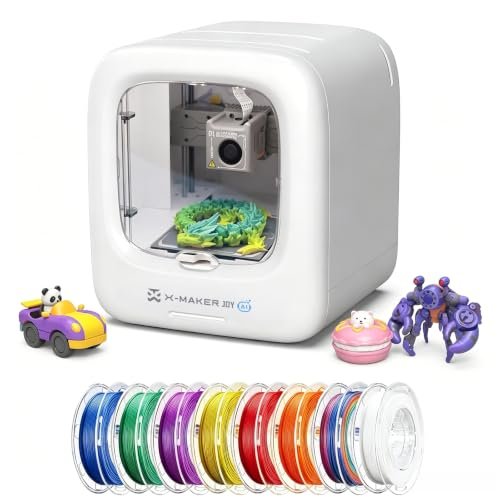
I’ve spent hundreds of hours assembling, troubleshooting, and tuning budget machines from overseas hubs, and finding the right model isn’t always straightforward. In this hands-on aliexpress 3d printer review, I break down ten standout options ranging from plug-and-play mini units to high-speed multi-color machines. We’ll look at print quality, setup times, and software quirks to help you pick the right machine for your budget and skill level.
AOSEED AI 3D Printer for Kids All-in-One Starter Kit
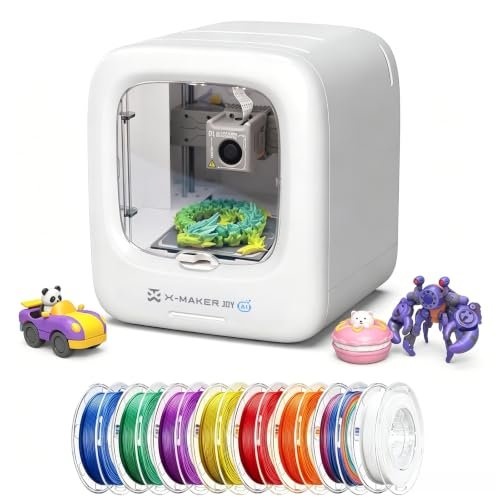
The AOSEED AI Starter Kit is built specifically for younger creators and complete beginners. It combines an enclosed safety-first design with intelligent app features that make printing feel as simple as using a smartphone app. With speeds reaching up to 400mm/s, kids won’t have to wait hours just to see their toy designs come to life. The package comes ready to roll out of the box with eight spools of PLA filament so you can start making immediately.
Key features that stand out:
– AI Doodle converts voice, photo, and text prompts into 3D models
– Pre-assembled enclosed frame with a pinch-resistant door
– Speeds up to 400mm/s with 0.05mm layer precision
– Integrated camera for live progress monitoring and automatic time-lapse clips
– Filament runout detection and leveling-free build plate
– Includes 8 mini rolls of child-safe PLA material
Pros:
– Zero assembly or manual leveling required before printing
– Huge catalog of 20,000+ kid-friendly models available via the app
– Safe design keeps little hands away from hot components
Cons:
– It only prints in a single color at a time, requiring multi-part assembly for colorful toys.
– The build volume is limited to small toys and decorative items.
Best for: Young kids, classrooms, and parents wanting a safe creative toy maker.
Expert Opinion: This starter kit removes all the typical calibration headaches that frustrate newcomers. The AI-prompt modeling app keeps children engaged without forcing them to learn complex CAD programs first.
Entina Tina2C Mini 3D Printer for Beginners

The Entina Tina2C is one of the most accessible desktop units available, setting up in under five minutes. It features factory-calibrated auto-leveling that ensures smooth initial layers without any paper-sliding guesswork. Its flexible magnetic spring bed makes popping finished miniatures off the platform completely painless. Despite its budget-friendly price, the smart wireless connectivity lets you control prints directly from your mobile device.
Key features that stand out:
– 3.9 x 3.9 x 3.9-inch compact desktop build volume
– Fully automated bed leveling system with zero manual knobs
– Poloprint Cloud app integration with 3,500+ ready-to-print models
– Quick-swap nozzle design for straightforward maintenance
– Power-loss recovery to resume prints after sudden outages
– Flexible magnetic build plate for quick model removal
Pros:
– Ultra-compact footprint fits easily on small computer desks
– Near-instant setup right out of the box
– Quiet motor drivers make it easy to run during study sessions
Cons:
– The small build volume prevents printing larger household or functional items.
– The feeder tube can be finicky when loading brittle filaments.
Best for: Students, hobbyists tight on desk space, and complete beginners on a strict budget.
Expert Opinion: The Tina2C is a solid choice if you want to test the 3D printing waters without an intimidating setup. It delivers reliable small-scale prints, though you will quickly outgrow its miniature print area if you need functional parts.
Anycubic Kobra X Multicolor 3D Printer
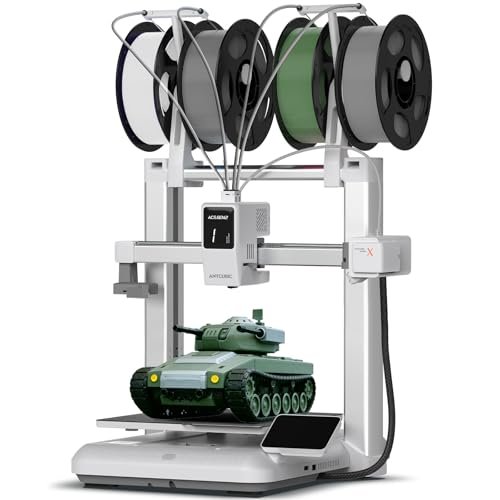
The Anycubic Kobra X brings multi-material printing into the mainstream hobbyist workshop. Engineered with high-speed performance up to 600mm/s, this machine cuts down production times substantially compared to older bed slingers. Its LeviQ 3.0 auto-leveling system reads 49 distinct points to establish great bed adhesion every run. With the ACE 2 Pro filament management unit, you can feed multiple colors and mix rigid plastics with flexible filaments like TPU.
Key features that stand out:
– High-speed printing up to 600mm/s with built-in vibration compensation
– Native 4-color printing, expandable up to 19 colors with extra ACE units
– 260 x 260 x 260mm practical build area
– Hardened steel nozzle handling temperatures up to 300°C
– Integrated 720P AI camera for remote monitoring and error detection
– Ultra-quiet operation under 48 dB
Pros:
– Fast setup takes roughly 15 minutes from unboxing to printing
– Excellent multi-color handling with less purge waste than prior generations
– Reliable auto-leveling with zero manual Z-offset calibration needed
Cons:
– Filament consumption increases when purging between frequent color changes.
– Slicer software takes some time to learn for complex multi-material projects.
Best for: Cosplayers, model painters, and hobbyists who want colorful display models without manual painting.
Expert Opinion: Anycubic has done a great job smoothing out multi-filament swaps here. The combination of hardened steel components and high travel speed makes it a serious competitor to more expensive enclosed units.
Anycubic Kobra X Multicolor Desktop System
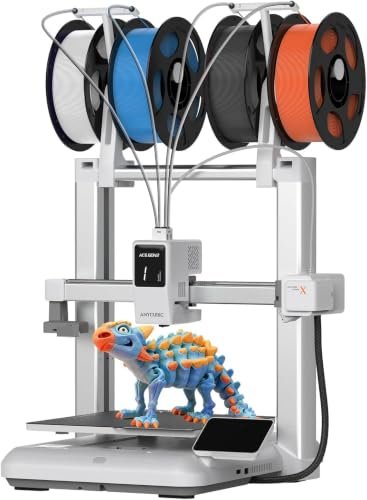
This iteration of the Kobra X focuses heavily on streamlining multi-color workflows and speeding up output. It cuts down filament travel paths by over 80%, saving precious material and accelerating swap times during prints. The hardened steel hotend reaches 300°C, opening the door for demanding materials like ASA, PETG, and flexible TPU. With a roomy 260mm cube volume, you have ample breathing room for functional prototypes and decorative home accents.
Key features that stand out:
– Optimized filament feeding path to minimize material purging
– Blazing 600mm/s speed capable of printing a Benchy in roughly 14 minutes
– Full LeviQ 3.0 multi-point sensor grid for automated calibration
– Top-mounted spool system that keeps desk clutter down
– Smart AI spaghetti and foreign object detection
– Dual-band Wi-Fi and direct LAN connections for steady data transfer
Pros:
– Significantly reduces print times on multi-colored items
– Broad material compatibility including engineering-grade filaments
– Large, responsive touchscreen with intuitive controls
Cons:
– Does not include starter filament spools in the box.
– The open-frame design makes printing warp-prone materials like ASA trickier in drafty rooms.
Best for: Intermediate makers who need fast turnaround times on multi-color prints.
Expert Opinion: The shortened purge cycle makes a noticeable difference in both print duration and wasted plastic. It handles fine details well, provided you calibrate your slicer’s retraction settings for your specific filament brands.
AOSEED AI 3D Printer for Kids Holiday Edition
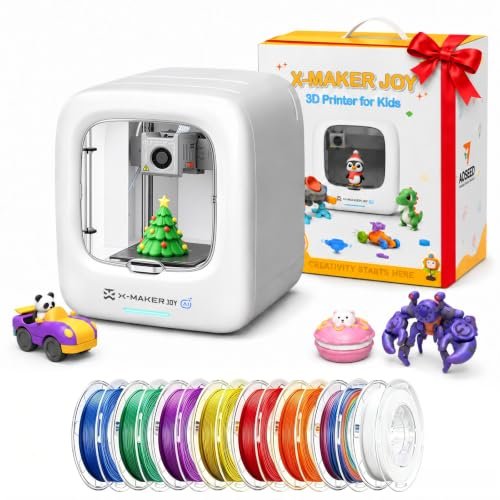
Packaged with special gift-ready presentation, this AOSEED Holiday Edition is tailored for festive family projects. It packs safe enclosed hardware alongside kid-friendly software loaded with thousands of holiday figures and STEM projects. Thanks to AI MiniMe and Doodle generators, children can snap a photo or speak an idea to create printable avatars. Operating at speeds up to 400mm/s, it turns screen time into real-world creative building without testing a child’s patience.
Key features that stand out:
– Festive gift kit featuring 8 starter PLA filament spools
– Fully enclosed chassis with transparent safety panels
– Rapid 400mm/s peak speeds with automated print pausing
– AI-driven modeling tools compatible with phones and tablets
– Built-in time-lapse camera for sharing completed prints
– ISO 16000 tested non-toxic PLA consumables
Pros:
– Comes with plenty of filament to keep projects going for weeks
– Kid-friendly interface eliminates technical barriers
– Safe, enclosed construction stops curious fingers from touching hot ends
Cons:
– The print volume is restricted to smaller toys and ornaments.
– Only prints single-color objects per job.
Best for: Holiday gifts, young tech enthusiasts, and family crafting sessions.
Expert Opinion: AOSEED understands the beginner market well. The holiday bundle offers genuine out-of-the-box utility because you don’t need to shop around for extra spools or build plates before running your first test model.
Creality Ender 3 V3 SE 3D Printer
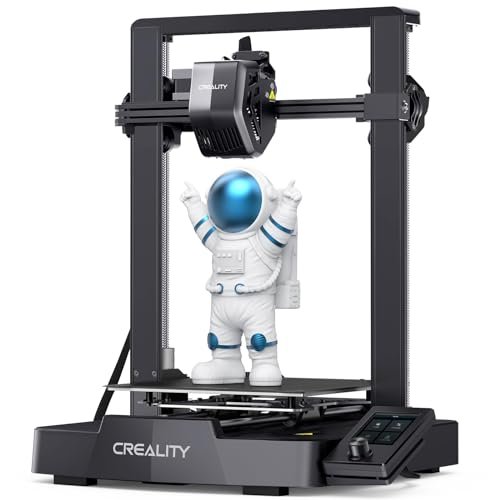
The Ender 3 V3 SE modernizes the most popular budget platform in 3D printing history. It incorporates CR Touch auto-leveling paired with a strain sensor, completely removing manual bed screws from the equation. The “Sprite” direct drive extruder feeds standard PLA, PETG, and flexible TPU with consistent grip and zero slippage. With rigid dual Z-axis screws and steel Y-axis rails, it easily reaches 250mm/s print speeds without sacrificing surface quality.
Key features that stand out:
– Proven “Sprite” dual-gear direct drive extruder
– CR Touch automated bed leveling with automatic Z-offset calibration
– 250mm/s maximum print speed with 2500mm/s² acceleration
– Rigid dual Z-axis synchronization and 8mm steel Y-axis linear shafts
– Simple 3-step assembly that takes roughly 20 minutes
– Automatic push-button filament loading and unloading
Pros:
– Outstanding price-to-performance ratio
– Huge community support and readily available replacement parts
– Direct drive extruder handles flexible filaments like TPU with ease
Cons:
– The display interface is controlled via a rotary knob rather than a modern touchscreen.
– It lacks built-in Wi-Fi, relying on SD cards for file transfers out of the box.
Best for: Budget-conscious hobbyists, tinkers, and beginners looking for an affordable, reliable workhorse.
Expert Opinion: Creality fixed nearly every complaint people had with early Ender models. The automatic Z-offset and direct-drive extruder make this one of the most reliable entry-level printers on the market today.
Creality K2 Pro Combo Multicolor 3D Printer
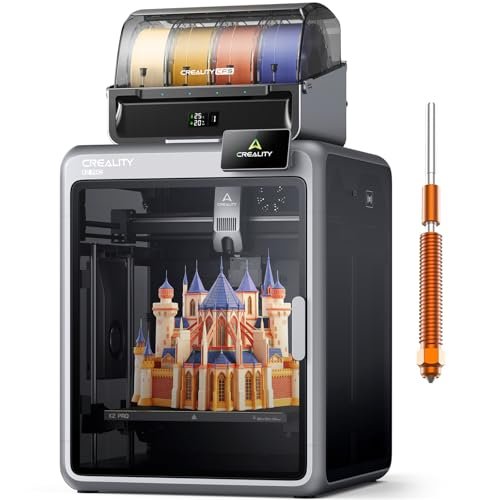
The Creality K2 Pro Combo is a serious industrial-grade desktop machine built for demanding creators. It features an actively heated build chamber reaching 60°C, preventing edge warping on engineering plastics like ABS, ASA, and carbon-fiber blends. The bundled CFS smart filament system allows multi-material workflows across up to 16 colors with RFID spool tracking. Driven by FOC step-servo motors and linear rails, this machine pushes speeds up to 600mm/s while maintaining clean layer lines.
Key features that stand out:
– Spacious 300 x 300 x 300mm build volume
– CFS unit providing automated multi-color and multi-material feeding
– Active 60°C chamber heater for printing warp-sensitive plastics
– Dual AI cameras for continuous print health and flow rate monitoring
– Hardened steel extruder gears with high-flow 40mm³/s melt capacity
– Quick-swap nozzle design and smart area-based bed probing
Pros:
– Handles abrasive carbon-fiber and technical plastics right out of the box
– Massive build volume accommodates large structural parts
– Active chamber heating ensures exceptional layer bonding
Cons:
– The overall footprint is large and requires a sturdy, dedicated table.
– Multi-color filament purging adds considerable time to complex jobs.
Best for: Small businesses, functional prototyping, and experienced makers printing high-temp engineering materials.
Expert Opinion: The K2 Pro Combo puts commercial-grade features onto your workbench. The active chamber heating makes printing ASA and nylon blends remarkably painless compared to standard enclosed beds.
Toybox 3D Printer for Kids

The Toybox 3D Printer is designed from the ground up to make printing fun and frustration-free for young children. Its companion app gives instant access to licensed designs from popular franchises, including Batman and SpongeBob. The updated auto-leveling print platform prevents common first-layer failures, letting kids manage their own projects independently. It uses non-toxic, eco-friendly PLA, making it completely safe for bedroom desks and family play areas.
Key features that stand out:
– Companion mobile app with 15,000+ ready-to-print toys
– Officially licensed character prints ready with one touch
– Simple auto-leveling bed calibration
– Kid-safe, durable frame with accessible maintenance parts
– Easy web and mobile app model importing (STL, OBJ support)
– Includes starter PLA filament spool and Toybox Pro trial
Pros:
– The easiest software workflow available for young children
– Children can sketch simple designs directly in the app to print
– Compact and lightweight enough to move from room to room
Cons:
– Premium catalog features require a paid subscription after the initial trial.
– Print volume is quite small compared to standard hobbyist printers.
Best for: Young children (ages 6–11) looking for an intuitive digital toy maker.
Expert Opinion: For pure ease of use among young kids, Toybox remains tough to beat. While hardware-savvy makers will find it basic, its software library keeps children printing without needing an adult to configure slicer settings.
AOSEED AI 3D Printer for Beginners (Standard Kit)
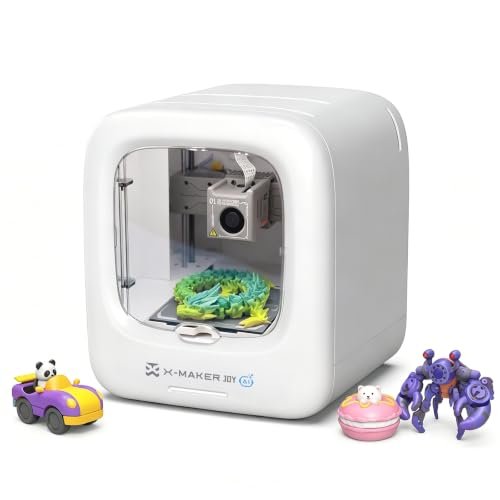
This version of the AOSEED AI printer is an economical entry point for creative families. It retains the same pinch-safe enclosed chassis and high-speed 400mm/s motion system as its deluxe siblings. The machine relies on an intelligent auto-leveling bed that needs no user adjustments, keeping maintenance simple. Through the integrated mobile app, users can design through voice prompts or print pre-tested toys in as little as 20 minutes.
Key features that stand out:
– 400mm/s peak printing speeds with 0.05mm layer resolution
– Integrated camera for live mobile monitoring and time-lapse creation
– Full enclosure with quiet fans and ISO-certified safe materials
– AI-driven design tools converting voice, text, and photos into models
– Fast-heating nozzle with automatic filament runout pause
– Includes 1 starter spool of PLA filament
Pros:
– Enclosed unit keeps noise down and protects against burns
– Extremely approachable app interface for absolute beginners
– Quick print times keep projects moving quickly
Cons:
– Comes with only one starter spool of filament, which runs out quickly.
– Does not natively print multiple colors in a single continuous job.
Best for: Families wanting a capable, safe starter machine without paying extra for bundle extras.
Expert Opinion: If you prefer picking out your own filament colors separately, this standard bundle gives you the core AI-assisted machine at a lower entry cost. It delivers consistent toy prints right after plugging it in.
Anycubic Kobra S1 Max Combo 3D Printer
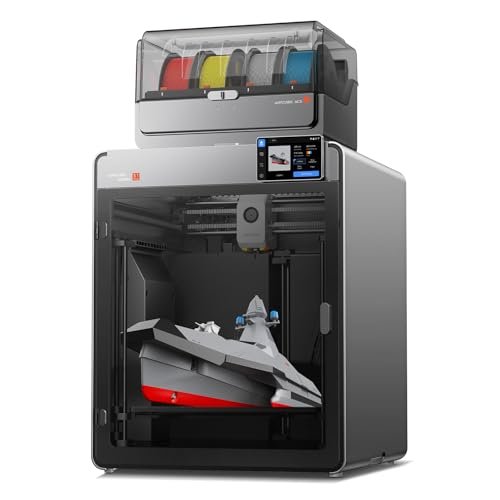
The Anycubic Kobra S1 Max Combo is a giant in the consumer 3D printing space, boasting a massive 350 x 350 x 350mm build envelope. Its fully-enclosed CoreXY motion system keeps vibrations minimal, even while sustaining speeds up to 600mm/s. The unit features an actively heated 65°C chamber paired with a 350°C hotend, making it ready for industrial materials like ABS, ASA, and nylon. With the ACE 2 Pro multicolor unit, you can execute large multi-color projects in a single uninterrupted run.
Key features that stand out:
– Extra-large 350 x 350 x 350mm build space for single-piece manufacturing
– CoreXY mechanical frame with all-metal construction
– Max speeds up to 600mm/s with 20,000mm/s² acceleration
– Active 65°C chamber heating prevents warping on engineering filaments
– Multi-color printing expanding up to 16 colors with ACE units
– LeviQ 3.0 auto-leveling with real-time dynamic flow calibration
Pros:
– Huge volume eliminates the need to split large helmets and enclosures
– CoreXY frame ensures high accuracy on tall prints
– High-temp hotend and heated chamber support structural engineering plastics
Cons:
– Very heavy unit that requires substantial workbench space and careful moving.
– Higher power consumption due to the large heated bed and chamber heater.
Best for: Cosplayers making full-size armor, product designers, and small-scale batch manufacturers.
Expert Opinion: The Kobra S1 Max Combo solves the biggest headache for cosplay and prototyping: having to cut models into pieces. The heated chamber works well, delivering flat, warp-free bases on massive technical prints.
Helpful Comparison Insights
Choosing between these printers comes down to build volume, material requirements, and who will be using the machine.
If you are buying for younger children or classroom environments, closed-frame models like the AOSEED AI Series and Toybox prioritize physical safety and simple software. You trade away large build plates and advanced material settings for reliable one-touch operation and pinch-free enclosures.
When you want to jump into multi-color decorative printing, the Anycubic Kobra X and Creality K2 Pro Combo deliver dedicated material-switching systems. These units automate filament swaps, though you must account for increased purge waste and longer print durations during color shifts.
For large functional prototyping and cosplay armor, the Anycubic Kobra S1 Max Combo stands apart due to its massive 350mm cube volume and heated chamber. On the flip side, if you are looking for the absolute best budget value to learn standard printing, the open-frame Creality Ender 3 V3 SE remains unmatched for affordable maintenance and community upgrade options.
Final Verdict
Navigating online 3D printer options requires balancing automated features against budget limits. Here is how I categorize these choices based on real-world workshop testing:
- The Best Entry-Level Value: The Creality Ender 3 V3 SE takes the prize. It gives you direct-drive reliability, hands-off bed leveling, and great print speeds without inflating the price tag.
- The Best for Kids & Classrooms: The AOSEED AI Starter Kit edges out the competition thanks to its included filament bundle, built-in safety enclosure, and beginner-friendly AI generation tools that skip complex slicers.
- The Best for Heavy-Duty Makers: The Anycubic Kobra S1 Max Combo earns top marks for professionals and prop makers who need immense build volume alongside high-temperature, warp-resistant engineering material support.
AliExpress 3D Printer Review FAQ
How reliable is buying a 3D printer through overseas platforms like AliExpress?
Buying a 3D printer through platforms like AliExpress is generally safe if you buy directly from official brand stores (such as Creality, Anycubic, or Kingroon). Most major manufacturers operate their own storefronts on the platform and maintain regional warehouses in the US and Europe, ensuring quick delivery times and local return options.
What is the difference between CoreXY and bed-slinger 3D printers?
Bed-slinger printers (like the Ender 3 V3 SE or Kobra X) move the print bed back and forth along the Y-axis. This keeps the printer affordable but can introduce wobbling on tall prints at high speeds. CoreXY printers (like the Kobra S1 Max) keep the bed stationary or moving only along the Z-axis, allowing much faster, more precise prints without shifting the model around.
Do I need an enclosure for 3D printing?
If you are printing standard PLA and PETG, you do not need an enclosure. However, if you plan to print technical materials like ABS, ASA, or Nylon, an enclosure is vital. Enclosures trap ambient heat, prevent drafts, and stop parts from warping and cracking during long print jobs. They also add a layer of physical safety in homes with pets and kids.
Are multi-color 3D printers wasteful?
Multi-color systems that use a single nozzle must purge filament between every color swap to avoid bleeding. While this does create some plastic waste (often called purge poop or purge towers), modern slicers and systems like Anycubic’s ACE 2 Pro have significantly reduced purge volumes by optimizing travel paths and flush volumes.
How steep is the learning curve for 3D printer slicing software?
Modern slicers like Creality Print, Anycubic Slicer, and OrcaSlicer come with pre-configured profiles for specific machines and filaments. For basic prints, you simply import a 3D model (STL file), select your printer, and hit “Slice.” Advanced tuning (supports, infill patterns, wall thickness) takes some practice, but child-focused printers bypass this completely with one-touch mobile apps.
What maintenance does a budget 3D printer require?
Regular maintenance includes keeping the linear rails or rods lubricated, checking belt tension every few months, wiping dust off the build plate with isopropyl alcohol, and clearing occasional nozzle clogs. Printers with auto-leveling and quick-swap hotends have reduced routine maintenance down to just a few minutes a month.
Affiliate Disclosure: As an Amazon Associate, I earn from qualifying purchases made through links on this site.