When I first started 3D printing years ago, I spent countless weekends troubleshooting bed-leveling dials, clogged hotends, and failed prints. Thankfully, modern machines have made learning the craft far simpler, letting you focus on creating rather than constant tinkering. In this guide, I share my hands-on insights on what makes a good 3d printer for beginners and break down five reliable models that let you create clean prints right out of the box.
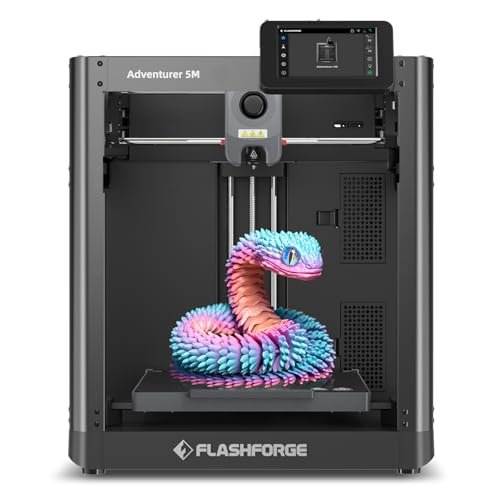
FLASHFORGE Adventurer 5M 3D Printer

The FLASHFORGE Adventurer 5M brings industrial speed into an accessible format that won’t overwhelm newcomers. Built on a rigid CoreXY structure, it hits rapid travel speeds up to 600mm/s while maintaining sharp line clarity across every layer. Its one-click automatic bed leveling ensures you get consistent first-layer squish without touching a single manual screw, while the quick-swap nozzle system lets you switch tip sizes in just a few seconds.
Key features that stand out:
– CoreXY motion system reaching up to 600mm/s speed and 20000mm/s² acceleration
– Full one-click auto-leveling system with vibration compensation
– Rapid-heating hotend reaching 200°C in just 35 seconds
– Dual-sided textured PEI flexible build plate for effortless print removal
– Remote monitoring and cloud slicing support via Flash Studio mobile app
Pros:
– Setup takes less than 15 minutes from unboxing to your first print.
– The dual-cooling fans keep bridges and overhangs tidy even at high speeds.
– Swapping hotends takes practically zero tools or technical know-how.
Cons:
– It produces noticeable fan noise when operating at maximum travel speeds.
– The open-frame design makes it less ideal for high-temperature materials like ABS without an enclosure.
Best for: Hobbyists who want rapid prototyping speeds and dependable auto-calibration without breaking the bank.
Expert Opinion: The Adventurer 5M is one of the most painless entries into high-speed printing. The bed leveling is truly hands-off, which eliminates the single biggest frustration beginners usually face.
Entina Tina2C 3D Printer for Beginners & Kids
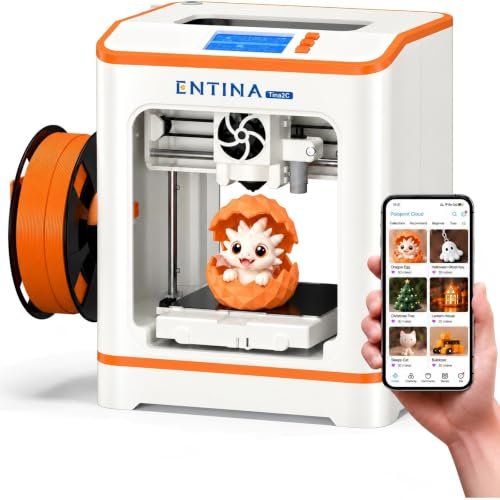
If you’re shopping for a younger student or need a machine that fits onto an already crowded desk, the Entina Tina2C is a standout choice. It arrives fully assembled from the factory, allowing you to start your first model in roughly five minutes using the guided smartphone setup. The companion app connects via 2.4GHz Wi-Fi and unlocks thousands of pre-made models, while the flexible magnetic print surface makes popping off completed prints safe and simple.
Key features that stand out:
– Out-of-the-box plug-and-play assembly with no complex tool setup required
– Built-in automatic bed leveling sensor for hassle-free first layers
– Direct app integration featuring over 3,500 ready-to-print 3D designs
– Quick-swap nozzle design and bendable magnetic bed for easy part removal
– Quiet stepper drivers paired with integrated interior LED lighting
Pros:
– Extremely compact footprint that easily fits on any school desk or nightstand.
– The app library lets kids print fun toys without learning complex 3D CAD software first.
– Very safe design with low power draw and enclosed moving parts.
Cons:
– The 3.9-inch cubic build volume restricts you to smaller miniatures and trinkets.
– It lacks a heated bed, so you are primarily limited to printing with standard PLA filament.
Best for: Kids, teachers, and beginners who want a compact, safe, and affordable introduction to desktop fabrication.
Expert Opinion: The Tina2C removes technical friction for families. While you won’t print giant cosplay helmets on it, its reliable mobile workflow makes it an exceptional learning tool for young creators.
Bambu Lab P2S Combo

The Bambu Lab P2S Combo represents the higher end of consumer desktop printing, offering automated workflows that practically eliminate user error. Its fully enclosed build chamber features an adaptive airflow system with carbon filtration, keeping temperatures stable for challenging filaments. The bundled AMS 2 Pro unit handles up to four colors automatically while actively drying your filament at temperatures up to 65°C, ensuring your spools stay free of moisture.
Key features that stand out:
– High-speed motion system reaching speeds up to 600mm/s with active flow compensation
– AMS 2 Pro multi-color system with integrated active filament heating and drying
– Built-in AI chamber monitoring for automated spaghetti and failure detection
– Adaptive chamber airflow system with active carbon air purification
– Complete ecosystem integration with MakerWorld, Bambu Studio, and the Bambu Handy app
Pros:
– Flawless multi-color printing without manual spool swapping during print jobs.
– The active filament dryer in the AMS unit prevents brittle filament issues.
– Enclosed chamber expands your material options to PETG, ABS, ASA, and nylon.
Cons:
– It carries a premium price point compared to standard entry-level bedslingers.
– Multi-color prints generate a fair amount of wasted purge filament during color changes.
Best for: Ambitious newcomers who want commercial-grade reliability, multi-color creativity, and zero mechanical tinkering.
Expert Opinion: If budget isn’t your primary concern, the P2S Combo is as close to an “appliance-style” 3D printer as you can buy. You spend your time designing and collecting prints rather than calibrating hardware.
Entina Tina2 Plus 3D Printer
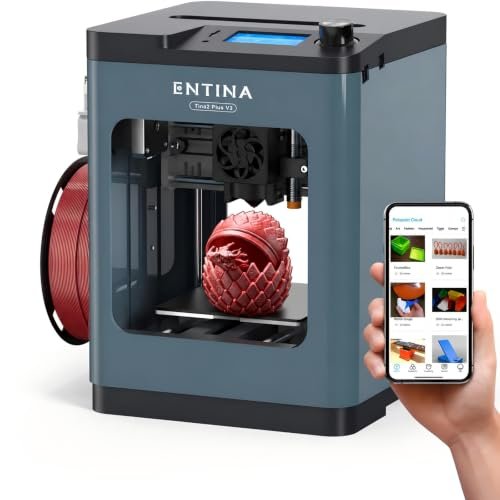
The Entina Tina2 Plus takes the compact convenience of mini printers and injects genuine performance upgrades. It bumps print velocity up to 250mm/s high-speed printing, driven by an efficient ceramic hotend that reaches operating temperature in just 40 seconds. A dual Z-axis lead screw structure provides extra stability during taller prints, while the textured spring steel PEI plate ensures firm adhesion without messy glue sticks.
Key features that stand out:
– Upgraded 250mm/s printing speed with an efficient 40-second ceramic hotend
– Rigid dual Z-axis mechanical layout for reduced layer banding
– Removable textured PEI spring steel bed for durable adhesion and easy release
– Partially enclosed frame layout that shields young fingers from heated components
– Multiple connectivity options including Wi-Fi app control, USB, and TF card
Pros:
– Considerably faster than most mini-format desktop printers in its class.
– The dual Z-axis setup delivers smooth vertical surface quality.
– Slicing and printing over local Wi-Fi keeps your workspace cable-free.
Cons:
– The build plate remains relatively modest compared to standard 220mm beds.
– Advanced slicer settings take a bit of fine-tuning if you step outside the stock Poloprint profiles.
Best for: Classrooms and home hobbyists who need a small-footprint machine that prints quickly and cleanly.
Expert Opinion: The Tina2 Plus addresses the speed limitations common in mini printers. Adding a ceramic heater and a genuine PEI spring sheet turns this small machine into a workhorse for small parts.
Bambu Lab A1 3D Printer

The Bambu Lab A1 brings premium calibration tech down to an accessible, open-bed format. It boasts full-auto calibration that handles Z-offset, resonance testing, and bed leveling completely behind the scenes before each job begins. Thanks to active motor noise canceling, it runs quietly enough to sit right beside you on an office desk, and you can easily expand it with the AMS lite module down the road for four-color printing.
Key features that stand out:
– High-precision motion control with 10,000 mm/s² acceleration
– Active flow rate compensation using high-frequency nozzle eddy-current sensors
– 1-Clip quick-swap nozzle design for tool-free hotend changes
– Whisper-quiet operation backed by active stepper motor noise cancellation
– Full compatibility with the AMS lite multi-material feeding system
Pros:
– Incredibly quiet operation makes it ideal for bedrooms and quiet home offices.
– Flow rate calibration automatically fixes under-extrusion and over-extrusion on corners.
– Generous 256 x 256 x 256 mm build volume handles full-sized functional prints.
Cons:
– The open bed slinger footprint requires extra clearance in front and behind the unit.
– Lacking an enclosure means it is not suited for high-warp materials like ABS.
Best for: Everyday makers who want a full-sized, whisper-quiet machine with an easy upgrade path to multi-color printing.
Expert Opinion: The Bambu Lab A1 sets the benchmark for modern open-frame printers. Its automated flow rate compensation guarantees smooth top surfaces, making beginner prints look like store-bought goods.
Practical Comparison Insights for Beginners
When picking your first machine, looking past raw wattage or marketing buzz helps you find what fits your routine. Here are practical insights to keep in mind:
- Footprint and Print Area: If space is tight, the Entina Tina2C and Tina2 Plus are unbeatable for desks and dorm rooms. However, if you plan to make wearable cosplay masks or large storage bins, the full-sized beds on the Bambu Lab A1 or Flashforge Adventurer 5M are essential.
- Enclosed vs. Open-Frame: The Bambu Lab P2S Combo features an enclosed, filtered chamber that protects drafts from warping materials like ABS or ASA. If you only plan to melt PLA, PETG, or TPU, open-bed machines like the Bambu Lab A1 deliver exceptional results for less money.
- Speed and Motion Systems: Traditional bed-slingers move the heavy print plate back and forth along the Y-axis. The Flashforge Adventurer 5M and Bambu P2S use a CoreXY layout where the bed only moves downward, yielding cleaner layer alignment at speeds above 300mm/s.
- Multi-Color Capabilities: The Bambu Lab ecosystem (both the P2S with AMS 2 Pro and the A1 with AMS lite) leads the industry in automated color-swapping. If painted models or decorative multi-hue prints are your goal, consider machines built for multi-material feeders.
Final Verdict
Choosing the right starter machine comes down to how you plan to use it:
- The Gold Standard for Most Beginners: Bambu Lab A1 strikes the sweet spot between bed size, near-silent operation, and flawless automated calibration. It simply works every time you tap print.
- The Best Speed-to-Price Contender: FLASHFORGE Adventurer 5M delivers rigid CoreXY performance and rapid nozzle swaps at an accessible price point, making it a great pick for functional makers.
- The Best Budget Pick for Kids and Schools: Entina Tina2C cuts out setup confusion entirely with its friendly app library and compact, safe build.
- The All-In-One Powerhouse: Bambu Lab P2S Combo is the ultimate turnkey system for anyone wanting multi-color prints and engineering-grade filament options right out of the gate.
Finding a Good 3D Printer for Beginners: Frequently Asked Questions
What filament type should a beginner start with?
PLA (Polylactic Acid) is the best starting filament. It melts at modest temperatures (around 190°C to 215°C), emits virtually no odor, and does not require an enclosed build chamber to avoid warping. Once you feel comfortable with PLA, you can graduate to PETG for stronger, heat-resistant functional brackets, or TPU for flexible prints.
Is automatic bed leveling necessary for a beginner?
Yes, auto bed leveling is one of the most valuable features for anyone starting out. In the past, manual bed leveling required slipping a piece of paper under the nozzle at four corners while turning thumbwheels, which led to frequent first-layer failures. Automatic systems use touch sensors or strain gauges to map the bed and adjust on the fly, saving hours of frustration.
What is the difference between FDM and resin printing for beginners?
FDM (Fused Deposition Modeling) uses spools of plastic filament melted through a hot nozzle, which is clean, safe for living spaces, and easy to manage. Resin (SLA) printing uses liquid photopolymers cured by UV light, producing fine detail for miniature figurines. However, resin requires chemical handling, rubber gloves, isopropyl alcohol wash stations, and dedicated room ventilation, making FDM far more beginner-friendly.
Can I run these printers from my smartphone?
Yes, modern beginner machines like the Bambu Lab A1, Flashforge Adventurer 5M, and Entina Tina2 series feature mobile apps (such as Bambu Handy, Flash Studio, and Poloprint Cloud). These apps let you browse pre-sliced model repositories, start prints remotely, and monitor job progress over your home Wi-Fi network without touching a computer.
How much maintenance does an entry-level 3D printer require?
Routine maintenance is minimal on modern units. You will periodically want to wipe dust and debris off the guide rails, apply a light coat of synthetic grease to the lead screws, clean the textured PEI plate with warm water and dish soap to remove finger oils, and check that nozzle screws remain snug. Quick-swap nozzles have made clearing rare filament clogs easier than ever.
What software (slicer) do I need to prepare my files?
To turn a 3D model (usually an STL or 3MF file) into instructions your printer understands, you use a program called a slicer. Most beginner-friendly brands provide tailored software based on open-source platforms, such as Bambu Studio, FlashPrint, or Cura. These programs come with pre-tested profiles, meaning you can simply import your model, click “slice,” and export the print file without changing complicated technical values.
Affiliate Disclosure: As an Amazon Associate, I earn from qualifying purchases made through links on this site.