I’ve spent hundreds of hours assembling, tweaking, and running benchmarks across dozens of machines to see how they stack up against the metrics highlighted in popular 3d printer reviews cnet discussions. Whether you need a simple starter unit for school projects or a high-speed multicolor powerhouse for rapid prototyping, finding reliable hardware shouldn’t feel like endless guesswork. In this guide, I break down nine top-performing models, analyzing real-world print speeds, bed adhesion, and day-to-day usability to help you pick the right tool for your bench.
Creality Ender 3 V3 SE Beginner-Friendly 3D Printer
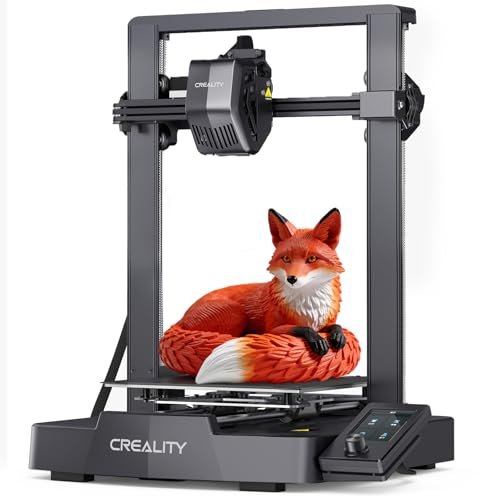
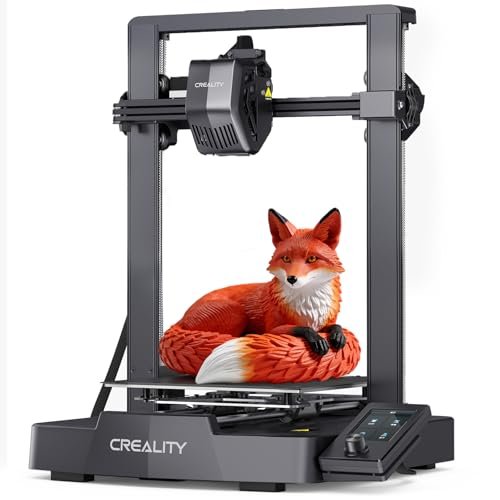
The Creality Ender 3 V3 SE proves that budget-friendly printing does not require hours of manual mechanical calibration. Equipped with CR Touch auto leveling and automatic Z-offset calibration, the machine consistently lays down clean first layers without the headache of manual paper tests. Its Sprite direct drive extruder feeds standard PLA, PETG, and flexible TPU smoothly, while the dual synchronized Z-axis keeps layer lines neat even at speeds reaching 250mm/s.
Key features that stand out:
– 250mm/s maximum print speed with 2500mm/s² acceleration
– CR Touch auto bed leveling with automated Z-offset calibration
– Proven Sprite direct drive extruder handling rigid and flexible materials
– Dual synchronized Z-axis lead screws and solid Y-axis linear shafts
– Flexible PC spring steel build plate mounted on a 32-bit silent mainboard
Pros:
– Setup takes less than twenty minutes thanks to straightforward modular assembly
– Sprite direct drive prevents jams when working with flexible TPU filaments
– Silent stepper drivers keep operational motor whine to an absolute minimum
Cons:
– The included PC spring steel sheet wears down faster than textured PEI alternatives.
Best for: Budget-conscious beginners and tinkerers who want a reliable, easy-to-upgrade workhorse.
Expert Opinion: This machine is the benchmark for budget FDM printing, trading gimmicks for solid mechanics, dependable bed probing, and reliable extrusion.
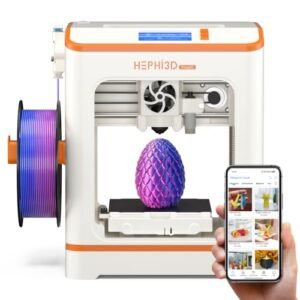
Hephi3d TINA2C 3D Printer Beginner Friendly
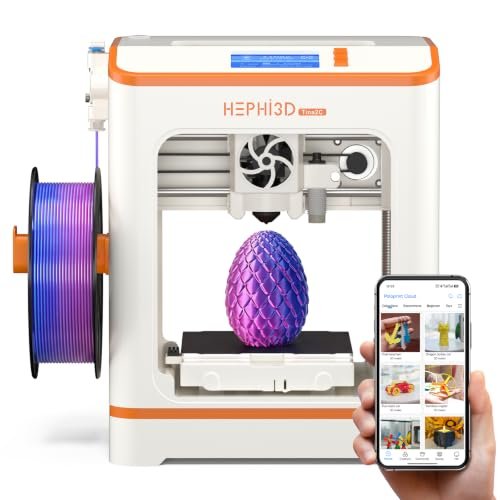
Designed specifically for small workspaces and quick setups, the Hephi3d TINA2C is an ultra-compact machine built for zero-friction making. It arrives fully assembled and factory leveled, allowing anyone to unbox it and start a test print in roughly five minutes. With one-tap mobile app printing and a massive integrated online model library, younger students and casual hobbyists can create without needing to learn complex slicing software first.
Key features that stand out:
– Factory-assembled chassis ready to run straight out of the box
– Integrated smart app control featuring over 3,500 ready-to-print 3D designs
– Automated bed sensing with a fast 3-second quick-release hotend
– Open-source firmware support for standard desktop slicers like Cura
– Built-in power outage recovery to protect jobs from unexpected interruptions
Pros:
– Requires zero assembly or mechanical leveling before your first print
– Companion smartphone app makes finding and sending models very accessible for kids
– Lightweight frame takes up minimal desk space in bedrooms or classrooms
Cons:
– The compact build envelope restricts you to printing smaller toys and miniatures.
Best for: Younger students, absolute beginners, and STEM educators with tight desk space.
Expert Opinion: If you want to introduce children to 3D printing without managing mechanical calibrations or slicer profiles, the TINA2C provides a fun, painless entry point.
Anycubic Kobra X Multicolor 3D Printer
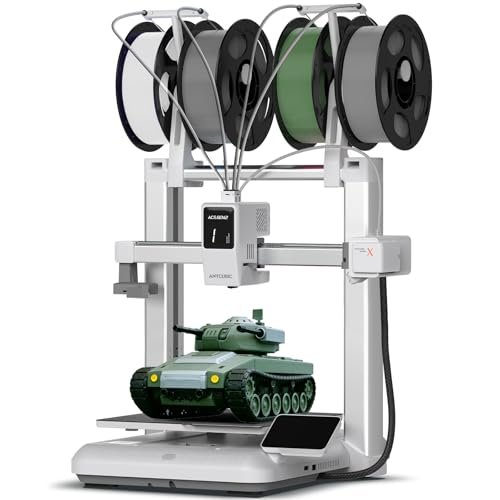
The Anycubic Kobra X brings high-capacity multi-material fabrication to home workshops with support for up to 19 vibrant colors via ACE 2 Pro units. It reaches travel speeds up to 600mm/s with active vibration compensation, allowing you to finish large, detailed models in a fraction of standard print times. Featuring LeviQ 3.0 49-point auto bed leveling and an AI monitoring camera, it keeps prints running smoothly while spotting spaghetti errors before filament goes to waste.
Key features that stand out:
– Multi-color capability supporting 4 colors standard and up to 19 with add-ons
– High-speed motion system reaching up to 600mm/s with active resonance tuning
– LeviQ 3.0 49-point fully automated bed leveling system
– Integrated 720p AI camera for real-time monitoring and failure detection
– Roomy 260x260x260mm build volume paired with a 300°C hardened steel nozzle
Pros:
– Generous print volume accommodates large functional prototypes and multi-part assemblies
– Active AI monitoring detects spaghetti early, saving substantial filament over time
– Hardened steel nozzle easily prints abrasive filaments right out of the box
Cons:
– Purging between frequent color swaps can create extra filament waste if not fine-tuned.
Best for: Creative makers and small studios seeking fast, automated multi-color production.
Expert Opinion: Anycubic has delivered an impressive multi-material platform here, pairing industrial-inspired print speeds with a reliable auto-leveling system that removes first-layer anxiety.
Anycubic Kobra X Multicolor 3D Printer (Native Setup)
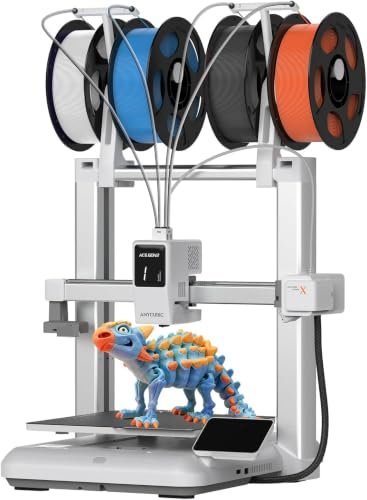
This configuration of the Anycubic Kobra X focuses heavily on streamlining filament swaps to significantly cut production time. By reducing the filament travel path by 81.25%, the machine dramatically shortens purge cycles, effectively doubling multicolor printing speed while keeping waste low. Combined with high-precision LeviQ 3.0 calibration and dual-band Wi-Fi management, this setup makes managing complex, multi-shade projects effortless from your mobile device or computer.
Key features that stand out:
– Shortened filament path design cutting color transition travel by over 80%
– Rapid 600mm/s maximum speed capable of finishing a standard Benchy in 14 minutes
– 49-point automated leveling algorithm ensuring flat first-layer adhesion
– Dual-band 2.4G/5G Wi-Fi with Anycubic App remote slicing and control
– Durable hardened nozzle handling technical filaments up to 300°C
Pros:
– Drastically reduced purge cycles save both time and expensive filament spools
– Fast bed heating and automated probing make job turnarounds very quick
– Dual-band Wi-Fi provides a stable wireless connection across busy home networks
Cons:
– Starter filament spools are not included in the package and must be purchased separately.
Best for: Experienced hobbyists who want rapid multicolor output without excessive material purge waste.
Expert Opinion: The shortened toolhead filament pathway solves one of the biggest drawbacks of multi-filament printing, turning color transitions into a fast, resource-friendly process.
Entina Mini 3D Printers Tina2 Basic
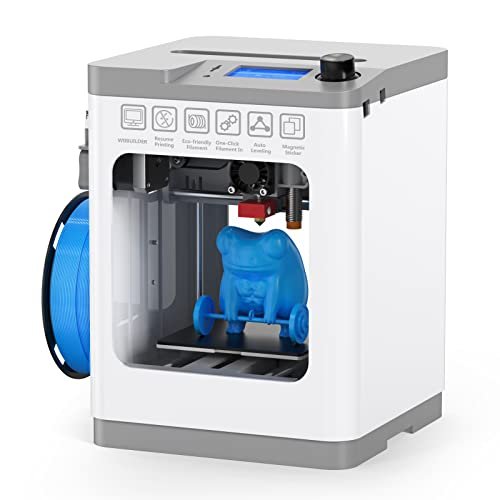
The Entina Tina2 Basic offers an affordable, approachable entry point into desktop manufacturing for younger builders and hobbyists. It arrives fully assembled with automated bed leveling, eliminating the steep mechanical learning curve that often frustrates first-time owners. The rigid dual Z-axis rails keep the printhead stable during travel, ensuring surprisingly clean details and layer alignment on small decorative prints.
Key features that stand out:
– Factory-assembled mini chassis ready to run within minutes
– Dual Z-axis guide rails providing enhanced mechanical stability
– One-touch automatic bed leveling with a flexible magnetic build sheet
– Clear 2.4-inch LCD screen for easy offline printing via MicroSD
– Open-source slicer support compatible with Wiibuilder and Cura
Pros:
– Extremely lightweight and portable design fits on crowded desks
– One-button automatic filament loading makes swapping spools very simple
– Dual Z-axis motion minimizes layer banding on miniature figures
Cons:
– Lacks onboard wireless connectivity, requiring prints to be loaded via MicroSD card.
Best for: Classrooms, kids, and anyone wanting a low-cost, compact desktop printer for small crafts.
Expert Opinion: For parents or teachers seeking a dependable, budget-friendly desktop printer that avoids loose belts and manual leveling knobs, the Tina2 Basic is a practical choice.
Hephi3d TINA2C 3D Printer with 4-Color Starter Bundle
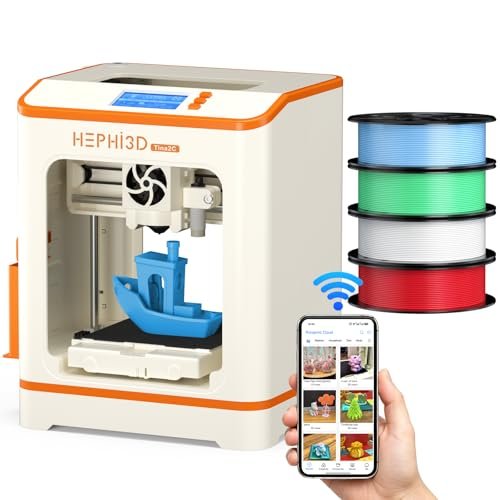
This complete bundle of the Hephi3d TINA2C provides everything a newcomer needs to start printing right away, including four colors of PLA filament. Its user-friendly ecosystem features one-tap printing via mobile app, letting users select from thousands of pre-made models or turn 2D photos into basic 3D designs. Safety and convenience are central to its design, highlighted by a 3-second quick-release hotend and automated bed detection.
Key features that stand out:
– Comprehensive starter kit including 4 PLA filament colors and maintenance tools
– Wireless app-controlled printing with access to thousands of ready-to-print models
– Intelligent auto-detect bed leveling paired with a removable magnetic plate
– Built-in photo-to-3D generation features designed for STEM education
– Modular hotend design enabling 3-second tool-free replacements
Pros:
– Generous filament bundle lets you jump directly into multiple creative projects
– Enclosed moving elements make it safer around young children and curious pets
– Modular hotend makes clearing accidental filament clogs completely pain-free
Cons:
– The non-heated print surface limits you to standard PLA filament.
Best for: Holiday gifting, family craft sessions, and curious kids exploring 3D design.
Expert Opinion: Bundling multiple starter filaments with a fully assembled, auto-leveling mini frame makes this one of the most practical gift-ready setups available today.
Creality K2 SE 4C Multi-Color 3D Printer
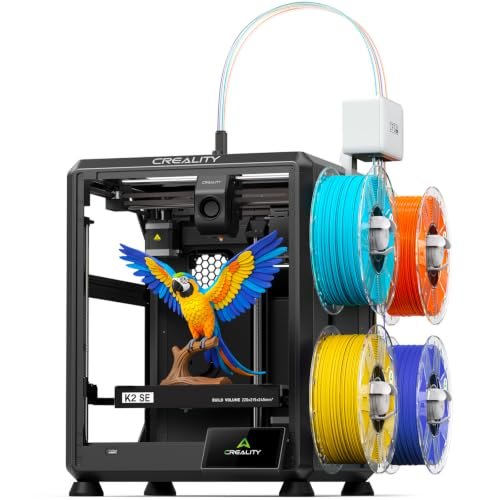
The Creality K2 SE 4C is built for enthusiasts and makers who want fast, industrial-grade performance alongside built-in 4-color printing. Powered by a rigid CoreXY motion system, it reaches speeds of up to 500mm/s with 20,000mm/s² acceleration while taking up 37% less bench space than older multicolor systems. It also features smart print protection sensors for tangles and runouts, ensuring multi-hour prints complete without unexpected filament mishaps.
Key features that stand out:
– Integrated 4-color multi-material system requiring no third-party modding
– High-speed CoreXY motion architecture supporting speeds up to 500mm/s
– Smart auto leveling that probes active print zones to accelerate setup times
– Full print protection including filament tangle sensors and power-loss recovery
– Creality OS with root access, Fluidd interface, and dual-material support capabilities
Pros:
– CoreXY motion delivers sharp corners and smooth surfaces even at high travel speeds
– Compact integrated filament management saves valuable workshop counter space
– Open Creality OS firmware allows advanced users to tweak settings via Fluidd
Cons:
– High acceleration settings can generate noticeable chassis noise during rapid infill printing.
Best for: Serious hobbyists, prop builders, and makers looking for dependable multi-color capability.
Expert Opinion: Creality strikes a fantastic balance here, combining the raw speed of CoreXY mechanics with integrated multi-material handling that rivals high-end prosumer printers.
Creality HALOT-X1 Neo Resin 3D Printer
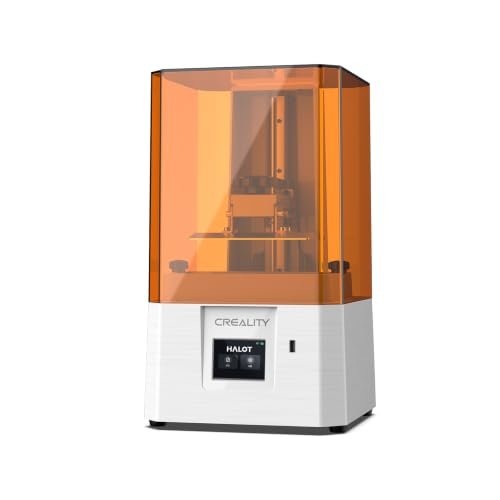
If you need microscopic detail, the Creality HALOT-X1 Neo uses a 6.8-inch 9K monochrome LCD to render exceptionally crisp surfaces. Its 18μm XY pixel size captures minute skin textures, hair strands, and sharp edges that standard filament printers simply cannot replicate. To eliminate initial frustration, it comes factory pre-leveled, helping resin beginners bypass the tricky mechanical alignment steps common to older vat printers.
Key features that stand out:
– 9K optical resolution (8520 x 4320) delivering a fine 18μm XY pixel size
– Factory pre-leveled build plate for immediate out-of-the-box operation
– Integrated AI modeling engine converting 2D images into 3D files
– Flexible connectivity supporting 2.4GHz Wi-Fi, USB, and Creality Cloud
– Broad slicer compatibility including HALOT BOX, CHITUBOX, and Lychee
Pros:
– Delivers glass-smooth surfaces and crisp edges without visible layer lines
– Pre-leveled build plate takes the mechanical frustration out of resin printing
– Broad software support allows you to use your preferred third-party slicers
Cons:
– Handling liquid resin requires safety gear, isopropyl alcohol, and separate curing equipment.
Best for: Tabletop miniature painters, jewelry designers, and digital sculptors demanding fine detail.
Expert Opinion: The 9K resolution on this compact screen offers stunning visual clarity, making the HALOT-X1 Neo an outstanding option for anyone stepping into resin printing.
Hephi3d TINA2 Plus Beginner 3D Printer
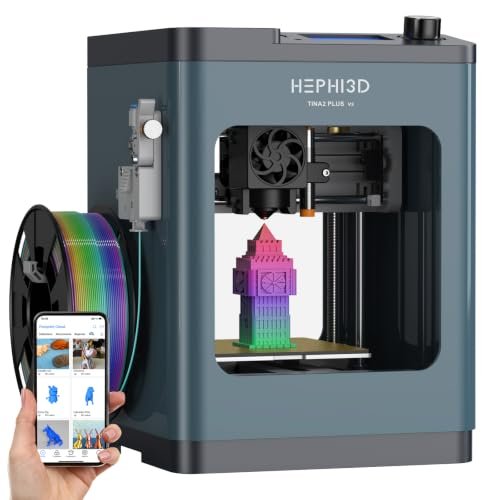
The Hephi3d TINA2 Plus updates the compact desktop formula with an upgraded 250mm/s top print speed and wireless app connectivity. The addition of an adjustable 80°C heated bed improves first-layer adhesion, significantly reducing warping on small technical prints. Using the Poloprint Cloud app, you can pick, slice, and send models straight from your tablet or smartphone without needing a desktop computer nearby.
Key features that stand out:
– Upgraded motion system reaching up to 250mm/s with high-speed cooling fans
– Adjustable heated build plate reaching up to 80°C for improved bottom-layer grip
– Poloprint Cloud wireless app integration featuring over 3,000 ready models
– Tool-free 3-second quick-release hotend for quick nozzle servicing
– Fully open-source slicing compatibility supporting Cura, PrusaSlicer, and Wiibuilder
Pros:
– Heated bed prevents corner warping on tricky geometric prints
– 250mm/s capability cuts down wait times on small prototype jobs
– Full wireless slicing lets you manage prints entirely from a tablet or phone
Cons:
– The build volume remains relatively small for functional household repairs.
Best for: Students and hobbyists wanting a fast, heated-bed desktop printer in a compact size.
Expert Opinion: Adding a heated bed and higher travel speeds to this mini platform turns a basic beginner unit into a genuinely capable, rapid desktop prototyping machine.
Practical Buying Advice and Comparison Insights
Choosing the right machine comes down to understanding your workspace, the materials you want to use, and your patience for tinkering. When looking at data points found across 3d printer reviews cnet guides, a few clear patterns emerge between different machine types.
- Filament (FDM) vs. Resin (SLA): FDM printers like the Creality Ender 3 V3 SE or Anycubic Kobra X use spools of plastic filament. They are ideal for functional brackets, household repairs, toys, and large props. Resin printers like the Creality HALOT-X1 Neo use liquid photopolymer cured by a UV screen. They produce exceptional surface detail for D&D miniatures and jewelry, but they require handling chemicals, safety gloves, and post-wash curing stations.
- Multicolor Capability: Units like the Anycubic Kobra X and Creality K2 SE 4C handle multi-color prints natively. If you want decorative prints without manual hand painting, these systems are fantastic. Just remember that frequent color swaps produce purge waste, so look for models that optimize filament travel paths.
- Speed and Motion Systems: Traditional “bed-slingers” move the print bed back and forth along the Y-axis. While budget units handle 250mm/s reliably, CoreXY machines like the Creality K2 SE 4C keep the bed stationary on the horizontal plane. This allows for blistering speeds up to 500mm/s with significantly less ringing and vibration.
- Compact Desktop Units: The Hephi3d TINA2C and Entina Tina2 Basic sacrifice build volume to deliver a tiny footprint and true out-of-the-box printing. They are the best choice for kids, classrooms, and small bedrooms where you have zero room for bulky frames.
Final Verdict
To help you decide quickly based on your personal printing needs, here is how our tested options match different user profiles:
- For the Practical Value Hunter: The Creality Ender 3 V3 SE remains the top pick for budget-focused makers. It delivers dependable auto-leveling, direct drive feeding, and solid build volume at an accessible price.
- For High-Speed Multi-Color Printing: The Anycubic Kobra X and Creality K2 SE 4C stand at the front of the pack. The Kobra X excels with its AI monitoring and expandable color palettes, while the K2 SE 4C delivers blazing CoreXY speeds in a space-saving chassis.
- For Fine Miniatures and Sculpting: The Creality HALOT-X1 Neo is the standout choice. Its 9K screen resolves fine details that no standard filament printer can match.
- For Kids, Classrooms, and Desktops: The Hephi3d TINA2C bundle or Hephi3d TINA2 Plus are unmatched for ease of use. They require no assembly, feature kid-friendly app controls, and eliminate mechanical frustration right out of the box.
Frequently Asked Questions About 3d printer reviews cnet
What should beginners look for when checking 3d printer reviews cnet data?
Beginners should focus primarily on automatic bed leveling, assembly requirements, and slicer compatibility. Auto bed leveling ensures clean first-layer squish without tedious manual wheel turning. Choosing a machine with a direct drive extruder and a flexible build plate will also prevent common feeding jams and make model removal much easier.
How does auto bed leveling work on modern desktop 3D printers?
Modern 3D printers use physical touch probes (like CR Touch) or inductive sensors to measure multiple points across the build surface. The machine’s firmware builds a mesh grid of the bed’s subtle dips and bumps. During printing, the printer automatically micro-adjusts the Z-axis height in real time, keeping your nozzle at the perfect distance across the entire plate.
Is resin 3D printing better than FDM filament printing?
Neither is universally better; they serve completely different tasks. Resin 3D printing offers superior surface fidelity and captures microscopic details with almost zero visible layer lines, making it the top choice for tabletop gaming miniatures and dental casts. FDM filament printing is far better for structural parts, large household items, and everyday functional builds because the materials are cheaper, stronger, and do not require post-process chemical washing.
Are high print speeds like 500mm/s actually usable?
Yes, but only if the printer features active resonance compensation (input shaping) and a rigid motion system like CoreXY. Machines like the Creality K2 SE 4C and Anycubic Kobra X combine high-acceleration stepper motors with advanced cooling fans and firmware algorithms. This allows them to print two to three times faster than older generation machines without suffering from ghosting or rough outer walls.
Can compact mini 3D printers handle technical filaments like PETG or ABS?
Most mini 3D printers, such as the basic TINA2 models, are engineered specifically for PLA due to their lower nozzle temperatures and unheated beds. However, models featuring a heated bed—like the Hephi3d TINA2 Plus—can handle PETG and certain flexible TPU filaments. Materials like ABS or ASA generally require fully enclosed heated chambers to prevent shrinking and warping.
Do multicolor 3D printers waste a lot of plastic?
Multicolor single-nozzle printers must purge leftover color from the hotend every time the toolhead changes filament. This creates small purge towers or filament “poop.” While this does use extra material, newer models have optimized filament travel paths and software purge volumes to cut that waste by half compared to early multi-material systems.
Which slicing software is best for everyday 3D printing?
Most makers start with open-source slicers like UltiMaker Cura or PrusaSlicer, both of which feature pre-configured profiles for popular machines. Newer high-speed printers also support modern slicers like OrcaSlicer or proprietary tools like Creality Print and Anycubic Slicer, which include built-in profiles for multi-color material management and wireless job dispatching.
Affiliate Disclosure: As an Amazon Associate, I earn from qualifying purchases made through links on this site.