After testing dozens of machines and photopolymer supplies in my workshop over the past few years, I know evaluating the real 3d resin printer price means looking past the initial machine sticker tag. Getting razor-sharp tabletop miniatures and detailed prototypes does not require overspending, but you have to account for resin types, enclosure gear, and hardware features. In this guide, I break down what you actually get for your hard-earned money so you can pick the setup that matches your workshop needs.
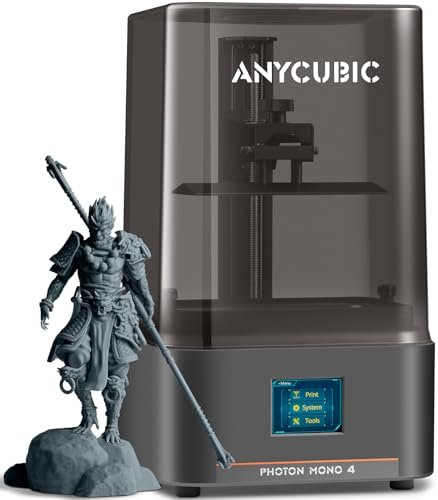
ANYCUBIC Photon Mono 4 Resin 3D Printer
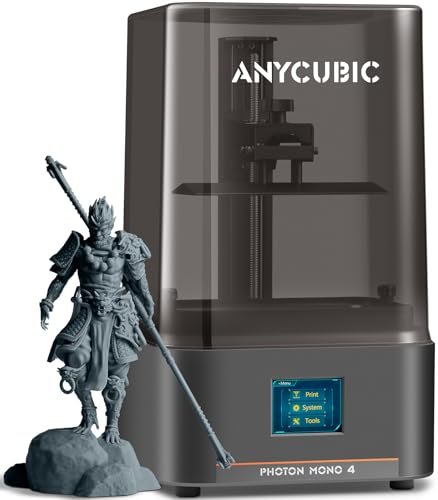
The ANYCUBIC Photon Mono 4 brings ultra-dense 10K resolution to a compact desktop footprint without inflating your startup costs. The LighTurbo matrix light source minimizes visible layer lines, while the textured build plate keeps smaller models firmly anchored. It is an accessible entry point that lets you produce crisp miniatures and functional parts straight out of the box.
Key features that stand out:
– 7-inch 10K monochrome LCD screen with 9024×5120 resolution
– 17×17μm XY axis precision for fine detail reproduction
– LighTurbo matrix light source for even UV light distribution
– Laser-engraved build platform 2.0 to mitigate print warping
– Power-loss resume printing feature and quick 4-point leveling
Pros:
– Crisp 10K resolution captures fine details on miniatures.
– Laser-engraved build plate offers reliable first-layer adhesion.
– Quick initial setup with straightforward 4-point manual leveling.
Cons:
– The printer does not connect to the Anycubic mobile app.
Best for: Budget-conscious miniature painters and tabletop gamers wanting high-resolution prints.
Expert Opinion: This machine delivers exceptional pixel density for its price tier, making it one of the most cost-effective ways to get crisp 10K detail without stepping up to larger commercial hardware.
ELEGOO Mars 5 Ultra Resin 3D Printer
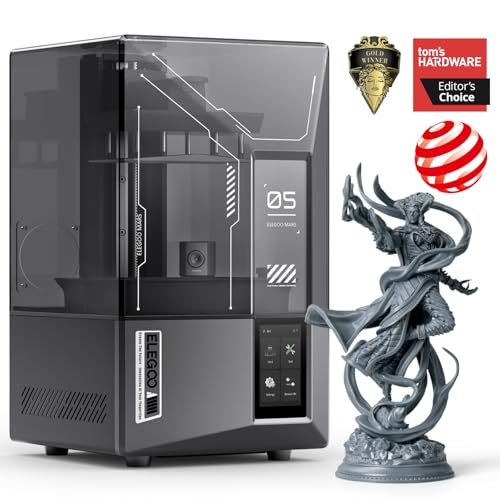
The ELEGOO Mars 5 Ultra stands out with its high-speed tilt release mechanism that peels prints quickly and smoothly. You also get an integrated AI camera that watches for print failures like warping or empty plates, saving both resin and clean-up time. Its smart mechanical residue sensor protects the delicate screen from leftover bits, making it a reliable workhorse for creators.
Key features that stand out:
– 7-inch 9K monochrome LCD with 18μm XY resolution
– Tilt release peeling technology reaching print speeds up to 150 mm/h
– Built-in AI camera for real-time error detection and alerts
– Mechanical sensor for residue detection and resin shortage alerts
– Wi-Fi cluster management to run multiple printers together
Pros:
– High printing speeds cut project wait times in half.
– AI camera catches failures early to save valuable resin.
– Mechanical residue sensor helps prevent costly LCD screen punctures.
Cons:
– AI error detection can occasionally misread dark or highly reflective resins.
Best for: Small print farms and hobbyists who want automated safety checks and high print speeds.
Expert Opinion: If you run small-batch production, the tilt release system and AI monitoring on this unit easily justify its price tag by preventing ruined screens and failed print runs.
ELEGOO Mars 5 Resin 3D Printer
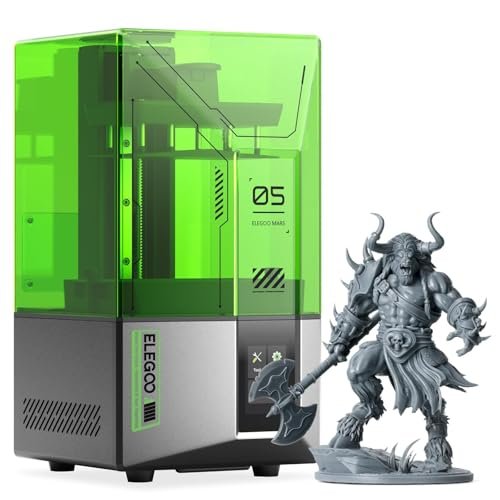
The ELEGOO Mars 5 brings one-click automatic leveling to an entry-level machine, removing the calibration guesswork for first-time users. It utilizes a 4K mono LCD paired with a COB light source to yield clean surfaces across prints of all sizes. Built-in smart sensors and overheat protection make sure your machine runs reliably without burning through components.
Key features that stand out:
– True one-click automated bed leveling system
– 4K monochrome LCD display with COB light source
– Built-in mechanical sensor to detect vat debris and resin levels
– Automatic hardware self-check before each print cycle
– Thermal protection that triggers automatic shutoff over 80°C
Pros:
– Automatic leveling eliminates manual paper calibration steps completely.
– Overheat protection safeguards the internal electronics during long runs.
– Debris detection protects the screen from accidental puncture damage.
Cons:
– The 4K resolution is lower than newer 9K and 10K competitors in this size bracket.
Best for: Beginners who want an easy, low-maintenance entry into 3D printing without manual bed leveling.
Expert Opinion: For anyone worried about manual leveling or damaging their screen with cured resin chunks, this unit provides peace of mind at an approachable price point.
Bambu Lab P1S Combo 3D Printer with AMS

While shoppers looking at the 3d resin printer price market usually search for UV resin units, the Bambu Lab P1S Combo represents an alternative path for multi-color prototyping. It provides blazing speeds up to 500 mm/s inside a fully enclosed build chamber that handles engineering filaments like ABS and ASA. Paired with the Automatic Material System (AMS), it gives you multi-color prints without resin wash-and-cure mess.
Key features that stand out:
– AMS unit supporting multi-material printing with up to 16 colors
– Top print speeds up to 500 mm/s with 20,000 mm/s² acceleration
– Fully enclosed body suitable for temperature-sensitive materials
– Automatic bed leveling and active vibration compensation
– Fast 15-minute out-of-the-box assembly
Pros:
– Multi-color printing without any chemical washing or curing steps.
– Enclosed chamber helps print tough technical materials without warping.
– Rapid print speeds outpace conventional filament machines by a wide margin.
Cons:
– It cannot match the ultra-smooth microscopic details produced by high-resolution resin printers.
Best for: Makers wanting functional, multi-color parts without handling liquid resins, fumes, or chemical wash baths.
Expert Opinion: Although it is an FDM machine, comparing its price against a complete resin setup is worthwhile if you want multi-color functional parts without dealing with hazardous fumes and washing stations.
YOOPAI Large Resin 3D Printer Enclosure with Ventilation
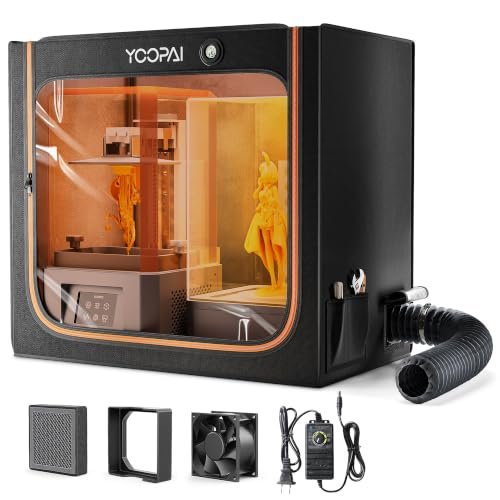
Factoring safety gear into your overall budget is essential, and this YOOPAI enclosure offers dual-printer capacity to house your printer alongside a wash station. It features an adjustable 12V variable-speed ventilation fan combined with an activated carbon filter to exhaust fumes outside. The insulated construction maintains ambient heat, ensuring your resin stays at a steady temperature for consistent printing.
Key features that stand out:
– Spacious internal dimensions (30 x 19.7 x 28.3 inches) fit two machines
– 12V variable fan reaching up to 6,000 RPM with carbon filter
– High-transparency clear PVC viewing window
– Six-sided enclosed dustproof build keeps foreign particles out
– Thermal insulation design to retain internal printing temperatures
Pros:
– Keeps strong resin smells out of living spaces.
– Roomy enough to hold both a printer and a wash-and-cure station.
– Thermal insulation prevents resin viscosity issues in cold rooms.
Cons:
– It takes up significant workspace footprint on your workbench.
Best for: Indoor makers needing active odor management and thermal control for their resin setup.
Expert Opinion: Never overlook ventilation when pricing out a workspace; an enclosure like this protects your indoor air quality and stabilizes print temperatures for better layer bonding.
ELEGOO Saturn 4 Ultra 16K Resin 3D Printer
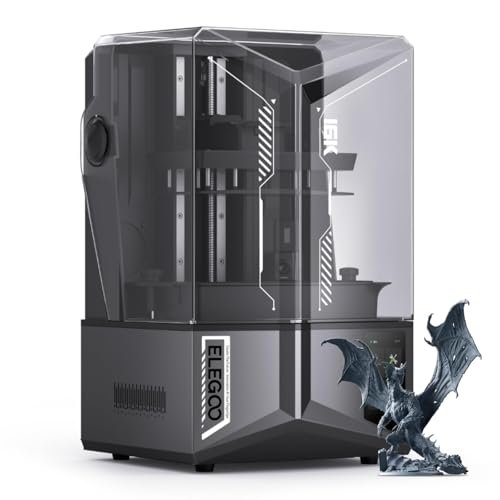
The ELEGOO Saturn 4 Ultra raises the bar with its massive 16K monochrome LCD, delivering crisp detail across a generous build volume. It includes intelligent tank heating to 30°C, solving layer adhesion problems caused by chilly workshops. With tilt release peeling technology and a built-in AI camera, it combines commercial-grade speed with top-tier reliability.
Key features that stand out:
– 10-inch 16K high resolution monochrome screen
– Intelligent vat heating that holds resin at a consistent 30°C
– Tilt release mechanism enabling print speeds up to 150 mm/h
– Integrated AI camera with chamber lighting for day and night monitoring
– True automated leveling for straight-out-of-the-box operation
Pros:
– Ultra-high 16K resolution delivers crisp details across large prints.
– Built-in vat heater prevents cold-weather print failures.
– Fast tilt release cuts print duration dramatically.
Cons:
– Larger replacement LCD screens and release films cost more when maintenance is needed.
Best for: Serious creators, prop makers, and mini-studios needing large-format, high-resolution prints.
Expert Opinion: The heated vat alone makes this unit worth the investment if you print in basements or garages, as stable temperature is the number-one factor in resin success.
ELEGOO ABS-Like 3.0+ 3D Printer Resin Grey 1kg
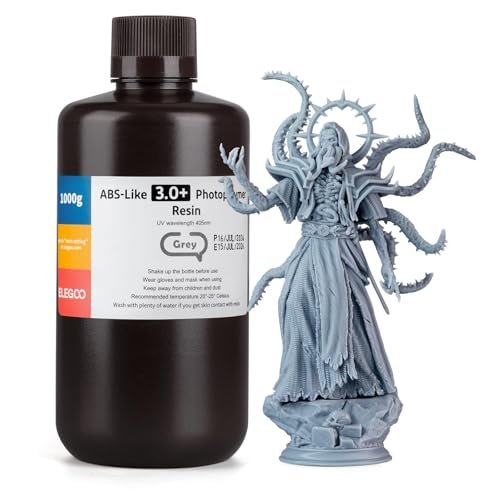
Consumables form a major part of the ongoing 3d resin printer price equation, and this resin provides exceptional impact resistance for durable parts. It resists heat up to 55°C while maintaining low shrinkage and high dimensional accuracy. The improved fluidity helps it flow back over the screen quickly, boosting overall print success rates.
Key features that stand out:
– Heat resistance up to 55°C to maintain model structure
– High toughness allowing prints to be drilled and tapped
– Low shrinkage formula for accurate part tolerances
– High fluidity for swift layer refilling and reduced peel stress
– Fast curing times compatible with modern mono LCD screens
Pros:
– Far less brittle than standard photopolymer resins.
– Parts can be tapped, screwed, or mechanically joined.
– Consistent grey color highlights fine surface details well.
Cons:
– It costs slightly more per bottle than basic standard resins.
Best for: Functional parts, mechanical assemblies, and gaming miniatures that need to withstand drops.
Expert Opinion: If you are tired of delicate resin prints shattering after dropping onto a tabletop, switching to this ABS-like formula pays for itself in avoided reprints.
SUNLU Fast Curing Standard 3D Resin 1kg
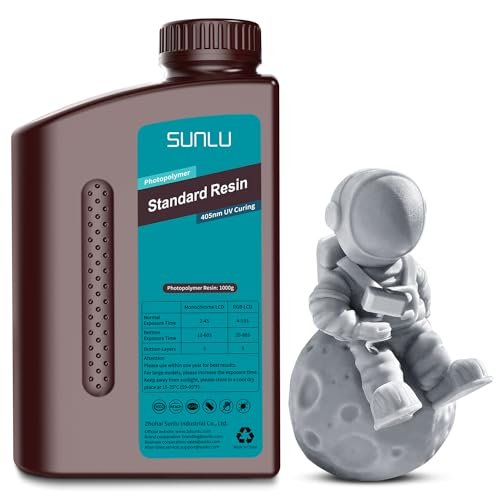
SUNLU standard resin keeps recurring material expenses low while delivering smooth surface finishes and sharp edges. Its low viscosity and fast curing profile make it universally compatible across nearly all LCD and DLP desktop printers. The formula features minimal odor and easy alcohol cleanup, making daily handling straightforward for hobbyists.
Key features that stand out:
– Broad 365–405nm UV wavelength compatibility
– Low shrinkage rate for consistent dimensional accuracy
– Fast exposure times to shorten overall print cycles
– Patented leak-proof bottle design for clean storage and transit
– Mild odor profile compared to traditional hobby resins
Pros:
– Very affordable price per kilogram keeps operating costs low.
– Rinses clean quickly in standard isopropyl alcohol baths.
– Smooth, non-chalky finish that takes acrylic paint smoothly.
Cons:
– Cured prints can be somewhat brittle if dropped on hard floors.
Best for: Display figures, visual display models, and beginners running frequent test prints.
Expert Opinion: This is my go-to recommendation for beginners who want an economical resin to dial in their printer settings without wasting expensive specialized photopolymers.
ELEGOO ABS-Like 3.0+ 3D Printer Resin Grey 2kg
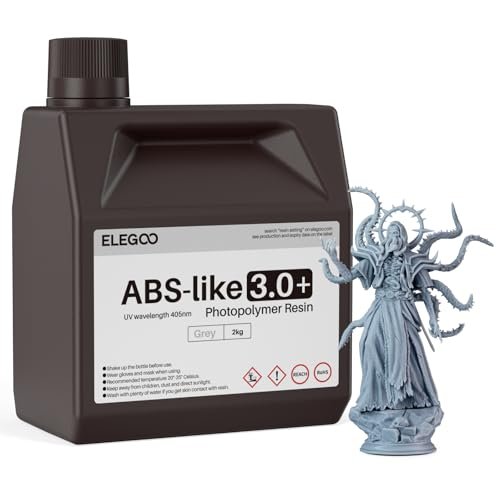
Buying materials in bulk is an easy way to lower your long-term operating costs, and this 2kg jug of ABS-Like 3.0+ offers solid savings per gram. It delivers the same high impact strength and 55°C heat tolerance as the 1kg bottle, allowing for parts that flex rather than shatter. The consistent batch formulation means you can print large batches without constantly recalibrating exposure times.
Key features that stand out:
– Cost-effective 2000g bulk packaging
– High mechanical toughness suitable for tapping and drilling
– Heat tolerance up to 55°C against mechanical warping
– High fluidity minimizes peeling suction forces during prints
– Formulated for low shrinkage and crisp feature detail
Pros:
– Lower cost per gram compared to single-kilogram containers.
– High durability prevents accidental breaks during model cleanup.
– Plenty of resin to complete massive multi-piece build plates.
Cons:
– The heavier 2kg bottle can be slightly awkward to pour into small vats.
Best for: High-volume miniature printers and makers running continuous production runs.
Expert Opinion: If you print daily, moving up to the 2kg volume reduces your per-gram printing expense and ensures consistent layer curing across extended printing projects.
ANYCUBIC Photon Mono 4 10K Desktop Resin Printer
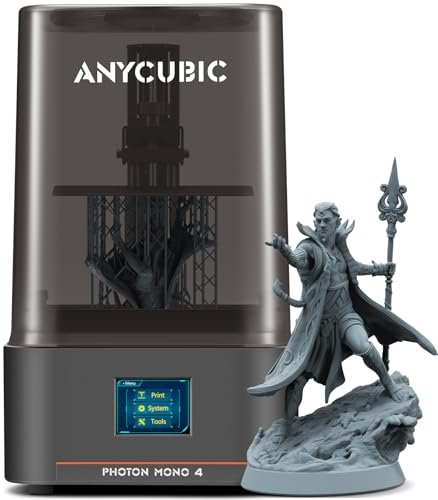
This iteration of the ANYCUBIC Photon Mono 4 emphasizes factory-calibrated precision and long-term customer protection right out of the box. Its 7-inch 10K screen creates prints with an XY resolution of just 17 microns, supported by single-layer exposure times around 1.5 seconds. With extended LCD warranty coverage and a textured build surface, it removes much of the anxiety from beginner resin printing.
Key features that stand out:
– Factory tuned and calibrated prior to boxed shipment
– 9024×5120 screen resolution yielding 17×17μm pixel density
– 1.5-second fast single-layer exposure times with LighTurbo UV
– 6-month extended LCD warranty with lifetime technical support
– Power outage print recovery system built into the firmware
Pros:
– Backed by an extended six-month warranty on the LCD panel.
– Fast 1.5-second exposure times keep project turnaround times quick.
– Pre-calibrated out of the box for quick setup.
Cons:
– FEP release film and included tools are excluded from warranty coverage.
Best for: Beginners wanting extra warranty security and rapid exposure speeds.
Expert Opinion: An extended screen warranty on a 10K machine provides genuine value, as replacing a high-density screen is typically the single biggest repair cost in desktop resin printing.
Helpful Comparison Insights
Evaluating printers based purely on specs can be tricky. When weighing the 3d resin printer price against real performance, consider these practical differences:
- Resolution vs Screen Size: A 4K screen on a compact printer like the ELEGOO Mars 5 still produces clean models, but jumping to the 10K screen on the Photon Mono 4 delivers noticeably sharper edges on tiny 28mm tabletop miniatures. Meanwhile, larger printers require higher pixel counts like the 16K screen on the Saturn 4 Ultra just to maintain that same fine pixel density across a larger build plate.
- Peeling Technology: Traditional printers pull the build plate straight up, creating heavy suction forces that require slower lift speeds. Machines equipped with tilt release mechanisms rock the vat sideways, drastically speeding up cycle times while putting far less stress on delicate supports.
- Resin Types and True Costs: Standard resins like SUNLU Standard are easy on the wallet, making them ideal for practice prints and display statues. However, switching to an ABS-like photopolymer drastically reduces brittleness, saving you money on failed prints and broken miniature limbs.
- Workspace Protection: Liquid printing requires secondary equipment. Budgeting for an active ventilation enclosure like the YOOPAI prevents volatile organic compounds (VOCs) from lingering in your home while maintaining the warmer ambient temperatures resin needs to cure properly.
Final Verdict
Selecting the right setup comes down to your personal workflow, available space, and printing goals:
- The Best Entry-Level Value: If you want maximum detail for miniatures without spending extra, the ANYCUBIC Photon Mono 4 gives you an exceptional 10K screen at an entry-level price.
- The Smartest Medium-Format Workhorse: For creators who want speed and reliability, the ELEGOO Saturn 4 Ultra 16K earns top marks. The heated vat and tilt release technology solve the two most common causes of failed prints.
- The Hassle-Free Beginner Pick: If manual calibration intimidates you, the ELEGOO Mars 5 offers dependable one-click auto-leveling and debris sensors that protect your investment from day one.
- The Production Consumable Choice: Pair your hardware with ELEGOO ABS-Like 3.0+ in the 2kg size to keep your running costs low while producing durable, drop-resistant parts.
Frequently Asked Questions About 3D Resin Printer Price
What is the average 3d resin printer price for beginners?
Entry-level desktop resin printers generally cost between $180 and $300. In this price bracket, you can expect a 7-inch monochrome LCD with 4K to 10K resolution, reliable manual or auto-leveling, and sufficient build volume for miniatures and small decorative pieces.
Beyond the initial machine cost, you will need to budget for consumables and post-processing tools. Expect to spend $20 to $40 per kilogram on resin, plus costs for 99% isopropyl alcohol, nitrile gloves, replacement release films (FEP/PFA), and safety equipment like a ventilated enclosure or carbon filters. A dedicated wash and cure station adds roughly $90 to $150 to your total cost of ownership.
Does a higher screen resolution mean a much higher price?
While 14K and 16K screens carry a slight price premium, the gap has shrunk rapidly. You can now purchase 9K and 10K desktop printers for less than what basic 2K machines cost just a few years ago. Higher resolutions increase print sharpness, especially on small models, without dramatically increasing the overall cost.
How much does replacement film and LCD screen maintenance cost?
Monochrome LCD screens typically last between 1,500 and 2,000 printing hours. A replacement screen generally ranges from $40 to $90 depending on size and resolution. Release films are wear items that cost between $10 and $25 for multi-packs and should be replaced whenever they become cloudy, dented, or scratched.
Is standard resin cheaper to run than ABS-like resin?
Yes, standard photopolymer resin is generally $4 to $10 cheaper per kilogram than tough or ABS-like formulas. However, standard resin is brittle, which can lead to higher reprint rates from broken supports or dropped parts. Investing in an ABS-like resin often reduces total resin consumption by cutting down on failed prints.
Can an enclosure save money on resin printing?
A quality enclosure saves money by providing thermal insulation. Liquid photopolymer resin requires ambient temperatures between 20°C and 30°C (68°F to 86°F) to cure properly. An insulated enclosure helps maintain that temperature without having to heat your entire room or garage, lowering both heating bills and temperature-related print failures.
Affiliate Disclosure: As an Amazon Associate, I earn from qualifying purchases made through links on this site.