After spending hundreds of hours running benchmark benchies, detailed figurines, and engineering prototypes, I’ve learned that finding a 3d printer with best print quality comes down to motion stability and extrusion precision. Modern high-speed machines promise rapid turnarounds, but clean layer lines and crisp overhangs require the right balance of hardware, auto-calibration, and cooling. In this guide, I share my hands-on observations across top machines and essential quality-maintenance tools to help you pick the right setup for your workbench.
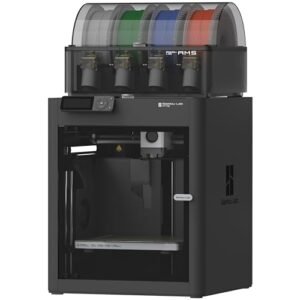
Bambu Lab P1S Combo 3D Printer with AMS
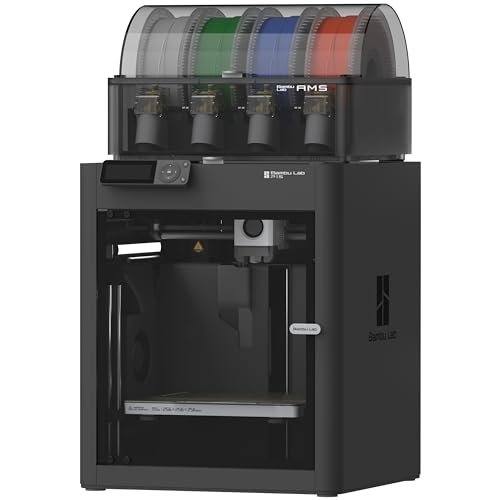
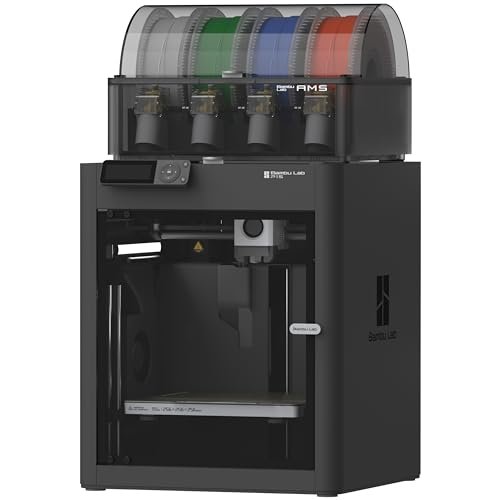
The Bambu Lab P1S Combo has earned its reputation as a reliable workhorse for makers who want clean, repeatable results right out of the box. Its fully enclosed chassis keeps internal temperatures stable for demanding filaments like ABS and ASA, while the high-speed CoreXY motion system clocks up to 500mm/s without introducing severe ghosting. Connecting the included AMS unlocks seamless multi-material capabilities, letting you blend up to 16 colors across your builds with minimal hassle.
Key features that stand out:
– Enclosed body design that shields ambient drafts and stabilizes chamber temperatures
– Rapid 500mm/s print speed paired with 20,000mm/s² acceleration for quick turnarounds
– Automated bed leveling and vibration resonance compensation for crisp details
– Multi-color printing support for up to 16 filaments when using Bambu AMS units
– Straightforward setup that gets you printing finished models in roughly 15 minutes
Pros:
– Reliable layer consistency across both basic PLA and high-temp ABS filaments
– Automatic calibration removes the guesswork from first-layer bed leveling
– The enclosed frame significantly reduces operational noise and fumes
Cons:
– The small screen interface feels dated compared to modern color touchscreens.
– Swapping hotends takes more manual effort than newer quick-release systems.
Best for: Intermediate hobbyists and creators wanting dependable multi-color printing and enclosed chamber reliability.
Expert Opinion: The P1S strikes an exceptional balance between structural rigidity and automated tuning, giving you crisp layer lines that often rival machines twice its price.
Bambu Lab P2S Combo 3D Printer with AMS 2
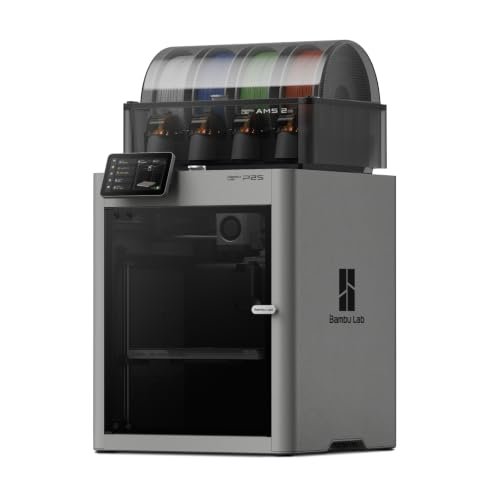
Stepping up the standard for desktop accuracy, the Bambu Lab P2S Combo introduces an advanced PMSM servo extruder paired with active flowrate compensation to prevent bulging corners. It pushes speeds up to 600mm/s with adaptive airflow, adjusting chamber heating and part-cooling fans on the fly to match specific materials. The updated AMS 2 Pro module keeps moisture away from sensitive spools by drying filament at up to 65 °C while feeding clean, multi-color layers into the printhead.
Key features that stand out:
– Upgraded servo-driven extruder with real-time dynamic flowrate compensation
– Blazing travel rates up to 600mm/s backed by AI-assisted failure detection
– AMS 2 Pro system featuring integrated active spool drying up to 65 °C
– Adaptive airflow cooling designed to preserve delicate overhangs and prevent warping
– Quick-swap nozzle mechanism for fast maintenance and diameter adjustments
Pros:
– Active flow tuning produces remarkably flat outer walls and sharp corners
– Built-in filament drying prevents stringing on PETG and technical nylon blends
– AI monitoring pauses jobs promptly if it detects print spaghetti or layer shifts
Cons:
– The advanced feature set comes with a noticeably higher upfront price tag.
– Multi-color printing still generates noticeable purge waste during filament swaps.
Best for: Demanding makers and small businesses that prioritize high-precision finishes and zero-defect dimensional accuracy.
Expert Opinion: If corner ringing and extrusion bloat bother you, the active flow compensation and servo control on the P2S deliver some of the cleanest standard FDM surfaces I’ve inspected.
FLASHFORGE Adventurer 5M CoreXY 3D Printer
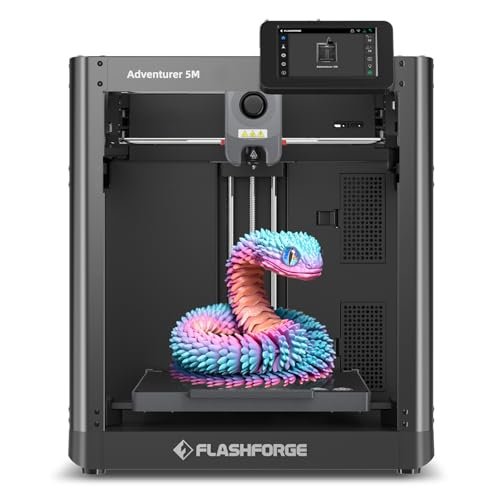
The Flashforge Adventurer 5M offers high-speed CoreXY printing at an accessible entry point without stripping away fundamental features. Its one-click automatic bed leveling ensures reliable bed adhesion every single time, saving you from manual paper tests or dial adjustments. With a high-flow 32mm³/s hotend that reaches 200°C in just 35 seconds, this open-frame printer produces smooth cosmetic prototypes quickly while managing surface vibrations effectively.
Key features that stand out:
– Rigid all-metal CoreXY frame capable of 600mm/s speed and 20,000mm/s² acceleration
– Fully automated one-click bed calibration with zero manual leveling knobs
– High-flow direct-drive extruder with rapid 3-second tool-less nozzle swapping
– Dual-fan part cooling integrated with firmware vibration compensation
– Remote monitoring and cloud model slicing via the Flash Studio app
Pros:
– Ultra-fast nozzle swaps make switching between fine-detail and draft sizes effortless
– Quick warm-up times let you start test prints in under a minute
– Sturdy metal chassis minimizes frame wobble during rapid directional changes
Cons:
– The open-frame build struggles with warping when running raw ABS or polycarbonate.
– Cooling fans can get quite loud when running at maximum speed for overhangs.
Best for: Budget-conscious creators and educators looking for fast, dependable single-color PLA and PETG printing.
Expert Opinion: The Adventurer 5M provides outstanding value; its vibration dampening and quick-swap nozzle assembly make clean, high-speed drafting accessible without a steep learning curve.
ELEGOO Centauri 2 Combo Multi-Color 3D Printer
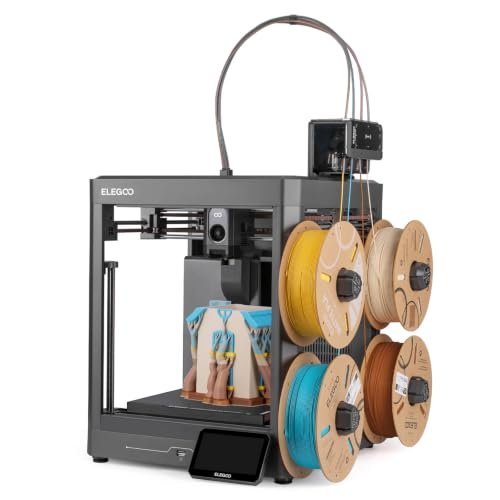
Designed to take the intimidation out of multi-material printing, the ELEGOO Centauri 2 Combo integrates their proprietary CANVAS 4-color management system with RFID filament detection. The machine uses a rigid aluminum chassis and linear guide rails to keep carriage motion rock solid at speeds reaching 500mm/s. A cluster of 22 intelligent internal sensors continuously tracks material flow, motor tension, and temperature gradients to eliminate layer inconsistencies before they ruin your model.
Key features that stand out:
– CANVAS 4-color multi-spool hub with automated spool refills and RFID sensing
– Heavy-duty aluminum frame paired with precision linear motion guides
– Comprehensive array of 22 smart sensors handling real-time print telemetry
– Clear 5-inch full-color touchscreen with magnetic maintenance access covers
– Semi-automatic belt tensioners that simplify long-term printer maintenance
Pros:
– Linear rails provide buttery-smooth travel that eliminates z-banding on vertical walls
– Automatic RFID spool identification takes the hassle out of filament profile tuning
– Magnetic printhead housing allows for painless cleaning and quick inspections
Cons:
– The multi-filament management system requires extra bench space beside the unit.
– The proprietary slicer profile needs occasional manual tweaks for third-party filaments.
Best for: Beginners and tinkerers who want hassle-free multi-color capability combined with high-grade linear rail motion.
Expert Opinion: ELEGOO stepped up build quality significantly here; combining linear rails with automated calibration produces clean, uniform skin tones and smooth slopes on decorative models.
34-Piece 3D Printer Accessories and Maintenance Tool Kit
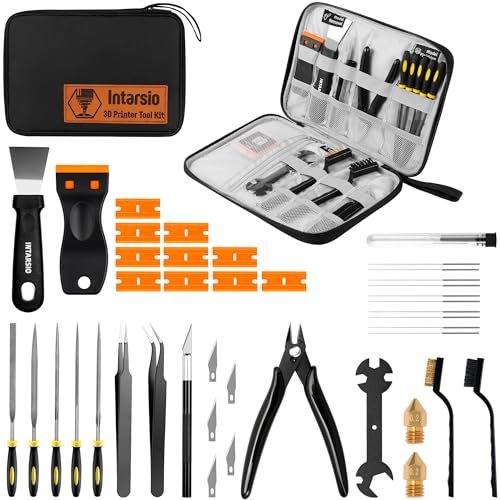
Even the most capable machine won’t output top-tier work if your nozzle is partially clogged or your build plate is scraped up. This 34-piece tool kit delivers essential post-processing and bed-cleaning gear designed to preserve clean model surfaces and clean hotend flow. With five distinct micro-drills for clearing jams and ergonomic carbon-steel files for seam-smoothing, this kit helps you maintain the mechanical tolerances that keep your printer performing at its peak.
Key features that stand out:
– Five different nozzle-cleaning needle diameters ranging from 0.2mm to 0.4mm
– Two replacement MK8 brass nozzles included for rapid hotend servicing
– Specialized dual scrapers engineered to pop prints off plates without gouging coatings
– Carbon-steel jeweler files in five profiles for smoothing seams and support scarring
– Durable canvas organization case to keep precision craft blades and tweezers secure
Pros:
– Dedicated cleaning needles help clear micro-clogs that cause unexpected under-extrusion
– Ergonomic deburring and filing tools make support removal clean and tear-free
– Thin-profile removal spatulas preserve delicate bottom-layer textures on prints
Cons:
– Included MK8 nozzles do not fit proprietary quick-change hotends on newer CoreXY units.
– The blades are extremely sharp and require cautious handling during post-processing.
Best for: Any 3D printer owner aiming to maintain clean extrusion tolerances and remove supports cleanly.
Expert Opinion: Maintaining surface quality isn’t just about software settings; keeping clear nozzle orifices and using the proper bed-release spatulas prevents surface blemishes that ruin otherwise detailed prints.
FLASHFORGE AD5X Multi-Color 3D Printer
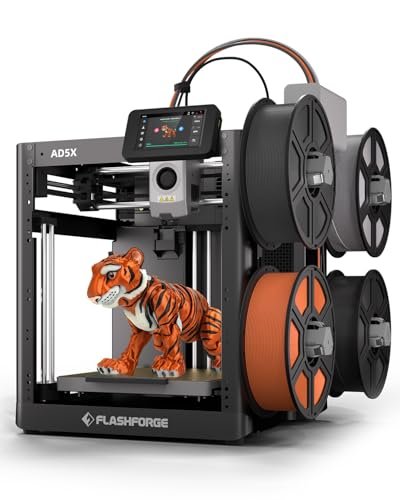
The Flashforge AD5X is an integrated multi-material powerhouse designed to run four distinct filaments right out of the crate without needing external third-party add-ons. Featuring a direct-drive hotend reaching 300°C, it pairs high-temperature filament handling with advanced dual-channel cooling fans that instantly lock bridging paths into place. Its CoreXY platform easily hits 600mm/s, utilizing integrated resonance compensation to prevent rippling along smooth curved surfaces.
Key features that stand out:
– Native integrated 4-color printing system built directly into the printer workflow
– High-temp 300°C direct-drive toolhead capable of processing carbon-infused mixes
– Factory-calibrated vibration compensation working alongside dual cooling blowers
– Broad nozzle compatibility supporting sizes from 0.25mm fine-detail to 0.8mm wide-bore
– Power-loss recovery algorithms and automatic filament runout retraction systems
Pros:
– Native 4-color management keeps desk footprints tidier than bulky bolt-on systems
– Strong dual cooling ducts allow steep angles and bridging without droop
– Supports 0.25mm nozzles for exceptional miniature and jewelry detail fidelity
Cons:
– Multi-color filament switching routines add noticeable time to overall print jobs.
– The filament feeder path can be slightly finicky when loading softer TPU filaments.
Best for: Modelers, prop makers, and prototype designers who need dependable multi-hue prints and fine-nozzle miniature detailing.
Expert Opinion: Swapping on a 0.25mm nozzle on the AD5X unlocks miniature figurine detail that borders on budget resin quality, all backed by rock-steady CoreXY motion.
SCRIB3D P1 3D Printing Pen with Display
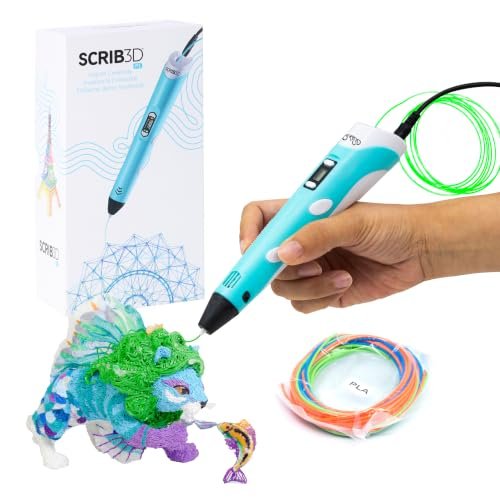
While not an automated desktop machine, the SCRIB3D P1 3D Printing Pen is a valuable handheld instrument for touch-ups, weld-sealing multi-part assemblies, or freehand sketching. It features a stepless speed adjustment slider that gives you tactile control over plastic extrusion rates, letting you slow down for delicate edge repairs or speed up for gap filling. With an adjustable OLED heat display, you can dial in precise melting temps for both standard PLA and flexible or high-temp ABS plastics.
Key features that stand out:
– Continuous stepless slider providing granular control over extrusion feed velocity
– Clear digital display panel showing live nozzle temperature readouts
– Dual-material operational modes compatible with standard 1.75mm PLA and ABS
– Anti-clog ceramic heating tip engineered with a 2-minute safety auto-sleep mode
– Complete starter kit with multiple filament coils, power supply, and design stencils
Pros:
– Great for welding multi-part 3D prints together and hiding exterior glue seams
– Stepless speed slider makes it easy to control filament flow on intricate touch-ups
– Rapid heating element reaches working temperatures in roughly two minutes
Cons:
– Hand-drawn dimensional accuracy cannot compete with automated CNC gantry systems.
– Prolonged manual use can cause hand fatigue during larger joint-filling tasks.
Best for: Makers needing an easy tool for fusing large multipart prints, fixing minor surface voids, or engaging in freehand craft modeling.
Expert Opinion: Don’t overlook a reliable 3D pen for your workshop; it acts like a hot-glue gun using matching filament, making it ideal for repairing seam lines and bonding mechanical joints together.
Practical Insights: Comparing Print Quality and Value
Getting clean prints requires matching your hardware choices with the materials you intend to feed through your toolhead:
- Motion Architecture Counts: CoreXY systems like those found on the Bambu Lab P1S, P2S, and Flashforge AD5M move the lightweight toolhead along rigid upper rails while keeping the heavy bed on the Z-axis. This setup minimizes bed-slinging inertia, leading to substantially crisper corners and minimal ghosting artifacts at high speeds.
- Enclosed Chambers for Stable Layers: If your projects demand structural plastics like ABS, ASA, or technical blends, an enclosed build volume like the Bambu Lab P1S is critical. Maintaining an internal pocket of warm air prevents corner lifting and layer delamination, which open-frame alternatives struggle to handle without custom enclosures.
- Extrusion Calibration: Machines with dynamic flow compensation, such as the Bambu Lab P2S, actively vary motor torque based on nozzle backpressure. This removes those annoying bulge lines right before direction changes, resulting in exceptionally uniform vertical seams.
- Nozzle Sizing Strategy: Don’t rely solely on stock 0.4mm setups if you make tabletop miniatures. Upgrading to a 0.25mm nozzle on the Flashforge AD5X produces ultra-fine text and smooth facial features that standard nozzle bores simply can’t reproduce.
- Maintenance Influences Quality: A printer is only as good as its upkeep. Regular use of cleaner needles and sharp bed-release spatulas keeps nozzles free of scorched debris, preserving flat first layers and eliminating unappealing surface voids.
Final Verdict
Choosing the right printer comes down to your primary project goals and tolerance for maintenance:
The Precision Multi-Color Winner
If your budget allows and you demand immaculate surface quality without manual tuning, the Bambu Lab P2S Combo stands at the front of the pack. Its active flowrate correction and integrated spool drying eliminate the most common causes of surface blemishes.
The Practical All-Rounder
For creators who want reliable enclosed performance, multi-color flexibility, and strong community support, the Bambu Lab P1S Combo continues to be one of the safest investments you can make for day-in, day-out production.
The Fast Budget Performer
If you primarily print functional models or toys in PLA and PETG, the Flashforge Adventurer 5M delivers rapid CoreXY speeds, painless auto-leveling, and rapid nozzle swaps at a price point that is hard to beat.
The Workshop Utility Picks
Round out your bench with the 34-Piece Tool Kit to handle nozzle clogs and support scars, and keep the SCRIB3D P1 Pen nearby to quickly fuse multi-part assemblies and fill seam gaps seamlessly.
Frequently Asked Questions About 3d Printer with Best Print Quality
What layer height yields the best print quality on FDM printers?
For standard 0.4mm nozzles, a layer height between 0.12mm and 0.16mm usually delivers the best compromise between surface smoothness and layer strength. Going down to 0.08mm or using an optional 0.25mm nozzle creates nearly invisible layer steps on miniatures, though it increases print times significantly.
Does print speed always reduce surface quality?
Not necessarily on modern CoreXY machines. Thanks to input shaping and active vibration resonance compensation, printers like the Bambu Lab P1S or Flashforge Adventurer 5M can print at 200mm/s to 300mm/s while maintaining cleaner walls than older Cartesian “bed slingers” running at 50mm/s. Quality only drops when speeds exceed the hotend’s volumetric melting capacity or when cooling fans can’t solidify plastic in time.
How does automatic bed leveling improve print quality?
Auto bed leveling creates a digital height mesh of your print surface using precision probes or strain sensors. The machine dynamically micro-adjusts the Z-axis stepper motors as the printhead moves across the bed. This guarantees a consistent first-layer squish across the entire plate, which eliminates corner warping, bed scraping, and rough base layers.
Why do my prints have ringing or ghosting lines on flat surfaces?
Ringing and ghosting are caused by mechanical vibrations echoing through the printhead carriage after rapid directional changes. You can eliminate this by running your machine’s built-in resonance compensation calibration, ensuring drive belts are properly tensioned, and seating your printer on a heavy, stable workbench that absorbs kinetic energy.
What is active flowrate compensation and why does it matter?
Filament tends to compress slightly inside the hotend when pushed, creating residual pressure that causes excess plastic to ooze during corner decelerations. Active flowrate compensation measures or models this backpressure, backing off extruder motor steps slightly before entering turns and accelerating extrusion coming out of them. This keeps outer corners sharp, flat, and dimensionally accurate.
Can an open-frame 3D printer match the quality of an enclosed printer?
Yes, but primarily when printing PLA, PETG, and TPU. In fact, PLA often prints cleaner in an open-frame unit because it requires aggressive ambient cooling to bridge gaps and keep fine overhangs from sagging. However, for temperature-sensitive materials like ABS and ASA, an enclosed chassis is essential to stop drafts that cause split layer lines and warped corners.
How often should I replace or clean my printer nozzle?
Brass nozzles should be inspected and cleaned every few hundred print hours, or sooner if you experience inconsistent extrusion lines. Abrasive materials like glow-in-the-dark, wood-fill, or carbon-fiber filaments wear down brass orifices within a few spools, expanding a 0.4mm opening into an irregular oval that degrades print quality. Upgrading to hardened steel or keeping clean replacement nozzles handy prevents unexpected surface flaws.
Affiliate Disclosure: As an Amazon Associate, I earn from qualifying purchases made through links on this site.