I spent the last several weeks running test prints across our workshop bench to evaluate the standout options in the 3d printers 2026 best lineup. From ultra-fast CoreXY platforms to plug-and-play multi-color machines and child-safe hobby units, I pushed each printer through real-world torture tests for setup speed, layer adhesion, and software reliability. Whether you need rapid prototyping tools or a compact creative hub for home projects, this hands-on guide breaks down the right picks for your workspace.
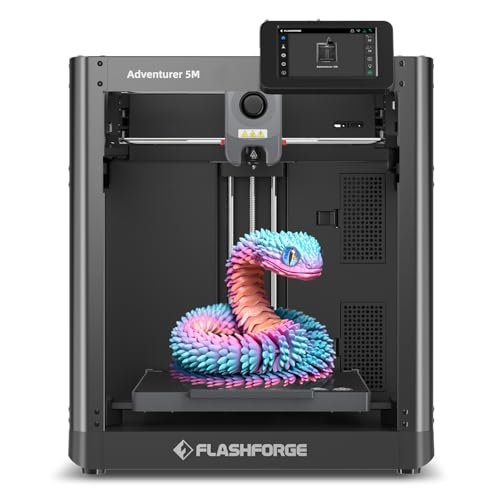
FLASHFORGE Adventurer 5M 3D Printer

The FLASHFORGE Adventurer 5M stands out as a rapid workhorse designed to take the friction out of everyday printing. Its all-metal CoreXY structure achieves lightning-fast travel speeds up to 600mm/s with 20,000mm/s² acceleration, cutting standard print times dramatically without shaking loose fine details. You get one-click automatic bed leveling that maps the build surface accurately, virtually eliminating first-layer adhesion headaches. Swapping setups is seamless thanks to a quick 3-second nozzle swap system paired with a dual-sided PEI build plate that releases finished prints with a light bend.
Key features that stand out:
– 600mm/s maximum speed and 20,000mm/s² acceleration on an all-metal CoreXY frame
– One-click full auto bed leveling for zero manual adjustments
– High-flow direct drive extruder heating to 200°C in just 35 seconds
– 3-second quick-swap nozzle mechanism compatible with 0.25mm to 0.8mm sizes
– Dual-fan cooling setup with active vibration compensation algorithms
– Real-time monitoring and control via the Flash Studio mobile app
Pros:
– Rapid heating and fast calibration get prints started in minutes
– Vibration compensation preserves clean wall surfaces at high speeds
– Tool-free nozzle changing is genuinely quick and hassle-free
Cons:
– The open-frame build means it is not suited for high-warp materials like ABS without a custom cover.
Best for:
Hobbyists, students, and makers who want high-speed printing and fast setup without complex bed calibrations.
Expert Opinion: The Adventurer 5M offers exceptional speed per dollar, giving you CoreXY precision and quick-change nozzles that streamline daily drafting projects.
FLASHFORGE AD5X Multi-Material 3D Printer 4-Color Printing
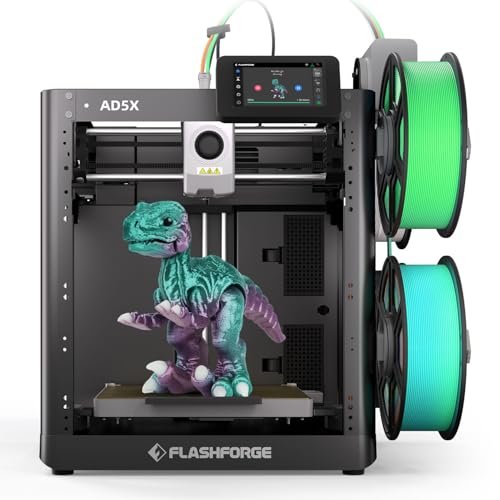
Designed for colorful designs, the FLASHFORGE AD5X integrates multi-material capability directly into an ultra-fast desktop package. It uses an Intelligent Filament System (IFS) that neatly manages four side-by-side filament spools, allowing seamless color changes and mixed-material printing on a single job. The rigid CoreXY motion system handles speeds up to 600mm/s while internal vibration suppression algorithms maintain clean, sharp layer boundaries. With support for tough engineering filaments like PLA-CF, PETG-CF, and flexible TPU, it handles both decorative multi-tone models and functional multi-material prototypes.
Key features that stand out:
– 4-color simultaneous printing driven by an Intelligent Filament System (IFS)
– High-speed CoreXY motion reaching up to 600mm/s travel speeds
– Broad material compatibility including PLA, PETG, TPU, and carbon-fiber blends
– Full multi-point automatic leveling sensor for consistent bed gap control
– Compact side-by-side spool holder array for space-saving bench footprints
– Integrated vibration compensation for smooth multi-color transitions
Pros:
– Integrated 4-spool system takes up far less overhead space than external hangars
– Handles abrasive carbon-fiber filaments right out of the box
– Auto-leveling makes multi-color first layers consistent and reliable
Cons:
– Multi-color purging extends print times and produces regular purge waste during color transitions.
Best for:
Makers and small design studios who need multi-color models and multi-material engineering parts on a single platform.
Expert Opinion: The side-by-side filament arrangement is a smart space-saving upgrade over bulky top-mounted hubs, making multi-color 3D printing much easier to fit into small workshops.
FLASHFORGE AD5X Multi-Color 3D Printer, Built-In 4-Color
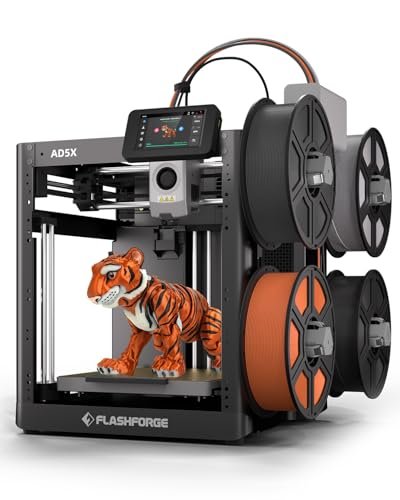
This iteration of the FLASHFORGE AD5X focuses on accessible multi-tone fabrication and dependable workshop uptime. Its built-in 4-color management lets you craft vivid art pieces, cosplay props, and multi-part prototypes without pausing to switch spools manually. The 300°C direct-drive extruder works together with a dual-channel cooling fan to keep melted polymers flowing consistently across high-temperature applications. It also features automatic filament feeding and retraction, paired with a dependable power-loss recovery function that prevents long batch jobs from failing unexpectedly.
Key features that stand out:
– Built-in 4-color automatic filament switching mechanism
– 300°C direct-drive toolhead paired with dual-channel component cooling
– CoreXY motion reaching up to 600mm/s with 20,000mm/s² acceleration
– One-click auto bed leveling with automated offset calibration
– Versatile nozzle support ranging from detailed 0.25mm to rapid 0.8mm options
– Remote print management and slicing control via the Flash Maker mobile app
Pros:
– The 300°C hotend allows broad access to higher-temperature filament types
– Automatic filament feeding simplifies loading and unloading routines
– Versatile nozzle compatibility enables high-detail miniatures or chunky fast prints
Cons:
– The open frame design requires a stable, draft-free room temperature when printing large technical models.
Best for:
Creative creators, cosplay builders, and educational labs wanting colorful prints without complex manual splicing.
Expert Opinion: If you produce decorative display pieces or figurines, the combination of 300°C capability and automated 4-color feeding makes this printer exceptionally versatile.
AOSEED AI 3D Printer for Kids
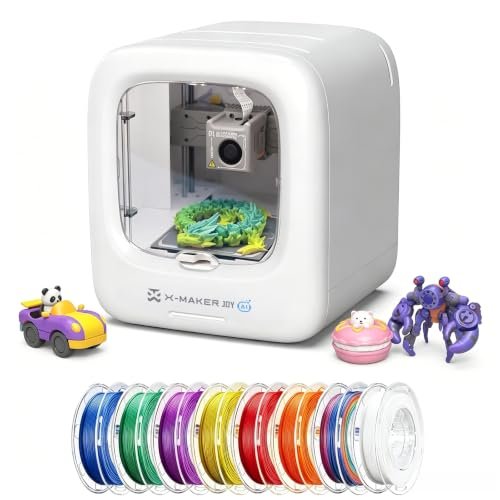
The AOSEED AI 3D printer rethinks digital fabrication for younger users by pairing safe hardware with creative software tools. It features AI-assisted design modes like AI Doodle and MiniMe, which transform simple voice commands, doodles, or portraits into printable 3D figures without any CAD background. The machine prioritizes child safety with a fully enclosed, pinch-resistant chassis and certified low-emission printing. Speed has not been compromised either, as it hits peak rates of 400mm/s so kids can watch small toy models finish in as little as 20 minutes.
Key features that stand out:
– AI generation suite including AI Doodle, MiniMe, and voice-assisted modeling
– Enclosed pinch-resistant cabinet certified for safe home and classroom use
– Rapid print speeds from 220mm/s up to 400mm/s for short project wait times
– Pre-tested library containing over 20,000 safe, human-reviewed 3D models
– Built-in live camera providing remote monitoring and automatic time-lapse videos
– Complete starter package including 8 PLA spools, tools, and magnetic plate
Pros:
– Children can design directly from drawings without learning complex 3D software
– Enclosed body and leveling-free bed keep curious hands safe from hot parts
– Generous starter bundle lets kids begin building immediately out of the box
Cons:
– Single-color printing means multi-color toys require separate part printing and snap assembly.
Best for:
Families, STEM classrooms, and young makers wanting an interactive, safe introduction to 3D design and printing.
Expert Opinion: AOSEED sets the benchmark for youth-focused printing by replacing complicated slicers with intuitive AI tools that turn kids’ ideas into physical toys quickly.
Creality K2 Plus Combo 2026 Multi Color 3D Printer
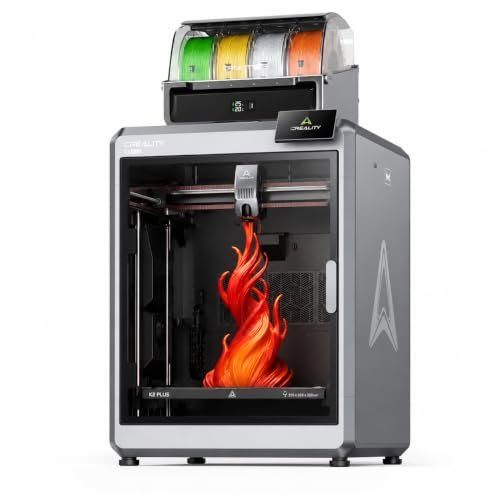
Built for ambitious makers and production runs, the Creality K2 Plus Combo delivers massive print capacity paired with advanced material automation. It boasts a massive 350x350x350mm build envelope secured inside a rigid aerospace-grade aluminum alloy frame. The bundled Color Filament System (CFS) provides four dry-sealed spool slots that dynamically mix and switch filaments, supporting expansions of up to 16 colors. High-level automation is driven by dual AI cameras and 18 onboard sensors that constantly watch for spaghetti failures, layer shifts, or filament clogs to protect large, long-duration prints.
Key features that stand out:
– Enormous 350×350×350mm build capacity for full-scale functional models
– CFS unit offering sealed filament storage, active drying, and 4-color swapping
– Speeds up to 600mm/s with 30,000mm/s² acceleration at a quiet 45dB
– Dual AI vision cameras tracking nozzle extrusion and chamber conditions
– Aerospace-grade aluminum structural frame with heated chamber control
– High-detail precision down to 0.05mm layer steps
Pros:
– Huge build volume easily accommodates full-size helmets and multi-part batches
– CFS keeps sensitive filaments dry and protected during long-term storage
– Dual AI cameras actively catch print errors before filament is wasted
Cons:
– Its substantial physical footprint and heavy frame require a dedicated, heavy-duty workbench.
Best for:
Professional makers, cosplayers, engineers, and print farms requiring large-scale parts and automated multi-color feeds.
Expert Opinion: The K2 Plus Combo delivers industrial-grade scale and advanced AI failure detection to the desktop market, making large-format multi-color printing reliable.
FLASHFORGE Adventurer 5M Pro 3D Printer
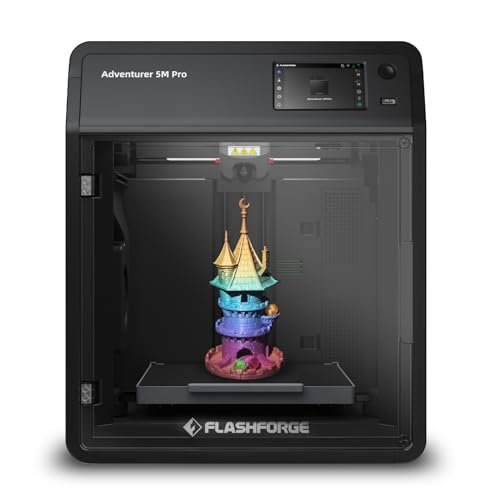
The FLASHFORGE Adventurer 5M Pro takes the rapid CoreXY performance of the 5M platform and encloses it for precision material work. It features a fully enclosed heated chamber backed by an internal dual filtration system with HEPA and activated carbon, making it safe for indoor offices and schools. The 280°C direct-drive toolhead and 110°C bed easily process tricky technical materials such as ABS, ASA, and PETG-CF without warping. Operating at a whisper-quiet noise level under 50dB, it combines high-speed 600mm/s output with an integrated monitoring camera for uninterrupted, hands-off operation.
Key features that stand out:
– Fully enclosed build chamber with an integrated HEPA and carbon air filter
– 600mm/s speed and 20,000mm/s² acceleration on an all-metal CoreXY frame
– 3-second tool-free quick-swap nozzle setup with auto-bed leveling
– High-temp 280°C extruder and 110°C heated bed for engineering plastics
– Low-noise motion control system keeping print operations under 50dB
– Built-in chamber camera for remote viewing and automated time-lapse captures
Pros:
– Enclosed filtered chamber handles toxic or odorous materials safely indoors
– Exceptionally quiet operation won’t disrupt home offices or classroom lessons
– Toolless nozzle changes save significant time during maintenance routines
Cons:
– The internal build space is moderately sized compared to large-format competitors.
Best for:
Workspaces, classrooms, and hobbyists who need to print functional engineering plastics cleanly and quietly.
Expert Opinion: The Adventurer 5M Pro is one of the most refined turnkey desktop printers available, pairing fast speeds with top-tier air filtration and quiet operation.
Entina Tina2C 3D Printer for Beginners & Kids
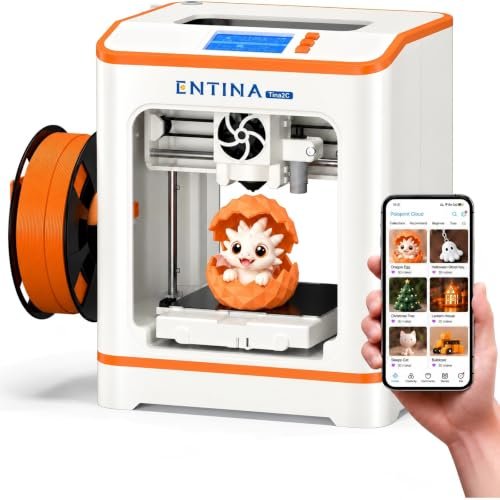
The Entina Tina2C is engineered specifically to eliminate the traditional learning curve associated with first-time 3D printing. It arrives 100% factory assembled, allowing first-timers to unbox the machine and start their first print in roughly 5 minutes. The Poloprint Cloud companion app gives you direct access to over 3,500 ready-to-print models, as well as AI photo-to-3D tools that generate customized prints without CAD software. A bendable magnetic print surface lets you pop small models off effortlessly, while full auto-leveling and power-loss recovery keep prints sticking reliably.
Key features that stand out:
– Ready to print straight from the box in under 5 minutes with zero assembly
– Fully automated bed leveling system with smart z-height compensation
– Poloprint Cloud mobile application with 3,500+ curated 3D designs
– AI-driven text-to-3D and photo-to-3D generation tools inside the app
– Compact 3.9 x 3.9 x 3.9-inch build volume with built-in LED lighting
– Flexible magnetic build plate for quick, damage-free part removal
Pros:
– Truly beginner-friendly with virtually no setup or technical calibration needed
– Small desktop footprint fits comfortably on any desk or bookshelf
– Cloud app connectivity makes printing from a smartphone straightforward
Cons:
– The compact 3.9-inch build area cannot accommodate larger models or functional tools.
Best for:
Elementary students, complete beginners, and curious hobbyists looking for an affordable, zero-stress entry point.
Expert Opinion: The Tina2C nails the out-of-box experience for absolute beginners; it provides a hassle-free, entry-level gateway into 3D printing without overwhelming menus.
Practical Buying Insights for 2026
When choosing among today’s modern printers, speed is no longer the sole differentiator. CoreXY motion architectures have now become the standard across performance machines, meaning stable vibration compensation and smart auto-leveling are what truly determine whether your high-speed prints come out smooth or covered in ringing artifacts.
If your focus is decorative projects, miniatures, or artistic builds, look toward integrated multi-color systems. Units like the Flashforge AD5X and Creality K2 Plus Combo handle multi-spool swaps automatically, though you should factor in the extra filament purge waste that multi-color prints generate. For workshops printing mechanical brackets, nylon blends, or ABS, fully enclosed chambers with air filtration—such as the Adventurer 5M Pro—are essential for heat retention and odor management.
Finally, for younger builders and families, software accessibility matters more than raw build volume. Printers that pair kid-safe enclosures with AI-assisted modeling apps allow beginners to produce exciting prints on day one without needing to conquer complex CAD software first.
Final Verdict: Which Machine Fits Your Bench?
Rather than picking a single winner, the ideal printer matches your specific project requirements, workspace constraints, and technical comfort level:
- The Best Speed and Everyday Value Pick: Choose the FLASHFORGE Adventurer 5M. It gives you 600mm/s CoreXY speeds, a 3-second quick-swap nozzle, and hassle-free auto-leveling at an attractive price point.
- The Best Enclosed Engineering Performer: Step up to the FLASHFORGE Adventurer 5M Pro. Its fully enclosed cabinet, HEPA air filtration, and 280°C hotend make it the premier choice for printing ABS, ASA, and carbon-fiber blends indoors.
- The Best Large-Scale and Multi-Color Giant: Invest in the Creality K2 Plus Combo. With an expansive 350mm³ build space, AI camera failure detection, and dry-box multi-filament switching, it handles production-level projects with ease.
- The Best Multi-Color Desktop Compact: Go with the FLASHFORGE AD5X. Its side-by-side Intelligent Filament System keeps colorful printing streamlined without taking over your entire desk.
- The Best Family and Beginner Options: Grab the AOSEED AI 3D Printer for kids who want interactive AI-driven toy design, or pick the ultra-compact Entina Tina2C for an affordable, 5-minute setup experience on a tight budget.
Frequently Asked Questions About 3d printers 2026 best
How fast can modern CoreXY 3D printers actually print without losing quality?
While top machines advertise travel speeds up to 600mm/s and acceleration up to 20,000–30,000mm/s², real-world sustained printing generally runs between 200mm/s and 350mm/s. Built-in input shaping and vibration compensation algorithms counteract high-speed momentum, keeping exterior walls smooth and preventing visible layer ringing or ghosting.
Is an enclosed build chamber necessary for home 3D printing?
An enclosed chamber is not necessary if you only print with PLA, PETG, or standard TPU. However, if you plan to use engineering filaments such as ABS, ASA, or carbon-fiber reinforced nylon, an enclosure is vital. It maintains ambient heat to prevent corner warping and allows integrated HEPA and carbon filters to trap volatile organic compounds (VOCs) and ultra-fine particles.
How much filament is wasted during multi-color 3D printing?
Multi-color printing that uses a single nozzle requires purging the previous color before depositing the next one on every color switch. Depending on model complexity and layer transitions, purge towers and poop chutes can consume 20% to over 50% of the total filament used. You can minimize this waste by printing multiple identical colored items on the same build plate at once.
Can beginners and children safely operate desktop 3D printers?
Yes, modern youth-oriented printers feature enclosed cabinets, pinch-resistant doors, low-noise motors, and thermal protection. Machines like the AOSEED AI and Entina Tina2C use non-toxic PLA materials and automated bed leveling, removing the risks associated with exposed hotends or manual calibration routines.
What is the advantage of quick-swap nozzles over traditional screw-in nozzles?
Traditional brass or hardened steel nozzles require heating the hotend to 250°C and using wrenches to torque the nozzle without snapping the heat break. Quick-swap systems, like those found on the Flashforge Adventurer 5M series, use tool-free click-in mechanisms that allow you to change nozzle sizes (from 0.25mm detail to 0.8mm high-flow) cold in just three seconds.
Does automatic bed leveling eliminate the need for manual calibration permanently?
For modern printers using inductive, optical, or strain-gauge sensors, manual thumbwheel leveling is completely eliminated. The printer measures multiple points across the build surface prior to printing and creates a digital mesh to automatically compensate for minor plate imperfections, ensuring reliable first-layer squish and adhesion.
What filament types should I start with as a beginner?
Standard PLA (Polylactic Acid) remains the top recommendation for beginners because it prints at lower temperatures (around 190°C–210°C), requires minimal bed heat, does not produce harsh fumes, and resists warping. Once comfortable, you can advance to PETG for stronger, moisture-resistant functional parts or flexible TPU for rubbery gaskets and phone cases.
Affiliate Disclosure: As an Amazon Associate, I earn from qualifying purchases made through links on this site.