Whenever I browse through 3d printer reviews youtube channels publish, I notice how fast desktop fabrication is evolving from clunky DIY kits into polished appliances. After testing these compact entry-level units and blazing-fast CoreXY workhorses on my own workbench, I can confirm that reliability has reached an all-time high. In this guide, I break down seven standout machines featured across maker channels to help you pick the right model for your desk and budget.
Entina Tina2C 3D Printer for Beginners & Kids
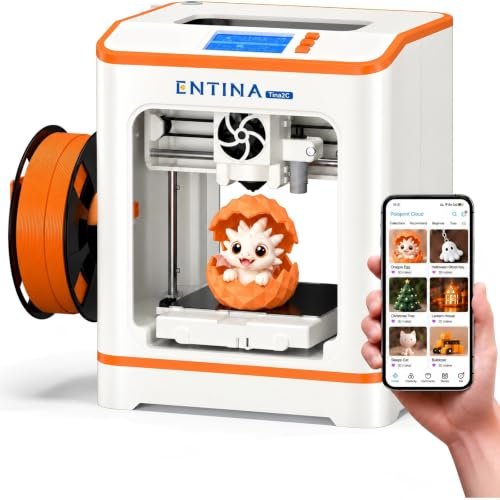
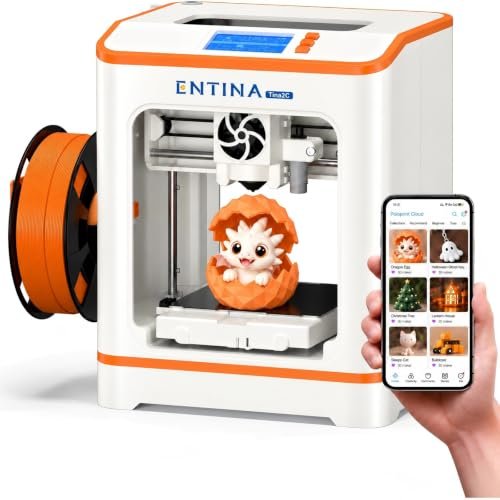
The Entina Tina2C is a plug-and-play desktop machine built specifically for first-time users who want zero setup hassle. It arrives fully assembled with factory calibration, letting you kick off your first project with guided auto leveling in roughly five minutes. Using the Poloprint app, you gain access to an AI-powered text-to-3D engine alongside 3,500 ready-to-print designs. It also includes a magnetic bendable build plate that makes popping parts off completely painless.
Key features that stand out:
– Auto bed leveling combined with quick power-loss recovery
– Poloprint Cloud app integration with 2.4GHz Wi-Fi and AI model generator
– Quick-swap nozzle design paired with flexible magnetic build plate
– Open software support for Cura and Simplify3D via TF card or wireless control
– Ultra-compact footprint with a 3.9 x 3.9 x 3.9-inch build volume
Pros:
– Ready to print straight out of the box with zero assembly
– Poloprint app makes remote smartphone printing simple for kids
– Tiny desk footprint fits neatly into small bedrooms or classrooms
Cons:
– The 3.9-inch build volume prevents you from printing larger household items.
Best for: Young kids, complete beginners, and classrooms wanting an inexpensive, safe entry into 3D printing.
Expert Opinion: This little machine strips away every technical barrier that usually scares newcomers away from 3D printing. While you won’t print full-size helmets on it, its reliable bed leveling and quick nozzle changes make it a dependable learning tool.
AOSEED AI 3D Printer for Kids

The AOSEED AI machine bridges the gap between digital imagination and physical toys by turning voice, text, or photos into real objects. It features an enclosed, pinch-resistant chassis along with a kid-safe leveling-free platform that eliminates dangerous hot-surface accidents. With travel speeds reaching up to 400mm/s peak velocity, it can churn out miniature toys in just twenty minutes. The machine also houses a built-in monitoring camera that automatically creates shareable time-lapse videos of every print.
Key features that stand out:
– AI Doodle and AI MiniMe engines for text, voice, and photo-to-3D generation
– Rapid printing speeds ranging from 220mm/s up to 400mm/s
– Enclosed kid-safe design using TÜV Rheinland certified safe PLA
– Integrated HD camera for real-time app checks and automatic time-lapse generation
– Complete starter kit bundled with 8 rolls of filament, tools, and stickers
Pros:
– AI software lets children create custom designs without 3D modeling skills
– Built-in camera provides remote monitoring and fun time-lapse clips
– Generous bundle with multiple filament rolls right in the box
Cons:
– Single-color printing requires manual assembly if you want multi-colored toys.
Best for: Families and elementary school students who want instant creative output powered by assisted AI tools.
Expert Opinion: Many YouTube creators highlight this printer for its child-centric software ecosystem. It effectively removes CAD modeling frustration, replacing it with prompt-based creativity that keeps children genuinely invested in making physical projects.
Entina Tina2C Mini 3D Printer Starter Bundle
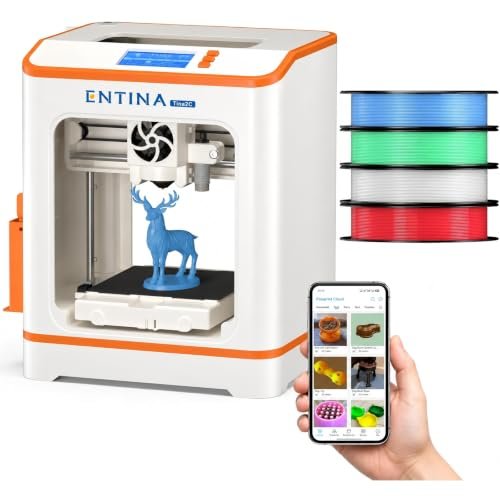
This bundled version of the Tina2C gives you everything required to start manufacturing colorful desk accessories without extra supply runs. It comes packed with a 1kg PLA bundle divided into four distinct 250g spools to jumpstart your color options. The printer features factory-calibrated automatic leveling along with an assisted setup procedure via Poloprint Cloud that takes less than five minutes. A quiet motor system and a removable magnetic print surface ensure clean prints and hassle-free part removal.
Key features that stand out:
– Starter package featuring 1kg of PLA across four separate colors
– Fully assembled setup running prints via Wi-Fi or TF card
– Smart assisted leveling system with built-in power interruption protection
– Flexible spring steel magnetic plate and tool-free nozzle replacement
– Access to 3,500+ cloud models and educational STEM project guides
Pros:
– Comes with plenty of multi-colored filament right in the package
– Extremely quiet operation makes it practical for shared study desks
– Guided calibration prevents bed scratching or adhesion failures
Cons:
– The spool holder struggles to seat standard third-party 1kg filament rolls without an external mount.
Best for: Budget-focused parents looking for an all-in-one gift set that requires zero additional accessories to start printing.
Expert Opinion: Buying a printer only to realize you need extra plastic is frustrating, which is why this bundle frequently gets recommended in beginner video guides. It delivers the solid mechanics of the standard Tina2C while solving your initial material needs on day one.
FLASHFORGE Adventurer 5M 3D Printer

The Flashforge Adventurer 5M is a high-performance machine powered by a rigid all-metal CoreXY structure designed for speed and precision. It prints at up to 600mm/s with 20,000mm/s² acceleration, drastically cutting down print times on functional prototypes. The direct-drive hotend hits 200°C in just 35 seconds, while one-click full auto-leveling guarantees uniform layer squish across the dual-sided textured PEI sheet. Maintenance is simple thanks to a clever 3-second quick-release nozzle mechanism.
Key features that stand out:
– High-speed CoreXY motion system reaching speeds up to 600mm/s
– Direct-drive 280°C hotend with a rapid 3-second nozzle swap mechanism
– Dual-sided textured PEI flexible build surface
– Sensor-driven automated bed leveling with active vibration compensation
– Remote control and project dispatch via Flash Studio app
Pros:
– Incredible print speeds that reduce typical multi-hour jobs to under an hour
– Effortless nozzle changes without handling wiring or hot tools
– Textured PEI sheet provides dependable first-layer adhesion
Cons:
– The open-frame design produces noticeable fan noise when running at maximum speed.
Best for: Hobbyists, makers, and functional prototyping fans seeking fast, dependable prints without endless manual tweaking.
Expert Opinion: YouTube reviewers consistently praise the AD5M for offering commercial-grade CoreXY velocity at an entry-level price point. Its active vibration compensation keeps corners crisp and layer lines clean, even when running at full throttle.
ELEGOO Centauri 2 Combo 3D Printer
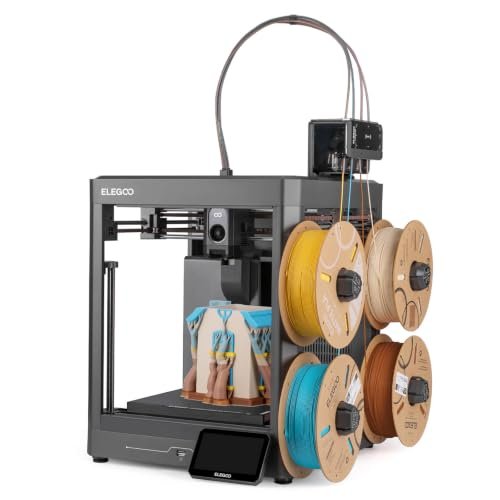
The ELEGOO Centauri 2 Combo introduces seamless multi-color 3D printing via its CANVAS 4-color filament system. Driven by independent feeder motors and smart RFID material recognition, this setup manages automatic spool changeovers and continuous refills without manual intervention. Under the hood, a rigid aluminum CoreXY frame reaches speeds of 500mm/s while 22 embedded sensors oversee temperature, extrusion flow, and surface alignment. Remote slicer management through the ELEGOO Matrix app brings modern convenience to complex projects.
Key features that stand out:
– CANVAS automated 4-color switching system with RFID tracking
– CoreXY motion mechanics achieving up to 500mm/s speed
– 22 intelligent diagnostic sensors for continuous print supervision
– Full automatic pre-print calibration with resonance compensation
– Responsive 5-inch full-color touchscreen interface with magnetic maintenance covers
Pros:
– Smooth multi-color and multi-material transitions without jams
– Rigid chassis construction limits print wobble on tall models
– Smart sensors warn you of filament snags before a print fails
Cons:
– Multi-color purging extends total printing duration and generates material waste.
Best for: Miniature painters, prop makers, and creative designers who want multi-color prints without manual swapping.
Expert Opinion: Elegoo listened closely to community feedback when engineering this setup. The integration between the CANVAS unit and the printer’s motion system rivals much more expensive options, making multi-color printing approachable rather than frustrating.
Entina Tina2 Plus 3D Printer

The Tina2 Plus upgrades Entina’s compact concept by introducing a rapid 250mm/s print speed and an upgraded structural chassis. It uses an efficient 40-second ceramic heater block that reaches extrusion temperatures almost immediately to minimize wait times. Stability gets a major boost through a dual Z-axis lead screw system paired with a spring steel PEI platform that holds onto prints firmly during printing. A partially enclosed frame protects hands from mechanical pinch points while maintaining easy access to the build area.
Key features that stand out:
– Upgraded printing speeds reaching up to 250mm/s
– Fast-heating ceramic hotend reaching target temps in 40 seconds
– Dual Z-axis synchronization for vertical stability
– Textured PEI spring-steel build surface with auto-leveling sensor
– Pre-assembled construction with out-of-the-box readiness
Pros:
– Significantly faster throughput than previous mini desktop models
– Dual Z-axis eliminates gantry sag for cleaner vertical walls
– PEI build sheet releases parts instantly once cooled down
Cons:
– The print volume remains relatively small compared to standard desktop beds.
Best for: Students, STEM teachers, and compact workshops needing quick turnaround times on small replacement parts.
Expert Opinion: The Tina2 Plus addresses the primary criticism leveled against compact desktop machines: sluggish speed. By adding a ceramic hotend and dual lead screws, it handles brisk motion cleanly while keeping its small-footprint charm.
FLASHFORGE AD5X Multi-Material 3D Printer
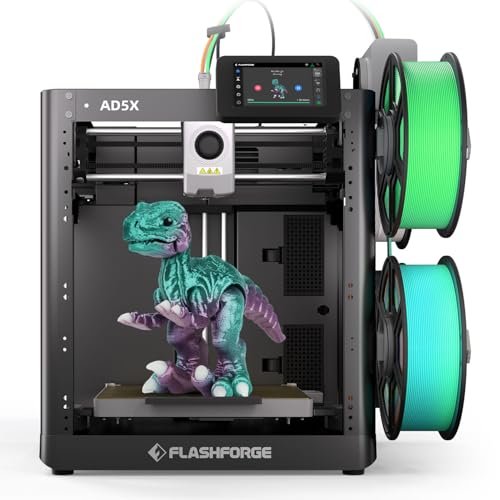
The Flashforge AD5X brings high-speed manufacturing together with multi-material versatility using its Intelligent Filament System (IFS). This CoreXY printer manages 4-color synchronized printing alongside mixed material setups like PLA, PETG, TPU, and carbon-fiber blends. It cruises at speeds up to 600mm/s backed by active vibration dampening algorithms that stop surface ghosting before it starts. The compact side-by-side material organizer keeps multiple spools aligned neatly on your desk without taking up excessive rear workspace.
Key features that stand out:
– IFS 4-color multi-material handling for mixed filament setups
– CoreXY all-metal layout delivering speeds up to 600mm/s and 20,000mm/s² acceleration
– Full-grid automated bed level sensing with active layer adjustment
– Advanced vibration cancellation system for mirror-smooth outer walls
– Broad filament profile support covering flexible TPU and composite carbon-fiber filaments
Pros:
– Handles complex multi-color prints at breakneck operational speeds
– Side-mounted filament layout fits easily onto shallow workbenches
– CoreXY mechanics keep layer lines remarkably uniform across large prints
Cons:
– Initial multi-color configuration carries a steeper learning curve for beginners.
Best for: Advanced hobbyists, cosplay creators, and small business workshops producing production-ready multi-tone parts.
Expert Opinion: Multi-material 3D printing often suffers from slow cycle times, but the AD5X changes that narrative. Its pairing of blazing CoreXY travel speeds with an organized four-spool feeder delivers rapid, vibrant prints with surprising reliability.
Helpful Comparison Insights
- Speed and Motion Architecture: The Flashforge AD5M, AD5X, and ELEGOO Centauri 2 use high-end CoreXY kinematic frames that blast past 500mm/s. In contrast, smaller beds like the Entina Tina2C prioritize a compact, safe footprint over raw acceleration.
- Multi-Color Capabilities: If single-shade prints feel limiting, the ELEGOO Centauri 2 Combo and Flashforge AD5X stand apart with dedicated 4-spool filament management. The AOSEED AI and Tina2C keep things simpler with single-spool feeds tailored to quick toys or functional clips.
- Workspace and Safety: For classrooms and kids’ desks, the AOSEED AI and Entina Tina2 Plus emphasize pinch-resistant enclosures and non-toxic materials. If your main goal is engineering prototypes in PETG or Carbon-Fiber, look to the Flashforge series for higher nozzle temperatures.
- Ease of Use: If you want zero calibration headaches, every machine here features sensor-assisted auto bed leveling, saving you from the tedious paper-sliding routines of older printers.
Final Verdict
- Top Value for Beginners and Kids: The Entina Tina2C Starter Bundle offers the simplest path to your first print. It removes all guesswork by including four filament spools, guided app calibration, and a safe, compact build volume.
- Top Pick for Speed and Engineering: The Flashforge Adventurer 5M delivers raw capability at a fair price. Its 600mm/s CoreXY structure, swappable nozzles, and sturdy frame make it a workhorse for makers who value fast turnarounds.
- Top Pick for Multi-Color Creativity: The ELEGOO Centauri 2 Combo sets the benchmark for multi-material printing. With its CANVAS 4-color automation, RFID detection, and extensive sensor suite, it lets you tackle intricate multi-tone designs reliably.
Frequently Asked Questions About 3d Printer Reviews YouTube
Why do so many 3d printer reviews youtube creators recommend auto-leveling?
Manual bed leveling with a sheet of paper is the leading cause of first-layer failures for beginners. 3D printer reviews youtube creators focus heavily on auto-leveling sensors because they map microscopic bed variances automatically. This ensures your filament squishes down evenly every time, preventing peeling, warping, and nozzle clogs.
Is CoreXY really that much better than traditional bed-slingers?
Yes, especially for speed and vertical print quality. In a CoreXY 3D printer, the build bed only moves downward along the Z-axis while lightweight belts move the printhead on the X and Y axes. Because the heavy print bed does not slide back and forth, you eliminate violent vibrations, allowing speeds past 500mm/s without ghosting artifacts.
How does multi-color 3D printing work on modern desktop units?
Multi-color systems like the ELEGOO CANVAS and Flashforge IFS feed up to four separate spools into a single hotend. The slicer software directs the printer to cut the filament, retract it, load the new color, and purge the leftover plastic into a waste tower before resuming the model. This creates seamless, multi-colored prints from a single file.
Can kids safely operate these printers on their own?
Supervision is always recommended, but kid-focused models like the AOSEED AI and Entina Tina2 series include smart safeguards. They feature enclosed moving parts, low-voltage power components, pinch-resistant casings, and non-toxic PLA plastics. Machines with enclosed frames prevent curious hands from touching hot nozzle blocks during operation.
What software do I need to prepare 3D models for printing?
Most consumer 3D printers connect directly to user-friendly mobile apps like Poloprint Cloud or Flash Studio for one-tap printing. For deeper customization on a computer, you can use desktop slicing programs such as OrcaSlicer, Cura, or ELEGOOSlicer. These programs convert 3D model files (STL or OBJ) into instructions (G-code) your printer understands.
What is the advantage of a PEI spring steel build plate?
Textured PEI spring steel sheets have largely replaced traditional glass beds across modern 3D printers. Filaments like PLA, PETG, and TPU adhere firmly to PEI when heated without messy glue sticks. Once the print finishes and the metal plate cools down, you simply lift and flex the spring steel sheet to pop your finished creation off instantly.
Affiliate Disclosure: As an Amazon Associate, I earn from qualifying purchases made through links on this site.