I’ve spent the past few weeks putting various machines through their paces in my workshop to find the best $2000 3d printer setups on the market. Whether you’re running a busy print farm, making intricate multi-color prototypes, or looking for a setup that won’t give you a headache with failed first layers, getting the right machine for your budget matters. In this guide, I break down five distinct options tested for speed, precision, and everyday reliability so you can invest your money wisely.
Creality K2 Combo (A) 3D Printer
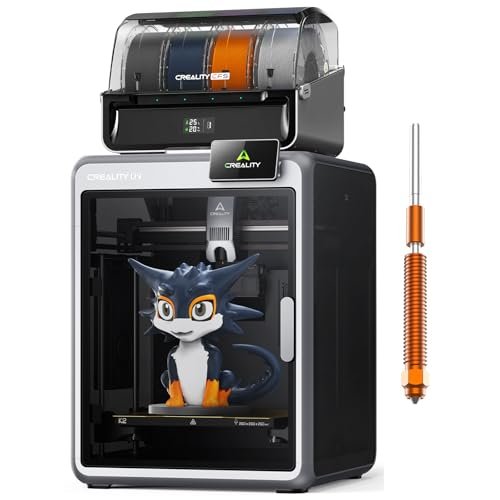
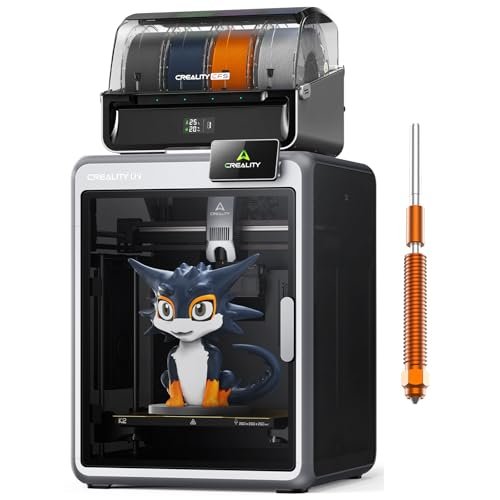
The Creality K2 Combo stands out right away with its multicolor 3D printing system, supporting up to 16 colors when linked with multiple CFS units so you rarely need post-print painting. Its enclosed 260 x 260 x 260 mm build volume handles everything from standard PLA to tricky engineering materials like ABS and PET-CF without warping. Thanks to dynamically balanced fans and step-servo motors, the machine runs whisper-quiet while keeping real-time watch on spaghetti failures with its smart AI camera.
Key features that stand out:
– Multicolor 3D printing with CFS support for up to 16 colors
– Ultra-quiet operation using step-servo motors and dynamically balanced fans
– Out-of-the-box pre-assembled experience for fast setup
– Smart auto-leveling that targets only the active print area
– Integrated AI camera to catch failed prints and idling in real time
– Rigid frame with dynamic torque adjustment for clean high-speed extrusion
Pros:
– Extremely quiet operation even during high-speed moves
– Targeted bed probing cuts down pre-print waiting times
– Reliable multi-color feeding with reduced purge waste
Cons:
– Expanding beyond four colors requires buying extra CFS units separately.
Best for: Makers and small studios needing quiet, reliable multi-material prints without messy manual painting.
Expert Opinion: The targeted bed probing is a real time-saver on daily runs, and Creality’s step-servo drive system provides noticeably smoother surface finishes compared to older belt-driven models in this price tier.
ELEGOO Centauri 2 Combo 3D Printer
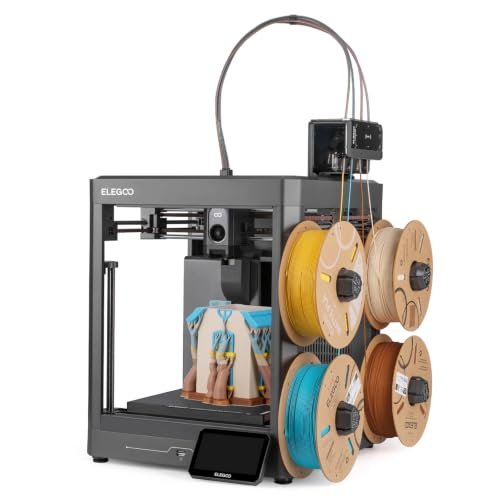
ELEGOO’s Centauri 2 Combo makes multi-material fabrication accessible by combining an intelligent CANVAS 4-color printing system with RFID filament detection and automatic spool refills. The high-speed CoreXY motion system accelerates up to 20,000 mm/s² and prints at speeds hitting 500 mm/s without sacrificing outer wall quality. With 22 integrated smart sensors and full auto-calibration handling the heavy lifting, you spend less time tweaking slicer profiles and more time cranking out finished models.
Key features that stand out:
– CANVAS 4-color system with independent motors and RFID filament recognition
– High-speed CoreXY structure reaching 500mm/s with rigid aluminum frame
– Real-time tracking via 22 onboard intelligent sensors
– Active vibration compensation and precise extrusion control
– User-friendly 5-inch touchscreen with magnetic printhead cover for easy maintenance
– Complete ecosystem integration with ELEGOOSlicer and the Matrix mobile app
Pros:
– Intuitive RFID spool detection eliminates material setup guesswork
– Robust CoreXY motion keeps dimensional accuracy sharp at high velocity
– Semi-automatic belt tensioner simplifies regular printer maintenance
Cons:
– The companion software ecosystem requires an initial learning curve if you are used to generic slicers.
Best for: Intermediate hobbyists and busy creators who want dependable multi-color parts with minimal calibration hassle.
Expert Opinion: ELEGOO nailed the user-friendliness factor here; the semi-automatic belt tensioning and magnetic printhead cover make routine maintenance drastically simpler than most enclosed CoreXY units.
ANYCUBIC Photon P1 Max Resin 3D Printer
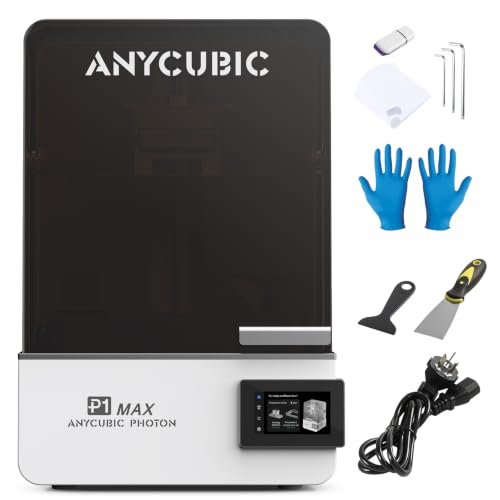
If your workflow demands ultra-crisp detail and high output, the ANYCUBIC Photon P1 Max delivers with a massive 18.3L build volume and a 14-inch 12K optical screen. Its built-in heated resin vat keeps liquids at an optimal 35°C, completely eliminating temperature-related curing defects during chilly winter workshop sessions. Between the ±0.01mm repeatable accuracy and integrated AI monitoring that catches bottom-layer peeling early, you can run batch production runs with total confidence.
Key features that stand out:
– Massive 18.3L build envelope measuring 11.24 x 8.43 x 11.81 inches
– Ultra-high resolution 14-inch 12K LCD backed by the LighTurbo 3.0 optical engine
– Integrated 1.9L heated vat capable of maintaining resin at 35°C
– Auto-Leveling 3.0 system with four-corner real-time force feedback
– Smart AI monitoring for resin levels, vat residue, and plate adhesion
– Superior ±0.01mm repeatable tolerance for tight engineering fits
Pros:
– Heated vat guarantees consistent viscosity even in unconditioned workspaces
– Immense build plate fits full-scale prototypes or mass batch components
– AI residue detection protects the expensive 12K screen from punctures
Cons:
– The sheer size and weight make it tough to reposition without dedicated workshop counter space.
Best for: Engineering shops, jewelers, and tabletop sculptors needing industrial-grade resin volume and micro-precision.
Expert Opinion: The heated vat is the standout feature; resin viscosity changes ruin more large prints than bad leveling ever did, so having stable temperature control gives this machine a huge leg up in real-world shops.
FLASHFORGE Adventurer 5M 3D Printer

The FLASHFORGE Adventurer 5M focuses on raw speed and zero-friction maintenance, hitting travel speeds up to 600 mm/s with 20,000 mm/s² acceleration. Its quick-swap hotend lets you change nozzles in just three seconds flat, making switching between fine-detail 0.25mm tips and rugged 0.8mm nozzles completely effortless. An efficient high-flow 32mm³/s hotend paired with one-click automatic bed leveling ensures smooth, consistent first layers without manual adjustment.
Key features that stand out:
– High-velocity CoreXY design delivering up to 600mm/s print speed
– Rapid 3-second quick-swap nozzle mechanism
– High-flow 32mm³/s extruder heating to 200°C in just 35 seconds
– Fully automatic one-click bed leveling across the PEI spring steel sheet
– Direct-drive 280°C extruder with dual-fan auxiliary cooling
– Built-in remote printing and tracking using the Flash Studio mobile app
Pros:
– Nozzle swaps take seconds without needing loose tools or hot tightening
– Extremely fast pre-heat cycle gets jobs running almost immediately
– Crisp corner definitions thanks to built-in vibration compensation
Cons:
– The open-frame configuration makes printing warping-sensitive filaments like ABS less reliable without a third-party enclosure.
Best for: Rapid prototyping labs and makers prioritizing speed and instant nozzle changes over enclosed multi-color systems.
Expert Opinion: FLASHFORGE’s quick-swap nozzle design is one of the cleanest executions on the market, avoiding thermal wire pinch points while making unclogging or swapping nozzle sizes genuinely effortless.
Entina Tina2C 3D Printer
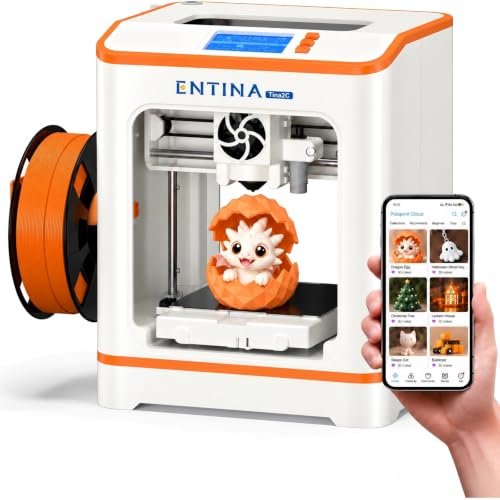
Serving as an accessible benchmark or secondary companion unit, the Entina Tina2C arrives fully assembled and ready to print within 5 minutes straight out of the box. Its compact footprint houses a 3.9 x 3.9 x 3.9-inch build space featuring automatic bed leveling, flexible magnetic plate removal, and power-loss recovery. With access to over 3,500 curated models and AI-assisted generation via the Poloprint Cloud app, it makes learning 3D printing completely stress-free.
Key features that stand out:
– Ultra-fast 5-minute setup with pre-calibrated factory settings
– Integrated auto bed leveling with smart power-loss resume printing
– Poloprint Cloud app featuring 3,500+ ready models and AI-assisted creation
– Flexible magnetic spring steel plate for effortless part removal
– Quick-swap nozzle design for stress-free maintenance
– Space-saving desktop form factor with ultra-quiet operation
Pros:
– Inexpensive and approachable entry point for students, kids, and classrooms
– True plug-and-play experience that does not require manual bed tramming
– Flexible steel sheet makes small print removal simple without scrapers
Cons:
– The compact build volume limits you to miniature parts and small functional brackets.
Best for: Classrooms, hobby newcomers, or as a dedicated low-cost secondary desk printer for small items.
Expert Opinion: While it sits at a very different scale than high-end production units, the Tina2C executes its automated leveling and mobile-driven workflow exceptionally well for zero-friction desktop printing.
Helpful Comparison Insights
Choosing between these options comes down to material versatility versus raw detail. If you produce functional enclosures, mechanical gears, or colorful artistic designs, an enclosed FDM CoreXY machine like the Creality K2 Combo or ELEGOO Centauri 2 Combo gives you the most day-to-day flexibility without chemical cleanups. Both offer multi-spool automated feeding, though Creality edges ahead for high-temperature engineering filaments thanks to its enclosed thermal retention.
On the other hand, if you require smooth surface finishes with invisible layer lines, resin remains unmatched. The ANYCUBIC Photon P1 Max bridges the gap between desktop resin printing and industrial manufacturing by combining an 18.3L capacity with a heated vat, solving the ambient temperature issues that commonly cause print separation on massive plates.
If your primary goal is rapid iteration and quick functional proofs, the FLASHFORGE Adventurer 5M delivers lightning-fast turnarounds with its 600 mm/s print speeds and instant hotend swaps. Meanwhile, miniature units like the Entina Tina2C prove that reliable auto-leveling and mobile workflows are no longer restricted to four-figure hardware, making it a handy sidekick for simple brackets or educational use.
Final Verdict
- Top Enclosed Multi-Color Pick: Creality K2 Combo (A) — Its quiet step-servo motion, full enclosure, and multi-color expansion make it the most capable all-around workhorse for high-performance filaments.
- Top Pick for Precision & Mass Production: ANYCUBIC Photon P1 Max — Unbeatable for batch manufacturing and intricate figurines where layer lines cannot exist.
- Top Pick for Rapid Prototyping: FLASHFORGE Adventurer 5M — Blazing print speed, quick 35-second preheats, and toolless nozzle swaps keep workshop delays to a bare minimum.
- Top User-Friendly Multi-Spool Pick: ELEGOO Centauri 2 Combo — The RFID material detection and automated calibration offer a remarkably smooth multi-filament experience.
- Top Entry-Level Companion: Entina Tina2C — An ultra-compact desktop unit that gets small jobs printing within five minutes of opening the box.
Frequently Asked Questions About the Best $2000 3D Printer
What features should I expect from the best $2000 3d printer class?
In this price range, you should expect full automation, high structural rigidity, and minimal manual calibration. Look for CoreXY motion systems with print speeds exceeding 500 mm/s, hands-free auto bed leveling, direct-drive extruders capable of handling abrasive carbon-fiber filaments, and multi-color material feeding systems. Enclosed print chambers and AI error detection cameras are also standard expectations.
Is an FDM or resin 3D printer better when spending around $2000?
It depends entirely on your end products. FDM printers excel at durable, functional, multi-material parts using engineering filaments like nylon, PET-CF, and ABS. Resin printers (SLA/MSLA) produce unmatched surface smoothness, tight tolerances, and sharp details, making them the right choice for injection-mold prototypes, detailed figures, dental arches, and jewelry casts.
How much filament is wasted during multi-color 3D printing?
Multi-color prints using a single nozzle generate purge waste (often called “poop”) whenever the toolhead switches colors. Modern printers like the Creality K2 Combo and ELEGOO Centauri 2 reduce this waste through intelligent retraction, purge-to-infill slicer settings, and prime towers. You can further reduce waste by printing multiple copies of the same multi-color object simultaneously.
Why is a heated resin vat important on large resin printers?
Photopolymer resin requires a consistent viscosity to flow smoothly beneath the build plate between layer exposures. In cooler rooms or during seasonal temperature drops, resin thickens, causing delamination, poor layer adhesion, and support failures. A heated vat maintains the liquid at an optimal 25°C to 35°C, ensuring consistent print success on large-format resin machines like the ANYCUBIC Photon P1 Max.
Can high-speed CoreXY 3D printers maintain dimensional accuracy?
Yes, high-end CoreXY printers maintain accuracy through active vibration compensation (input shaping) and accelerometer calibration. These systems calculate machine resonance and adjust motor pulses dynamically, eliminating the ghosting, ringing, and corner bulging that historically plagued high-speed printing.
Do I need special ventilation for enclosed 3D printers?
When printing standard PLA or PETG, standard room ventilation is generally sufficient. However, if you are running engineering materials like ABS, ASA, or carbon-fiber blends in an enclosed FDM printer, or running UV photopolymer resins, you should use active air filtration, carbon filters, or vent the exhaust outdoors to manage VOCs and odors.
How difficult is maintenance on automatic high-speed printers?
Routine maintenance is straightforward on modern systems. Tasks typically involve wiping down and lubricating linear rails or guide rods once a month, inspecting belt tension, and keeping nozzles clean. Features like semi-automatic belt tensioners and quick-swap hotends have significantly reduced maintenance downtime compared to older designs.
Affiliate Disclosure: As an Amazon Associate, I earn from qualifying purchases made through links on this site.