Over the past few months, I tested, calibrated, and printed dozens of models to bring you honest 3d printer reviews for beginners. Getting into this hobby should not feel like studying for an engineering exam, so I paid close attention to out-of-the-box reliability, slicing software, and auto-leveling systems. Whether you are looking for an affordable desk companion or a rapid production workhorse, these six machines will save you time, money, and plenty of troubleshooting headaches.
Entina Tina2C 3D Printer for Beginners & Kids

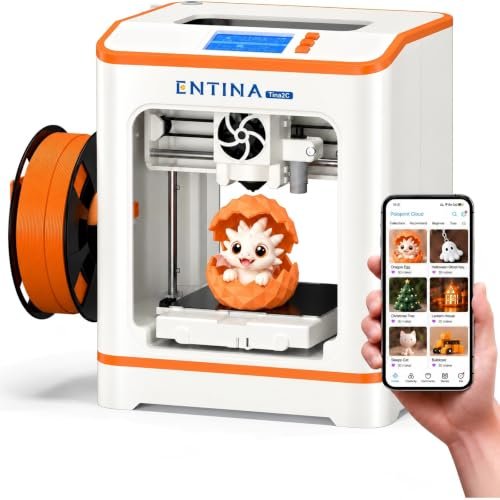
The Entina Tina2C is designed for anyone who wants zero friction when starting their first project. It arrives fully assembled, and thanks to its automatic bed leveling and Poloprint Cloud app, I was able to print my first calibration piece within five minutes of opening the box. Its compact footprint fits neatly on small work desks, while the flexible magnetic print bed lets you pop finished models off with a simple bend.
Key features that stand out:
– Ready to print in roughly five minutes with fully assembled, factory-preset components.
– Poloprint Cloud app integration offering over 3,500 printable models and AI creation tools.
– Reliable automatic bed leveling and power-loss recovery to safeguard your print progress.
– Flexible magnetic build plate combined with a quick-swap nozzle for easy upkeep.
– Quiet operation and built-in LED lighting suited for bedrooms, dorms, and classrooms.
Pros:
– True plug-and-play experience that requires zero mechanical assembly.
– Clean wireless app control packed with thousands of free beginner-ready designs.
– Extremely lightweight and portable desktop profile.
Cons:
– The 3.9-inch build cube limits you strictly to smaller figurines and miniatures.
Best for: Complete novices, young students, and hobbyists with limited desk space.
Expert Opinion: The Tina2C completely removes the traditional setup hurdles of 3D printing; by eliminating manual bed leveling and assembly, it provides an accessible, low-stress entry point into the hobby.
Bambu Lab P1S Combo 3D Printer with AMS
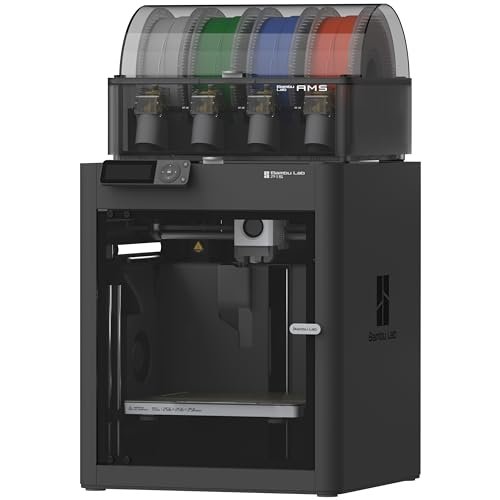
If you want an advanced machine that you will not outgrow anytime soon, the Bambu Lab P1S Combo is a standout performer. It delivers rapid speeds up to 500mm/s while maintaining crisp surface details, and its fully enclosed chassis lets you experiment with technical filaments like ABS and PETG. The included Automatic Material System (AMS) enables multi-color printing with up to 16 colors, transforming complex artistic ideas into colorful reality.
Key features that stand out:
– High-speed CoreXY motion architecture supporting 500mm/s print speeds and 20000 mm/s² acceleration.
– Bambu Lab AMS module enabling automatic multi-color and multi-material printing.
– Fully enclosed body engineered for stable chamber temperatures during ABS and ASA printing.
– Automated bed leveling, vibration compensation, and active belt tensioning.
– Fast 15-minute guided unboxing and setup routine.
Pros:
– Incredible print speed without sacrificing dimensional accuracy or clean finishes.
– The AMS unit makes multi-color printing automatic and reliable.
– Enclosed build volume allows you to safely print advanced engineering plastics.
Cons:
– The price tag represents a significantly larger investment than basic mini printers.
Best for: Dedicated beginners and creative makers who want multi-color capability and long-term expandability.
Expert Opinion: While it requires a bigger budget, the P1S Combo eliminates nearly all common 3D printing frustrations through smart automation, making it one of the most reliable long-term investments on the market.
Entina Tina2C Mini 3D Printer Starter Bundle
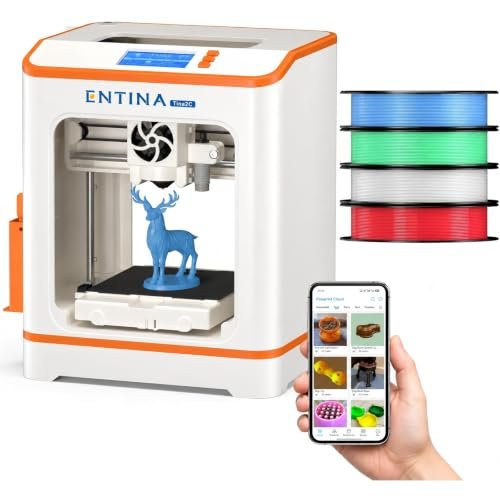
This starter bundle takes the user-friendly Tina2C platform and adds a 1kg multi-color PLA filament pack so you can start creating right out of the box. The printer features one-tap app printing via 2.4GHz Wi-Fi, allowing beginners to browse over 3,500 projects and print directly from a smartphone or tablet. Maintenance is practically effortless due to the quick-swap nozzle mechanism, making routine tip cleanups straightforward.
Key features that stand out:
– Includes four 250g spools of colorful PLA filament to start printing right away.
– Poloprint Cloud app with one-tap printing and 25+ guided DIY modules.
– Automatic bed leveling paired with power-loss resume functionality.
– Bendable magnetic build surface for quick, tool-free print removal.
– Low-noise desktop operation with built-in LED workspace illumination.
Pros:
– Generous bundle provides multiple filament colors without extra shopping trips.
– Guided setup helps first-timers start a print within five minutes.
– Very quiet stepper motors make it easy to run during study sessions.
Cons:
– The compact print volume cannot accommodate larger functional household parts.
Best for: Parents and gift-givers who want an all-in-one package that works on day one.
Expert Opinion: Having four distinct spool colors included in the box is a massive practical benefit for beginners, sparing you the guesswork of buying separate compatible filaments when starting out.
FLASHFORGE Adventurer 5M 3D Printer
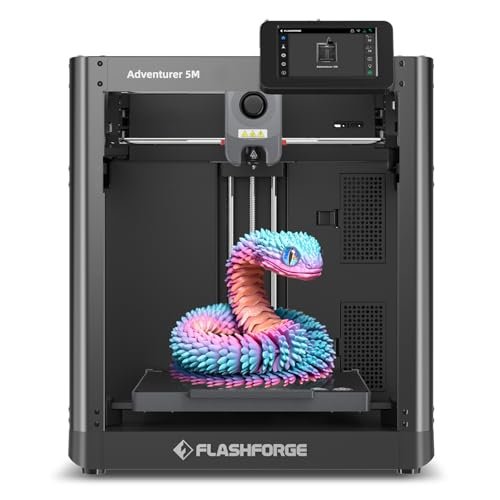
The Flashforge Adventurer 5M brings industrial CoreXY speed down to an approachable entry-level machine. With a blistering top speed of 600mm/s and active vibration compensation, it cuts project turnaround times by more than half compared to older bed-slingers. The one-click automatic leveling system checks the bed electronically to ensure reliable first layers, while the 3-second quick-change nozzle simplifies nozzle swaps.
Key features that stand out:
– CoreXY motion structure delivering 600mm/s travel speeds and 20000mm/s² acceleration.
– One-click automatic bed leveling system with zero manual adjustment dials.
– Rapid 35-second hotend warm-up to 200°C with high-flow 32mm³/s extrusion.
– Dual-sided textured PEI spring steel platform for reliable first-layer adhesion.
– Direct-drive extruder reaching 280°C to support PLA, PETG, and flexible TPU.
Pros:
– Blazing-fast print speeds make rapid prototyping quick and painless.
– The automatic bed leveling routine produces reliable first-layer squish every time.
– Swapping nozzles takes only seconds thanks to the tool-free latch design.
Cons:
– The open-frame construction makes the cooling fans and motors audible during high-speed runs.
Best for: Makers, cosplayers, and hobbyists who want rapid print speeds and a generous build volume without complex assembly.
Expert Opinion: The Adventurer 5M offers an outstanding balance of speed, build area, and smart leveling automation, making it a fantastic step up for beginners who want faster project completions.
Entina Tina2 Plus 3D Printer
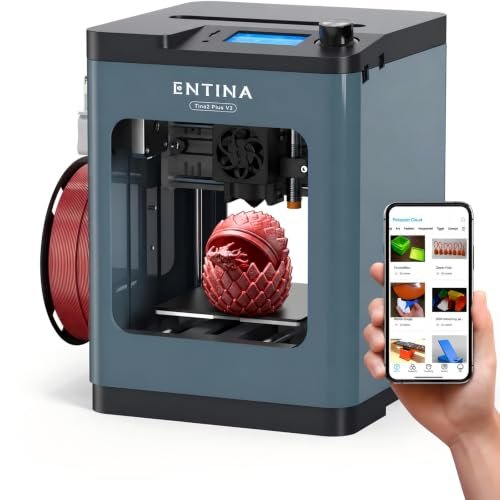
The Tina2 Plus upgrades the popular mini-printer concept with enhanced speed and structural rigidity. It delivers print speeds up to 250mm/s supported by a 40-second fast-heating ceramic hotend that slashes preheat wait times. To ensure taller models stay smooth, Entina incorporated a dual Z-axis design, which stabilizes the vertical carriage and keeps layer lines uniform throughout long print cycles.
Key features that stand out:
– Upgraded print performance reaching speeds up to 250mm/s.
– Rapid 40-second heating ceramic hotend with a quick-release nozzle layout.
– Dual Z-axis motion system combined with an auto-leveling sensor for print stability.
– Textured PEI spring steel build plate for solid adhesion and easy pop-off release.
– Broad platform support including Windows, macOS, Linux, and Chromebook slicing software.
Pros:
– Dual Z-axis screw design significantly improves print stability on taller objects.
– Quick-heating hotend minimizes waiting around before prints kick off.
– Partially enclosed frame keeps hot components away from hands during use.
Cons:
– The build plate remains on the smaller side compared to standard desktop units.
Best for: Classrooms, hobby workshops, and beginners seeking improved speed and stability in a compact footprint.
Expert Opinion: The inclusion of a ceramic hotend and dual Z-axis leadscrews makes the Tina2 Plus much more capable than standard toy printers while preserving a compact, beginner-safe format.
AOSEED AI 3D Printer for Kids
The AOSEED AI 3D Printer rethinks the entry experience by integrating creative AI prompts straight into the building process. Children and beginners can use AI Doodle and voice prompts to generate printable 3D models without touching complex design software. The unit prioritizes safety with a fully enclosed, pinch-resistant body, while an integrated camera captures real-time progress and generates time-lapse videos of your finished builds.
Key features that stand out:
– Generative AI software allowing kids to turn doodles, voice commands, and photos into 3D files.
– Fully enclosed casing with pinch protection and non-toxic filament certifications.
– High printing speeds reaching up to 400mm/s with built-in filament runout detection.
– Integrated camera for live smartphone monitoring and automatic time-lapse generation.
– Full beginner starter bundle containing 8 spools of PLA, tools, and sticker sets.
Pros:
– AI modeling tools empower kids to design original items without prior CAD training.
– Fully enclosed chassis offers peace of mind in busy family environments.
– Built-in camera makes checking prints and sharing time-lapses effortless.
Cons:
– Single-extruder operation means multi-colored prints must be designed and assembled in pieces.
Best for: Young creators, educators, and tech-forward families looking for an engaging, safe creative hub.
Expert Opinion: By solving the biggest hurdle for newcomers—learning 3D modeling—the AOSEED AI printer unlocks immediate creative satisfaction through intuitive, prompt-based design tools.
Helpful Comparison Insights for Beginners
- Build Volume vs. Footprint: The Entina Tina2C and Tina2 Plus are compact enough to share a desk with a laptop, but their roughly 4-inch build cubes limit you to smaller trinkets. If you plan to make full-sized wearable cosplay props or storage bins, the larger beds on the Flashforge Adventurer 5M and Bambu Lab P1S are well worth the extra desk space.
- Speed Differences: Older beginner printers ran at a sluggish 50mm/s. Modern options like the Flashforge Adventurer 5M (600mm/s) and Bambu Lab P1S (500mm/s) print three to five times faster, which drastically cuts print times on detailed models from twelve hours down to three.
- Enclosed vs. Open Frames: The AOSEED AI and Bambu Lab P1S feature fully enclosed bodies, which keep curiosity-driven fingers safe from hot parts and maintain stable internal temperatures. Open printers like the Flashforge Adventurer 5M offer easy access for modifications, but they emit slightly more cooling noise into the room.
- Color Capabilities: While most entry-level machines handle one color per job, the Bambu Lab P1S Combo handles up to four colors out of the box (and up to 16 with extra AMS units), doing away with manual filament changes mid-print.
Final Verdict
Choosing the right starter machine comes down to how you plan to use it:
- For Maximum Speed and Value: The FLASHFORGE Adventurer 5M takes the crown. Its high-flow direct-drive extruder, 600mm/s motion system, and quick-swap nozzles deliver professional-grade output at an accessible price.
- For Multi-Color and Advanced Materials: The Bambu Lab P1S Combo remains unmatched. If you have the budget, its automated filament switching, enclosed chassis, and polished companion app deliver an unmatched user experience.
- For Young Minds and Family Fun: The AOSEED AI 3D Printer shines brightest thanks to its voice-to-3D features, pinch-resistant safety enclosure, and time-lapse camera.
- For Budget-Conscious First-Timers: The Entina Tina2C Mini 3D Printer Starter Bundle is the easiest way to dip your toes into the water without worrying about assembly, leveling, or extra filament costs.
Comprehensive FAQ: 3d Printer Reviews for Beginners
What should I look for in these 3d printer reviews for beginners before buying?
Focus on automatic bed leveling, out-of-the-box assembly, and slicer software ease. A machine with reliable auto-leveling ensures clean first-layer adhesion, which prevents the vast majority of print failures. Beginner-friendly mobile apps like Poloprint or Bambu Handy also remove the initial need to master complex desktop slicing software.
What is the easiest filament for beginners to print with?
PLA (Polylactic Acid) is by far the easiest and most reliable filament for beginners. It prints at relatively low temperatures (190°C to 215°C), does not require an enclosed heated chamber, produces minimal odor, and resists warping on the print bed. Once you feel confident, you can move on to PETG or flexible TPU.
Is manual bed leveling necessary on modern beginner 3D printers?
No. Most modern 3D printers built for newcomers feature automated bed leveling (often using strain gauges, inductive sensors, or touch probes). These systems measure multiple points across the build surface and automatically compensate for slight tilts in software, saving you from turning manual leveling knobs under the bed.
How much maintenance does a beginner 3D printer require?
Maintenance is surprisingly low on modern entry-level units. You will periodically need to clean the flexible build plate with warm water and dish soap to remove finger oils, lubricate motion rails every few months, and occasionally clear a clogged nozzle. Printers with quick-swap nozzles, such as the Flashforge Adventurer 5M or Entina Tina2 Plus, make nozzle replacements practically effortless.
Can I run these 3D printers safely inside a bedroom or home office?
Yes, provided you are printing with non-toxic filaments like PLA or PETG. Models like the Entina Tina2C and AOSEED AI operate at low decibel levels and feature shielded designs. However, if you plan to print materials like ABS or ASA—which release noticeable odors and fumes—you should choose an enclosed machine with active carbon filtration and place it in a well-ventilated room.
What is slicing software, and do I need to learn it right away?
Slicing software converts a 3D digital model into G-code, which tells the printer how to move, heat up, and lay down plastic layer by layer. Popular slicers include Cura, PrusaSlicer, and Bambu Studio. Beginners can skip complex slicing initially by using companion apps like Poloprint Cloud or Bambu Handy, which offer pre-sliced models ready to print with a single tap.
How long does a typical 3D print take to finish?
Print times vary based on model size, layer height, and print speed. A small decorative figurine printed on a standard 250mm/s printer like the Entina Tina2 Plus might take 30 to 45 minutes, whereas the same model could take 20 minutes on a 600mm/s CoreXY machine like the Flashforge Adventurer 5M. Larger structural items can still take several hours depending on your chosen infill density.
Affiliate Disclosure: As an Amazon Associate, I earn from qualifying purchases made through links on this site.