I spent the last several weeks putting the newest generation of rapid FDM machines through their paces in my workshop, running benchmark prints and torture tests. If you want to jump into additive manufacturing or upgrade an aging setup, picking from the best 2026 3d printers can feel overwhelming with all the new multi-color units and automated sensors hitting shelves. In this guide, I share hands-on feedback and practical test results so you can choose the right machine for your budget, workflow, and creative projects.
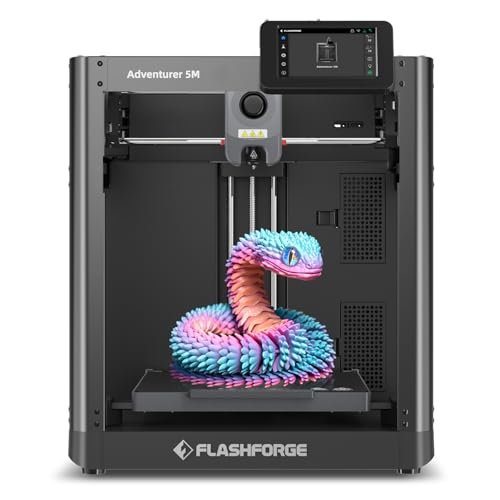
FLASHFORGE Adventurer 5M 3D Printer
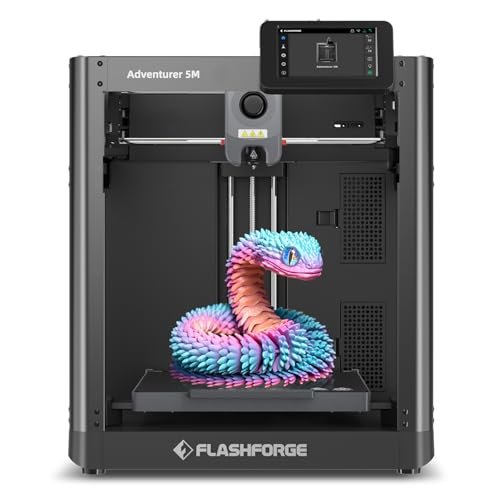
The FLASHFORGE Adventurer 5M delivers remarkable reliability straight out of the box with its one-click automatic bed leveling that lays down a smooth first layer every time. Its rigid all-metal CoreXY structure allows it to hit speeds up to 600mm/s without throwing layer lines out of alignment. You can swap between different print styles quickly thanks to the 3-second quick-release nozzle system, and the remote Flash Studio app lets you check in on long print jobs from your phone.
Key features that stand out:
– CoreXY motion frame capable of 600mm/s travel speeds and 20,000mm/s² acceleration
– Full auto-leveling routine that eliminates manual paper tests and offset calibration
– High-flow direct-drive extruder heated up to 280°C in just 35 seconds
– Flexible dual-sided PEI spring steel build sheet for effortless part removal
– Built-in vibration compensation and dual-fan auxiliary cooling
Pros:
– First-layer adhesion is rock solid without any manual bed adjustment.
– Nozzle swaps take seconds without requiring delicate tools or disassembling the print head.
– The high-speed motion system cuts standard print times by more than half.
Cons:
– The open-frame design means you will hear the cooling fans running at high speeds during demanding prints.
Best for:
Hobbyists and makers who want high-speed, reliable single-color prototyping without fiddly setup steps.
Expert Opinion:
The Adventurer 5M is one of the most accessible speed-focused printers on the workbench today. It focuses on zero-fuss setup, and its quick-swap nozzle mechanism makes maintenance far less intimidating for everyday users.
FLASHFORGE AD5X Multi-Material 3D Printer (4-Color Printing)
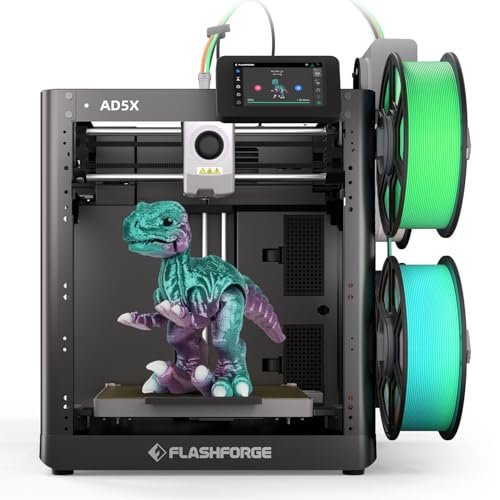
Multi-color printing used to be a messy chore, but the FLASHFORGE AD5X simplifies it by pairing high-speed CoreXY kinematics with an integrated 4-color filament system. The intelligent feeder handles color changes smoothly while maintaining print speeds up to 600mm/s on standard parts. Its side-by-side modular spool setup takes up much less vertical workspace than top-heavy towers, and the onboard vibration suppression algorithms keep multi-shade models crisp and artifact-free.
Key features that stand out:
– Intelligent Filament System (IFS) supporting 4-color printing in a single project
– Wide material compatibility including PLA, PETG, TPU, and carbon-fiber blends
– Advanced vibration compensation algorithm that smooths out high-speed layer transitions
– Full multi-point auto bed leveling for clean first-layer adhesion
– Space-efficient desktop footprint with horizontal side-by-side filament layout
Pros:
– Swapping between four different colors or support materials happens automatically mid-print.
– The compact spool arrangement fits comfortably on standard workbenches without snagging cables.
– Delivers clean surface finishes even when laying down contrasting filament shades.
Cons:
– Frequent color changes generate extra filament purge waste that you must factor into your material budget.
Best for:
Creators and small businesses wanting to print functional multi-color prototypes and figurines without manual pauses.
Expert Opinion:
The AD5X brings multi-material manufacturing down to an accessible desktop scale. It strikes a sensible balance between footprint and capability, saving desk space while running multi-color prints reliably.
FLASHFORGE AD5X Multi-Color 3D Printer (Built-In 4-Color Setup)
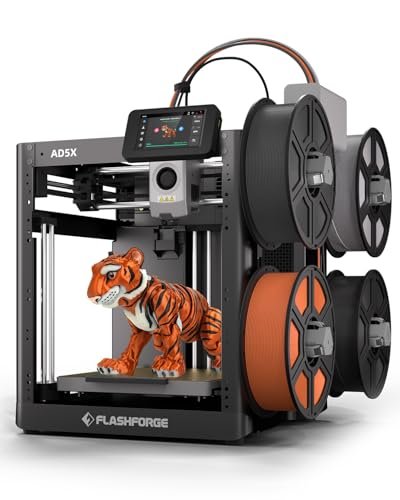
This iteration of the FLASHFORGE AD5X focuses on versatile material handling, featuring a 300°C high-temperature direct-drive extruder that tackles technical filaments alongside everyday plastics. The printer offers one-click automatic bed calibration to keep first layers consistent across long multi-hour builds. It easily accommodates nozzle sizes ranging from 0.25mm to 0.8mm, letting you toggle between ultra-fine tabletop miniatures and rapid structural enclosures with equal ease.
Key features that stand out:
– Direct-drive toolhead capable of sustained 300°C printing temperatures
– Native 4-color multi-spool feed system with automatic filament retraction
– Support for four nozzle diameters (0.25mm, 0.4mm, 0.6mm, and 0.8mm)
– Power-loss resume and automated filament runout monitoring
– Remote control and status tracking via the Flash Maker mobile application
Pros:
– Handles abrasive and higher-temperature materials without clogging or slipping.
– The option to use a 0.25mm nozzle allows for incredible micro-detail on miniature prints.
– Automatic filament feeding makes loading and unloading spools completely painless.
Cons:
– Slicing multi-color files requires a small learning curve if you are transitioning from basic single-extruder slicers.
Best for:
Enthusiasts who want to combine detailed multi-color printing with high-temp, engineering-grade filament projects.
Expert Opinion:
Having a 300°C toolhead on a multi-color machine opens up practical engineering uses, such as printing PETG parts with dedicated dissolvable or breakaway supports. It is a workhorse that rewards users who like tuning their setup for specific technical jobs.
Creality K2 Plus Combo Multi Color 3D Printer
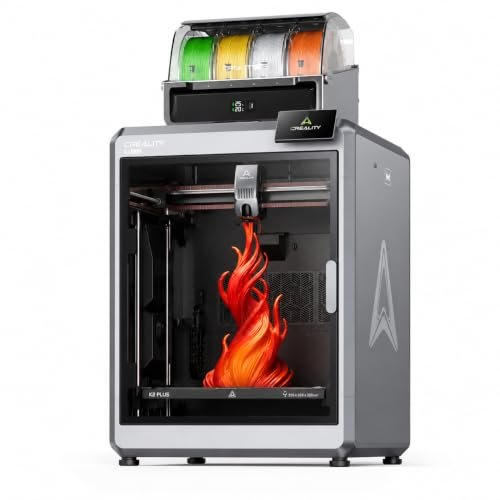
If you need serious print capacity, the Creality K2 Plus Combo delivers with an expansive 350 x 350 x 350 mm build volume enclosed in a rigid aluminum alloy chassis. It comes paired with the Color Filament System (CFS), offering sealed filament drying and automatic multi-color switching for up to 16 colors when daisy-chained. To keep giant prints from failing halfway through, the machine uses dual AI cameras and 18 internal sensors to spot spaghetti errors, monitor chamber heat, and regulate extrusion flow in real time.
Key features that stand out:
– Massive 350mm³ heated build chamber suited for large single-piece models
– Included 4-slot CFS unit with active sealing and humidity-controlled filament storage
– Maximum print speeds of 600mm/s backed by an aggressive 30,000mm/s² acceleration rate
– Comprehensive AI monitoring suite featuring dual cameras for failure detection
– Ultra-quiet stepper motor drivers keeping operating noise down around 45dB
Pros:
– Massive build volume lets you print full-size helmets, architectural models, and bulk batches in one piece.
– The enclosed, dry filament caddy protects hygroscopic materials like PETG from ambient moisture.
– Dual AI cameras catch print failures early, saving you from wasting entire spools of filament.
Cons:
– The large machine footprint demands a dedicated table or heavy-duty workbench to handle its size and inertia.
Best for:
Cosplayers, prop makers, and functional prototyping studios needing massive volume and multi-color automation.
Expert Opinion:
The K2 Plus Combo is built for ambitious projects. Creality has solved the two biggest pain points of large-format printing: material moisture and catastrophic mid-print failures, thanks to the integrated CFS box and smart AI oversight.
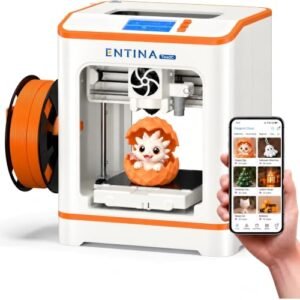
Entina Tina2C 3D Printer for Beginners & Kids
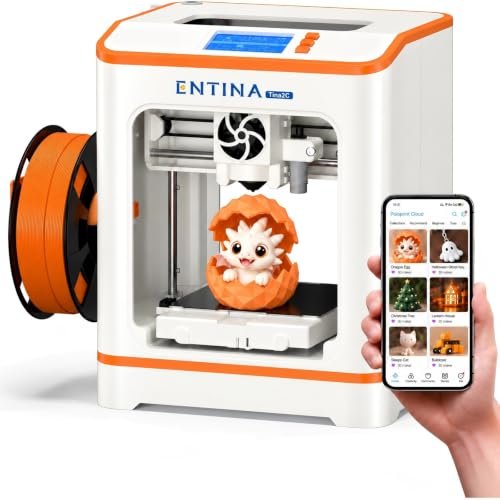
The Entina Tina2C is built specifically for low-friction onboarding, arriving fully assembled and ready to print in 5 minutes. Its compact 3.9-inch build cube fits easily on crowded desks, making it a great pick for bedrooms, classrooms, and small maker corners. You can browse over 3,500 cloud models and AI generation tools directly inside the Poloprint app, which lets beginners turn quick ideas or photos into physical items with zero previous CAD modeling experience.
Key features that stand out:
– Plug-and-play design with factory-calibrated automatic bed leveling
– Poloprint Cloud app integration featuring AI photo-to-3D and text-to-3D generators
– Removable magnetic spring steel bed for bending prints free without scrapers
– Quick-swap nozzle design that simplifies routine nozzle cleaning
– Safe, low-power desktop footprint with quiet motor operation and internal LED light
Pros:
– Children and total novices can start printing within minutes of opening the shipping box.
– The cloud app has thousands of curated, ready-to-print toys and school projects.
– Flexible magnetic build plate prevents damaged prints and scratched fingers.
Cons:
– The small 3.9-inch build area limits you to printing small trinkets, figurines, and miniature parts.
Best for:
Young learners, classrooms, and absolute beginners searching for a friendly, low-cost intro to 3D printing.
Expert Opinion:
The Tina2C removes the scary technical barriers that often keep beginners from enjoying 3D printing. It is not designed for giant functional brackets, but for STEM education and simple home crafts, it works smoothly and reliably.
AOSEED AI 3D Printer for Kids
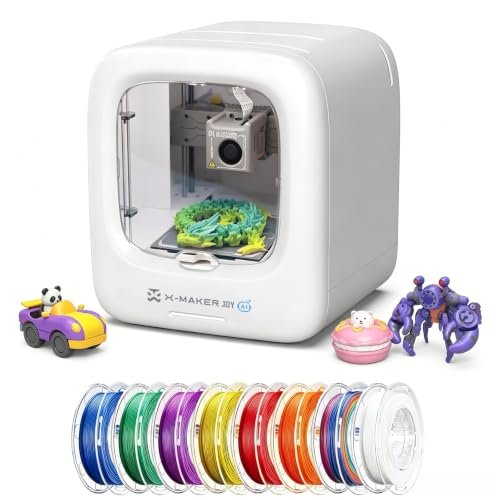
The AOSEED AI 3D Printer brings educational making into the living room with a fully enclosed, pinch-resistant child-safe design. It comes with an extensive starter kit including 8 rolls of PLA filament, giving kids everything needed to begin making right away. Young creators can explore creative AI tools like AI Doodle and AI MiniMe in the companion software to turn rough sketches or family portraits into printable models, while the toolhead pushes speeds up to 400mm/s for quick turnaround times.
Key features that stand out:
– Completely enclosed frame tested for child safety, cool-touch exterior, and quiet motors
– Companion design software with voice, text, and photo-prompted AI model generation
– Fast printing speeds reaching up to 400mm/s with 0.05mm layer precision
– Integrated camera for live smartphone monitoring and automatic time-lapse generation
– Includes 8 rolls of safe PLA filament, starter tools, and decorating accessories
Pros:
– The fully enclosed cabinet keeps curious hands away from hot nozzles and moving belts.
– AI sketch-to-print features keep children engaged without forcing them to learn complex engineering software.
– Prints small toys in under 30 minutes, which is perfect for maintaining kids’ attention spans.
Cons:
– It is strictly a single-color extruder, meaning multi-color models must be printed in separate parts and glued together.
Best for:
Parents and educators looking for a safe, turnkey toy-making station that sparks childhood creativity through AI.
Expert Opinion:
AOSEED understands that speed and ease of use matter most to younger users. By combining rapid print speeds with intuitive AI sketch tools and safety enclosures, they have turned what used to be a frustrating hobby into an engaging home toy workshop.
Magic Jimmy Spark AI 3D Printer for Kids
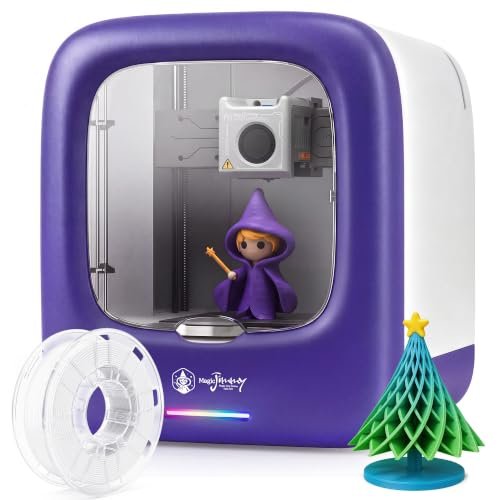
The Magic Jimmy Spark AI turns screen time into practical crafting time by giving kids an enclosed, safe toy-making platform. Setup takes virtually no effort—just pull it out of the box, connect to Wi-Fi, and select an item from the curated library of 20,000+ tested models. Children can also use built-in generative AI modules like AI Craft to turn simple drawings into 3D prints, while the internal camera automatically compiles fun time-lapse clips of each build.
Key features that stand out:
– Enclosed printing chamber with cool-touch body panels and non-toxic PLA compatibility
– Zero-assembly design ready for wireless printing immediately after unboxing
– Smart AI design suite including AI Craft, AI Doodle, and cartoon figurine makers
– Up to 400mm/s print velocity that completes basic library models in 20 to 60 minutes
– Onboard camera module that tracks progress and shares time-lapse videos
Pros:
– Enclosed build area prevents accidental burns and muffles high-speed motion noise.
– Generative AI software allows children to draw an idea on a tablet and hold it an hour later.
– Time-lapse video recording makes it easy for young makers to share their builds with family.
Cons:
– You can only load one filament spool at a time, requiring paint or assembly for multi-colored designs.
Best for:
Elementary and middle-school students who want an independent, creative outlet for toy making and STEM projects.
Expert Opinion:
The Magic Jimmy Spark AI takes the intimidation factor out of digital fabrication. Its closed design gives parents peace of mind, and the AI drawing suite lets kids produce customized objects without getting bogged down in technical slicer settings.
Practical Comparison Insights
When sizing up these modern machines, selecting the right one comes down to what you prioritize: print speed, multi-color flexibility, build capacity, or child safety.
If your primary goal is rapid everyday modeling, CoreXY speed demons like the FLASHFORGE Adventurer 5M offer the most straightforward value, giving you fast prints and reliable auto-leveling without excess mechanical complexity.
For makers who want multi-color convenience, the FLASHFORGE AD5X series provides an efficient desktop layout that fits standard workspaces. However, if you plan to tackle large-scale projects like wearable armor or production runs, the Creality K2 Plus Combo stands alone with its massive 350mm chamber, sealed filament drying system, and multi-camera AI failure protection.
On the other hand, traditional hobbyist machines can be overwhelming for younger users. That is where dedicated educational printers like the Entina Tina2C, AOSEED, and Magic Jimmy Spark shine. While they trade away build volume and multi-spool automation, they gain enclosed child-safe housings, one-tap mobile printing, and AI-assisted modeling tools that make 3D fabrication fun and accessible for the whole family.
Final Verdict
Choosing your ideal printer depends entirely on where you sit on the maker spectrum:
- The Pragmatic Speed Enthusiast: Go with the FLASHFORGE Adventurer 5M. It nails the core fundamentals—speed, auto-leveling, and fast nozzle maintenance—without charging you for features you might not need.
- The Colorful Prototyper: The FLASHFORGE AD5X is your best bet for turning out multi-hue decor, brackets, and multi-material designs without eating up your entire workspace.
- The Heavy-Duty Maker: Pick the Creality K2 Plus Combo. Its sheer build volume, active filament drying box, and smart AI monitoring make it the ultimate production hub for big, ambitious designs.
- The Young Explorer: Both the AOSEED AI and Magic Jimmy Spark offer secure, enclosed environments that let kids turn digital doodles into real toys safely and quickly.
Frequently Asked Questions About the Best 2026 3D Printers
How fast do modern CoreXY 3D printers actually print?
Most modern CoreXY 3D printers reach travel speeds between 400mm/s and 600mm/s, with accelerations up to 20,000 to 30,000mm/s². In practical terms, standard models that used to take six hours on older bed-slingers can now be finished in under two hours without sacrificing fine surface detail.
Is automatic bed leveling standard on the best 2026 3d printers?
Yes, full automatic bed leveling has become a baseline standard across modern machines. Sensors measure multiple points across the build surface and automatically calculate compensation matrices. This eliminates the frustrating chore of manual paper leveling and ensures reliable first-layer adhesion out of the box.
How does multi-color 3D printing work on single-nozzle printers?
Multi-color systems like the Flashforge IFS and Creality CFS use automated filament changers connected to a single hotend. The printer cuts and retracts the active filament, feeds in the next color, and purges the previous shade into a waste chute or purge block before resuming the print.
Are enclosed 3D printers safer for home and classroom use?
Enclosed printers provide much higher safety for homes and learning spaces. They prevent curious hands from touching hot nozzles or moving belts, keep stray drafts from warping prints, and significantly reduce operating noise. Enclosures also help contain plastic odors when using materials like ABS or ASA.
Can kids use these new AI-powered 3D printers without adult help?
Printers like the Entina Tina2C, AOSEED, and Magic Jimmy Spark are designed for independent operation by kids. Their apps feature curated, tested model libraries and AI tools that convert drawings or photos into 3D files with a single tap, removing the need for complex slicing software or engineering training.
What filament materials should I start with on a new printer?
Standard PLA (Polylactic Acid) is always the best starting filament because it melts at lower temperatures, does not require an enclosure, and produces sharp details with minimal warping. Once you get comfortable with your machine, you can expand into tougher materials like PETG for outdoor use or flexible TPU for phone cases and gaskets.
Affiliate Disclosure: As an Amazon Associate, I earn from qualifying purchases made through links on this site.